Display
Toyota multi-operation touch
Toyota multi-operation touch
Toyota multi-operation touch (vehicle with the 12.3-inch display)
The Toyota multi-operation touch allows a screen, such as the air conditioning control
screen, and the navigation screen to be displayed and operated simultaneously.
For details about the operation of the Toyota multi-operation touch, refer to “
NAVIGATION AND MULTIMEDIA SYSTEM OWNER’S MANUAL”.
Toyota multi-operation touch overview
The following functions can be displayed and operated on the Toyota multi-operation
touch.
Operate a switch to change the displayed function screen.
The displayed function can also be changed by performing an up or down flick operation
on the Toyota multi-operation touch.
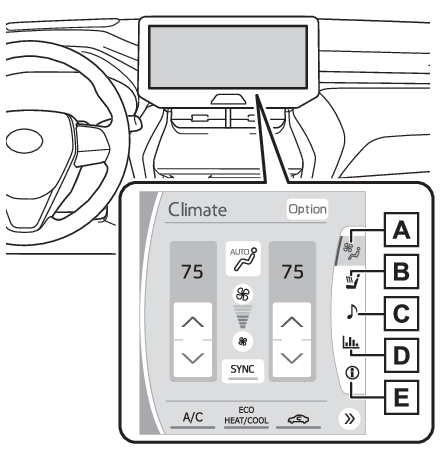 Select to display the air conditioning control screen. (Air conditioning controls)
Select to display the seat control screen. (Operating the seat heaters - Using the Toyota multi-operation touch (if equipped), Operating the seat ventilators - Using the Toyota multi-operation touch (if equipped))
Select to display the audio control screen.*
Select to display the energy monitor/fuel consumption screen. (Energy monitor/consumption screen)
Select to display the vehicle information screen. (Vehicle information display - AWD system display, Vehicle information display - AWD system display)
Toyota multi-operation touch operation
Moving screens on the Toyota multi-operation touch
Selecting
or
to change its displayed position on the Toyota multi-operation touch.
The screen position can also be changed by perform a left or right flick operation
on a screen.
Displaying a screen in full screen
Selecting
or
on the energy monitor/consumption screen or vehicle information screen will display
that screen in full screen.
Select
or
to return to the split-screen display.
Toyota multi-operation touch settings
Settings of the split-screen can be changed.
Select “
Setting” on the vehicle information screen to display the setting screen.
Select to display the air conditioning control screen. (Air conditioning controls)
Select to display the seat control screen. (Operating the seat heaters - Using the Toyota multi-operation touch (if equipped), Operating the seat ventilators - Using the Toyota multi-operation touch (if equipped))
Select to display the audio control screen.*
Select to display the energy monitor/fuel consumption screen. (Energy monitor/consumption screen)
Select to display the vehicle information screen. (Vehicle information display - AWD system display, Vehicle information display - AWD system display)
Toyota multi-operation touch operation
Moving screens on the Toyota multi-operation touch
Selecting
or
to change its displayed position on the Toyota multi-operation touch.
The screen position can also be changed by perform a left or right flick operation
on a screen.
Displaying a screen in full screen
Selecting
or
on the energy monitor/consumption screen or vehicle information screen will display
that screen in full screen.
Select
or
to return to the split-screen display.
Toyota multi-operation touch settings
Settings of the split-screen can be changed.
Select “
Setting” on the vehicle information screen to display the setting screen.
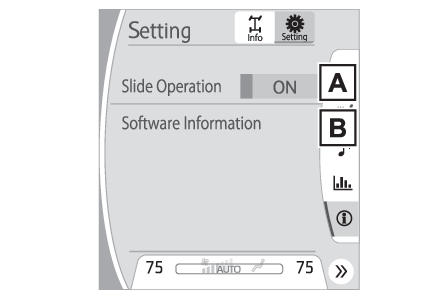 Select slide operation on/off
Display the software information
Copyright
©1982-2013, QNX Software Systems Limited. All rights reserved.
Select slide operation on/off
Display the software information
Copyright
©1982-2013, QNX Software Systems Limited. All rights reserved.