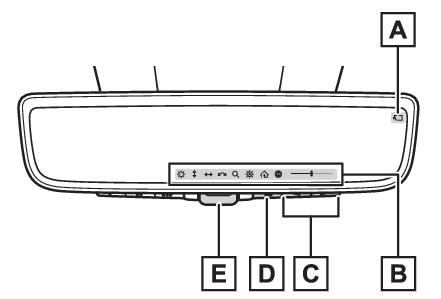
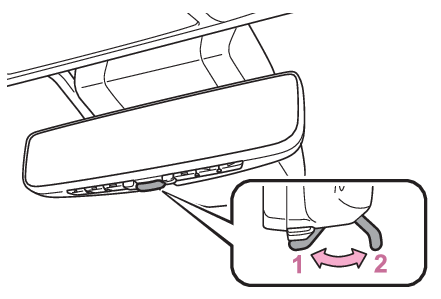
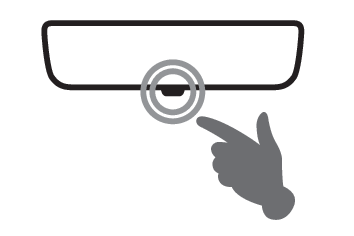
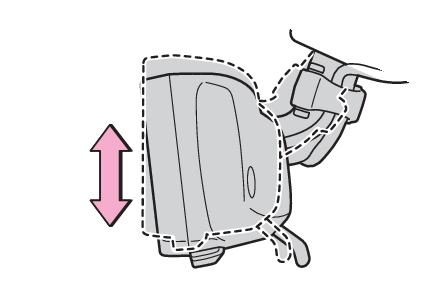
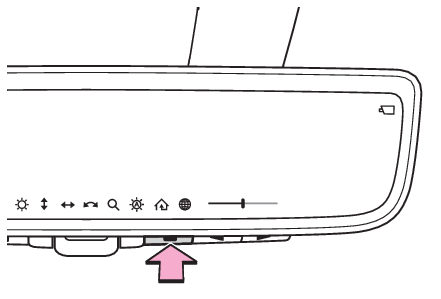
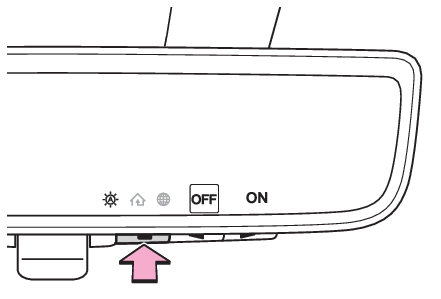
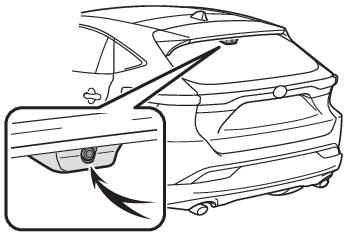
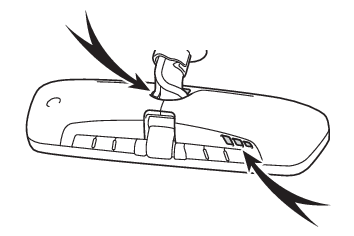
Digital Rear-view Mirror* *If equipped The Digital Rear-view Mirror is a system that uses the camera on the rear of the vehicle and displays its image on the display of the Digital Rear-view Mirror. The Digital Rear-view Mirror can be changed between optical mirror mode and digital mirror mode by operating the lever. The Digital Rear-view Mirror allows the driver to see the rear view despite obstructions, such as the head restraints or luggage, ensuring rear visibility. Also, the rear seats are not displayed and privacy of the passengers is enhanced. Warning: Observe the following precautions.Failure to do so may result in death or serious injury. Before using the Digital Rear-view Mirror Make sure to adjust the mirror before driving. (Adjusting the mirror) Change to optical mirror mode and adjust the position of the Digital Rear-view Mirror so that the area behind your vehicle can be viewed properly. Change to digital mirror mode and adjust the display settings. As the range of the image displayed by the Digital Rear-view Mirror is different from that of the optical mirror, make sure to check this difference before driving. System components Camera indicator Indicates that the camera is operating normally. Icon display area Displays icons, adjusting gauge, etc. (Display settings (digital mirror mode)) Select/adjust button Press to change the setting of the item you want to adjust. Menu button Press to display the icon display area and select the item you want to adjust. Lever Operate to change between digital mirror mode and optical mirror mode. Changing modes Operate the lever to change between digital mirror mode and optical mirror mode. Digital mirror mode Displays an image of the area behind the vehicle. will illuminate in this mode. Optical mirror mode Turns off the display of the Digital Rear-view Mirror allows it to be used as an optical mirror. Note: Digital mirror mode operating condition The power switch is turned to ON. When the power switch is changed from ON to OFF or ACC, the image will disappear after several seconds. When using the Digital Rear-view Mirror in digital mirror mode If it is difficult to see the displayed image due to light reflected off the Digital Rear-view Mirror, the camera being dirty or covered with water droplets, snow, etc., or if lights of a vehicle behind your vehicle or the displayed image are bothering you, change to optical mirror mode. When the back door is open, the Digital Rear-view Mirror image may not display properly. Before driving, make sure the back door is closed. Vehicles with panoramic fixed moon roof with one-touch frosted glass control: If the display is difficult to see due to reflected light, close the electronic sunshade. Any of the following conditions may occur when driving in the dark, such as at night. None of them indicates that a malfunction has occurred. Colors of objects in the displayed image may differ from their actual color. Depending on the height of the lights of the vehicle behind, the area around the vehicle may appear white and blurry. Automatic image adjustment for brighter surrounding image may cause flickering. If it is difficult to see the displayed image or flickering bothers you, change to optical mirror mode. The Digital Rear-view Mirror may become hot while it is in digital mirror mode.This is not a malfunction. Depending on your physical condition or age, it may take longer than usual to focus on the displayed image. In this case, change to optical mirror mode. Do not let passengers stare at the displayed image when the vehicle is being driven, as doing so may cause motion sickness. When the system malfunctions If the symbol shown in the illustration is displayed when using the Digital Rear-view Mirror in digital mirror mode, the system may be malfunctioning. The symbol will disappear in a few seconds. Operate the lever, change to optical mirror mode and have the vehicle inspected by your Toyota dealer. Adjusting the mirror Adjusting the mirror height The height of the rear view mirror can be adjusted to suit your driving posture. Change to optical mirror mode, adjusting the height of the rear view mirror by moving it up and down. Display settings (digital mirror mode) Settings of the display in the digital mirror mode, on/off operation of the automatic anti-glare function, etc. can be changed. Press the menu button. The icons will be displayed. Press the menu button repeatedly and select the item you want to adjust. Press or to change the setting. The icons will disappear if a button is not operated for approximately 5 seconds or more.
Icons Settings
Select to adjust the brightness of the display.
Select to adjust the area displayed up/down.
Select to adjust the area displayed to the left/right.
Select to adjust the angle of the displayed image.
Select to zoom in/out the displayed image.
Select to enable/disable the automatic anti-glare function.* Responding to the brightness of the headlights of vehicles behind, the reflected light is automatically adjusted. The automatic anti-glare function is enabled each time the power switch is changed to ON.
Select to display HomeLink® Training Tutorial to assist customers to train their Garage Door Opener System. (Garage door opener*)
Select to change the language of the Homelink® Training Tutorial.
*This is a function for the optical mirror mode, however, the setting can also be changed while using the digital mirror mode.
Enabling/disabling the automatic anti-glare function (optical mirror mode) The automatic anti-glare function in the optical mirror mode can be enabled/disabled. The setting can be changed in both the digital mirror mode and the optical mirror mode. When using the digital mirror mode Display settings (digital mirror mode) When using the optical mirror mode Press the menu button. The icons will be displayed. Press the menu button repeatedly and select . The setting display will be displayed. Press or to enable (ON)/disable (OFF) the automatic anti-glare function. The icons will disappear if a button is not operated for approximately 5 seconds or more. Note: Adjusting the display (digital mirror mode) If the displayed image is adjusted, it may appear distorted. This is not a malfunction. If the brightness of the Digital Rear-view Mirror is set too high, it may cause eye strain. Adjust the Digital Rear-view Mirror to an appropriate brightness. If your eyes become tired, change to optical mirror mode. The brightness of the Digital Rear-view Mirror will change automatically according to the brightness of the area in front of your vehicle. Sensor Digital Rear-view Mirror To prevent the light sensors from malfunctioning To prevent the light sensors from malfunctioning, do not touch or cover them. Warning: Observe the following precautions.Failure to do so may result in death or serious injury. While driving Do not adjust the position of the Digital Rear-view Mirror or adjust the display settings while driving.Stop the vehicle and operate the Digital Rear-view Mirror control switches. Failure to do so may cause a steering wheel operation error, resulting in an unexpected accident. Always pay attention to the vehicle’s surroundings. The size of the vehicles and other objects may look different when in digital mirror mode and optical mirror mode.When backing up, make sure to directly check the safety of the area around your vehicle, especially behind the vehicle.Additionally, if a vehicle approaches from the rear in the dark, such as at night, the surrounding area may appear dim. To prevent causes of fire If the driver continues using the Digital Rear-view Mirror while smoke or odor comes from the mirror, it may result in fire. Stop using the system immediately and contact your Toyota dealer.
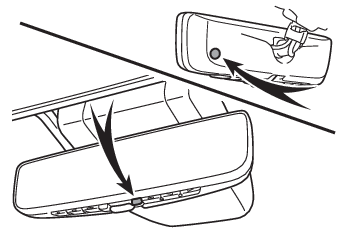
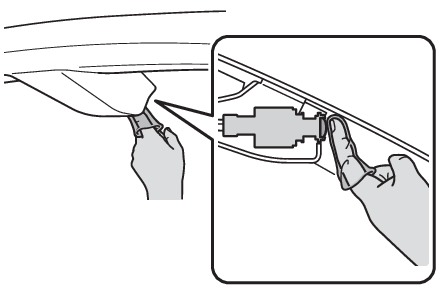
Cleaning the Digital Rear-view Mirror Cleaning the mirror surface If the mirror surface is dirty, the image on the display may be difficult to see.Clean the mirror surface gently using a soft dry cloth. Cleaning the camera When the camera lens is dirty, a clear image cannot be captured. If the camera lens is covered with foreign matter, such as water droplets or dust, clean it with a damp soft cloth. When it is difficult to clean it with a cloth, use a swab. When cleaning the camera lens, wipe the inside of the rear window as well. Note: The camera The camera for the Digital Rear-view Mirror is located as shown. The cooling fan There is a cooling fan in the Digital Rear-view Mirror. Cooling fan sounds may be heard when using the system. Notice: To prevent the Digital Rear-view Mirror from malfunctioning Do not use detergents, such as thinner, benzene, and alcohol to clean the mirror. They may discolor, deteriorate or damage the mirror surface. Do not smoke, use matches, use cigarette lighters or allow open flames near the mirror. It may damage the mirror or cause a fire. Do not remove, disassemble or modify the mirror. To prevent the camera from malfunctioning Observe the following precautions, otherwise the Digital Rear-view Mirror may not operate properly. Do not strike or hit the camera or subject it to a strong impact, as the camera installation position and angle may be changed. Do not remove, disassemble or modify the camera. Do not allow an organic solvent, car wax, window cleaner or glass coating to adhere to the camera. If this happens, wipe it off as soon as possible. When cleaning the camera lens, wipe the camera lens with a damp soft cloth.Do not strongly rub the camera lens, as it may be scratched and will not be able to transmit a clear image. When applying colored film (including transparent film) to the rear window glass, do not apply it to the area in front of the camera.If film is applied to the area in front of the camera, the image from the camera may not display properly. Do not subject the camera to a strong impact as this could cause a malfunction.If this happens, have the vehicle inspected by your Toyota dealer as soon as possible. Do not block the vent holes of the mirror. Otherwise, the mirror may be hot, leading to a malfunction or a fire. If you notice any symptoms If you notice any of the following symptoms, refer to the following table for the likely cause and the solution. If the symptom is not resolved by the solution, have the vehicle inspected by your Toyota dealer.
Symptom Likely cause Solution
The image is difficult to see. The mirror surface is dirty. Clean the mirror surface gently, using a soft dry cloth.
Sunlight or headlights are shining directly into the Digital Rear-view Mirror. Change to optical mirror mode.(Vehicles with panoramic fixed moon roof with one-touch frosted glass control: If the light is coming through the moon roof, close the electronic sunshade.)
The vehicle is in a dark area. The vehicle is near a TV tower, broadcasting station, electric power plant, or other location where strong radio waves or electrical noise may be present. The temperature around the camera is extremely high/low. The ambient temperature is extremely low. It is raining or humid. Sunlight or headlights are shining directly into the camera lens. The vehicle is under fluorescent lights, sodium lights, mercury lights, etc. Exhaust gas is obstructing the camera. Change to optical mirror mode.(Change back to digital mirror mode when the conditions have improved.)
Foreign matters such as water droplets or dust is on the camera lens. Wipe the camera lens with a damp soft cloth.
The image is difficult to see. The luggage in the luggage compartment is reflected off the rear window glass and obstructing the camera. Change to optical mirror mode. Move the luggage to a position where it does not obstruct the camera or cover it with a black cloth to reduce the amount it is reflected off the rear window glass.
The rear window glass is fogged up. Change to optical mirror mode.After defogging the rear window using the rear window defogger (Air conditioning controls - Defogging the rear window and outside rear view mirrors, Air conditioning controls - Defogging the rear window and outside rear view mirrors), use the digital mirror mode again.
The outside of the rear window glass is dirty. Use the rear window wiper to remove dirt.
The inside of the rear window glass is dirty. Wipe the inside of rear window glass with a damp soft cloth.
The image is out of alignment. The back door is not fully closed. Fully close the back door.
The camera or its surrounding area has received a strong impact. Change to optical mirror mode and have the vehicle inspected by your Toyota dealer.
The display is dim and is displayed. The system may be malfunctioning. Change to optical mirror mode and have the vehicle inspected by your Toyota dealer.
goes off.
is displayed. The Digital Rear-view Mirror is extremely hot.(The display will gradually become more dim. If the temperature continues to increase, the Digital Rear-view Mirror will turn off.) Reducing the cabin temperature is recommended to reduce the temperature of the mirror.( will disappear when the mirror becomes cool.) If does not disappear even though the mirror is cool, have the vehicle inspected by your Toyota dealer.
The lever cannot be operated properly. The lever may be malfunctioning. Change to optical mirror mode and have the vehicle inspected by your Toyota dealer.(To change to optical mirror mode, press and hold the menu button for approximately 10 seconds.)