Hybrid system
Energy monitor/consumption screenEnergy monitorDisplay
Consumption screenDisplay
Energy monitorConsumption screenEnergy monitor/consumption screenThe state of the hybrid system can be viewed on the multi-information display and
navigation or multimedia system screen.The energy monitor and fuel consumption screen can be displayed on the “
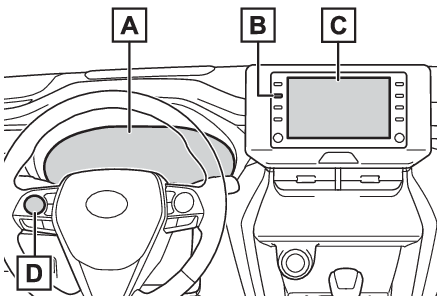
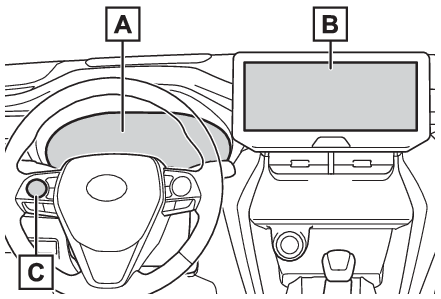
Home” screen of the multimedia display (vehicles with 8-inch display only).System componentsVehicles with 8-inch displayMulti-information display“
MENU” buttonNavigation or multimedia system screenMeter control switchesVehicles with 12.3-inch displayMulti-information displayNavigation or multimedia system screenMeter control switchesMulti-information display
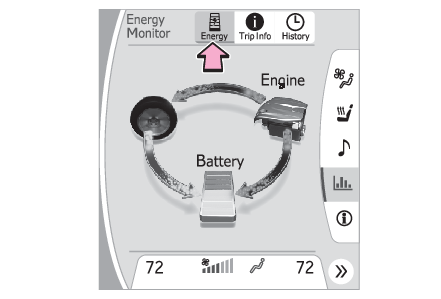
Energy monitorEnergy monitorThe energy monitor can be used to check the vehicle drive status, hybrid system operation
status and energy regeneration status.Display procedureMulti-information display (vehicles with 4.2-inch display)Press
or
of the meter control switches on the steering wheel and select
, press
or
of the meter control switches and select the energy monitor.Multi-information display (vehicles with 7-inch display)Press
or
of the meter control switches on the steering wheel and select
, press
or
of the meter control switches and select the energy monitor.Navigation or multimedia system screen (with 8-inch display)Press the “
MENU” button.Select “
Info” on the “
Menu” screen.Select “
ECO” on the “
Info” screen.If a screen other than “
Energy Monitor” is displayed, select “
Energy”.Navigation or multimedia system screen (with 12.3-inch display)Select
on the Toyota multi-operation touch (Toyota multi-operation touch (vehicle with the 12.3-inch display)).Select “
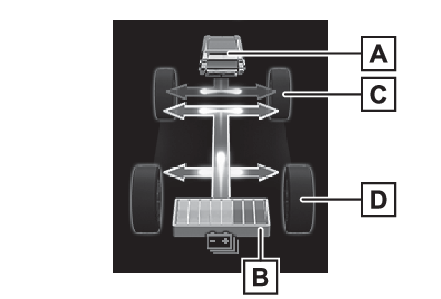
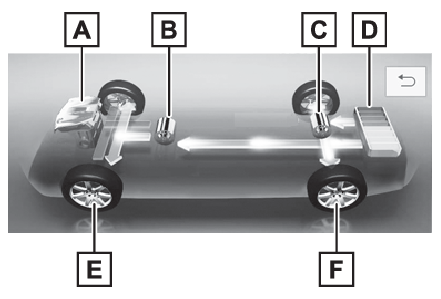
Energy” on the split-screen.Displaying a screen in full screen(Displaying a screen in full screen)DisplayWhen energy is flowing, an arrow appears to show the direction of the flow of energy.
When energy is not flowing, an arrow is not displayed.Green: Shows that the electrical energy charging or recovering.Yellow: Shows that the electrical energy using.Red: Shows that the gasoline engine power using.Multi-information displayThe figure shows all the arrows for the purpose of this explanation, but the actual
contents of the display will differ.Gasoline engineHybrid battery (traction battery)Front tiresRear tiresNavigation or multimedia system screen (with 8-inch display)The figure shows all the arrows for the purpose of this explanation, but the actual
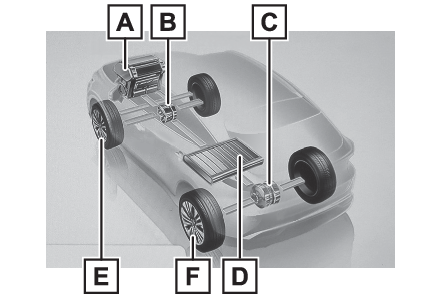
contents of the display will differ.Gasoline engineFront electric motor (traction motor)Rear electric motor (traction motor)Hybrid battery (traction battery)Front tiresRear tiresNavigation or multimedia system screen (with 12.3-inch display) (when displayed full
screen)The figure shows all the arrows for the purpose of this explanation, but the actual
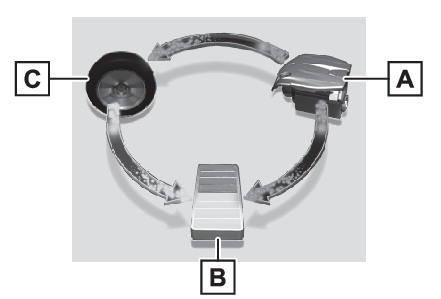
contents of the display will differ.Gasoline engineFront electric motor (traction motor)Rear electric motor (traction motor)Hybrid battery (traction battery)Front tiresRear tiresNavigation or multimedia system screen (with 12.3-inch display) (when displayed split-screen)The figure shows all the arrows for the purpose of this explanation, but the actual
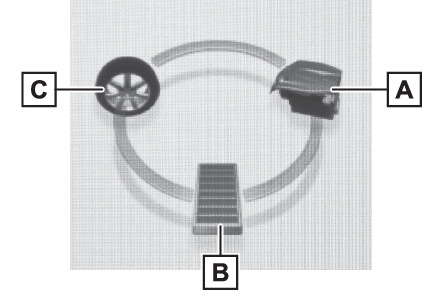
contents of the display will differ.Gasoline engineHybrid battery (traction battery)TireNavigation or multimedia system screen (with 8-inch display) (Home screen)Gasoline engineHybrid battery (traction battery)TiresNote:Hybrid battery (traction battery) statusThe display changes in 8 levels according to the remaining charge amount of the hybrid
battery (traction battery).The figure shows the multi-information display as an example for explanation.These images are examples only, and may vary slightly from actual conditions.LowHighRemaining charge amount warning of hybrid battery (traction battery)The buzzer sounds intermittently when the hybrid battery (traction battery) remains
without charging while the shift lever is in N, or the remaining charge amount drops
below a certain level. If the remaining charge amount drops further, the buzzer sounds
continuously.When a warning message is shown on the multi-information display and the buzzer sounds,
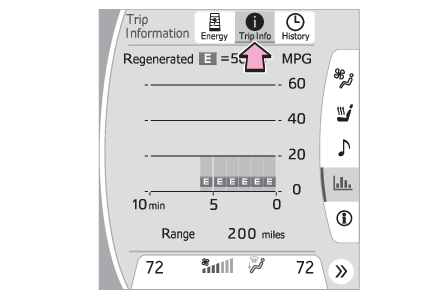
follow the instructions displayed on the screen to perform troubleshooting.Trip information screenDisplay procedureNavigation or multimedia system screen (with 8-inch display)Press the “MENU” button.Select “Info” on the “Menu” screen.Select “ECO” on the “Info” screen.If a screen other than “Trip Information” is displayed, select “Trip Information”.Navigation or multimedia system screen (with 12.3-inch display)Select
on the Toyota multi-operation touch (Toyota multi-operation touch (vehicle with the 12.3-inch display)).Select “
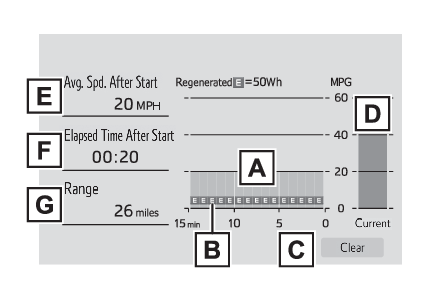
Trip Info” from split-screen.Displaying a screen in full screen(Displaying a screen in full screen)DisplayFuel consumption in the past 15 minutesRegenerated energy in the past 15 minutesOne symbol indicates 50 Wh. Up to 5 symbols are shown.Resetting the consumption dataCurrent fuel consumptionAverage vehicle speed since the hybrid system was started.Elapsed time since the hybrid system was started.Cruising rangeThe average fuel consumption history is divided by color into past averages and the
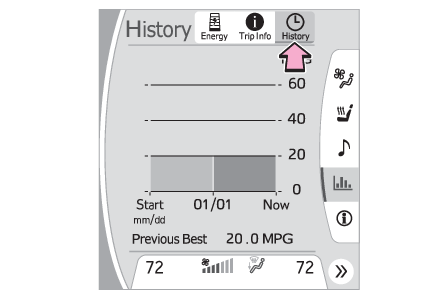
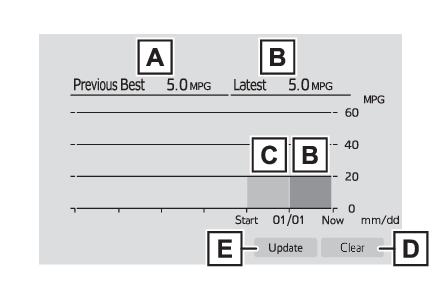
average fuel consumption since the last updated.Use the displayed average fuel consumption as a reference.The image is an example only, and may vary slightly from actual conditions.History screenDisplay procedureNavigation or multimedia system screen (with 8-inch display)Press the “MENU” button.Select “Info” on the “Menu” screen.Select “ECO” on the “Info” screen.If a screen other than “History” is displayed, select “History”.Navigation or multimedia system screen (with 12.3-inch display)Select
on the Toyota multi-operation touch (Toyota multi-operation touch (vehicle with the 12.3-inch display)).Select “
History” on the split-screen.Displaying a screen in full screen(Displaying a screen in full screen)DisplayBest recorded fuel consumptionLatest fuel consumptionPrevious fuel consumption recordResetting the history dataUpdating the latest fuel consumption dataThe average fuel consumption history is divided by color into past averages and the
average fuel consumption since the last updated. Use the displayed average fuel consumption as a reference.The image is an example only, and may vary slightly from actual conditions.Note:Updating the history dataUpdate the latest fuel consumption by selecting “Update” to measure the current fuel
consumption again.Resetting the dataThe fuel consumption data can be deleted by selecting “Clear”.Cruising rangeDisplays the estimated maximum distance that can be driven with the quantity of fuel
remaining.This distance is computed based on your average fuel consumption. As a result, the
actual distance that can be driven may differ from that displayed.“
Home” screen (vehicles with 8-inch display only)The average fuel consumption and distance to empty can be displayed on the “
Home” screen of the multimedia display.For details of the “
Home” screen, refer to the separate “
NAVIGATION AND MULTIMEDIA SYSTEM OWNER’S MANUAL”.