Lights
Interior light listInterior lightsInterior lights listShift lever
Shift lever lightLights
Shift lever lightLights
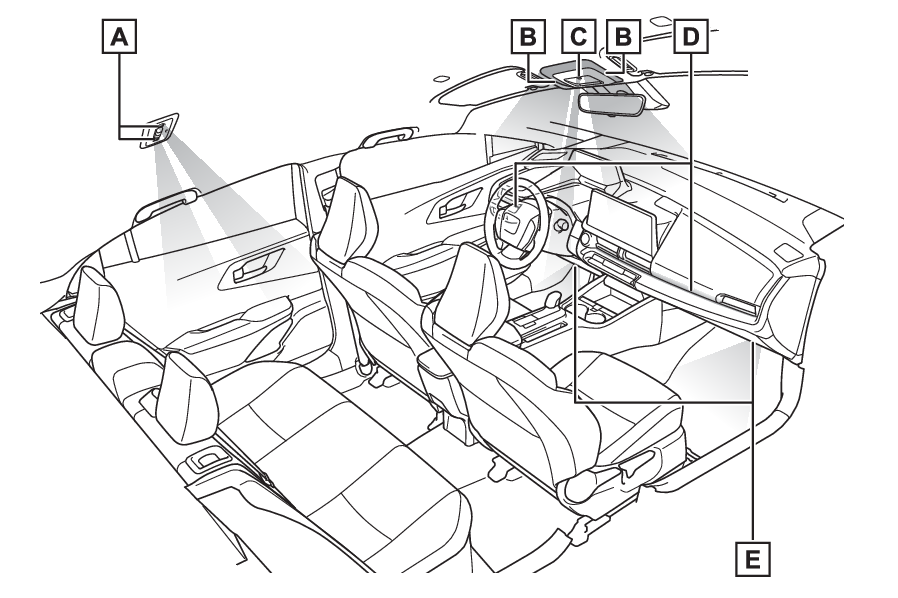
Footwell lightsInstrument panel ornament lightsFootwell lightsLocation of the interior lightsRear personal lights (Operating the personal lights)Interior lights (Operating the interior light)/Front personal lights (Operating the personal lights)Shift lever light*Instrument panel ornament lights (if equipped) (Illumination notification (if equipped))Footwell lights (if equipped)*The shift lever light turns on/off together with the tail lights.Note:Lights
Illuminated entry systemIlluminated entry systemIlluminated entry systemThe lights automatically turn on/off according to the power switch mode, the presence
of the electronic key, whether the doors are locked/unlocked, and whether the doors
are open/closed.To prevent the 12-volt battery from being dischargedIf the interior lights remain on when the power switch is turned to OFF, the lights
will go off automatically after 20 minutes.Automatic illumination of the interior lightsIf any of the SRS airbags deploy (inflate) or in the event of a strong rear impact,
the interior lights will turn on automatically. The interior lights will turn off
automatically after approximately 20 minutes.The interior lights can be turned off
manually. However, in order to help prevent further collisions, it is recommended
that they be left on until safety can be ensured. (The interior lights may not turn
on automatically depending on the force of the impact and conditions of the collision.)CustomizationSome functions can be customized. (Customizable features: Customizable features)Notice:To prevent 12-volt battery dischargeDo not leave the lights on longer than necessary when the hybrid system is off.Lights
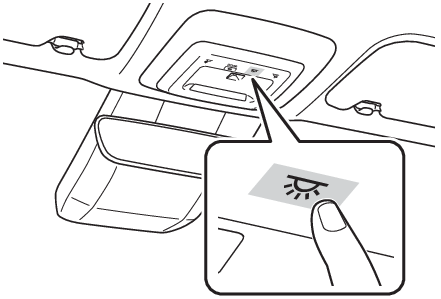
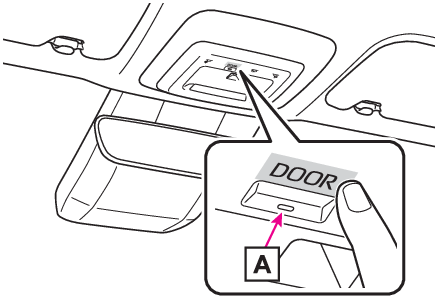
Interior lightsOperating the interior lightTurning the interior light on/offTouch the switch.Each time the switch is touched, the interior light turns on/off.The rear personal lights turn on/off together with the interior light.When a door is opened while the door position is on, the light turns on.Turning the door position on/offTouch the door-linked interior light switch.The lights are turned on and off according to whether the doors are opened/closed
while the door position is on.Each time the switch is touched, the door position turns on/off.When the door position is on, the indicator
on the switch illuminates.Note:When interior light switch and door-linked interior light switch do not respond as
normalWhen water, dirt, etc., have adhered to the switch surfaceWhen operated with a wet handWhen wearing gloves, etc.Personal lightsLights
Personal lightsLights
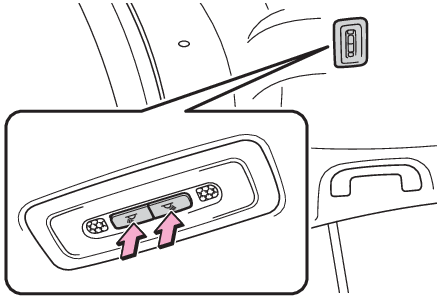
Rear personal lightsLights
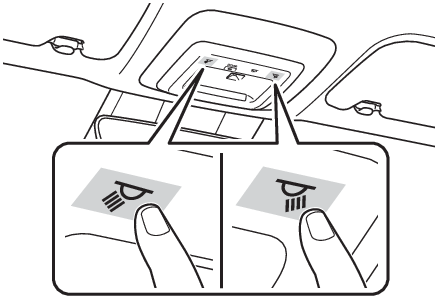
Front personal lightsOperating the personal lightsTurning the front personal lights on/offTouch the switch.Each time the switch is touched, the front personal light turns on/off.Turning the rear personal lights on/offPress the switch.Each time the switch is pressed, the rear personal light turns on/off.If the light is turned on by the interior lights, the rear personal light cannot turn
off by pressing the switch.Note:When front personal light switch does not respond as normalWhen water, dirt, etc., have adhered to the switch surfaceWhen operated with a wet handWhen wearing gloves, etc.Lights
Illumination notificationIllumination notificationIllumination notification (if equipped)Under the following conditions, the instrument panel ornament lights blink 2 times
to notify the driver.Preceding vehicle start notificationNotifies when the preceding vehicle starts off or accelerates while stopped behind
the preceding vehicle.This function may also operate while driving at extremely slow speeds immediately
before stopping the vehicle.PDA (Proactive Driving Assist) Obstacle Anticipation Assist linked notificationsNotifies when PDA (Proactive Driving Assist) Obstacle Anticipation Assist has detected
an operation target. (PDA (Proactive driving assist))Note:Operation description of illumination notificationPDA (Proactive Driving Assist) Obstacle Anticipation Assist linked notifications do
not operate when PDA (Proactive Driving Assist) Obstacle Anticipation Assist is disabled
through a customize setting. (PDA (Proactive driving assist))When the preceding vehicle is close in distance from the vehicle while stopped, the
timing for notifying that the preceding vehicle has started off may be delayed.This function does not operate when the front camera or front radar sensor does not
operate properly such as during bad weather.CustomizationSettings can be changed to enabled and disabled illumination notifications. (Customizable
features: Customizable features)