X-MODEX-MODE
Grip ControlSwitches
X-MODE switchSwitches
Grip ControlX-MODE**If equippedThis mode has improved road handling ability off roads.Select between the 2 types of mode, SNOW/DIRT and D.SNOW/MUD.During “
X-MODE”, the downhill assist control will control the brakes to maintain a constant vehicle
speed when driving on steep descents.Grip Control supports the driver’s operation by maintaining a low vehicle speed on
steep inclines and slippery roads without having to step on the accelerator pedal
or brake pedal.Warning:Be sure to observe the following before using “
X-MODE”If not observed, there is the danger that it may lead to an unexpected accident.Drive the vehicle after checking that the SNOW/DIRT indicator/D.SNOW/MUD indicator
turns on.“
X-MODE” is not a device that enhances the limited performance of the vehicle. Carefully
check the road surface conditions and the driving route in advance, and then drive
with caution.Conditions in which it may not function correctlyWhen driving on the following road surfaces, it may not be possible to maintain a
constant speed of the vehicle, which may lead to an unexpected accident.Extremely steep inclinesRough road surfacesSlippery road surfaces such as snowy roads and frozen road surfacesSystem Components“
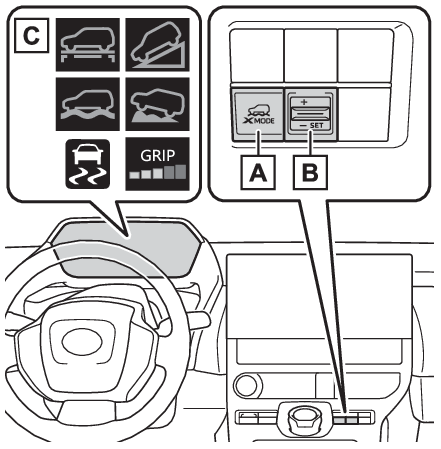
X-MODE” switchGrip Control switch (When using Grip Control)IndicatorsSelecting the Drive ModePress the “
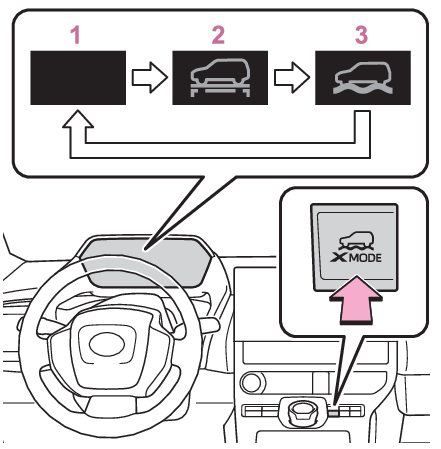
X-MODE” switch repeatedly until the system switches to the desired driving mode while the
vehicle is stopped or traveling at a speeds less than approximately 13 mph (20 km/h).Normal modeHas a good balance of electrical consumption performance, quietness, and driving performance,
and is suitable for driving in urban areas.SNOW/DIRT modeWhen the tires are likely to slip or slip on slippery roads such as snowy roads, gravel
roads, etc., the tire spinning is reduced, making it easier to drive.At this time, the SNOW/DIRT mode indicator lights up in green on the meter.D.SNOW/MUD modeIn special cases such as the tires being buried in deep snow or mud, the TRAC (Traction
Control) function is temporarily canceled, and the tires are idled as needed to make
it easier to start.At this time, the D.SNOW/MUD mode indicator lights up in green on the meter. In addition,
the VSC OFF indicator and PCS warning light will be turned on in the meter.Note:When “
X-MODE” is not availableIn the following cases, the system does not operate.When the EV system is not startedWhen SNOW/DIRT mode or D.SNOW/MUD mode is not selectedWhen Regeneration Boost is selectedWhen Advanced Park is being usedWhen the EV system is malfunctioningAbout Dynamic Radar Cruise Control or Cruise ControlDynamic radar cruise control and cruise control cannot be used during “
X-MODE”. If dynamic radar cruise control or cruise control are being used, it will be automatically
canceled.During “
X-MODE”In “
X-MODE”, VSC does not switch ON/OFF even if the VSC OFF switch is operated. It is fixed
as ON in SNOW/DIRT mode and OFF in D.SNOW/MUD mode.During “
X-MODE”, even if the Eco mode switch or regeneration boost switch is operated, operations
will not switch to the respective modes.The SNOW/DIRT and D.SNOW/MUD modes control the vehicle so that it can maximize the
drive force and improve the drive force on rough roads. As a result, power consumption
may diminish when compared to driving in normal mode.“
X-MODE” Automatic Release“
X-MODE” is automatically canceled when the power switch is turned OFF.When the vehicle speed exceeds about 25 mph (40 km/h), the X-MODE is canceled, the
“
X-MODE” indicator on the meter lights up in white, and switches to the normal mode.When the vehicle speed is approximately 22 mph (35 km/h) or less, “
X-MODE” indicator lights up in green and switches to X-MODE again.Cautions regarding the use of the systemFor safety, the following operations are not accepted when “
X-MODE” is ON.Eco mode switch operationsRegeneration Boost switch operationsWhen selecting “
X-MODE”, Downhill Assist ControlWhen the “
X-MODE” switch is pressed and SNOW/DIRT mode or D.SNOW/MUD mode is selected, the Downhill
Assist Control automatically enters the standby state and operates under the following
conditions.When the vehicle speed is approximately 18 mph (30 km/h) or lessNeither the accelerator pedal or brake pedal are not operatedNote:When changing the target vehicle speedWhen changing the target vehicle speed, adjust it with the accelerator pedal or the
brake pedal. When the foot is removed from the pedal, the system will operate at the
vehicle speed at that time.Downhill Assist Control during “
X-MODE”In SNOW/DIRT mode or D.SNOW/MUD mode, the downhill assist control can be set to standby
state. The operation indicator changes depending on the operating status of the downhill
assist control.When the system is not operating, the indicator turns on white.When Downhill Assist Control is not available when selecting “
X-MODE”In the following cases, the system does not operate.When SNOW/DIRT mode or D.SNOW/MUD mode is not selectedWhen the shift position is in PWhen the Grip Control is operatingWhen the brake system or EV system is malfunctioningGrip ControlSwitches
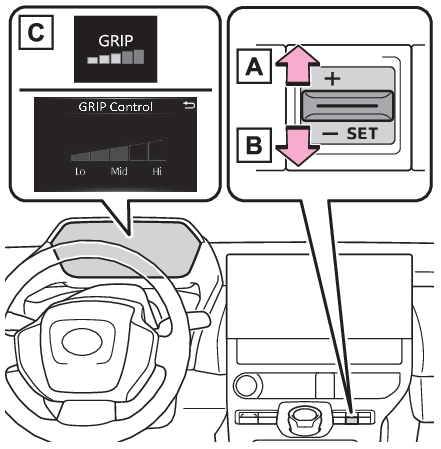
Grip ControlWhen using Grip ControlWith SNOW/DIRT mode or D.SNOW/MUD mode selected, press down on the Grip Control switch.At this time, the downhill assist control system indicator turns off and the Grip
Control indicator turns on.When the vehicle is stopped, press the brake pedal firmly and operate the switch.
The vehicle may start moving unintentionally on an incline.Set the speed of the Grip ControlPress the Grip Control switch up or down to set the desired speed (approximately 2
to 6 mph [2 to 10 km/h]). The set speed is shown on the multi-information display.Increase SpeedDecrease SpeedIndicator LightsGrip Control OperationsDuring system operations, the Grip Control indicator turns on green. If the Grip Control
indicator is white, release the brake pedal to activate the system.While the system is operating, the accelerator pedal and brake pedal can be used to
temporarily accelerate or decelerate. If operating the accelerator pedal or brake
pedal is stopped, the speed will return to the set speed.When Grip Control is releasedPress the “
X-MODE” SwitchWhen the Grip Control is released, the Grip Control operation light turns off, and
after a while, the downhill assist control system indicator light turns on.Drive carefully when releasing Grip Control while driving.Note:Grip Control Operations ConditionsWhen in “
X-MODE”When the shift position is in DWhen the parking brake has been releasedWhen the driver side door is closedWhen the vehicle is stopped by stepping on the brake or the vehicle speed is approximately
2 to 6 mph [2 to 10 km/h]Automatic Releasing the Grip ControlIn case of any of the following, the Grip Control is released.When the vehicle is stopped by stepping on the brake pedalWhen the vehicle speed exceeds more than 13 mph (20 km/h)When the shift position in a position other than DWhen the parking brake is operatedWhen the driver side door is openedABS/VSC is activated.When brake control and output suppression by the driving support device are activated
(example: Pre-Collision System, Parking Support Brake (If equipped))When the system determines it cannot continue in the current environmentWhen the power switch is turned OFFWhen Grip Control is not availableIn the following conditions, Grip Control is not available.When the brake system or EV system is malfunctioningAfter the EV system is started and until the vehicle has been running for a whileBrake hold systemThe brake hold system turns OFF when the Grip Control is being used. Press the brake
pedal firmly and operate the switch.When using the brake hold system again, turn ON the brake hold system after releasing
the Grip Control.Notice:Long term usageIf used continuously for a long periods of time, the temperature of the brakes may
rise the system may temporarily stop.Operation noises and vibrationsOperating noise may be heard from motor room, however this is not a malfunction.When the brake pedal is depressed, it may become harder than usual or it may feel
different from normal, but this is not a malfunction.When the operation indicator does not turn on in the meter even after operating the
switchThe system may not be working properly. Have the vehicle inspected at your Toyota
dealer.