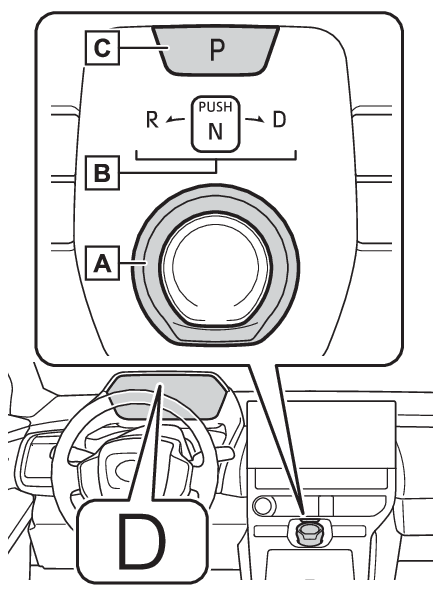
Shift positionShift positionSelect the shift position depending on your purpose and situation.Shift position purpose and functions
Shift position
Objective or function
P
Parking the vehicle/starting the EV system
R
Reversing
N
Neutral (Condition in which the power is not transmitted)
D
Normal driving
Note:Restraining sudden start (Drive-Start Control)Sudden start restraint control (Drive-Start Control [DSC])If a message about a shift operation is shownTo prevent the shift position from being selected incorrectly or the vehicle from
moving unexpectedly, the shift position may be changed automatically or operating
the rotary shifter may be required. In this case, change the shift position following
the messages on the multi-information display.After recharging/reconnecting the 12-volt batteryAfter recharging/reconnecting the 12-volt batteryWarning:When driving on slippery road surfacesBe careful of sudden acceleration, as this could result in the vehicle skidding to
the side or spinning.Notice:Situations where shift control system malfunctions are possibleIf any of the following situations occur, shift control system malfunctions are possible.
Immediately stop the vehicle in a safe place on level ground, apply the parking brake,
and then contact your Toyota dealer.When the warning message indicating the shift control system appears on the multi-information
display. (If a warning message is displayed)The display indicates that no shift position is selected for more than a few seconds.Shift position display and how to change the shift positionRotary shifterOperate the rotary shifter slowly and securely.To switch to N, hold down the rotary shifter and hold it for a while.To switch to R or D, hold down the rotary shifter and turn left or right according
to the arrow on the shift position indicator.Release the rotary shifter after each shifting operation to allow it to return to
its regular position.When shifting from P to N, D or R, from N, D or R to P, from D to R, or from R to
D, ensure that the brake pedal is being depressed and the vehicle is stationary.Shift position indicatorMeter display:The current shift position is illuminated.Rotary shifter display:The current shift position is illuminated.When selecting the shift position, make sure that the shift position has been changed
to the desired position by checking the shift position indicator provided on the instrument
cluster.P position switchFully stop the vehicle and set the parking brake, and then press the P position switch.When the shift position is changed to P, the switch illuminates.Check that the shift position indicator shows P.Note:Changing the shift position in each power switch modeThe shift position cannot be changed when the power switch is in ACC or off.When the power switch is in ON, if the “
READY” indicator is not illuminated, the shift position can only be changed to N.When the “
READY” indicator is illuminated, the shift position can be changed from P to D, N, or R.When the “
READY” indicator is flashing, the shift position cannot be changed from P to any other
position, even if the rotary shifter is operated. Operate the rotary shifter again
after the “
READY” indicator changes from flashing to illuminated.Shifting the shift position from P to other positionsWhile depressing the brake pedal firmly, operate the rotary shifter. If the rotary
shifter is operated without depressing the brake pedal, the buzzer will sound and
the shifting operation will be disabled.When selecting the shift position, make sure that the shift position has been changed
to the desired position by checking the shift position indicator provided on the instrument
cluster.The shift position cannot be changed whenIn the following situations, a buzzer will sound to inform you that the shift position
cannot be changed. Use the appropriate operation to attempt to change the shift position
again.When attempting to change the shift position from P with the brake pedal not depressedWhen attempting to change the shift position from P with the accelerator pedal depressedWhen attempting to change the shift position from N while stopped or driving at an
extremely low speed with the brake pedal not depressedWhen attempting to change the shift position from N while stopped or driving at an
extremely low speed with the accelerator pedal depressedWhen the P position switch is pressed while drivingWhen driving at an extremely low speed, the shift position may change to P.The shift position automatically changes to N whenIn the following situations, a buzzer will sound to inform you that the shift position
has been changed to N. Use the appropriate operation to attempt to change the shift
position again.When attempting to change the shift position to R while the vehicle is moving forwardWhen driving at a low speed, the shift position may change to R.When attempting to change the shift position to D while the vehicle is moving backwardWhen driving at a low speed, the shift position may change to D.When N is selected while drivingWhen selecting N while traveling at a speed above a certain level, hold the rotary
shifter at the N position.Reverse warning buzzerWhen shifting into R, a buzzer will sound to inform the driver that the shift position
is in R.Automatic P position selection functionIn the following situations, the shift position is automatically changed to P.When pressing the power switch with the vehicle stopped while the power switch is
in ON and the shift position is in a position other than P (after the shift position
has changed to P, the power switch will turn off)*If the driver’s door is opened and all of the following conditions are met, while
the shift position is in a position other than P:The power switch is in ON.The driver is not wearing the seat belt.The brake pedal is not depressed.To start off the vehicle after the shift position is changed to P, operate the rotary
shifter again.When the vehicle is stopped after the EV system has been stopped in an emergency while
driving.When voltage of the 12-volt battery drops while the shift position is in a position
other than P.*0When the power switch is pressed while driving at extremely slow speeds, such as immediately
before stopping the vehicle, the shift position may automatically change to P. Make
sure that the vehicle is completely stopped before pressing the power switch.If the shift position cannot be shifted from PThere is a possibility that the 12-volt battery is discharged. Check the 12-volt battery
in this situation. (If the 12-volt battery is discharged)CustomizationSome functions can be customized. (Reverse warning buzzer)Warning:For the rotary shifterDo not remove the rotary shifter knob or use anything but a genuine Toyota rotary
shifter knob. Also, do not hang anything on the rotary shifter. Doing so could prevent
the rotary shifter from returning to position, causing unexpected accidents to occur
when the vehicle is in motion.In order to prevent the shift position from accidentally being changed, do not touch
the rotary shifter when not using them.P position switchDo not press the P position switch while the vehicle is moving.If the P position switch
is pressed when driving at very low speeds (for example, directly before stopping
the vehicle), the vehicle may stop suddenly when the shift position switches to P,
which could lead to an accident.In order to prevent the shift position from accidentally being changed, do not touch
the P position switch when not using them.Notice:When exiting the vehicle (driver’s seat only)Check that the shift position indicator shows P and that the parking brake indicator
is illuminated before opening the door and exiting the vehicle.Keeping the shift position in N without activating the automatic P position selection
functionBy performing the following operation, the shift position can be held in N until the
shift position switches to P without activating the automatic P position selection
function.Operate the rotary shifter and change the shift position to N when the EV system is
operating.Return the rotary shifter to its regular position.Operate the rotary shifter to N and hold it there until the buzzer sounds.Press the power switch within 5 seconds after the buzzer sounds.The EV system stops with the shift position in N*Make sure to check that the buzzer sounds and “
Holding N Push P Switch When Done” is displayed on the multi-information display.In order to shift to a position other than N, first press the P position switch to
change the shift position to P.If the automatic P position switching operation selection function is performed operated
with the EV system stopped, the automatic P position selection function may not operate.Always
perform the operation with the EV system started.*To keep this state, do not operate the power switch. If the power switch is operated
repeatedly, the power switch will turn off after the shift position has automatically
changed to P.Selecting the driving mode“
X-MODE”X-MODE*Regeneration Boost SwitchSwitches
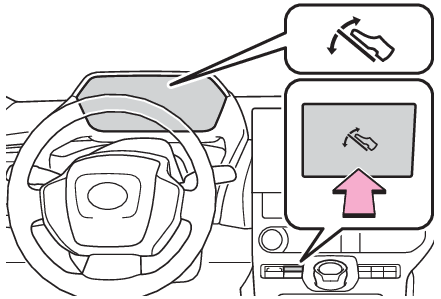
Regeneration Boost switchRegeneration Boost switchAcceleration/deceleration control can be performed only by operating the accelerator
pedal, and the frequency of switching to the brake pedal can be greatly reduced. Since
the deceleration when the accelerator pedal is released is stronger than that of a
conventional vehicle, the vehicle can be decelerated smoothly by slowly releasing
the pedal the accelerator pedal without completely releasing it.When the Regeneration Boost switch is pressed, the regenerative braking force, when
the accelerator pedal is released, becomes stronger than usual.Note:When Regeneration Boost cannot be usedIn the following cases, the system does not operate.When “
X-MODE” is activated (If equipped)When the brake system or EV system is malfunctioningWhen regenerative braking is limitedRegenerative braking may be restricted in the following situations:When the temperature of the electric motor or power control unit is extremely highRegenerative BrakingThe vehicle cannot be stopped by just releasing the accelerator pedal. Step on the
brake pedal when the vehicle is stopped.If the power switch is turned off and then the EV system is restarted, the Regeneration
Boost will be turned off.When driving at high speeds, the feeling of deceleration due to regenerative braking
is smaller than in a normal car.The maximum deceleration varies depending on the vehicle speed.The regenerative braking force may change depending on the battery condition.The regenerative braking force may become weak when the traction battery is fully
charged or when the temperature of the traction battery is low. The limit can be checked
by the size of the charging area or the regeneration limit display in the power meter.
(Power meter)If it seems there is slight feeling of deceleration due to the regenerative braking,
step on the brakes to slow down or stop.Regeneration Boost cannot be used when the following message is displayed on the multi-information
display.When decelerating, firmly step on the brake to decelerate.“
Regeneration Boost Unavailable XMODE Activated”“
Regeneration Boost Temporarily Unavailable Press Brake to Decelerate.”“
Regeneration Boost Temporarily Unavailable See Owner’s Manual”Stop lights turning ONWhen the regenerative braking force exceeds a certain level, the stop lights turns
on.Eco modeSwitches
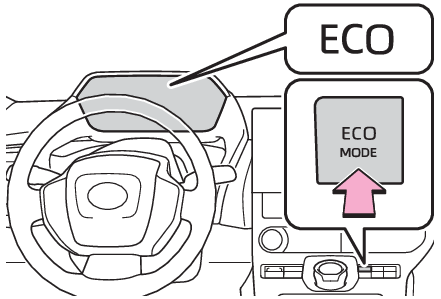
Eco modeSelecting Eco modeIt is suited for driving that suppress vehicle driving power and improves power consumption.Press the switch to switch over to Eco mode.Press the switch again to return to Normal driving mode.The Eco mode ON state is memorized even if the power switch is turned OFF.Note:Eco mode drive automatic cancellationEco mode is automatically canceled when snow mode or “
X-MODE” is selected and the vehicle returns to normal mode. (If equipped)When Eco mode is not availableEco mode cannot be activated when “
X-MODE” is selected. (If equipped)