Charging
DC chargingCharging methods
DC chargingDC chargingEV system
How to use DC chargingBattery (traction battery)
ChargingCharging
Charging procedureChargingTraction battery
ChargingHow to use DC chargingThis section explains the DC charging procedure for the traction battery.When using a DC charger, make sure to check the operation instructions of the DC charger.Warning:When using a DC chargerObserve the following precautions.Failure to do so may cause an unexpected accident,
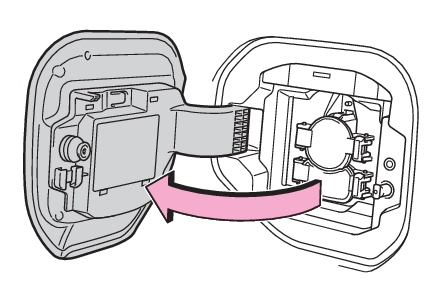
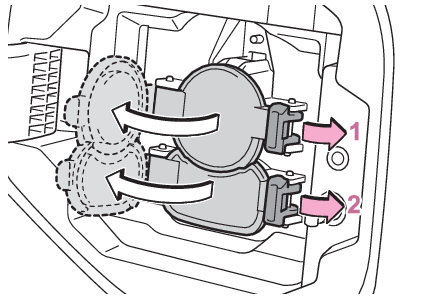
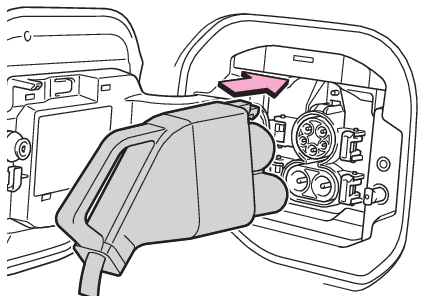
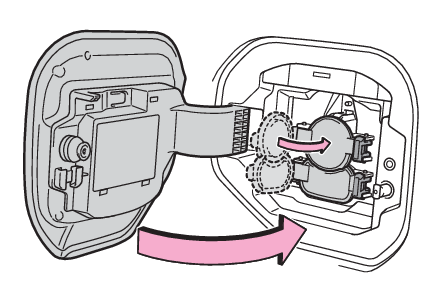
resulting in death or serious injury.Use a SAE J 1772 compliant DC charger.Do not use the charging cable longer than 30 meters.Confirm the following before chargingThings to know before chargingWhen chargingOpen the charging port lid. (Opening/closing the charging port lid)The charging inlet light will illuminate.Open the AC charging inlet cap, and then open the DC charging inlet cap.Insert DC charging connector firmly and fully into the charging inlet.The DC charging connector shape and treatment will differ depending on the type of
DC charger. Perform the operations in accordance to handling procedures of the DC
charger.Operate the DC charger and start the charging.Follow the handling procedures of the DC charger to start charging.Charging starts after a system check is done.Stop the charging in accordance to the handling procedures of the DC charger when
it is desired to interrupt the DC charging.Note:When the DC charging connector cannot be inserted into the DC charging inletWhen the AC charging connector cannot be inserted into the AC charging inletIf a message indicating vehicle error on the DC charger side is displayedEven if a message indicating vehicle error on the DC charger side (ex. vehicle error
found, vehicle error occurred, etc.) is displayed, there is no vehicle fault but possibly
a communication error between the DC charger and vehicle. In this case, there may
be terminal damage (bad contact) in the DC charging connector. If there is no error
with the vehicle, contact the facility manager of the DC charger.During DC chargingThe current charging condition can be checked on the multi-information display.The actual charging time may differ from that displayed on the DC charger during charging.There may be occasions the radio cannot be heard due to noise occurrence during DC
chargingAs the battery approaches full charge, the charging speed will decrease and it will
take longer to complete charging.Depending on the specifications of the charger (stand), charging will stop before
fully charging.The time to complete charging may change, or charging may stop before reaching the
upper limit of the charge capacity, due to the remaining charge of the traction battery,
the outside temperature, the specifications of the charger (stand), etc.It is recommended to avoid frequent DC charging to prevent a decline in the traction
battery capacity.Quickly move from the DC charging space for other users after the DC charging is completed.If DC charging is performed while the traction battery is extremely cold, such as
in cold weather, steam may come out of the motor compartment or dew may be formed
on the hood. This is because the heat, generated while the traction battery is warmed,
causes snow, ice, or frost to evaporate. This is not a malfunction.Depending on the specifications of the DC charger, charging may stop before the battery
is fully charged.The charge amount is corrected when the battery is fully charged, so 100% remaining
drive battery may not be displayed.How to set the DC charging powerYou can change the DC charging power limit on the multi-information display or multimedia.Setting operations on multi-information displayPress
or
of the meter control switches to select
.Press
or
of the meter control switches to select “
Vehicle Settings”, and then press and hold
.Press
or
of the meter control switches to select “
Charging Settings”, and then press
.The “
Charging Settings” screen will be displayed.Press
or
of the meter control switches to select “
DC charging power”, and then press
.The “
DC charging power” screen will be displayed.Press
or
of the meter control switches to select the charging power from “
MAX”, “
125kW”, “
100kW”, “
75kW”, “
50kW” and then press
.The maximum power when charging is limited to the selected power or less.If “
MAX” is selected, the vehicle will be charged with the maximum power that can be charged.Setting operations on multimediaSelect
.Select “
Vehicle customize”.Select “
Charging”.Select “
DC charging power”.Select from “
MAX”, “
125kW”, “
100kW”, “
75kW”, “
50kW”.The maximum power when charging is limited to the selected power or less.If “
MAX” is selected, the vehicle will be charged with the maximum power that can be charged.Changing the “
Charging Limit” settingsChanging the “Charging Limit” settingsIf “
Check Charging System Close Charging Port Lid See Owner’s Manual” is displayed on the multi-information displayIf the system check after DC charging is not completed successfully, the EV system
will not start even if the power switch is pressed while depressing the brake pedal.Perform a system check with the following procedures.Be sure to engage the parking brake and then turn the power switch off.Close the charging inlet cap, close the charging port lid.Check if “
Checking Charging System” is displayed on the multi-information display when the power switch is turned to
ON.Do not open the charging port lid while the charging system is checking.When the system check is completed, the power switch automatically turns off.Press the power switch while depressing the brake pedal. The “
READY” indicator turns on.Contact your Toyota dealer if the charging system check is done and the message on
the multi-information display does not go off.Warning:Warnings for DC chargingBe sure to observe the following when using DC charging.Failure to do so may cause an accident that could lead to death or serious injury.Check that the DC charger and DC charging inlet are not damaged. If there is any damage
to the DC charging inlet, do not perform a DC charge and have it inspected immediately
at your Toyota dealer.Do not touch the terminals of the DC charging connector or inlet with metallic sharp
tips (wires and needles), or allow a short circuit to occur with foreign objects.Do not insert anything other than the DC charging connector into the DC charging inlet.Check that the DC charging cable is not coiled up or pinned underneath heavy objects.Be sure the DC charging inlet makes direct contact with the DC charging connector.Do
not connect conversion adapters, extension cords, etc., between the DC charging connector
and DC charging inlet.When DC charging is interrupted, follow the handling procedures of the DC charger.
Immediately stop the DC charging when there is an outbreak of heat, smoke, strange
noises or smells, etc., during charging.Check that the DC charging connector and DC charging inlet do not have foreign objects
or snow or ice attached to it. If anything is attached to the inlet, be sure to completely
remove the material before connecting the DC charging connector.Do not charge the vehicle when there is a possibility of lightning. If you notice
lightning while charging the vehicle, do not touch the vehicle and the DC charging
cable.Do not get the DC charging inlet terminals wet.Close the hood when using DC charging. The cooling fan may suddenly start to run.
Keep hands and clothing (especially a tie, a scarf or a muffler) away from the fan.
Failure to do so may cause the hands or clothing to be caught, resulting in serious
injury.When connecting the DC charging connectorFollow the handling procedures of the DC charger to connect the DC charging connector.
If the connector is not connected properly, the system cannot recognize the connection,
and it may be possible to start the EV system.After charging is completed, make sure to remove the DC charging connector from the
DC charging inlet before starting the EV system.If the vehicle is started off with the connector still connected, it could lead to
an accident, possibly resulting in death or serious injury.Do not remove the DC charging connector from the DC charging inlet during DC charging.
After operating the DC charger to stop charging, remove the DC charging connector
from the DC charging inlet.Notice:When using DC chargingMake sure to follow the handling procedures of the DC charger. If the procedures are
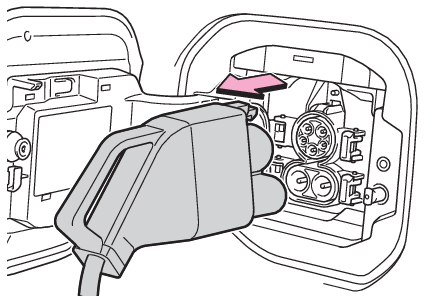
not followed properly, the vehicle and the DC charger may be damaged.After chargingOperate the DC charger and stop the charging.DC charging connector will be unlocked automatically when charging is completed.Remove the DC charging connector.The DC charging connector shape and treatment will differ depending on the type of
DC charger. Perform the operations in accordance to handling procedures of the DC
charger.Return the removed DC charging connector to its original position.Close the DC charging inlet cap, and then close the charging port lid.Note:When DC charging cannot be stoppedIf charging cannot be stopped from the DC charger side due to a malfunction, etc.Door unlock button on the wireless remote control, or next to the driver’s seat.You can also stop DC charging by pressing the door unlock switch three times at about
1 second intervals.If the DC charging connector cannot be unlockedIf the AC charging connector cannot be unlockedAfter DC chargingEven if the traction battery is charged to the upper limit value that is set, the
level of charge displayed on the DC charger may be lower than the actual one.Notice:Caution after DC chargingBe sure to close the DC charging inlet cap to the DC charging inlet and then close
the charging port lid after removing the DC charging connector from the inlet.If the
DC charging inlet cap is not attached, foreign materials may get into the inlet and
the may be malfunctioning.