AC chargingBattery (traction battery)
ChargingCharging
AC chargingCharging
Charging procedureChargingCharging methods
AC chargingEV system
How to use AC chargingTraction battery
ChargingHow to use AC chargingThis section explains the procedure for charging the traction battery with charging
cable.When using an AC charger, make sure to check the operation instructions on the AC
charger.When the charging schedule is registered, make sure “
Charge Now” is turned on before charging. (Setting “Charge Now” to onOperation on “Charging Schedule” screenOperation on “Closing
Display” screen, Turning “Charge Now” on)Notice:When using the AC charging cable and related partsTo prevent damage to the AC charging cable and related parts, observe the following
precautions.When interrupting or canceling charging, remove the charging connector before removing
the plug.When removing the AC charging cable, check that the charging connector is unlocked.Do not forcefully pull the charging connector cap and AC charging inlet cap.Do not apply a vibration to the charging connector while charging. Charging may be
stopped.Do not insert anything but the charging connector into the AC charging inlet.When inserting the plug into or removing the plug from the outlet, make sure to hold
the body of the plug.Do not damage the AC charging inlet cap with a sharp object.Do not forcefully pull the AC charging cable that is caught or entangled. If the cable
is entangled, disentangle it before using.Do not disassemble, repair or modify the AC charging inlet. When the AC charging inlet
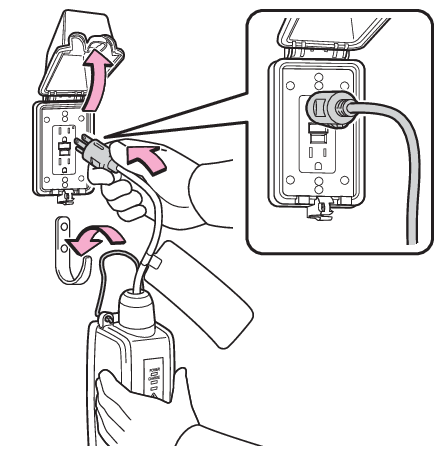
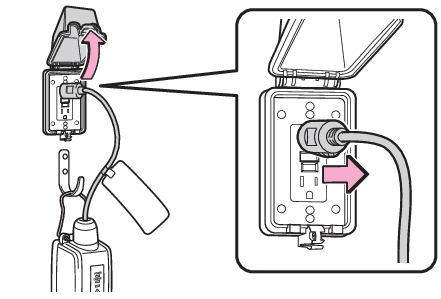
needs to be repaired, consult your Toyota dealer.Charging precautionsThings to know before chargingWhen chargingPrepare the AC charging cable. (AC charging cable*)Insert the plug of the AC charging cable into the outlet of the external power source.Make sure to hold the body of the plug and insert it firmly into the outlet.When the remote switch is equipped, turn it on.Check that the power indicator on the CCID (Charging Circuit Interrupting Device)
is illuminated.(If it is not illuminated, refer to When charging cannot be carried out)In order to reduce the load on the outlet and plug, when inserting the plug, use a
string, etc., to hang the CCID (Charging Circuit Interrupting Device) on a hook or
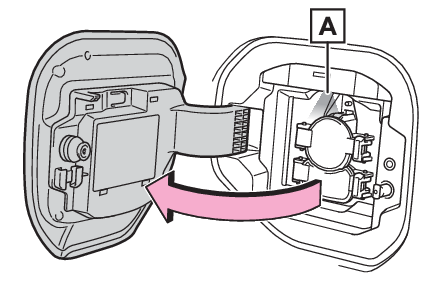
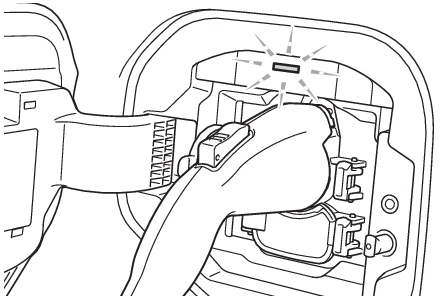
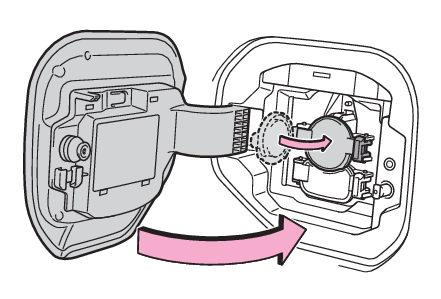
equivalent.Open the charging port lid. (Charging equipment)The AC charging inlet light
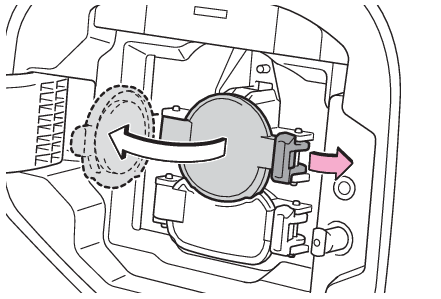
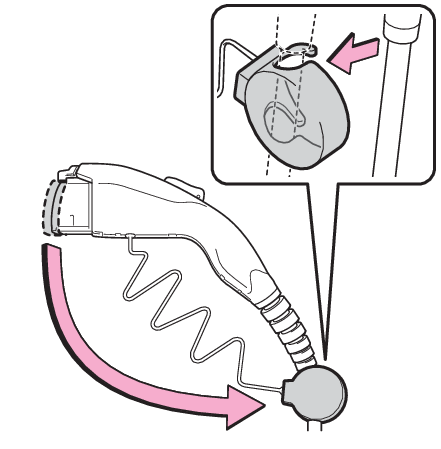
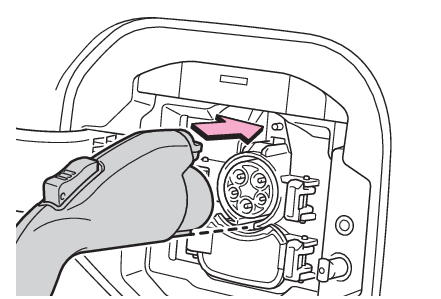
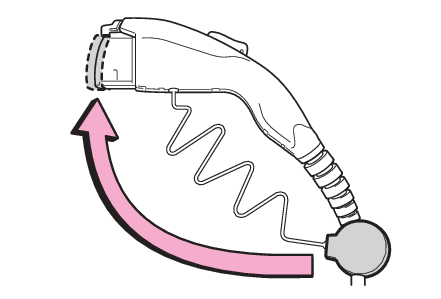
will illuminate.Open the AC charging inlet cap.Remove the charging connector cap and secure it to the cable.Insert the charging connector into the AC charging inlet.Align the guide position on the bottom of the charging connector, and push the charging
connector straight into the AC charging inlet as far as possible. Once a click sound
is heard, check that the charging connector is securely connected.The AC charging connector is locked when the door is locked.If the door is locked
and the AC charging connector is plugged in, it will automatically lock.Confirm that the charging indicator of the charging port is illuminated.Charging will not start if the charging indicator does not illuminate when the charging
connector is inserted. (When charging cannot be carried out)If the charging indicator is flashing, the charging schedule is registered. (If the charging indicator of the charging port flashes after connecting the AC charging
cable)If the error warning indicator on the CCID (Charging Circuit Interrupting Device)
flashes during charging, check When a malfunction occurs during charging and follow the correction procedure.The charging indicator will turn off when charging is completed.The charging indicator will also turn off when charging is stopped for some reason
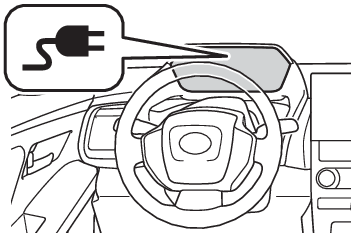
before completion. In this case, refer to When charging cannot be carried outNote:When connecting the AC charging connectorIf the door is opened or the power switch is turned to ON with the AC charging connector
connected, the charging cable indicator turns on to notify that the AC charging connector
is connected.If the charging indicator of the charging port flashes after connecting the AC charging
cableThe charging schedule (Using the charging schedule function) is registered and charging cannot be performed. To cancel charging using the charging
schedule and start charging, perform any of the following procedures.Turn “
Charge Now” on (Setting “Charge Now” to onOperation on “Charging Schedule” screenOperation on “Closing
Display” screen, Turning “Charge Now” on)While the charging indicator is flashing, remove and reconnect the charging connector
immediatelyWhen the charging connector cannot be inserted into the AC charging inletLocking and unlocking AC charging connectorSafety functionIf the latch release button is pressed, charging will not begin even if the AC charging
cable is connected.Also, charging will be stopped if the latch release button is pressed and held for
several seconds during charging. When restarting charging, reinsert the charging connector
after pulling it out, and check that the charging indicator of the charging port illuminates.Charging time may increaseCharging time may increaseWhen your circuit breaker trips during chargingThe upper limit of the charging current can be changed on the multi-information display
or multimedia.Setting operations on multi-information displayPress
or
of the meter control switches to select
.Press
or
of the meter control switches to select “
Vehicle Settings”, and then press and hold
.Press
or
of the meter control switches to select “
Charging Settings”, and then press
.The “
Charging Settings” screen will be displayed.Press
or
of the meter control switches to select “Charging Current”, and then press
.The “
Charging Current” screen will be displayed.Press
or
of the meter control switches to select “
16A” or “
8A” and then press
.Setting operations on multimediaSelect
.Select “
Vehicle customize”.Select “
Charging”.Select “
Charging current”.Select “
16A” or “
8A”.The maximum charging current is limited to less than or equal to the selected current.*If the breaker still trips while charging, even after changing the upper limit of
the charging current, check if the connected power source meets the specified charging
conditions. (Power sources that can be used)*Restricting the charging current will lengthen the charging time.Changing the “
Charging Limit” settingsThe upper limit of the charge capacity can be changed in “
Vehicle Settings” on the multi-information display or multimedia.The selected upper limit value is common to AC charging and DC charging.Setting operations on multi-information displayPress
or
of the meter control switches to select
.Press
or
of the meter control switches to select “
Vehicle Settings”, and then press and hold
.Press
or
of the meter control switches to select “
Charging Settings”, and then press
.The “
Charging Settings” screen will be displayed.Press
or
of the meter control switches to select “
Charging Limit”, and then press
.The “
Charging Limit” screen will be displayed.Select “
Full”, “
90%”, “
80%”, “
70%”, “
60%” or “
50%” and then press
.Setting operations on multimediaSelect
.Select “
Vehicle customize”.Select “
Charging”.Select “
Charging limit”.Select “
Full”, “
90%”, “
80%”, “
70%”, “
60%” or “
50%”.If the setting is changed during DC charging, charging may stop due to the operation
of the DC charger timer and the traction battery cannot be fully charged.Protection function of AC charging inlet overheatingBy installing a temperature sensor to the AC charging inlet, prevents parts from melting
when the temperature rises due to foreign matter entering the charging connector.When a certain temperature increase is detected, charging is stopped immediately.After this, when the power switch is off, a message will be displayed on the multi-information
display (When charging related message is displayed)Warning:When chargingObserve the following precautions.Failure to do so may cause an unexpected accident, resulting in death or serious injury.Connect to a power source suitable for charging. (Power sources that can be used)Check that the AC charging cable, plug and outlet are free of foreign matter.Before charging, check that the AC charging inlet is not deformed, damaged or corroded,
and check that the inlet is free of foreign matter such as dirt, snow and ice.If there
is dirt or dust in these areas, remove completely before inserting the charging connector.Only use outlets where the plug can be securely inserted.Do not bundle or wind the AC charging cable while charging, as doing so may result
in overheating.Do not touch the terminals of the charging connector and AC charging inlet with a
sharp metal objects (needles, etc.,) or hands, or short them with foreign objects.When charging outdoors, make sure to connect to a weatherproof outlet for outdoor
use.Ensure the weatherproof outlet cover closes completely. If the weatherproof outlet
cover cannot be closed, install a weatherproof outlet cover that will close.In order to stop charging at the charging station, follow the instructions of the
charger.If any heat, smoke, odors, noise or other abnormalities are noticed during charging,
stop charging immediately.Do not insert the plug if the outlet is submerged in water or snow.When charging while it is raining or snowing, do not connect or disconnect the plug
if your hands are wet. Also, do not get the plug or outlet wet.Do not charge the vehicle during a lightning storm.Prevent the AC charging cable from being caught in the door or back door.Do not let the wheels on the AC charging cable, plug, charging connector and CCID
(Charging Circuit Interrupting Device).Firmly insert the plug into the outlet.Do not use an extension cord and converting adaptor.Close the hood before using the charging system.The cooling fan may start operating
suddenly. Touching or getting close to rotating parts such as the fan may cause your
hands or clothes (especially a necktie or scarf) to become caught and result in a
serious injury.After connecting the charging cable, confirm that it is not wound around anything.If the power indicator on the CCID (Charging Circuit Interrupting Device) does not
illuminate after plugging the AC charging cable into the outlet, unplug it immediately.If the error warning indicator on the CCID (Charging Circuit Interrupting Device)
illuminates or flashes during chargingThere may be an electrical leakage in the power source path, or there may be a malfunction
in the AC charging cable or CCID (Charging Circuit Interrupting Device).Refer to CCID (Charging Circuit Interrupting Device) indicators and follow the correction procedure. If the error warning indicator does not turn
off even after performing the correction procedure, immediately stop charging, remove
the AC charging cable and contact your Toyota dealer. Continuing to charge the vehicle
in that condition may lead to unforeseen accidents or serious injury.Onboard traction battery chargerThe onboard traction battery charger is located in the motor compartment. Make sure
to observe the following precautions regarding the onboard traction battery charger.
Failure to observe these precautions may result in death or serious injury such as
burns and electric shocks.The onboard traction battery charger is hot during charging. Do not touch the onboard
traction battery charger, as doing so may result in burns.Do not disassemble, repair or modify the onboard traction battery charger. When the
onboard traction battery charger needs to be repaired, consult your Toyota dealer.Notice:When chargingDo not insert the plug into the AC charging inlet.The AC charging inlet may be damaged.Using private power generatorDo not use private power generators as a power source for charging.Doing so may make
charging unstable, the voltage may be insufficient, and the charging operation may
stop.Charging stationDue to the environment in which the power equipment is located, charging may be unstable
due to noise, the voltage may be insufficient, and the charging operation may stop.After chargingUnlock the doors to unlock the charging connector. (Locking and unlocking AC charging connector)The charging connector will be unlocked and the AC charging inlet light will illuminate
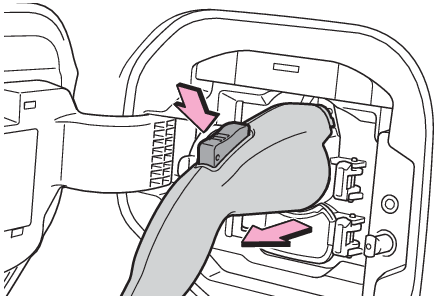
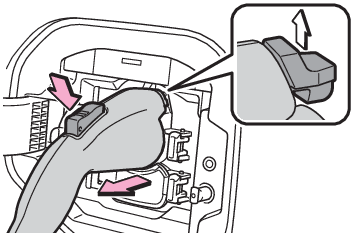
when the doors are unlocked.Pull the charging connector towards you while pressing the latch release button.If the latch release button is pressed during charging (while the charging indicator
is illuminated), charging will be interrupted.Attach the charging connector cap.Close the AC charging inlet cap and close the charging port lid.Remove the plug from the outlet when the charging equipment will not be used for a
prolonged period of time.Hold the body of the plug when removing.Make sure to put the cable away immediately after disconnecting. (After charging)When leaving the plug inserted, inspect the plug and connector once a month to check
if dirt or dust has accumulated.Note:When the outside temperature is low or highThe level shown on the SOC (State of Charge) gauge (Meter display) may drop slightly when the power switch is turned to ON, even if charging has been
completed and the traction battery is fully charged. However, this does not indicate
a malfunction.When removing the charging connectorPress the latch release button, check that the lever raises up, and then pull the
charging connector towards you.If the lever does not raise up even after the latch release button is pressed, the
charging connector is locked. If this occurs, unlock the doors using the smart key
system or wireless remote control to unlock the charging connector. (Locking and unlocking AC charging connector)If the charging connector cannot be unlockedIf the AC charging connector cannot be unlockedWarning:After chargingRemove the plug if it will not be used for a long time.Dirt and dust may accumulate
plug or outlet, which could cause a malfunction or fire, possibly leading to death
or serious injury.Notice:After chargingStore the AC charging cable out of reach from infants and children.After removing the plug from the outlet, keep it in a safe place free from moisture
and dust.The AC charging cable or plug may be damaged if the cable is stepped on or
ridden over by the vehicle.After disconnecting the charging connector from the AC charging inlet, make sure to
close the AC charging inlet cap and close the charging port lid.If the AC charging
inlet cap is left open, water or foreign objects may enter the AC charging inlet,
which could lead to vehicle damage.