Locking and unlocking the AC charging connectorCharging
Locking and unlocking the AC charging connectorCharging ports
Locking and unlocking the AC charging connectorLocking and unlocking AC charging connectorThe AC charging connector will be locked when it is connected to the AC charging inlet,
preventing the AC charging cable from being disconnected while charging.The AC charging connector is locked/unlocked, in connection with the locked/unlocked
state of the door, when it is inserted into the AC charging inlet.Locking and unlocking the AC charging connectorLocking the charging connectorIf the door is locked while the AC charging connector is inserted into the AC charging
inlet, the AC charging connector will be locked. If the door is locked and the AC
charging connector is inserted, the connector locks automatically.Unlocking the charging connectorThe AC charging connector will be unlocked when the doors are unlocked.Note:AC charging connector lock functionIf the AC charging connector is locked/unlocked repeatedly, it may not work temporary
due to protect the system by AC charging system. In this case, wait for a while before
connecting the AC charging connector to AC charging inlet again.The AC charging connector lock function does not guarantee that theft of the AC charging
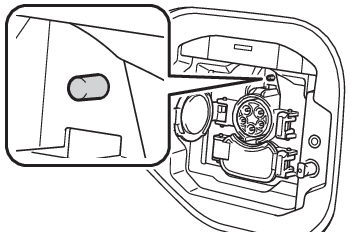
cable will be prevented, and is not necessarily effective for all mischiefs.When the AC charging connector cannot be inserted into the AC charging inletCheck that the connector lock pin is not extended.If the connector lock pin is extended, the connector lock is operating.Unlock the doors using the smart key system or wireless remote control and unlock
the AC charging connector lock and check that the connector lock pin is not extended.AC charging cable
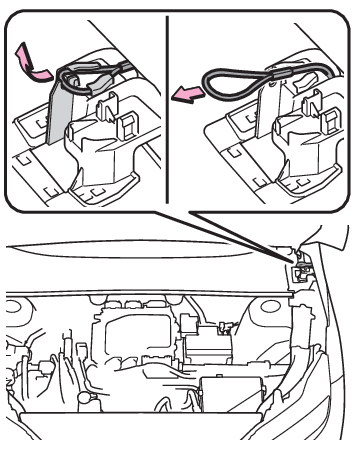
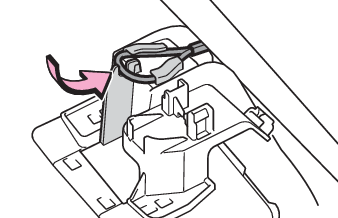
If the AC charging connector cannot be unlockedIf the AC charging connector cannot be unlockedThe AC charging connector can be unlocked by operating the emergency release wire.Open the hood. (Hood)Pull the emergency release wire.The AC charging connector is unlocked and can be removed.After unlocking the AC charging connector, fix the handle of the emergency release
wire to the attachment.This method is a temporary correction procedure for emergency use only. If the problem
persists, have the vehicle inspected by your Toyota dealer immediately.Do not operate the emergency release wire when the charging connector can be unlocked
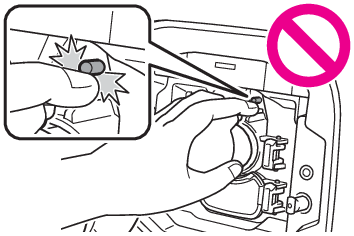
in the normal procedure.Warning:When connecting the AC charging connector to the AC charging inletDo not insert hand into the connector lock portion. A hand may be caught in the connector
lock pin, resulting in an injury.Notice:When locking the AC charging connectorObserve the following precautions. Failure to do so may cause a malfunction in the
charging connector locking system.Check that the AC charging connector is compatible with this vehicle.A charging connector
of the different type or a charging connector with damaged or deformed insertion part
may not be locked.Do not apply excessive force to the AC charging connector after the charging connector
is inserted.When removing the AC charging connector, make sure to unlock the AC charging
connector.