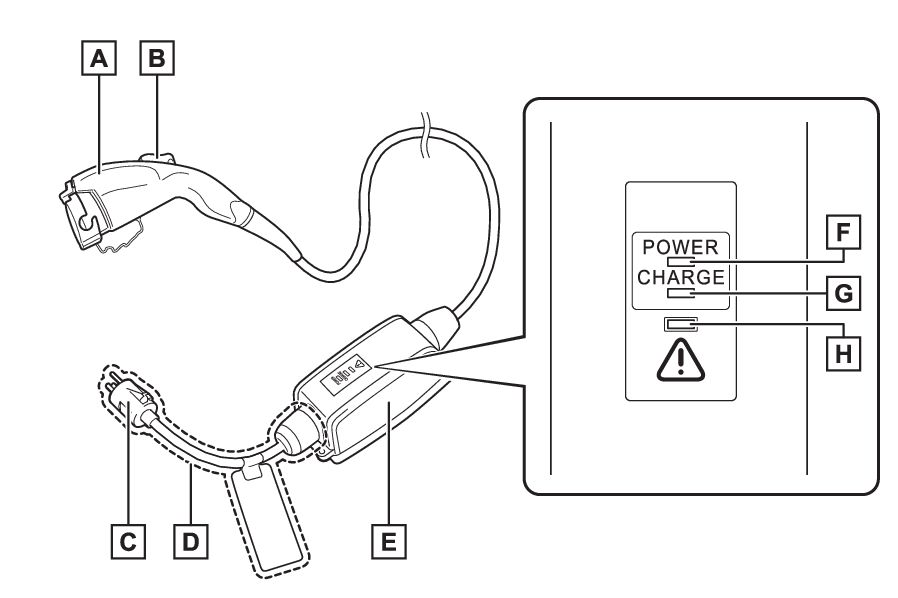
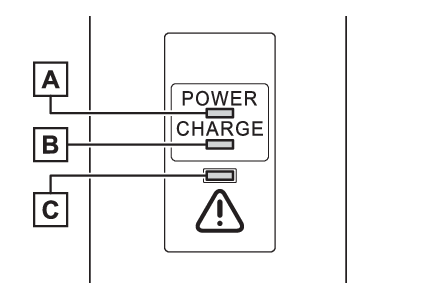
AC charging cable* *If equipped The function, correct operating procedure, etc., of the AC charging cable are explained. Warning: When using the AC charging cable and CCID (Charging Circuit Interrupting Device) Observe the following precautions. Failure to do so may cause an unexpected accident, resulting in death or serious injury. Do not attempt to disassemble or repair the AC charging cable, charging connector, plug or CCID (Charging Circuit Interrupting Device). If a problem arises with the AC charging cable or the CCID (Charging Circuit Interrupting Device), stop charging immediately and contact your Toyota dealer. Do not subject the AC charging cable, charging connector, plug or CCID (Charging Circuit Interrupting Device) to strong force or impact. Do not apply excessive force to the AC charging cable by forcefully folding, twisting, pulling or dragging the AC charging cable. Do not damage the AC charging cable with sharp objects. Do not fold the charging connector or plug or insert foreign objects into them. Do not put the charging connector and plug into water. Do not bring the AC charging cable to a high-temperature item such as a heating device. Do not apply a load to the AC charging cable and plug-cord (such as wrapping the AC charging cable around the CCID [Charging Circuit Interrupting Device] and the charging connector). Do not use or leave the AC charging cable in situations where a load is applied to the outlet and the plug (such as when the CCID [Charging Circuit Interrupting Device] is hanging in the air without contacting the ground). Notice: Precautions when handling AC charging cable Make sure to observe the following precautions. Failure to observe these precautions may result in damage to the AC charging cable and AC charging inlet. Insert the charging connector straight into the AC charging inlet. After inserting the charging connector, do not apply excessive force to or twist the connector. Also, do not lean on the connector or hang any objects from it. Do not step on or trip over the AC charging cable. Before removing the charging connector, make sure that it is unlocked. (Locking and unlocking AC charging connector) After removing the AC charging cable, promptly return it to its proper location. After removing the charging connector, securely install the AC charging inlet cap. When using the AC charging cable and related parts When using the AC charging cable and related parts Precautions for low temperatures In low temperatures, the AC charging cable and plug-cord may become hard. Therefore, make sure to not apply excessive force when they are hard. If excessive force is applied to the hardened AC charging cable and plug-cord, they may be damaged. AC charging cable CCID (Charging Circuit Interrupting Device) CCID (Charging Circuit Interrupting Device)The names of each part of the AC charging cable Charging connector Latch release button Plug Plug-cord CCID (Charging Circuit Interrupting Device) Power indicator (Indicator operation) Charging indicator (CCID) (Indicator operation) Error warning indicator (Indicator operation) AC charging cable Safety functions Charging Safety functions Safety functions The CCID (Charging Circuit Interrupting Device) has the following safety features. Electrical leakage detection function If an electrical leakage is detected during charging, the power source will be automatically interrupted, thus preventing fires or electrical shocks caused by electrical leakage. If the power source is interrupted, the error warning indicator flashes. If the power source is interrupted: When a malfunction occurs during charging Automatic check function This is an automatic system check that is run before charging begins to check for problems in the operation of the electrical leakage detection function. If a malfunction is found in the electrical leakage detection function as a result of the check, the error warning indicator flashes to inform the user. (When a malfunction occurs during charging) Temperature detection function A temperature detection function is equipped to the plug. While charging, if heat is generated due to looseness on the outlet side etc., this function suppresses heat by controlling the charging current. Conditions for supplying current to the vehicle The CCID (Charging Circuit Interrupting Device) is designed to prevent electrical current from being supplied to the charging connector when it is not connected to the vehicle, even if the plug is inserted into the outlet. Charging Charging indicator CCID (Charging Circuit Interrupting Device) indicators AC charging cable Indicator CCID (Charging Circuit Interrupting Device) Indicator Indicators Charging cable Indicators Charging indicator (CCID) Indicators Error warning indicator Indicators Power indicator Indicator operation 3 indicators are used to indicate the following conditions. Power indicator Illuminates when electricity is flowing to the CCID (Charging Circuit Interrupting Device). Charging indicator Illuminates when charging is in progress. Error warning indicator Flashes when there is an electrical leakage or when a malfunction occurs in the CCID (Charging Circuit Interrupting Device). CCID (Charging Circuit Interrupting Device) Operation When a malfunction occurs during charging The indicators on the CCID (Charging Circuit Interrupting Device) use a combination of different statuses (not illuminated, illuminated or flashing) to inform the user of internal malfunctions. When the error warning indicator is illuminated or flashing, temporarily remove the plug from the outlet and then reconnect it to check if the error indicator turns off. If the error warning indicator turns off, charging is now possible. If it does not turn off, perform the correction procedure in the following chart.
Status Power indicator Error warning indicator Details/Correction procedure
Charging system error Not illuminated Not illuminated or illuminated An electrical leakage is detected and charging is canceled, or there is a malfunction in the AC charging cable. Consult your Toyota dealer
Illuminated Flashes
Plug temperature detection malfunction Flashes Flashes There is a malfunction in the plug temperature detection part. Consult your Toyota dealer
Plug temperature increase detection Flashes Not illuminated An increase in the temperature of the plug is detected due to an improper connection between the outlet and plug. Check that the plug is securely connected to the outlet. While the power indicator is flashing, charging is performed with limited current.
AC charging cable life span notice Illuminated Flashes The number of charges using the AC charging cable is nearing the end of its usable life span. Consult your Toyota dealer
AC charging cable life span Illuminated Illuminated The number of charges using the AC charging cable has exceeded its usable number of charges. Consult your Toyota dealer
AC charging cable Maintenance Maintenance AC charging cable Inspecting the AC charging cable For safety, inspect the AC charging cable on a routine basis. Warning: Routine inspection Check the following points regularly. Failure to do so may cause an unexpected accident, resulting in death or serious injury. The AC charging cable, plug, charging connector, CCID (Charging Circuit Interrupting Device), etc., have not been damaged The outlet has not been damaged. The plug can be securely inserted into the outlet. The plug does not get extremely hot during use The tip of the plug has not been deformed. The plug is not dirtied by dust, etc. Remove the plug from the outlet before inspecting it. If any abnormalities are found in the AC charging cable as a result of the inspection, immediately stop use and consult your Toyota dealer. Maintaining the AC charging cable When the AC charging cable is dirty, first remove the dirt with a hard, wringed cloth, and then wipe the cable with a dry cloth. However, never wash it with water. If the AC charging cable is washed with water, fire or electric shock may occur during charging, possibly resulting in death or serious injury. When not using the AC charging cable for a long time Remove the plug from the outlet. Dust could accumulate on the plug or in the outlet, possibly causing overheating which could lead to a fire. Also, keep the cable in a place free from moisture.