Power outlets
Power outlet (AC 120 V/1500 W)Power outlet (AC 120 V/1500 W)**If equippedPlease use a power supply for electronic goods that use less than 120 VAC (power consumption
of 1500 W).When using electronic goods, make sure that the power consumption of all the connected
power outlets is less than 1500 W. (When turning the power outlet on)Note:The power outlet (120 VAC) can be used when“
READY” indicator is illuminated.When using “
My Room Mode” (Using the “My Room Mode”)The power outlet (120 VAC)Use electrical devices that do not exceed a total maximum power usage of 1500 W at
AC 120 V for the power outlet (AC 120 V/1500 W). If electrical devices exceeding the
specified capacity are used, the protection function will activate and prevent the
power outlet from being used.Some electrical devices with high power consumption (such as an electric griddle)
may need to use the power outlet solely. In this case, do not use such a device together
with other devices.When power is supplied to multiple devices, some devices may not operate properly.
In this case, use the device solely.While the power outlet is used, a large current may flow causing the current power
to exceed 1500 W depending on the electrical device used. In this situation, the protection
function may activate and stop the power supply function.Certain types of electrical devices may disturb TV or radio by noises.Noise may be heard from the cooling fan under the rear seats when using the power
outlet, but this is not a malfunction.120 VAC Devices which may not operate properlyThe following electrical devices may not operate properly even if their total power
consumption is less than 1500 W.Devices with high initial peak wattageDevices that require larger power consumption than described in the instruction manual
of the electrical device.Measuring devices that process precise dataDevices that require an extremely stable power supplyDevices that require a constant power supply from the power outlet, such as a device
with a timer.When using the power outlet while the vehicle is parked or stoppedThe doors cannot be locked or unlocked using the smart key system.The doors cannot be locked or unlocked using the electronic key. The doors can only
be locked or unlocked using the mechanical key (If the electronic key does not operate properly).A buzzer may sound or “
Key Not Detected Check Key Location” may be displayed on the multi-information display when the door is opened or closed.
Make sure to carry the electronic key on your person.Warning:For safe useObserve the following precautions.Failure to do so may lead to an accident, resulting in death or serious injury.Do not allow persons unfamiliar with the system, such as a child, to use the power
outlet by themselves.Do not disconnect the plug of a device while your hands are wet or insert a pin or
other object into the power outlet. Also, if a liquid or snow is on the power outlet,
dry the outlet before using it.Do not attempt to modify, disassemble or repair a power outlet. For information on
repairs, contact your Toyota dealer.Keep the power outlet free of dust and foreign matter. Also, make sure to clean the
power outlet periodically.Hold the plug by its body when inserting or removing the plug into or from the power
outlet. Do not touch the plug blades. Pulling the cord to remove the power source
plug may damage the plug or cord.If any abnormal heat is felt in the cord or outlet, stop using it immediately. Also,
observe the following precautions to prevent abnormal heat from being generated from
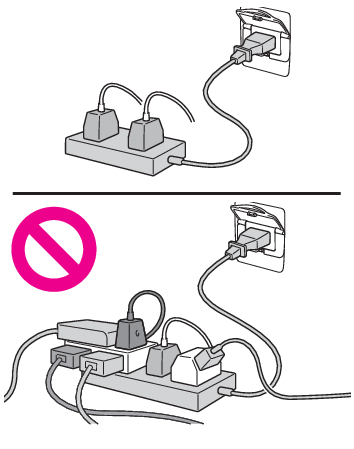
the cord or power outlet.Do not connect multiple branched power outlets, such as a two-way socket, to the power
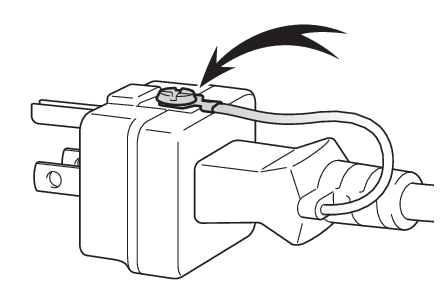
outletWhen using a cord reel, pull all of the cord out from the reelWhen using a device with a ground wire, use a conversion adapter to connect the ground
wire to the ground terminal of the adapter.If the plug of a device fits loosely in a power outlet, even though it is fully inserted,
replace the power outlet. For information on replacement, contact your Toyota dealer.Devices to be connectedMake sure to read any instruction manual which came with a device and observe any
warnings on the device.Do not connect a device to a power outlet if the device is malfunctioning or its plug
is damaged.When the outside temperature is extremely low or high, the device may not operate
properly or may malfunction.Electrical devices that require horizontal setting may not operate properly.Except in the case of waterproof electrical devices, do not use electrical devices
in locations exposed to rain or water, or in high humidity.Do not use electrical devices that are or may be submerged or immersed in water.Do not use medical devices because the power supply function may be stopped temporarily
depending on the vehicle condition.Using the power outlet while parked or stoppedThe power outlets are for use in directly connecting electrical devices such as lights.
Do not use the power outlets as generators to supply power to a house, etc. To use
this as a power supply system for emergency use (for example, as a dedicated system
that can be connected to an external power source, or as a system where the supply
circuit from the external power source is separate from the electric wiring from the
power company) for a house, etc., consult with the manufacturer or dealer of this
system.While using the power outlet, make sure to securely engage the parking brake and not
to shift the shift lever from P. The vehicle may move unexpectedly, possibly resulting
in an accident.Do not leave the vehicle unattended while using the power outlet.Do not use the power outlet during weather with a possibility of lightning. If you
notice lightning while using the power outlet, stop using it.Do not use the power outlet if the vehicle has a vehicle cover installed.Be especially careful when using an electrical device such as a heater and sleeping
in the vehicle. The device may stop unexpectedly due to operations such as an automatic
stop of the power supply system.Do not use while the vehicle is stopped on a slope or other slanted location. Do not
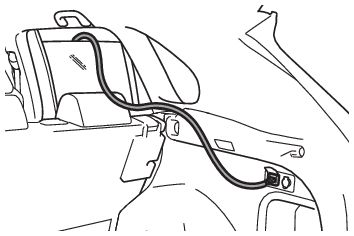
move or tilt the vehicle during use.Observe the following precautions when using the power outlet with the cord pulled
outside of the vehicle.Be careful of entry of rain or water. If the power outlet becomes wet, dry the outlet
before using.Prevent the cord from being caught in the window or doorProvide some slack in the cord and do not pull it too tightMake sure not to start the vehicleDo not refuel or wash the vehicle during use.Make sure that the hood is closed. As the engine will start automatically depending
on the condition of the vehicle, make sure that nothing is left near or contacting
the exhaust pipes. Also, do not put your head or hands anywhere inside the engine
compartment, as the cooling fan may operate suddenly. Keep hands and clothing (especially
a tie, scarf, etc.) away from the fan as they may get caught in a fan.Do not stop the vehicle near objects which burn easily. If the exhaust system is extremely
hot, it may cause a fire.The gasoline engine starts automatically when the remaining charge of the hybrid battery
(traction battery) decreases. When using a power outlet in an area with poor ventilation
or an enclosed area, such as a garage or a place where snow has piled up, properly
use an air intake and exhaust device to prevent lack of oxygen and fullness of exhaust
gas. If such device cannot be used, do not use the power outlet.When using the power outlet while drivingDo not use devices such as the following when driving. Also, do not use a device if
it cannot be secured within the vehicle.Devices which may distract the driver and be a hinderance to safe driving, such as
a TV, DVD player, etc.When the device is not completely secured and may fall over in the event of sudden
braking or a collisionWhen the device may fall resulting on an accident, or may generate heat resulting
in a fireWhen there is a risk of burns, etc. (a toaster, microwave, electric heater, electric
kettle, coffee maker, etc.)Devices which may fall under the pedals and prevent the brake pedal from being depressed,
such as a hair dryer, AC adaptor, mouse, etc.Do not use devices which produce steam while the windows are closed. Doing so may
cause the windows to fog up, reducing visibility and making it difficult to drive
safely. Also, the steam may damage or negatively affect other devices. If the device
must be used, stop the vehicle and open the windows before use.Notice:To avoid short circuit or malfunctionObserve the following precautions. Failure to do so may lead to the power outlet not
operating correctly or damage to the vehicle or a connected device.Do not set a toaster or other device which generates heat near the interior components
or on a seat. Heat may cause these parts to melt or burn.Do not use devices which are sensitive to vibration or heat in the vehicle. These
devices may malfunction due to vibration while driving or heat while the vehicle is
parked in the sun.When not using a power outlet, make sure to close the cover. If foreign matter or
a liquid enters the power outlet, it may cause a malfunction or short circuit.Using the power outlet while parked or stoppedWater may leak from the exhaust pipe while the engine running if the power outlet
is used for a long time. However, this is not a malfunction.At extremely low temperatures, water may freeze in the exhaust pipe and make it difficult
to start the engine, or an odor may come from the exhaust pipe. In this case, stop
using the power outlet, and then drive the vehicle for 15 to 30 minutes.Before using the power outlet while the vehicle is stoppedMake sure to check the followings before using the power outlet.Park the vehicle in a well-ventilated area, avoiding locations with poor ventilation
such as garages, as the engine may start while the system is operating.Park the vehicle on a hard, flat surfaceClose the hoodSet the parking brakeShift the shift lever to PTurn the power switch to OFFDo not leave any valuables in the vehicle or luggage compartment, in order to prevent
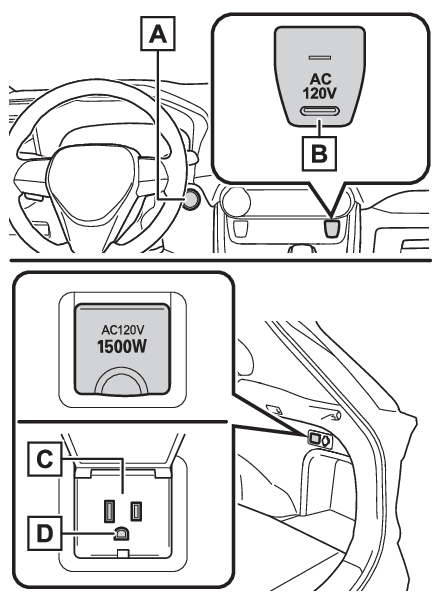
theft. The alarm system cannot be set while supplying power.Name for all partsPower switch (Power (ignition) switch)AC 120 V switchPower outletGround terminalWhen turning the power outlet onCheck that the parking brake is engaged, securely depress the brake pedal and press
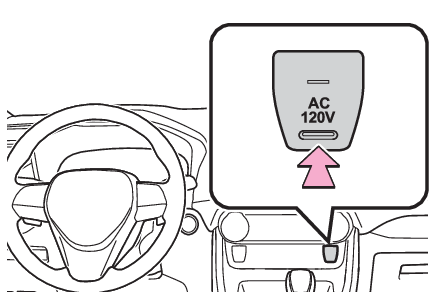
the power switch (Starting the hybrid system).Check that the READY indicator is illuminated, and press the AC 120 V switch.The power outlet can be used when the indicator on the AC 120 V switch is illuminated.The power outlet are turned off/on each time the AC 120 V switch is pressed.When connecting a deviceObserve the precautions described in the instructions of the electrical device.Before connecting the plug to the power outlet, check that the power of the electrical
device is turned off.Open the lid, and fully and securely insert the plug of the device into the power
outlet.Make sure that the power source plug is not incompletely inserted.In the following
situations, use an extension cord etc to connect the power source plug securely.The plug is large and cannot be securely inserted all the way into the power outletThe plug is heavy and may disconnect from the power outletWhen using a device with a ground wire, use a conversion adapter to connect the ground
wire to the ground terminal.When turning the power outlet offTurn the connected devices off.Press the AC 120 V switch to turn the power outlet off.Disconnect each plug from the power outlet.Close the lid of the power outlet.