Blind Spot Monitor (BSM)BSM (Blind Spot Monitor)RCTA (Rear Cross Traffic Alert)
RCTA FunctionRear Cross Traffic Alert (RCTA)BSM (Blind Spot Monitor)The Blind Spot Monitor is a system that has 2 functions:The BSM (Blind Spot Monitor) functionAssists the driver in making a decision when changing lanesThe RCTA (Rear Cross Traffic Alert) functionAssists the driver when backing upThese functions use the same sensors.Warning:Cautions regarding the use of the BSM functionThe driver is solely responsible for safe driving. Always drive safely, taking care
to observe your surroundings.The BSM function is a supplementary function which alerts
the driver that a vehicle is in a blind spot of the outside rear view mirrors or is
approaching rapidly from behind into a blind spot. Do not overly rely on the BSM function.
As the function cannot judge if it is safe to change lanes, over reliance could lead
to an accident resulting in death or serious injury.As the system may not function correctly under certain conditions, the driver’s own
visual confirmation of safety is necessary.Cautions regarding the use of the RCTA functionThere is a limit to the degree of recognition accuracy and control performance that
this system can provide, do not overly rely on this system. The driver is always responsible
for paying attention to the vehicle’s surroundings and driving safely.Display
RCTADisplay
BSM (Blind Spot Monitor)Multi-information display
BSM (Blind Spot Monitor)Outside rear view mirrors
BSM (Blind Spot Monitor)Side mirrors
BSM (Blind Spot Monitor)Warning buzzers
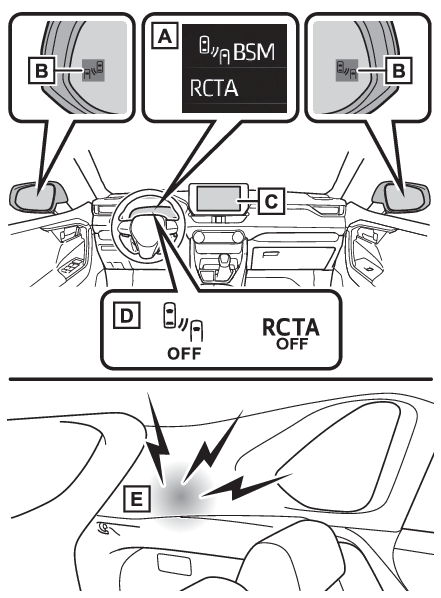
RCTA (Rear Cross Traffic Alert)System componentsMulti-information displayTurning the BSM function/RCTA function on/off.Outside rear view mirror indicatorsBSM function:When a vehicle is detected in a blind spot of the outside rear view mirrors
or approaching rapidly from behind into a blind spot, the outside rear view mirror
indicator on the detected side will illuminate. If the turn signal lever is operated
toward the detected side, the outside rear view mirror indicator will flash.RCTA function:When a vehicle approaching from the right or left at the rear of the
vehicle is detected, both outside rear view mirror indicators will flash.Multimedia Display (RCTA function only)If a vehicle approaching from the right or left at the rear of the vehicle is detected,
the RCTA icon (RCTA icon display) for the detected side will be displayed.BSM OFF indicator/RCTA OFF indicatorWhen the Blind Spot Monitor is disabled, the BSM OFF indicator illuminates.When the RCTA function is disabled, the RCTA OFF indicator illuminates.RCTA buzzer (RCTA function only)If a vehicle approaching from the right or left at the rear of the vehicle is detected,
a buzzer will sound from behind the rear seat.Turning the BSM function/RCTA function on/offThe BSM function and the RCTA function can be enabled/disabled on the
screen of the multi-information display. (Multi-information display (with 7-inch display) - Settings display, Multi-information display (with 12.3-inch display) - Settings display)The BSM function/RCTA function will be enabled each time the power switch is turned
to ON.Note:Outside rear view mirror indicators visibilityIn strong sunlight, the outside rear view mirror indicator may be difficult to see.Hearing the RCTA buzzerThe RCTA buzzer may be difficult to hear over loud noises such as high audio volume.RCTA (Rear Cross Traffic Alert)
Warning messageWhen “
Blind Spot Monitor Unavailable” or “
Rear Cross Traffic Alert Unavailable” is shown on the multi-information displayThe sensor voltage has become abnormal, or water, snow, mud, etc., may be built up
in the vicinity of the sensor area of the rear bumper. (To ensure the system can operate properly)Removing the water, snow, mud, etc., from the vicinity of the sensor area should
return it to normal.Also, the sensor may not function normally when used in extremely
hot or cold weather.When “
Blind Spot Monitor Malfunction Visit Your Dealer” or “
Rear Cross Traffic Alert Malfunction Visit Your Dealer” is shown on the multi-information displayThere may be a sensor malfunction or misaligned. Have the vehicle inspected at a Toyota
dealer.CustomizationSome functions can be customized. (Multi-information display (with 7-inch display) - Settings display, Multi-information display (with 12.3-inch display) - Settings display)Warning:Sensor
RCTASensor
Parking Support Brake function (rear-crossing vehicles)Sensor
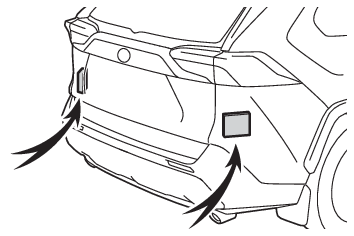
BSM (Blind Spot Monitor)To ensure the system can operate properlyBlind Spot Monitor sensors are installed inside the left and right sides of the rear
bumper respectively. Observe the following to ensure the Blind Spot Monitor can function
correctly.Keep the sensors and the surrounding areas on the rear bumper clean at all times.
If a sensor or its surrounding area on the rear bumper is dirty or covered with snow,
the Blind Spot Monitor may not operate and a warning message (When “Blind Spot Monitor Unavailable” or “Rear Cross Traffic Alert Unavailable” is
shown on the multi-information display) will be displayed. In this situation, clear off the dirt or snow and drive the vehicle
with the operation conditions of the BSM function (The BSM function is operational when) satisfied for approximately 10 minutes. If the warning message does not disappear,
have the vehicle inspected by your Toyota dealer.Do not subject a sensor or its surrounding area on the rear bumper to a strong impact.
If a sensor is moved even slightly off position, the system may malfunction and vehicles
may not be detected correctly. In the following situations, have your vehicle inspected
by your Toyota dealer.A sensor or its surrounding area is subject to a strong impact.If the surrounding area of a sensor is scratched or dented, or part of them has become
disconnected.Do not disassemble the sensor.Do not attach accessories, stickers (including transparent stickers), aluminum tape,
etc. to a sensor or its surrounding area on the rear bumper.Do not modify the sensor or surrounding area on the rear bumper.If a sensor or the rear bumper needs to be removed/installed or replaced, contact
your Toyota dealer.Do not paint the rear bumper any color other than an official Toyota color.Blind Spot Monitor (BSM)
Blind Spot Monitor functionBSM (Blind Spot Monitor)
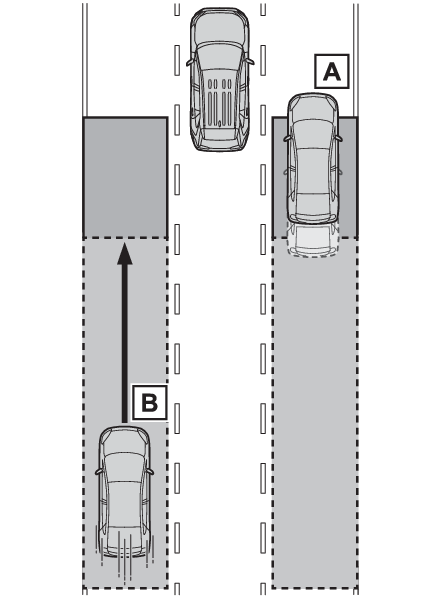
Blind Spot Monitor functionThe Blind Spot Monitor functionVehicles that can be detected by the Blind Spot MonitorThe BSM function uses radar sensors to detect the following vehicles traveling in
adjacent lanes and advises the driver of the presence of such vehicles via the indicators
on the outside rear view mirrors.Vehicles that are traveling in areas that are not visible using the outside rear view
mirrors (the blind spots)Vehicles that are approaching rapidly from behind in areas that are not visible using
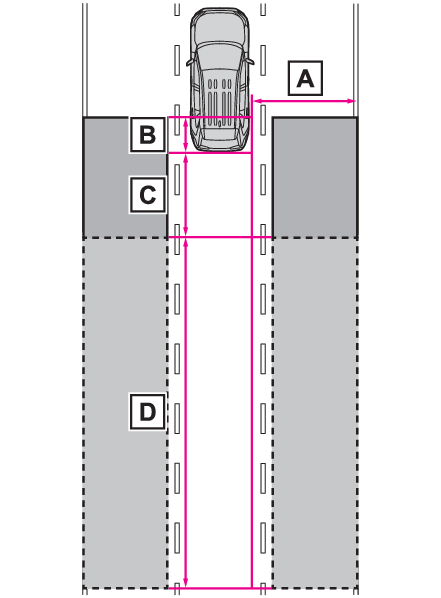
the outside rear view mirrors (the blind spots)The BSM function detection areasThe areas that vehicles can be detected in are outlined below.The range of each detection area is:Approximately 1.6 ft. (0.5 m) to 11.5 ft. (3.5 m) from either side of the vehicleThe area between the side of the vehicle and 1.6 ft. (0.5 m) from the side of the
vehicle cannot be detected.Approximately 3.3 ft. (1 m) forward of the rear bumperApproximately 9.8 ft. (3 m) from the rear bumperApproximately 9.8 ft. (3 m) to 197 ft. (60 m) from the rear bumperThe greater the difference in speed between your vehicle and the detected vehicle
is, the farther away the vehicle will be detected, causing the outside rear view mirror
indicator to illuminate or flash.Note:The BSM function is operational whenThe BSM function is operational when all of the following conditions are met:The BSM function is on.The shift lever is in a position other than R.The vehicle speed is greater than approximately 10 mph (16 km/h).The BSM function will detect a vehicle whenThe BSM function will detect a vehicle present in the detection area in the following
situations:A vehicle in an adjacent lane overtakes your vehicle.You overtake a vehicle in an adjacent lane slowly.Another vehicle enters the detection area when it changes lanes.Conditions under which the system will not detect a vehicleThe BSM function is not designed to detect the following types of vehicles and/or
objects:Small motorcycles, bicycles, pedestrians, etc.*Vehicles traveling in the opposite directionGuardrails, walls, signs, parked vehicles and similar stationary objects*Following vehicles that are in the same lane*Vehicles traveling 2 lanes away from your vehicle*Vehicles which are being overtaken rapidly by your vehicle*Depending on the conditions, detection of a vehicle and/or object may occur.Conditions under which the system may not function correctlyThe BSM function may not detect vehicles correctly in the following situations:When the sensor is misaligned due to a strong impact to the sensor or its surrounding
areaWhen mud, snow, ice, a sticker, etc., is covering the sensor or surrounding area on
the rear bumperWhen driving on a road surface that is wet with standing water during bad weather,
such as heavy rain, snow, or fogWhen multiple vehicles are approaching with only a small gap between each vehicleWhen the distance between your vehicle and a following vehicle is shortWhen there is a significant difference in speed between your vehicle and the vehicle
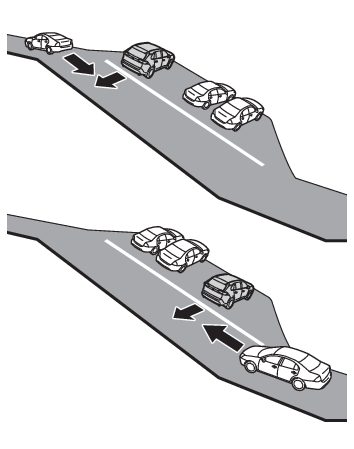
that enters the detection areaWhen the difference in speed between your vehicle and another vehicle is changingWhen a vehicle enters a detection area traveling at about the same speed as your vehicleAs your vehicle starts from a stop, a vehicle remains in the detection areaWhen driving up and down consecutive steep inclines, such as hills, dips in the road,
etc.When driving on roads with sharp bends, consecutive curves, or uneven surfacesWhen vehicle lanes are wide, or when driving on the edge of a lane, and the vehicle
in an adjacent lane is far away from your vehicleWhen an accessory (such as a bicycle carrier) is installed to the rear of the vehicleWhen there is a significant difference in height between your vehicle and the vehicle
that enters the detection areaImmediately after the BSM function/RCTA function are turned onWhen towing a trailerInstances of the BSM function unnecessarily detecting a vehicle and/or object may
increase in the following situations:When the sensor is misaligned due to a strong impact to the sensor or its surrounding
areaWhen the distance between your vehicle and a guardrail, wall, etc. that enters the
detection area is shortWhen driving up and down consecutive steep inclines, such as hills, dips in the road,
etc.When vehicle lanes are narrow, or when driving on the edge of a lane, and a vehicle
traveling in a lane other than the adjacent lanes enters the detection areaWhen driving on roads with sharp bends, consecutive curves, or uneven surfacesWhen the tires are slipping or spinningWhen the distance between your vehicle and a following vehicle is shortWhen an accessory (such as a bicycle carrier) is installed to the rear of the vehicleWhen the vehicle throws up water or snow behind.Blind Spot Monitor (BSM)
Rear Cross Traffic Alert functionBSM (Blind Spot Monitor)
Rear Cross Traffic Alert functionRCTA (Rear Cross Traffic Alert)
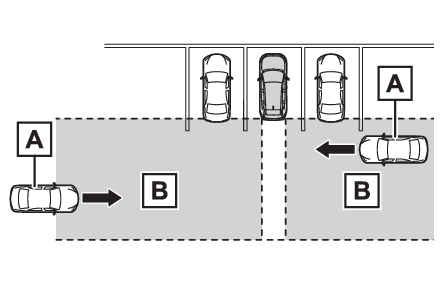
RCTA FunctionThe Rear Cross Traffic Alert functionOperation of the RCTA functionThe RCTA function uses radar sensors to detect vehicles approaching from the right
or left at the rear of the vehicle and alerts the driver of the presence of such vehicles
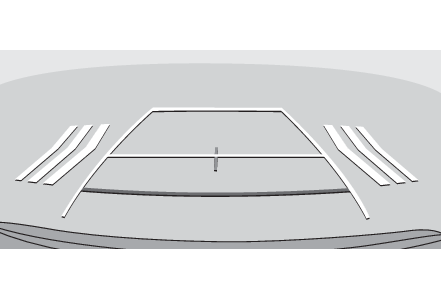
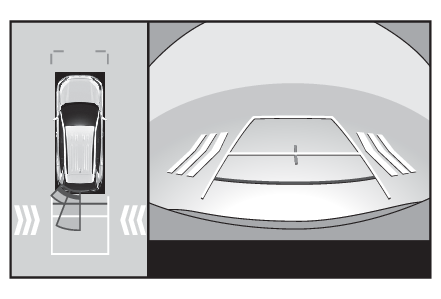
by flashing the outside rear view mirror indicators and sounding a buzzer.Approaching vehiclesDetection areasRCTA icon displayWhen a vehicle approaching from the right or left at the rear of the vehicle is detected,
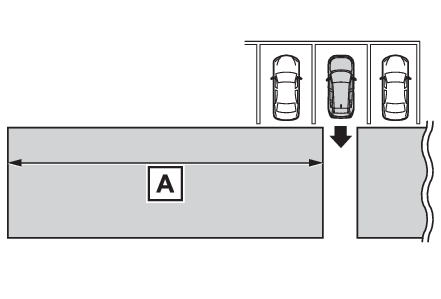
the following will be displayed on the Multimedia Display.Example: Vehicles are approaching from both sides of the vehicleWhen the Toyota parking assist monitor (if equipped) is displayedWhen the panoramic view monitor (if equipped) is displayedThe RCTA function detection areasThe areas that vehicles can be detected in are outlined below.The buzzer can alert the driver of faster vehicles approaching from farther away.Example:
Approaching vehicle
Speed
Approximate alert distance
Fast
34 mph (56 km/h)
131 ft. (40 m)
Slow
5 mph (8 km/h)
18 ft. (5.5 m)
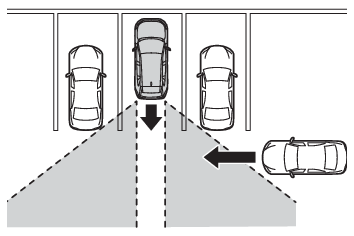
Note:The RCTA function is operational whenThe RCTA function operates when all of the following conditions are met:The RCTA function is on.The shift lever is in R.The vehicle speed is less than approximately 9 mph (15 km/h).The approaching vehicle speed is between approximately 5 mph (8 km/h) and 34 mph (56
km/h).Setting the buzzer volumeThe buzzer volume can be adjusted on the multi-information display. (Multi-information display (with 7-inch display) - Settings display, Multi-information display (with 12.3-inch display) - Settings display)Conditions under which the system will not detect a vehicleThe RCTA function is not designed to detect the following types of vehicles and/or
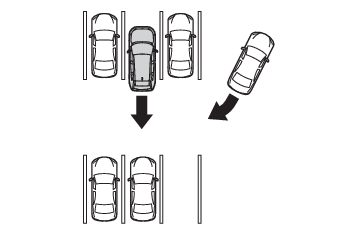
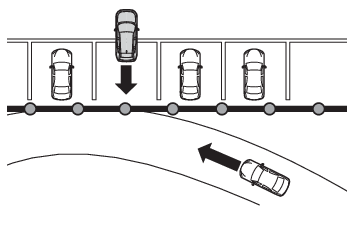
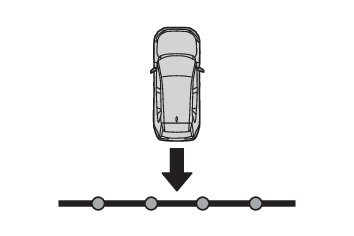
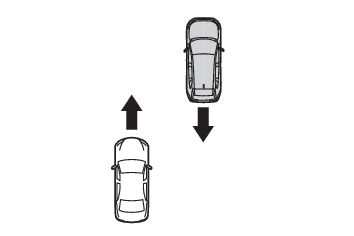
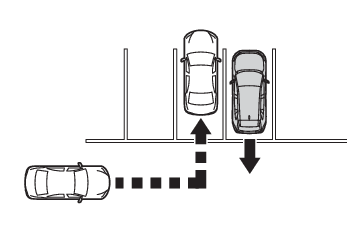
objects.Vehicles approaching from directly behindVehicles backing up in a parking space next to your vehicleVehicles that the sensors cannot detect due to obstructionsGuardrails, walls, signs, parked vehicles and similar stationary objects*Small motorcycles, bicycles, pedestrians, etc.*Vehicles moving away from your vehicleVehicles approaching from the parking spaces next to your vehicle*The distance between the sensor and approaching vehicle gets too close*Depending on conditions, detection of a vehicle and/or object may occur.Situations in which the system may not operate properlyThe RCTA function may not detect vehicles correctly in the following situations:When the sensor is misaligned due to a strong impact to the sensor or its surrounding
area.When mud, snow, ice, a sticker, etc., is covering the sensor or surrounding area on
the rear bumper.When driving on a road surface that is wet with standing water during bad weather,
such as heavy rain, snow, or fog.When multiple vehicles are approaching with only a small gap between each vehicle.When a vehicle is approaching at high speed.When equipment that may obstruct a sensor is installed, such as a towing eyelet, bumper
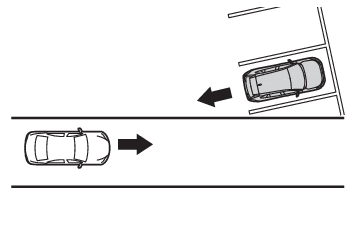
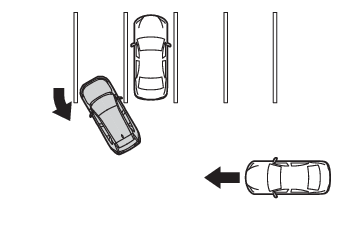
protector (an additional trim strip, etc.), bicycle carrier, or snow plow.When backing up on a slope with a sharp change in grade.When backing out of a sharp angle parking spot.When towing a trailer.When there is a significant difference in height between your vehicle and the vehicle
that enters the detection area.When a sensor or the area around a sensor is extremely hot or cold.If the suspension has been modified or tires of a size other than specified are installed.If the front of the vehicle is raised or lowered due to the carried load.When turning while backing up.When a vehicle turns into the detection area.Situations in which the system may operate even if there is no possibility of a collisionInstances of the RCTA function unnecessarily detecting a vehicle and/or object may
increase in the following situations:When the parking space faces a street and vehicles are being driven on the street.When the distance between your vehicle and metal objects, such as a guardrail, wall,
sign, or parked vehicle, which may reflect electrical waves toward the rear of the
vehicle, is short.When equipment that may obstruct a sensor is installed, such as a towing eyelet, bumper
protector (an additional trim strip, etc.), bicycle carrier, or snow plow.When a vehicle passes by the side of your vehicle.When a detected vehicle turns while approaching the vehicle.When there are spinning objects near your vehicle such as the fan of an air conditioning
unit.When water is splashed or sprayed toward the rear bumper, such as from a sprinkler.Moving objects (flags, exhaust fumes, large rain droplets or snowflakes, rain water
on the road surface, etc.).When the distance between your vehicle and a guardrail, wall, etc., that enters the
detection area is short.Gratings and gutters.When a sensor or the area around a sensor is extremely hot or cold.If the suspension has been modified or tires of a size other than specified are installed.If the front of the vehicle is raised or lowered due to the carried load.