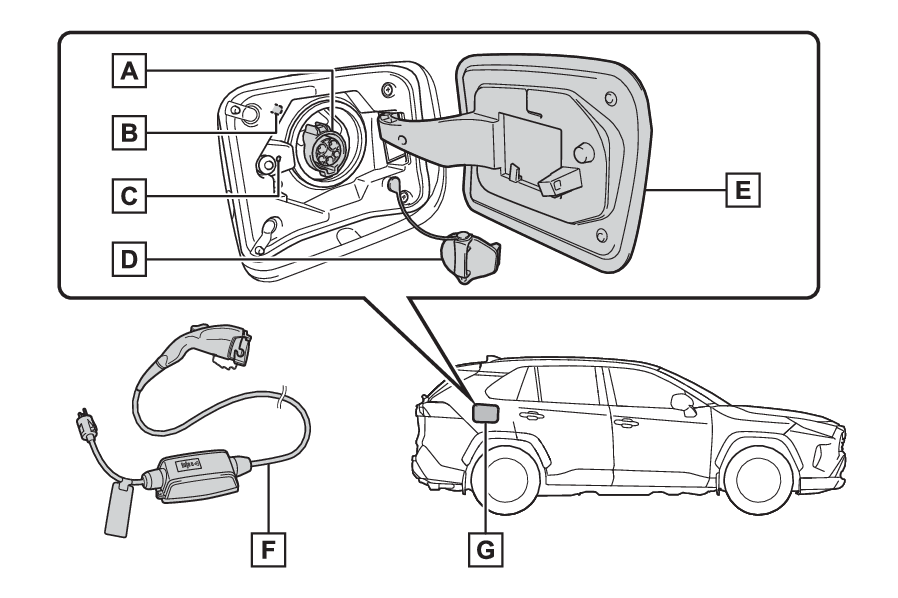
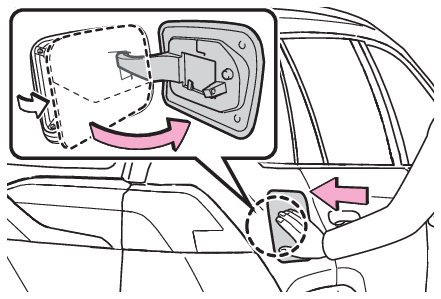
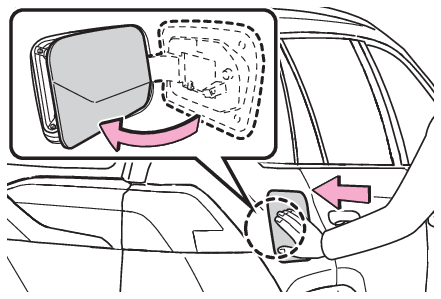
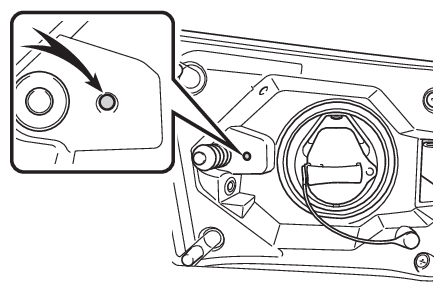
Charging equipment This vehicle features equipment for connecting to an external power source. Charging equipment and names AC charging inlet AC charging inlet light Charging indicator (Charging indicator) AC charging inlet cap Charging port lid (Opening and closing the charging port lid) AC charging cable (AC charging cable) Charging port Charging Opening and closing the charging port lid Charging port Opening and closing Opening and closing the charging port lid Opening the charging port lid Unlock the charging port lid by unlocking the doors.Slightly open the charging port lid by pressing the rear edge of it (the position shown in the illustration). Push and take your hand away to slightly open the charging port lid. Then open the lid fully by hand. Closing the charging port lid Close the charging port lid and press the central rear edge of the charging port lid (the location shown in the illustration). When the doors are locked, the charging port lid is also locked. (Locking and unlocking the charging port lid and charging connector) Charging Charging indicator Charging indicator The illumination/flashing pattern changes to inform the user of the charging status in the following ways.
Illumination/flashing pattern Vehicle condition
Illuminated Charging is in progress Charging is possible “ Battery Heater” (“Battery Heater”) is operating “ Battery Cooler” (“Battery Cooler”) is operating
Flashing (normally)* When charging schedule is registered (Using the charging schedule function) and AC charging cable is connected to vehicle
Rapidly flashing* When charging cannot be carried out due to malfunction in a power source or the vehicle etc. (When charging schedule function does not operate normally)
Not illuminated Charging connector is not inserted into AC charging inlet When the charging schedule (Using the charging schedule function) is on standby When charging is completed
*Flashes for a certain period of time, and then turns off.
Note: Charging indicator of the charging port When a system malfunction occurs while charging or using the Remote Air Conditioning System, the charging indicator rapidly flashes for a certain period of time, and then turns off. If this occurs, when a door is opened with the power switch off, a message is displayed on the multi-information display. When a message is displayed, follow the instructions displayed on the screen.