Mirrors
Outside rear view mirrorsRear view mirror
Outside rear view mirrorsDoors
Outside rear view mirrorsSwitches
Outside rear view mirror switchesOutside rear view mirrorsThe rear view mirror’s position can be adjusted to change the rear view.Note:When using the outside rear view mirrors in a cold weatherWhen it is cold and the outside rear view mirrors are frozen, it may not be possible
to fold/extend them or adjust the mirror surface. Remove the ice, snow, etc. covering
the outside rear view mirrors.Warning:Important points while drivingObserve the following precautions while driving.Failure to do so may result in loss
of control of the vehicle and cause an accident, resulting in death or serious injury.Do not adjust the mirrors while driving.Do not drive with the mirrors folded.Both the driver and passenger side mirrors must be unfolded and properly adjusted
before driving.Outside rear view mirrors
AdjustmentSide mirrors
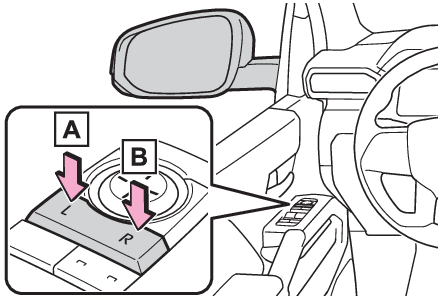
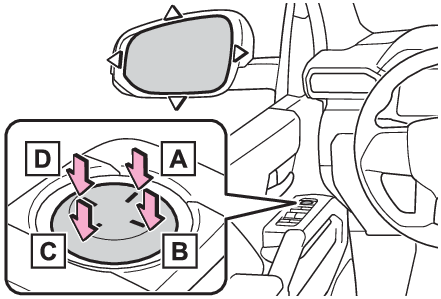
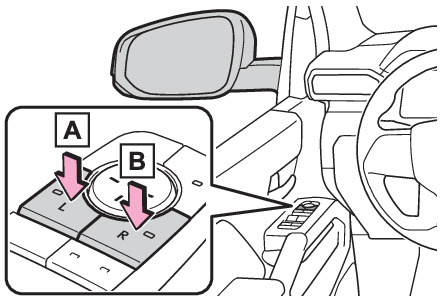
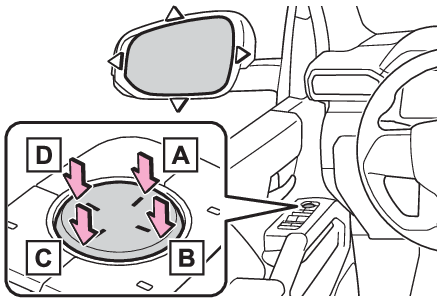
AdjustmentAdjustment procedureType ATo select a mirror to adjust, press the switch.LeftRightTo adjust the mirror, press the switch.UpRightDownLeftType BWhen selecting the mirror to adjust, the indicator on the switch illuminates.LeftRightPressing the same switch again will put the switch in neutral.To adjust the mirror, press the switch.UpRightDownLeftNote:Mirror angle can be adjusted whenThe power switch is in ACC or ON.Defogging the mirrorsThe outside rear view mirrors can be cleared using the mirror defoggers. Turn on the
rear window defogger to turn on the outside rear view mirror defoggers. (Defogging the rear window and outside rear view mirrors)Automatic adjustment of the mirror angle (if equipped)A desired mirror face angle can be entered to memory and recalled automatically by
the driving position memory. (Recording/recalling a driving position)Warning:When the mirror defoggers are operatingDo not touch the rear view mirror surfaces, as they can become very hot and burn you.Outside rear view mirrors
FoldingSide mirrors
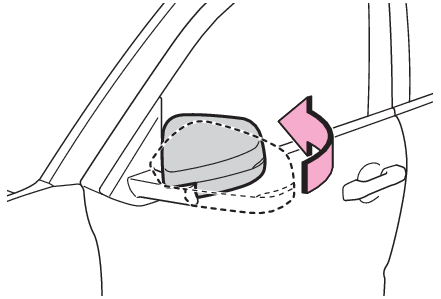
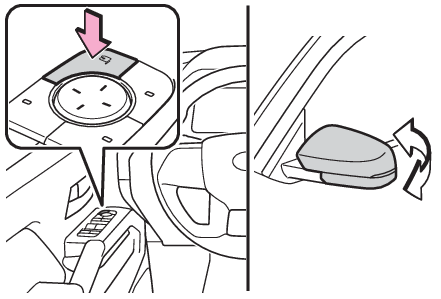
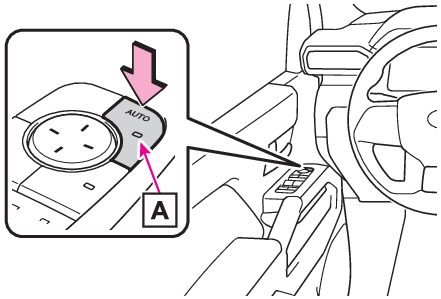
FoldingFolding the mirrors (manual type)Push the mirror back in the direction of the vehicle’s rear.Folding and unfolding the mirrors (power type)Using the switchPress the switch to fold the mirrors.Press it again to extend them to the original position.Setting automatic modePress the “
AUTO” switch to set automatic mode.When in automatic mode, the indicator
will come on.Automatic mode allows the folding or extending of the mirrors to be linked to locking/unlocking
of the doors.Pressing the switch once more will return to manual mode.Note:When disconnecting and reconnecting 12-volt battery terminalsThe automatic folding/extending mirror function will return to off as default. To
turn the function on, press the switch again to select on.CustomizationThe automatic mirror folding and extending operation can be changed. (Customizable
features: Customizable features)Warning:When a mirror is movingTo avoid personal injury and mirror malfunction, be careful not to get your hand caught
by the moving mirror.Linked mirror function when reversing (if equipped)When either “
L” or “
R” of the mirror select switch is selected, the outside rear view mirrors will automatically
angle downwards when the vehicle is reversing in order to give a better view of the
ground.To disable this function, select neither “
L” nor “
R”.Adjusting the mirror angle when the vehicle is reversingWith the shift lever in R, adjust the mirror angle at a desired position.The adjusted
angle will be memorized and the mirror will automatically tilt to the memorized angle
whenever the shift lever is shifted to R from next time.The memorized downward tilt position of the mirror is linked to the normal position
(angle adjusted with the shift position in other than R). Therefore, if the normal
position is changed after adjustment, the tilt position will also change.When the
normal position is changed, readjust the angle in reversing.