Doors
Back doorDoor lock
Back doorBack doorBack doorThe back door can be locked/unlocked and opened/closed by the following procedures.Warning:Observe the following precautions.Failure to do so may result in death or serious
injury.Child safety
Back door precautionsBefore drivingMake sure that the back door is fully closed. If the back door is not fully closed,
it may open unexpectedly while driving and hit near-by objects or luggage in the luggage
compartment may be thrown out, causing an accident.Do not allow children to play in the luggage compartment.If a child is accidentally
locked in the luggage compartment, they could get heat exhaustion or other injuries.Do not allow a child to open or close the back door.Doing so may cause the back door
to move unexpectedly, or cause the child’s hands, head, or neck to be caught by the
closing back door.Important points while drivingKeep the back door closed while driving.If the back door is left open, it may hit
near-by objects or luggage in the luggage compartment may be thrown out, causing an
accident.Never let anyone sit in the luggage compartment. In the event of sudden braking, sudden
swerving or a collision, they are susceptible to death or serious injury.Operating the back doorObserve the following precautions. Failure to do so may cause parts of the body to
be caught, resulting in death or serious injury.Remove any heavy loads, such as snow and ice, from the back door before opening it.
Failure to do so may cause the back door to suddenly shut again after it is opened.When opening or closing the back door, thoroughly check to make sure the surrounding
area is safe.If anyone is in the vicinity, make sure they are safe and let them know that the back
door is about to open or close.Use caution when opening or closing the back door in windy weather as it may move
abruptly in strong wind.Vehicles without power back door: The back door may suddenly shut if it is not opened
fully. It is more difficult to open or close the back door on an incline than on a
level surface, so beware of the back door unexpectedly opening or closing by itself.
Make sure that the back door is fully open and secure before using the luggage compartment.Vehicles with power back door: The back door may suddenly shut if it is not opened
fully, while on a steep incline. Make sure that the back door is secured before using
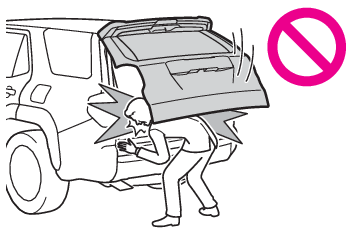
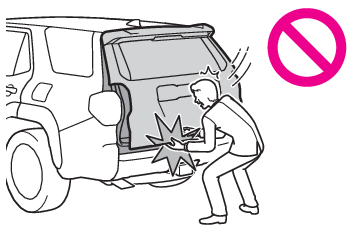
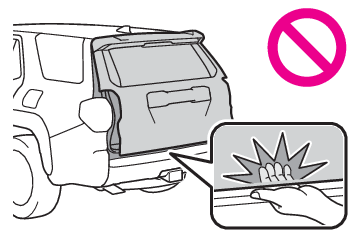
the luggage compartment.When closing the back door, take extra care to prevent your fingers, etc. from being
caught.Vehicles without power back door: When closing the back door, make sure to press it
lightly on its outer surface. If the back door handle is used to fully close the back
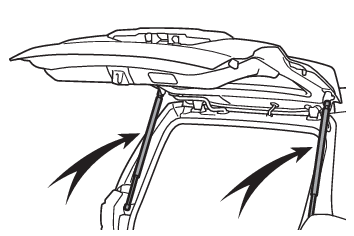
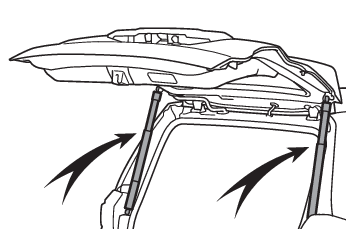
door, it may result in hands or arms being caught.Vehicles without power back door: Do not pull on the back door damper stay (Back door damper stays) to close the back door, and do not hang on the back door damper stay.Doing so may
cause hands to be caught or the back door damper stay to break, causing an accident.Vehicles with power back door: Do not pull on the back door spindle (Back door spindles) to close the back door, and do not hang on the back door spindle.Doing so may cause
hands to be caught or the back door spindle to break, causing an accident.If a bicycle carrier or similar heavy object is attached to the back door, it may
suddenly shut again after being opened, causing someone’s hands, head or neck to be
caught and injured. When installing an accessory part to the back door, using a genuine
Toyota part is recommended.Unlocking and locking the back door from the outsideSmart key system
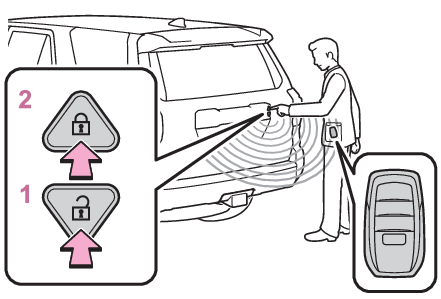
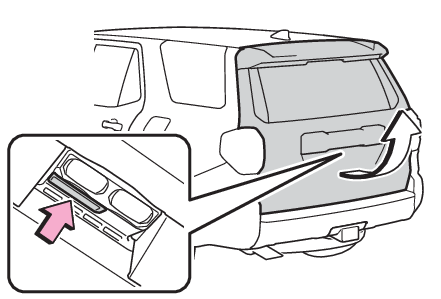
Entry functionsUsing the entry functionCarry the electronic key to enable this function.Unlocks all the doorsThe doors cannot be unlocked for 3 seconds after the doors are locked.Locks all the doorsCheck that the door is securely locked.Using the wireless remote controlWireless remote controlNote:Operation signalsOperation signalsSecurity featureSecurity featureUnlocking and locking the back door from the insideUsing the door lock switchesUnlocking and locking the doors from the insideOpening/closing the back door (vehicles without power back door)Opener
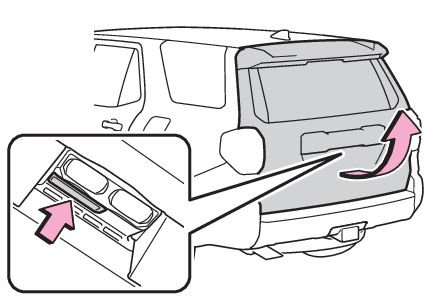
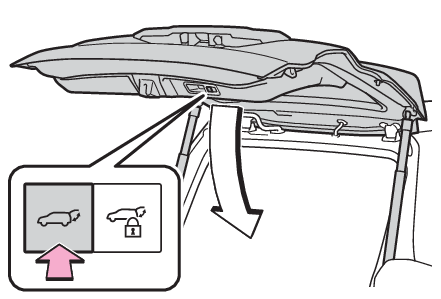
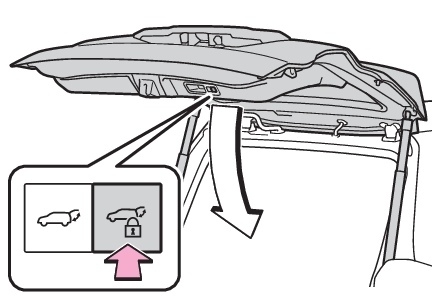
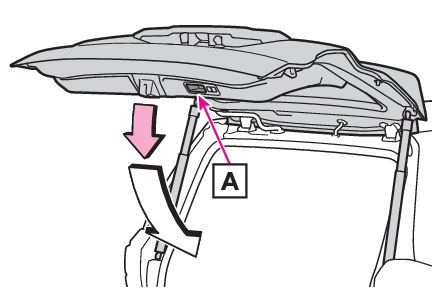
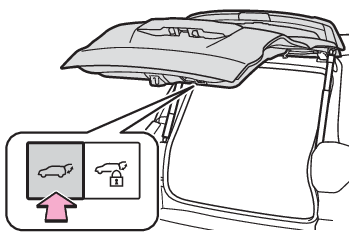
Back doorOpenRaise the back door while pressing up the back door opener switch.CloseLower the back door using the back door handles
, and make sure to push the back door down from the outside to close it.Be careful not to pull the back door sideways when closing the back door with the
handles.Note:Luggage compartment lightLights
Luggage compartment lightLuggage compartment lightsThe luggage compartment lights turn on when the back door is opened.When the power switch is turned to OFF, the lights will go off automatically after
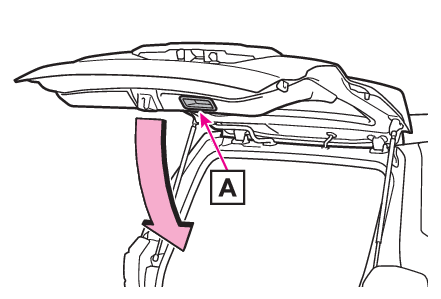
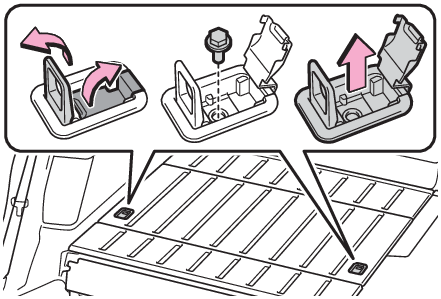
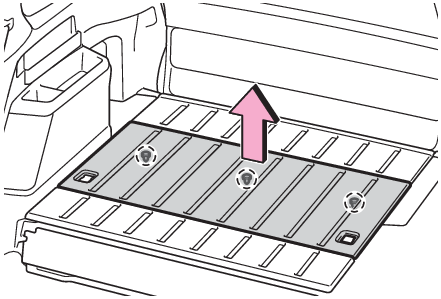
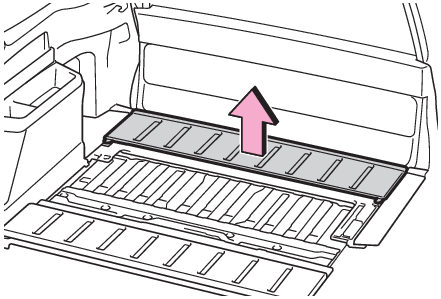
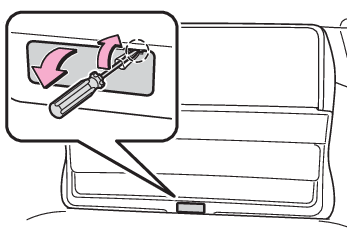
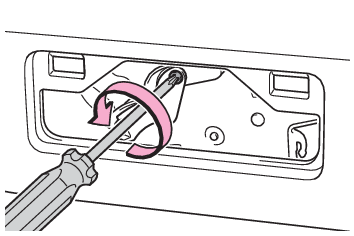
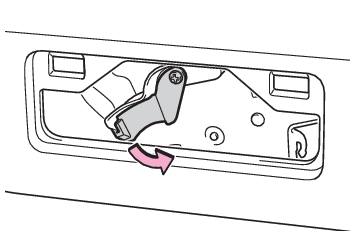
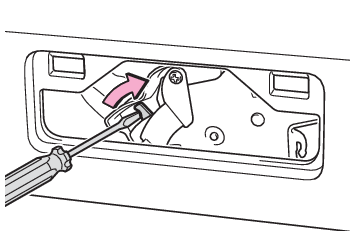
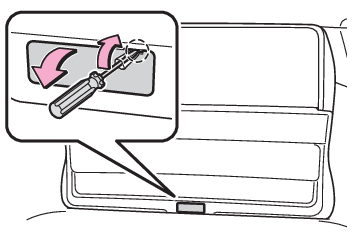
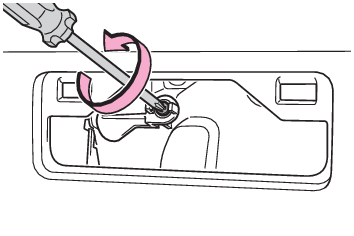
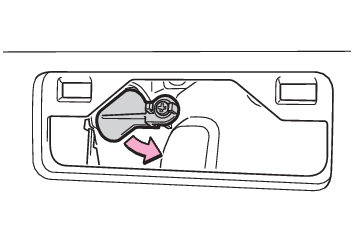
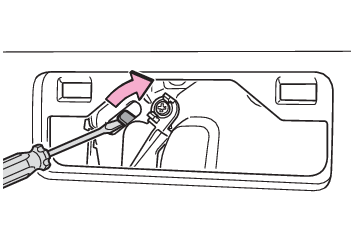
20 minutes.If the back door opener is inoperativeThe back door can be unlocked from the inside.Remove the cargo hook.Remove the center deck board.Remove the rear deck board.Remove the cover.To prevent damage, cover the tip of the screwdriver with a rag.Loosen the screw.Turn the cover.Move the lever.When installing, reverse the steps listed.Open door warning buzzerOpen door warning buzzerNotice:Back door damper staysThe back door is equipped with damper stays that hold the back door in place.Observe
the following precautions. Failure to do so may cause damage to the back door damper
stay, resulting in malfunction.Do not attach any foreign objects, such as stickers, plastic sheets, or adhesives
to the damper stay rod.Do not touch the damper stay rod with gloves or other fabric items.Do not attach any accessories other than genuine Toyota parts to the back door.Do not place your hand on the damper stay or apply lateral forces to it.Back door
Power back doorBack door
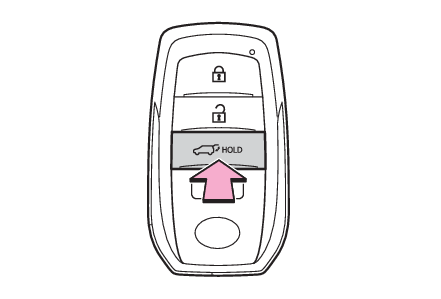
Wireless remote controlPower back doorOpening/closing the back door (vehicles with power back door)Back door
Wireless remote controlUsing the wireless remote controlPress and hold the switch.The power back door automatically opens/closes.The power back door can be operated whether it is locked* or unlocked.Pressing the switch while the power back door is opening/closing stops the operation.
When the switch is pressed and held again during the halted operation, the back door
will perform the reverse operation.*Opening of the power back door when it is locked can be disabled by a customized setting.
(Customizable features)Back door
Wireless remote controlSwitches
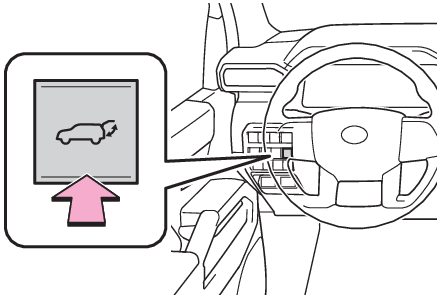
Power back door switchPower back door switchUsing the power back door switch on the instrument panelPress and hold the switch.The power back door automatically opens/closes.Unlock the back door before operating.Pressing the switch while the power back door is opening/closing stops the operation.
When the switch is pressed and held again during the halted operation, the back door
will perform the reverse operation.Opener
Back doorSwitches
Power back door switchPower back door switchUsing the switches on the back doorOpenWhen the back door is unlocked: Press the back door opener switch.When the back door is locked: While carrying the electronic key on your person, press
and hold the back door opener switch.The power back door automatically opens.Pressing the switch while the power back door is opening stops the operation.ClosePress the
switch on the lower part of the back door. The power back door automatically closes.Pressing the
switch while the power back door is operating will stop the operation. When the
switch is pressed again during the halted operation, the back door will perform the
reverse operation.Close the back door and lock all doors (close & lock function)Close all of the doors except the back door, carrying an electronic key and press
the
switch on the lower part of the back door.A different buzzer than the normal one will sound and the back door will begin closing
automatically. All the doors except the back door are locked and then back door will
also be locked at the same time it is closed. Operation signals will indicate that
all the doors have been closed and locked. (Operation signals)Pressing the
switch while the back door is operating will stop the operation. When the switch
is pressed again during the halted operation, the back door will be closed.Close the back door and lock all doors after moving away from the back door (close
& lock [Walk-Away] function)**This setting must be customized at your Toyota dealer.Close all of the doors except the back door, carrying an electronic key and press
the
switch on the lower part of the back door.A different buzzer than the normal one will sound and the close & lock (Walk-Away)
function will go into standby.While the buzzer is sounding, move away from the back door.When the sensor detects that you are away from the back door, the emergency flashers
will flash (on some models) and the buzzer will sound.Depending on the direction of moving away from the back door, the location and how
to hold the electronic key or circumstances, it may not be detected properly.All the doors other than the back door will be locked, and after the back door is
closed, the back door will also be locked. When all the doors have been closed and
locked, the buzzer will sound (on some models) and the emergency flashers will flash.The standby state is canceled if you do not move away from the back door for 30 seconds.
To operate the function again, perform the procedure again from the beginning.If you approach the back door carrying the electronic key, the back door operation
will stop, all the doors will be unlocked, and the buzzer will sound (on some models)
and the emergency flashers will flash.If the
switch is pressed after the back door operation has stopped, the close & lock (Walk-Away)
function will go into standby again.Using the back door handleLower the back door using the back door handle
.The back door closing assist (Back door closing assist) will be activated, and the power back door will fully close automatically.Back door
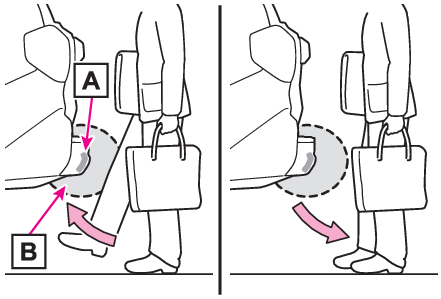
Hands Free Power Back DoorUsing the Hands Free Power Back DoorThe Hands Free Power Back Door enables automatic opening and closing of the power
back door by putting your foot near the lower right part of the rear bumper and moving
it away from the rear bumper. When operating the Hands Free Power Back Door, make
sure that the power switch is in OFF, the Hands Free Power Back Door operation is
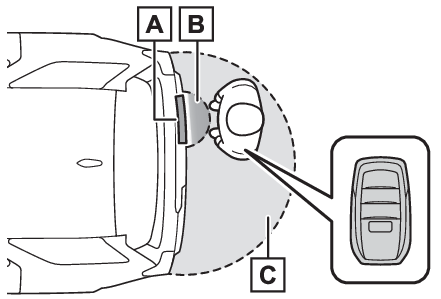
enabled and you are carrying an electronic key.While carrying an electronic key, stand within the smart key system operation range,
approximately 11.8 to 19.7 in. (30 to 50 cm) from the rear bumper.Kick sensorHands Free Power Back Door operation detection areaSmart key system operation detection area (Effective range (areas within which the electronic key is detected))Perform a kick operation by moving your foot to within approximately 3.9 in. (10 cm)
of the rear bumper and then pulling it back.Perform the entire kick operation within 1 second.The back door will not start operating while a foot is detected under the rear bumper.Operate the Hands Free Power Back Door without contacting the rear bumper with your
foot.If another electronic key is in the cabin or luggage compartment, it may take slightly
longer than normal for the operation to occur.Kick sensorHands Free Power Back Door operation detection areaWhen the kick sensor detects that your foot is pulled back, a buzzer will sound and
the back door will automatically fully open/close.If a foot is moved under the rear bumper while the back door is opening/closing, the
back door will stop moving.If a foot is moved under the rear bumper again during the halted operation, the back
door will perform the reverse operation.Closing and locking the back door after moving away from the back door using the kick
sensor (Hands Free close & lock [Walk-Away] function)**This setting must be customized at your Toyota dealer.The Hands Free Power Back Door enables automatic closing and locking of the power
back door by putting your foot near the right lower part of the rear bumper, moving
it away from the rear bumper, and moving away from the back door. When operating the
Hands Free Power Back Door, make sure that the power switch is in OFF, the Hands Free
Power Back Door (kick sensor) operation is enabled and you are carrying an electronic
key.While carrying an electronic key, stand within the Smart key system operation range,
approximately 11.8 to 19.7 in. (30 to 50 cm) from the rear bumper.Kick sensorHands Free Power Back Door operation detection areaSmart key system operation detection area (Effective range (areas within which the electronic key is detected))Perform a kick operation by moving your foot to within approximately 3.9 in. (10 cm)
of the rear bumper and then pulling your foot back after the buzzer sounds.Perform the entire kick operation within 1 second.The back door will not start operating while a foot is detected under the rear bumper.Operate the Hands Free Power Back Door without contacting the rear bumper with your
foot.If another electronic key is in the cabin or luggage compartment, it may take slightly
longer than normal for the operation to occur.If the buzzer sounds twice, perform a kick operation again.Kick sensorHands Free Power Back Door operation detection areaWhen the kick sensor detects that your foot is pulled back, a different buzzer than
the normal one will sound and the Hands Free close & lock (Walk-Away) function will
go into standby.While the buzzer is sounding, move away from the back door.When the sensor detects that you are away from the back door, the emergency flashers
will flash (on some models), and the buzzer will sound.Depending on the direction of moving away from the back door, the location and how
to hold the electronic key or circumstances, it may not be detected properly.All the doors other than the back door will be locked, and after the back door is
closed, the back door will also be locked. When all the doors have been closed and
locked, the buzzer (if equipped) will sound and the emergency flashers will flash.The standby state is canceled if you do not move away from the back door in 30 seconds.
To operate the function again, perform the procedure again from the beginning.If you approach the back door carrying the electronic key, the back door operation
will stop, all the doors will be unlocked, and the buzzer will sound (on some models)
and the emergency flashers will flash.If the power back door is operated after the back door operation has stopped, the
Hands Free close & lock (Walk- Away) function will go into standby again.Note:Luggage compartment lightLights
Luggage compartment lightLuggage compartment lightsThe luggage compartment lights turn on when the back door is opened.When the power switch is turned to OFF, the lights will go off automatically after
20 minutes.Back door closerIn the event that the back door is left slightly open, the back door closer will automatically
close it to the fully closed position.Whatever the state of the power switch, the back door closer operates.Power back door operating conditionsThe power back door can automatically open and close under the following conditions:When the back door window is completely closed.When the power back door system is enabled. (Changing settings of the power back door system (vehicles with power back door))When the back door is unlocked. However, if the back door opener switch is pressed
and held while carrying the electronic key on your person, the power back door will
be operated even if the back door is locked. (Using the power back door switch on the instrument panel)When the power switch is in ON, in addition to the above for the opening operations,
the back door operates for any of the following conditions:Parking brake is engagedThe brake pedal is depressedThe shift lever is in P.Operation of the power back doorA buzzer sounds to indicate that the back door is opening/closing.When the power back door system is disabled, the power back door does not operate
but it can be opened and closed by hand.When the power back door automatically opens, if an abnormality due to people or objects
is detected, operation will stop.Jam protection function
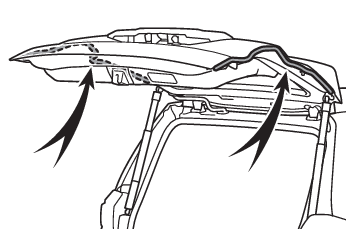
Power back doorJam protection functionSensors are equipped on both sides of the power back door. If anything obstructs the
power back door while it is closing, the back door will automatically operate in the
opposite direction or stop.Fall-down protection functionWhile the power back door is opening automatically, applying excessive force to it
will stop the opening operation to prevent the power back door from suddenly shutting.Back door closing assistIf the back door is lowered manually when the back door is stopped at an open position,
the back door will fully close automatically.Back door reserve lock functionThis function is a function which reserves locking of all doors, beforehand, when
the power back door is open.When the following procedure is performed, all the doors except the power back door
are locked and then power back door will also be locked at the same time it is closed.Close all doors, except the back door.During the power back door closing operation, lock the doors using the smart key system
(Smart key system (entry function)) or the wireless remote control. (Wireless remote control)Operation signals will indicate that all the doors have been closed and locked (Operation signals).If the electronic key is placed inside the vehicle after starting a close operation
via the door reserve lock function, the electronic key may become locked inside the
vehicle.If the power back door does not fully close due to the operation of the jam protection
function, etc., while the back door is automatically closing after a door reserve
lock operation is performed, the door reserve lock function is canceled and all the
doors will unlock.Before leaving the vehicle, make sure that all the doors are closed and locked.Close & lock function operating conditionsThis function can be operated when all of the following conditions are met:An electronic key is not detected within the vehicle.All of the doors other than the power back door are closed.The power switch is in OFF.Situations in which the close & lock function may not operate properlyIn the following situations, the close & lock function may not operate properly:If the
switch on the lower part of the power back door is pressed by a hand which is holding
an electronic keyIf the
switch on the lower part of the power back door is pressed when the electronic key
is in a bag, etc. that is placed on the groundIf the
switch on the lower part of the power back door is pressed with the electronic key
not near the vehicle.Close & lock (Walk-Away) function* operating conditionsThis function can be operated when all of the following conditions are met:Close & lock (Walk-Away) function is enabled.An electronic key is not detected within the vehicle.All of the doors other than the back door are closed.The brake pedal is not depressed.The power switch is in OFF.The electronic key is within the effective range (detection areas).*This setting can be customized by your Toyota dealer.Situations in which the close & lock (Walk-Away) function* may not operate properly*This setting must be customized at your Toyota dealer.In the following situations, the function may not operate properly:When the smart key system does not operate properly.When the close & lock function does not operate properly.When moving away from the back door while the close & lock (Walk-Away) function is
in the standby state.When the number of electronic keys registered in the vehicle increases.Hands Free Power Back Door operating conditionsThe Hands Free Power Back Door will open/close automatically when the following conditions
are met:The Hands Free Power Back Door (kick sensor) operation is enabled (Changing settings of the power back door system (vehicles with power back door))The power switch is in OFF, or ON with the shift lever in P.The electronic key is within the operational range. (Effective range (areas within which the electronic key is detected))A foot is put near the right lower part of the rear bumper and moved away from the
rear bumper.The power back door may also be operated by putting a hand, an elbow,
a knee, etc. near the right lower part of the rear bumper and moving it away from
the rear bumper. Make sure to put it close enough to the right lower part of the rear
bumper.Situations in which the Hands Free Power Back Door may not operate properlyIn the following situations, the Hands Free Power Back Door may not operate properly:When a foot remains under the rear bumperIf the rear bumper is strongly hit with a foot or is touched for a whileIf the rear bumper has been touched for a while, wait for a short time before attempting
to operate the Hands Free Power Back Door again.When operated while a person is too close to the rear bumperWhen an external radio wave source interferes with the communication between the electronic
key and the vehicle (Conditions affecting operation)When the vehicle is parked near an electrical noise source which affects the sensitivity
of the Hands Free Power Back Door, such as a pay parking spot, gas station, electrically
heated road, or fluorescent lightWhen the vehicle is near a TV tower, electric power plant, radio station, large display,
airport or other facility that generates strong radio waves or electrical noiseWhen water is applied to the rear bumper, such as when the vehicle is being washed
or in heavy rainWhen mud, snow, ice, etc. is attached to the rear bumperWhen the vehicle has been parked for a while near objects that may move and contact
the rear bumper, such as plantsWhen an accessory is installed to the rear bumperIf an accessory has been installed, turn the Hands Free Power Back Door (kick sensor)
operation setting off.Preventing unintentional operation of the Hands Free Power Back Door (vehicles with
Hands Free Power Back Door)When an electronic key is in the operation range, the Hands Free Power Back Door may
operate unintentionally, so be careful in the following situations.To prevent unintentional operation, turn the Hands Free Power Back Door (kick sensor)
operation setting off. (Changing settings of the power back door system (vehicles with power back door))When water is applied to the rear bumper, such as when the vehicle is being washed
or in heavy rainWhen dirt is wiped off the rear bumperWhen a small animal or small object, such as a ball, moves under the rear bumperWhen an object is moved from under the rear bumperIf someone is swinging their legs while sitting on the rear bumperIf the legs or another part of someone’s body contacts the rear bumper while passing
by the vehicleWhen the vehicle is parked near an electrical noise source which affects the sensitivity
of the Hands Free Power Back Door, such as a pay parking spot, gas station, electrically
heated road, or fluorescent lightWhen the vehicle is near a TV tower, electric power plant, radio station, large display,
airport or other facility that generates strong radio waves or electrical noiseWhen the vehicle is parked in a place where objects such as plants are near the rear
bumperIf luggage, etc. is set near the rear bumperIf accessories or a vehicle cover is installed/removed near the rear bumperWhen the vehicle is being towedHands Free close & lock (Walk- Away) function operating conditionsThis function can be operated when all of the following conditions are met:Hands Free close & lock (Walk-Away) function is enabled*.Hands Free Power Back Door is enabled.An electronic key is not detected within the vehicle.All of the doors other than the back door are closed.The power switch is in OFF.The electronic key is within the effective range (detection areas).*0This setting can be customized by your Toyota dealer.Situations in which the Hands Free close & lock (Walk-Away) function* may not operate properlyIn the following situations, the function may not operate properly:When the smart key system does not operate properly.When the close & lock function does not operate properly.When moving away from the back door while the Hands Free close & lock (Walk-Away)
function is in the standby state.When the number of electronic keys registered in the vehicle increases.When the Hands Free Power Back Door does not operate properly.*0This setting can be customized by your Toyota dealer.Initialization
Power back doorWhen reconnecting the 12-volt batteryTo enable the power back door to operate properly, close the back door manually.If the back door opener is inoperativeThe back door can be unlocked from the inside.Remove the cargo hook.Remove the center deck board.Remove the rear deck board.Remove the cover.To prevent damage, cover the tip of the screwdriver with a rag.Loosen the screw.Turn the cover.Move the lever.When installing, reverse the steps listed.CustomizationSome functions can be customized. (Customizable features: Customizable features)Warning:Back door closerIn the event that the back door is left slightly open, the back door closer will automatically
close it to the fully closed position. It takes several seconds before the back door
closer begins to operate. Be careful not to catch fingers or anything else in the
back door, as this may cause bone fractures or other serious injuries.Use caution when using the back door closer as it still operates when the power back
door system is canceled.Power back doorObserve the following precautions when operating the power back door. Failure to do
so may cause death or serious injury.Check the safety of the surrounding area to make sure there are no obstacles or anything
that could cause any of your belongings to get caught.If anyone is in the vicinity, make sure they are safe and let them know that the back
door is about to open or close.If the power back door system is turned off while the back door is operating automatically,
the automatic operation is stopped. The back door then has to be operated manually.
Take extra care when on an incline, as the back door may open or close unexpectedly.If the operating conditions of the power back door are no longer met, a buzzer may
sound and the back door may stop opening or closing. The back door then has to be
operated manually. Take extra care when on an incline, as the back door may open or
close abruptly.On an incline, the back door may suddenly shut after it opens. Make sure the back
door is fully open and secure.In the following situations, the power back door may detect an abnormality and automatic
operation may be stopped. In this case, the back door has to be operated manually.
Take extra care when on an incline, as the back door may open or close abruptly.When the back door contacts an obstacleWhen the 12-volt battery voltage suddenly drops, such as when the power switch is
turned to ON or the hybrid system is started during automatic operationIf a bicycle carrier or similar heavy object is attached to the back door, the power
back door may not operate, causing itself to malfunction, or the back door may suddenly
shut again after being opened, causing someone’s hands, head or neck to be caught
and injured. When installing an accessory part to the back door, using a genuine Toyota
part is recommended.Jam protection functionObserve the following precautions. Failure to do so may cause death or serious injury.Never use any part of your body to intentionally activate the jam protection function.The jam protection function may not work if something gets caught just before the
back door fully closes. Be careful not to catch fingers or anything else.The jam protection function may not work depending on the shape of the object that
is caught. Be careful not to catch fingers or anything else.Hands Free Power Back DoorObserve the following precautions when operating the Hands Free Power Back Door.Failure
to do so may cause death or serious injury.Check the safety of the surrounding area to make sure there are no obstacles or anything
that could cause any of your belongings to get caught.When putting your foot near the lower right part of the rear bumper and moving it
from the rear bumper, be careful not to touch the exhaust pipes until they have cooled
down sufficiently, as touching hot exhaust pipes can cause burns.Do not leave the electronic key within the effective range (detection area) of the
luggage compartment.Close & lock (Walk-Away) function* and Hands Free close & lock (Walk-Away) function**0This setting can be customized by your Toyota dealer.The back door starts to close automatically when leaving the back door. Check the
safety of the surrounding area to make sure there are no obstacles or anything that
could cause any of your belongings to get caught.Notice:Back door spindlesThe back door is equipped with spindles that hold the back door in place.Observe the
following precautions. Failure to do so may cause damage to the back door spindle,
resulting in malfunction.Do not attach any foreign objects, such as stickers, plastic sheets, or adhesives
to the spindle rod.Do not attach any accessories other than genuine Toyota parts to the back door.Do not place your hand on the spindle or apply lateral forces to it.To prevent back door closer malfunctionDo not apply excessive force to the back door while the back door closer is operating.
Applying excessive force may cause the back door closer to malfunction.To prevent damage to the power back doorMake sure that there is no ice between the back door and frame that would prevent
movement of the back door. Operating the power back door when excessive load is present
on the back door may cause a malfunction.Do not apply excessive force to the back door while the power back door is operating.Take care not to damage the sensors (installed on the right and left edges of the
power back door) with a knife or other sharp object. If the sensor is disconnected,
the power back door will not close automatically.Close & lock functionWhen closing the power back door using the close & lock function, a different buzzer
than the normal one will sound before the operation begins.To check that the operation has started correctly, check that a different buzzer than
the normal one has sounded.Additionally, when the power back door is fully closed and locked, operation signals
will indicate that all of the doors have been locked.Before leaving the vehicle, make sure that the operation signals have operated and
that all of the doors are locked.Hands Free Power Back Door precautionsThe kick sensor is located behind lower right part of the rear bumper. Observe the
following to ensure that the Hands Free Power Back Door function operates properly:Keep the lower right part of the rear bumper clean at all times.If the lower right
part of the rear bumper is dirty or covered with snow, the Hands Free Power Back Door
may not operate. In this situation, clean off the dirt or snow, move the vehicle from
the current position and then check if the Hands Free Power Back Door operates.If
it does not operate, have the vehicle inspected by your Toyota dealer.Do not apply coatings that have a rain clearing (hydrophilic) effect, or other coatings,
to the lower right part of the rear bumper.Do not park the vehicle near objects that may move and contact the lower right part
of the rear bumper, such as grass or trees.If the vehicle has been parked for a while
near objects that may move and contact the lower right part of the rear bumper, such
as grass or trees, the Hands Free Power Back Door may not operate. In this situation,
move the vehicle from the current position and then check if the Hands Free Power
Back Door operates. If it does not operate, have the vehicle inspected by your Toyota
dealer.Do not subject the rear bumper or its surrounding area to a strong impact.If the rear
bumper or its surrounding area has been subjected to a strong impact, the Hands Free
Power Back Door may not operate properly. If the Hands Free Power Back Door does not
operate in the following situations, have the vehicle inspected by your Toyota dealer.The kick sensor or its surrounding area has been subjected to a strong impact.The lower right part of the rear bumper is scratched or damaged.Do not disassemble the rear bumper.Do not attach stickers to the rear bumper.Do not paint the rear bumper.If a bicycle carrier or similar heavy object is attached to the power back door, disable
the Hands Free Power Back Door (kick sensor). (Changing settings of the power back door system (vehicles with power back door))Changing settings of the power back door system (vehicles with power back door)The settings of the power back door system can be changed by displaying the “
Vehicle Settings”
screen from the setting screen of the multi-information display. (Customizable features)The changed power back door settings are not reset by turning the power switch to
OFF. In order to restore the original settings, they need to be changed back on the
setting screen of the multi-information display.Adjusting the open position of the back door (vehicles with power back door)The open position of the power back door can be adjusted.Stop the back door in the desirable position. (Opening/closing the back door (vehicles with power back door))Press and hold the switch on the lower part of the back door for approximately 2 seconds.When the settings are completed, the buzzer sounds 4 times.When opening the back door the next time, the back door will stop at that position.Note:Canceling the adjusted open position of the back doorPress and hold the switch on the lower part of the back door for approximately 7 seconds.After the buzzer sounds 4 times, it sounds twice more. When the power back door does
the opening operation the next time, the door will open to the initial settings position.CustomizationThe opening position can be set with the multi-information display. (Customizable features)Priority for the stop position is given to the last position set by either the switch
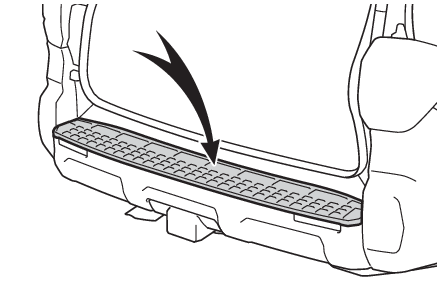
on the lower part of the back door or multi-information display.Rear step bumperThe rear step bumper is intended for rear end protection and easier step-up loading.