Switches
Ignition switchSwitches
Engine switchKeys
Engine switchIgnition switch (engine switch)Engine switchEngine
Ignition switch (engine switch)Engine
Engine switchEngine (ignition) switchPerforming the following operations when carrying the electronic key on your person
starts the engine or changes engine switch modes.Smart key system
Starting the engineEngine
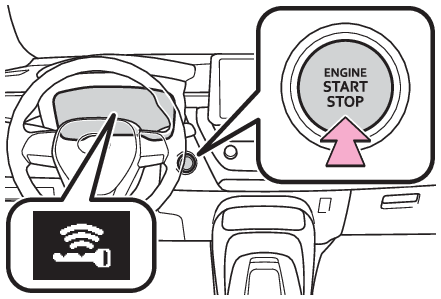
How to start the engineStarting the enginePull the parking brake switch to check that the parking brake is set. (Parking brake)The parking brake indicator will come on.Check that the shift lever is set in P (continuously variable transmission) or N (manual
transmission).Firmly depress the brake pedal (continuously variable transmission) or clutch pedal
(manual transmission). and a message will be displayed on the multi-information display. If it is not displayed,
the engine cannot be started.Press the engine switch shortly and firmly.When operating the engine switch, one short, firm press is enough. It is not necessary
to press and hold the switch.The engine will crank until it starts or for up to 30 seconds, whichever is less.Continue depressing the brake pedal (continuously variable transmission) or clutch
pedal (manual transmission) until the engine is completely started.The engine can be started from any engine switch mode.Note:If the engine does not startThe engine immobilizer system may not have been deactivated. (Engine immobilizer system)Contact your Toyota dealer.If a message related to start-up is shown on the multi-information display, read the
message and follow the instructions.If the battery is dischargedThe engine cannot be started using the smart key system. Refer to If the vehicle battery is discharged to restart the engine.Electronic key battery depletionElectronic key battery depletionConditions affecting operationConditions affecting operationNotes for the entry functionNote for the entry functionSteering lock
Steering lock system warning messageSteering lock
Column lock releaseLock steering columnSteering lock functionAfter turning the engine switch off and opening and closing the doors, the steering
wheel will be locked due to the steering lock function. Operating the engine switch
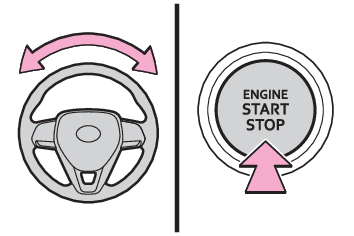
again automatically cancels the steering lock.When the steering lock cannot be released, “Push Engine Switch while Turning Steering
Wheel in Either Direction” will be displayed on the multi-information display. Press
the engine switch shortly and firmly while turning the steering wheel left and right.To prevent the steering lock motor from overheating, operation of the motor may be
suspended if the engine is turned on and off repeatedly in a short period of time.
In this case, refrain from operating the engine switch. After about 10 seconds, the
steering lock motor will resume functioning.Electronic key batteryElectronic key batteryOperation of the engine switchIf the switch is not pressed shortly and firmly, the engine switch mode may not change
or the engine may not start.If attempting to restart the engine immediately after turning the engine switch off,
the engine may not start in some cases. After turning the engine switch off, please
wait a few seconds before restarting the engine.CustomizationIf the smart key system has been deactivated in a customized setting, refer to If the electronic key does not operate properly.Warning:When starting the engineAlways start the engine while sitting in the driver’s seat. Do not depress the accelerator
pedal while starting the engine under any circumstances.Doing so may cause an accident
resulting in death or serious injury.Caution while drivingIf engine failure occurs while the vehicle is moving, do not lock or open the doors
until the vehicle reaches a safe and complete stop. Activation of the steering lock
in this circumstance may lead to an accident, resulting in death or serious injury.Notice:When starting the engineDo not race a cold engine.If the engine becomes difficult to start or stalls frequently, have your vehicle checked
by your Toyota dealer immediately.Symptoms indicating a malfunction with the engine switchIf the engine switch seems to be operating somewhat differently than usual, such as
the switch sticking slightly, there may be a malfunction. Contact your Toyota dealer
immediately.Stopping the engineContinuously variable transmissionStop the vehicle completely.Set the parking brake (Parking brake), and shift the shift lever to P.Check the parking brake indicator is illuminated.Press the engine switch.The engine will stop, and the meter display will be extinguished.Release the brake pedal and check that “ACCESSORY” or “IGNITION ON” is not shown on
the multi-information display.Manual transmissionStop the vehicle completely.If the parking brake is in manual mode, set the parking brake. (Parking brake)Check the parking brake indicator is illuminated.Shift the shift lever to N. (Manual transmission*)Press the engine switch.The engine will stop, and the meter display will be extinguished.Release the brake pedal and check that “ACCESSORY” or “IGNITION ON” is not shown on
the multi-information display.Note:Automatic engine shut off featureThe vehicle is equipped with a feature that automatically shuts off the engine when
the shift lever is in P (continuously variable transmission) or the parking brake
is set (manual transmission) with the engine running for an extended period.The engine will automatically shut off after approximately 1 hour if it has been left
running while the shift lever is in P (continuously variable transmission) or the
parking brake is set (manual transmission).The timer for the automatic engine shut off feature will reset if the brake pedal
(continuously variable transmission) or the clutch pedal (manual transmission) is
depressed, or if the shift lever is in a position other than P (continuously variable
transmission) or the parking brake is released (manual transmission).After the vehicle is parked, if the door is locked with the door lock switch (Unlocking and locking the doors from the inside) from the inside or the mechanical key (If the electronic key does not operate properly) from the outside, the automatic engine shut off feature will be disabled. The timer
for the automatic engine shut off feature will be re-enabled if the driver’s door
is opened.Warning:Stopping the engine in an emergencyIf you want to stop the engine in an emergency while driving the vehicle, press and
hold the engine switch for more than 2 seconds, or press it briefly 3 times or more
in succession. (If your vehicle has to be stopped in an emergency)However, do not touch the engine switch while driving except in an emergency. Turning
the engine off while driving will not cause loss of steering or braking control, but
the power assist to these systems will be lost. This will make it more difficult to
steer and brake, so you should pull over and stop the vehicle as soon as it is safe
to do so.If the engine switch is operated while the vehicle is running, a warning message will
be shown on the multi-information display and a buzzer sounds.Vehicles with a continuously variable transmission: To restart the engine after performing
an emergency shutdown, shift the shift lever to N and then press the engine switch.Vehicles with a manual transmission: To restart the engine after performing an emergency
shutdown, depress the clutch pedal and then press the engine switch.When parkingExhaust gases include harmful carbon monoxide (CO), which is colorless and odorless.
Observe the following precautions.Failure to do so may cause exhaust gases to enter the vehicle and may lead to an accident
caused by light-headedness, or may lead to death or a serious health hazard.If the vehicle is in a poorly ventilated area or a closed area, such as a garage,
stop the engine.Do not leave the vehicle with the engine running for a long time. If such a situation
cannot be avoided, park the vehicle in an open space and ensure that exhaust fumes
do not enter the vehicle interior.Do not leave the engine running in an area with snow build-up, or where it is snowing.
If snowbanks build up around the vehicle while the engine is running, exhaust gases
may collect and enter the vehicle.Engine switch
Changing the engine switch modesIgnition switch (engine switch)
Changing the engine switch modesEngine
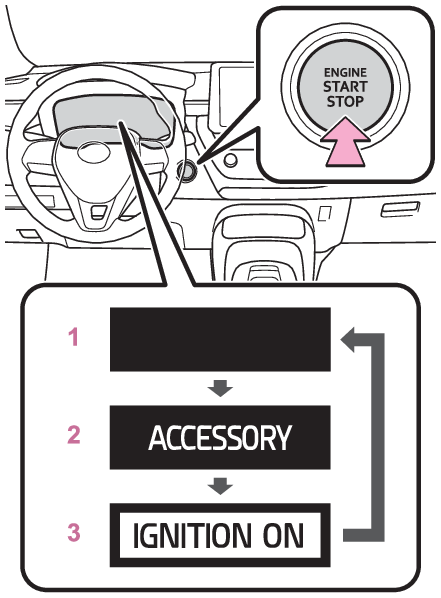
ACCESSORY modeChanging engine switch modesModes can be changed by pressing the engine switch with brake pedal (continuously
variable transmission) or clutch pedal (manual transmission) released. (The mode changes
each time the switch is pressed.)OFF*The emergency flashers can be used.ACCSome electrical components such as the audio system can be used.“ACCESSORY” will be displayed on the multi-information display.ONAll electrical components can be used.“IGNITION ON” will be displayed on the multi-information display.*Vehicles with a continuously variable transmission: If the shift lever is in a position
other than P when turning off the engine, the engine switch will be turned to ACC,
not to off.Note:Engine switch
Auto power off functionIgnition switch (engine switch)
Auto power off functionAuto power off functionContinuously variable transmission: If the vehicle is left in ACC for more than 20
minutes or ON (the engine is not running) for more than an hour with the shift lever
in P, the engine switch will automatically turn off. However, this function cannot
entirely prevent battery discharge. Do not leave the vehicle with the engine switch
in ACC or ON for long periods of time when the engine is not running.Manual transmission: If the vehicle is left in ACC for more than 20 minutes or ON
(the engine is not running) for more than an hour, the engine switch will automatically
turn off. However, this function cannot entirely prevent battery discharge. Do not
leave the vehicle with the engine switch in ACC or ON for long periods of time when
the engine is not running.Notice:To prevent battery dischargeDo not leave the engine switch in ACC or ON for long periods of time without the engine
running.If “ACCESSORY” or “IGNITION ON” is displayed on the multi-information display, the
engine switch is not off. Exit the vehicle after turning the engine switch off.When stopping the engine with the shift lever in a position other than P (vehicles
with a continuously variable transmission)If the engine is stopped with the shift lever in a position other than P, the engine
switch will not be turned off but instead be turned to ACC. Perform the following
procedure to turn the switch off:Check that the parking brake is set.Shift the shift lever to P.Check that “ACCESSORY” is displayed on the multi-information display and press the
engine switch shortly and firmly.Check that “ACCESSORY” or “IGNITION ON” on the multi-information display are off.Notice:To prevent battery dischargeDo not stop the engine when the shift lever is in a position other than P. If the
engine is stopped in another shift lever position, the engine switch will not be turned
off but instead be turned to ACC mode. If the vehicle is left in ACC, battery discharge
may occur.