Warning messagesSmart key system
Warning messageMulti-information display
Warning messagesEmergency, in case of
If a warning message is displayedDynamic radar cruise control
Warning messageDisplay
Warning messagesMeter
Warning messagesWasher
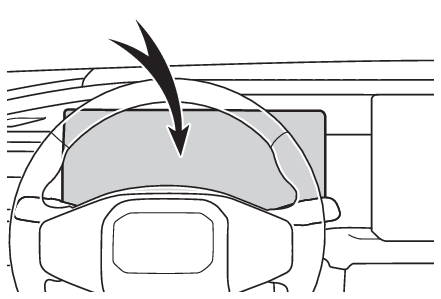
Low washer fluid warning messageIf a warning message is displayedThe multi-information display shows warnings of system malfunctions, incorrectly performed
operations, and messages that indicate a need for maintenance. When a message is shown,
perform the correction procedure appropriate to the message.If a warning message is displayed again after the appropriate actions have been performed,
contact your Toyota dealer.Note:Warning messagesThe warning messages explained below may differ from the actual messages according
to operation conditions and vehicle specifications.If a message about an operation is shownIf a message about an operation of the accelerator pedal or brake pedal is shownA warning message about an operation of the brake pedal may be shown while the driving
assist systems such as PCS (Pre-Collision system) or the dynamic radar cruise control
is operating. If a warning message is shown, be sure to decelerate the vehicle or
follow the instruction shown on the multi-information display.A warning message is shown when Brake Override System operates. (Restraining the hybrid system output (Brake Override System))A warning message is shown when Drive-Start Control or Parking Support Brake (if equipped)
(Sudden start restraint control (Drive-Start Control [DSC])) operates. Follow the instructions on the multi-information display.If a message about an operation of the power switch is shown (if equipped)An instruction for operation of the power switch is shown when the incorrect procedure
for starting the hybrid system is performed or the power switch is operated incorrectly.
Follow the instructions shown on the multi-information display to operate the power
switch again.If a message about a shift operation is shownTo prevent the shift lever from being operated incorrectly or the vehicle from moving
unexpectedly, a message that requires shifting the shift position may be shown on
the multi-information display. In that case, follow the instruction of the message
and shift the shift position.If a message or image about an open/close state of a part or replenishment of a consumable
is shownConfirm the part indicated by the multi-information display or a warning light, and
then perform the coping method such as closing the open door or replenishing a consumable.If a message that indicates the need for visiting your Toyota dealer is displayedThe system or part shown on the multi-information display is malfunctioning. Have
the vehicle inspected by your Toyota dealer immediately.If a message that indicates the need for referring to Owner’s Manual is displayedIf the following messages are shown, there may be a malfunction.Immediately have the vehicle inspected by your Toyota dealer.“
Hybrid System Malfunction”“
Check Engine”“
Hybrid Battery System Malfunction”“
Accelerator System Malfunction”“
Smart Key System Malfunction”“
Engine Coolant Temp High” (If your vehicle overheats)“
Shift System Malfunction Apply Parking Brake Securely When Parking See Owner’s
Manual”*“
P Switch Malfunction Apply Parking Brake Securely When Parking See Owner’s Manual”*“
Shift System Unavailable Apply Parking Brake Securely When Parking See Owner’s
Manual”*“
Shift System Malfunction See Owner’s Manual”*“
Shift System Malfunction Stop in a Safe Place See Owner’s Manual”*“
Battery Low Shifting Unavailable See Owner’s Manual”**For vehicles with electronically controlled type shift leverIf the following messages are shown, there may be a malfunction.Immediately stop the vehicle in a safe place and contact your Toyota dealer. Continuing
to drive the vehicle may be dangerous.“
Oil Pressure Low”“
Braking Power Low”If “
Maintenance Required for Traction Battery Cooling Parts See Owner’s Manual” is shown, the filter may be clogged, the air intake vent may be blocked, or there
may be a gap in the duct. Therefore, perform the following correction procedure.Cleaning the hybrid battery (traction battery) air intake vents (Cleaning the hybrid battery (traction battery) air intake vent)If the warning message is shown even if the vents are cleaned, have the vehicle inspected
by your Toyota dealer.If “
Shift System Malfunction Shifting Unavailable Drive to a Safe Place and Stop” or “
Shift System Malfunction Driving Unavailable” is displayed (for vehicles with electronically controlled type shift lever)There is a malfunction in the shift control system. Have the vehicle inspected by
your Toyota dealer immediately.If a message that indicates the need for the shift lever operation is displayed (vehicles
with electronically controlled type shift lever)To prevent the shift lever from being operated incorrectly or the vehicle from moving
unexpectedly, a message that requires shifting the shift position may be displayed
on the multi-information display. In that case, follow the instruction of the message
and shift the shift position.If “
Hybrid System Overheated Output Power Reduced” is shownThe message may be shown when driving under severe operating conditions. (For example,
when driving up a long steep hill or driving up a steep hill in reverse.)Coping method: If your vehicle overheatsIf “
Traction Battery Needs to be Protected Refrain from the Use of N Position” is shownThis message may be displayed when the shift position is in N.As the hybrid battery (traction battery) cannot be charged when the shift position
is in N, shift the shift position to P when the vehicle is stopped.If “
Traction Battery Needs to be Protected Shift into P to Restart” is shownThis message is displayed when the hybrid battery (traction battery) charge has become
extremely low because the shift position has been left in N for a certain amount of
time.When operating the vehicle, shift to P and restart the hybrid system.If “
Shift to P when Parked” is shown (if equipped)Message is displayed when the driver’s door is opened without turning the power switch
to OFF with the shift in any position other than P.Shift the shift position to P.If “
Shift is in N Release Accelerator Before Shifting” is shownMessage is displayed when the accelerator pedal has been depressed and the shift position
is in N. Release the accelerator pedal and shift the shift position to D or R.If “
Press Brake when Vehicle is Stopped Hybrid System may Overheat” is shownMessage is displayed when the accelerator pedal is depressed to maintain the vehicle
position when stopped on a upward slope, etc.If this continues, the hybrid system may overheat.Release the accelerator pedal and depress the brake pedal.If “
Low Battery Turn Power OFF” is shownWhen ACC Customization is OFF, turn the power switch OFF.When ACC Customization is ON, turn the multimedia system OFF.If “
Auto Power OFF to Conserve Battery” is shown (if equipped)Power was turned off due to the automatic power off function.Next time when starting the hybrid system, operate the hybrid system for approximately
5 minutes to recharge the 12-volt battery.If “
Engine Oil Level Low Add or Replace” is displayedThe engine oil level may be low. Check the level of the engine oil, and add engine
oil if necessary. (Adding engine oil) This message may be displayed if the vehicle is stopped on a slope. Move the vehicle
to a level surface and check if the message disappears.If “
Maintenance Required Soon” is shownIndicates that all maintenance according to the driven distance on the maintenance
schedule* should be performed soon.Comes on approximately 4500 miles (7200 km) after the message has been reset.If necessary, perform maintenance. Please reset the message after the maintenance
is performed. (Scheduled maintenance)*Refer to the separate “
Scheduled Maintenance Guide” or “
Owner’ Manual Supplement” for the maintenance interval applicable to your vehicle.If “
Maintenance Required Visit Your Dealer” is shownIndicates that all maintenance is required to correspond to the driven distance on
the maintenance schedule*.Comes on approximately 5000 miles (8000 km) after the message has been reset. (The
indicator will not work properly unless the message has been reset.)Perform the necessary maintenance. Please reset the message after the maintenance
is performed. (Scheduled maintenance)*Refer to the separate “
Scheduled Maintenance Guide” or “
Owner’ Manual Supplement” for the maintenance interval applicable to your vehicle.If “
Engine Maintenance Required Visit Your Dealer” is shownThe engine or an engine component is malfunctioning. Have the vehicle inspected by
your Toyota dealer immediately.Warning buzzerWarning buzzerIf “
Vehicle Exit Assist Deactivated Be Careful When Exiting Vehicle” is shownThe safe exit assist function may temporarily stop.Be careful of approaching vehicles when exiting the vehicle.If “
Vehicle Exit Assist Deactivated” is shownAfter the power switch is turned off, a message may be displayed when the safe exit
assist operation conditions are no longer met.Correction procedure: Conditions under which the system will not detect a vehicleIf a message regarding the driving support system is displayedThe icon that indicates the system disabled or a malfunction appears with a message. PCS (Pre-Collision System) LDA (Lane Departure Alert) LTA (Lane Tracing Assist) LCA (Lane Change Assist)* AHB (Automatic High Beam) Dynamic radar cruise control Cruise control Dynamic radar cruise control eco run mode RSA (Road Sign Assist) PDA (Proactive Driving Assist) FCTA (Front Cross Traffic Alert)* Traffic Jam Assist* Emergency Driving Stop System Driver break suggestion BSM (Blind Spot Monitor) RCTA (Rear Cross Traffic Alert) Safe Exit Assist Parking Assist-Sensor* PKSB (Parking Support Brake)* RCD (Rear Camera Detection)* Driver Monitor**If equippedIf “
System Malfunction Visit Your Dealer” is displayedThe system associated with the displayed icon has stopped.Have the vehicle inspected by your Toyota dealer immediately.If “
System Stopped See Owner’s Manual” is displayedThe system associated with the displayed icon has stopped.Follow the following correction methods.Check the voltage of the 12-volt batteryCheck the sensors that the Toyota Safety Sense 4.0 uses for foreign matter covering
them. Remove them if any. (Sensors used by Toyota Safety Sense 4.0)Indicates the sensors may not be operating properly. (Situations in which the Blind Spot Monitor cannot detect vehicles, Conditions under which the system will not detect a vehicle, Situations in which the system may not operate properly, Situations in which the system may operate unexpectedly)Check the rear bumper around the sensors used by the BSM, RCTA, or Safe Exit Assist
for foreign matter covering them. Remove them if any. (To ensure the system can operate properly)Check the situations in which the sensors may not operate properly, and improve the
situation if applicable. (Situations in which the system may operate even if there is no possibility of a collision, Situations in which the system may not operate properly, Situations in which the system may operate unexpectedly)Check the sensors including camera sensors for foreign matter covering them. Remove
them if any. (Type of sensors, Types of cameras and sensors used for the Advanced Park)When problems are solved and the sensors are operational, this indication may disappear
by itself. If “
System Stopped Front Camera Low Visibility See Owner’s Manual” is displayedFollow the following correction methods.Using the windshield wipers, remove the dirt or foreign matter from the windshield.Using the air conditioning system, defog the windshield.Close the hood, remove any stickers, etc. to clear the obstruction in front of the
front camera.If “
System Stopped Front Camera Out of Temperature Range Wait until Normal Temperature” is displayedFollow the following correction methods.If the front camera is hot, such as after the vehicle is parked in the sun, use the
air conditioning system to decrease the temperature around the front camera.If a sunshade was used when the vehicle was parked, depending on its type, the sunlight
reflected from the surface of the sunshade may cause the temperature of the front
camera to become excessively high.If the front camera is cold, such after the vehicle is parked in an extremely cold
environment, use the air conditioning system to increase the temperature around the
front camera.If “
System Stopped Front Radar Sensor Blocked Clean Radar Sensor” is displayedFollow the following correction methods.Check if there is any foreign matter attached to the radar sensor or radar sensor
cover and clean them if necessary (Sensors used by Toyota Safety Sense 4.0)This message may be displayed when driving in an open area with few nearby vehicles
or structures, such as a desert, grasslands, suburbs, etc.The message may be cleared
by driving the vehicle in an area with structures, vehicles, etc. nearby.If “
System Stopped Front Radar Sensor Out of Temperature Range Wait until Normal Temperature” is displayedThe temperature of the radar sensor is outside of the operating range. Wait for the
temperature to become appropriate.If “
System Stopped Front Radar In Self Calibration See Owner’s Manual” is displayedFollow the following correction methods.Check if there is any foreign matter attached to the radar sensor or radar sensor
cover and clean them if necessary (Sensors used by Toyota Safety Sense 4.0)The radar sensor may be misaligned and will be adjusted automatically while driving.
Continue driving for a while.If “
Parking Assist Unavailable Low Visibility See Owner’s Manual” is displayed (if equipped)Remove any dirt or foreign matter from the rear camera or side cameras.Even after the dirt is removed, it will take a certain time for restart system.If “
System Stopped Due to Battery Disconnection Continue Driving to Complete Self Calibration” is displayedThe steering angle neutral point may be initialized and will be automatically adjusted
while driving. Please continue driving for a while.If “
System Stopped Driver Monitor Out of Temperature Range Wait until Normal Temperature” is displayed (if equipped)The temperature of the driver monitor camera is outside of the operating range. Wait
for the temperature to become appropriate.If “
System Stopped Driver Monitor Camera Blocked See Owner’s Manual” is displayed (if equipped)The lens of the driver monitor camera may be dirty.When there is dirt on the camera
lens, clean it with a dry, soft cloth so as to not damage it.If “
Unavailable Activation Condition not Satisfied See Owner’s Manual” is displayedThe LCA function cannot be used as the operating conditions have not been met. (Operating conditions of function)Operate the turn signal lever again after the following operating conditions are met.The system detects a broken white line on the side which the lane change is to be
performed.The system has detected a moving object behind the vehicle at least once since the
engine was started.If “
Parking Assist Unavailable Sensor Blocked” is displayedFollow the following correction methods.A sensor may be covered with water drops, ice, snow, dirt, etc. Remove the water drops,
ice, snow, dirt, etc., from the sensor to return the system to normal.Also, due to
ice forming on a sensor at low temperatures, a warning message may be displayed or
the sensor may not be able to detect an object. Once the ice melts, the system will
return to normal.If a sensor is dirty, the position of the dirty sensor will be shown
on the display.If an abnormality is displayed even though there are no water drops,
ice, snow or dirt, the sensor may be operating abnormally. Have the vehicle inspected
by your Toyota dealer.Warning:If a warning light comes on or a warning buzzer sounds when a warning message is shown
on the multi-information displayIf a warning light comes on or a warning buzzer sounds when a warning message is shown
on the multi-information display*Notice:“
High Power Consumption Partial Limit On AC/Heater Operation” is frequently shownThere is a possible malfunction relating to the charging system or the 12-volt battery
may be deteriorating. Have the vehicle inspected by your Toyota dealer.If “
Maintenance Required For Traction Battery At Your Dealer” is shownThe hybrid battery (traction battery) is scheduled to be inspected or replaced. Have
the vehicle inspected by your Toyota dealer immediately.Continuing to drive the vehicle without having the hybrid battery (traction battery)
inspected will cause the hybrid system not to start.If the hybrid system does not start, contact your Toyota dealer immediately.