Ventilators (seat ventilators)Steering wheel
Heated steering wheelSeats
Seat heatersSeats
Seat ventilatorsSeat ventilatorsSeat heatersHeaters
Heated steering wheelHeaters
Seat heatersHeated steering wheelFront seats
Seat heatersFront seats
Seat ventilatorsFront seat heatersHeated steering wheel*/seat heaters*/seat ventilators**If equippedHeated steering wheelWarm up the grip of the steering wheelSeat heatersWarm up the seat upholsterySeat ventilatorsMaintain good ventilation by pulling air through the seat upholsteryWarning:Child safety
Heated steering wheel and seat heater precautionsChild safety
Seat heater precautionsTo prevent minor burn injuriesCare should be taken if anyone in the following categories comes in contact with the
steering wheel or seats when the heater is on:Babies, small children, the elderly, the sick and the physically challengedPersons with sensitive skinPersons who are fatiguedPersons who have taken alcohol or drugs that induce sleep (sleeping drugs, cold remedies,
etc.)Notice:To prevent damage to the seat heaters and seat ventilatorsDo not put heavy objects that have an uneven surface on the seat and do not stick
sharp objects (needles, nails, etc.) into the seat.To prevent 12-volt battery dischargeDo not use the functions when the hybrid system is off.Switches
Heated steering wheelHeated steering wheelSelect
(vehicles with “
All Auto”) or
(vehicles without “
All Auto”) on the Multimedia Display.When the switch is selected, the operation condition changes as follows.Vehicles with “
All Auto”: AUTO Hi (2 segments lit) Lo (1 segment lit) OffVehicles without “
All Auto”: Hi (2 segments lit) Lo (1 segment lit) OffThe level indicator (red) illuminates during operation. “
AUTO” indicator illuminates during automatic operation.Note:Operation conditionThe power switch is in ON.CustomizationThe temperature setting of the heated steering wheel can be set on the Multimedia
display. (Customizable features)Seat heatersFront seatsSelect
then select
(vehicles with “
All Auto”) or select
(vehicles without “
All Auto”) on the Multimedia Display.When the switch is selected, the operation condition changes as follows.Vehicles with “
All Auto”: AUTO Hi (3 segments lit) Mid (2 segments lit) Lo (1 segment lit) OffVehicles without “
All Auto”: Hi (2 segments lit) Lo (1 segment lit) OffThe level indicator (red) illuminates during operation. “
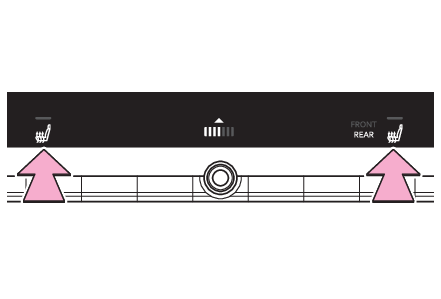
AUTO” indicator illuminates during automatic operation.Rear seats (if equipped)Using the Multimedia Display (front seats)Select “
REAR” then select
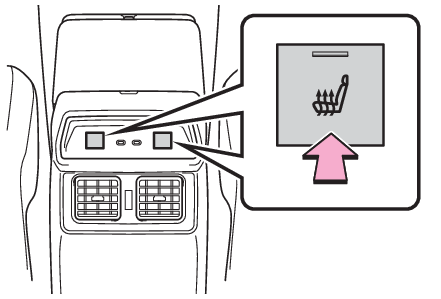
.The level indicator (red) on the Multimedia Display illuminates during operation.Using the seat heater switches (rear seats)Press the switch to turn the seat heaters on/offThe indicator on the switch illuminates during operation.Note:Operation conditionThe power switch is in ON.CustomizationThe temperature setting of the front seats can be set on the Multimedia display. (Customizable features)Warning:To prevent causes of overheating and minor burn injuriesObserve the following precautions when using a seat heater:Do not cover the seat with a blanket or cushion when using the seat heater.Do not use seat heater more than necessary.Switches
Seat ventilator switchesSwitches
Seat heater switchesSeat ventilatorsSelect
then select
on the Multimedia Display.When the switch is selected, the operation condition changes as follows.AUTO Hi (3 segments lit) Mid (2 segments lit) Lo (1 segment lit) OffThe level indicator (blue) illuminates during operation. “
AUTO” indicator illuminates during automatic operation.Note:Operation conditionThe power switch is in ON.Air conditioning system-linked control modeWhen a seat ventilator is set to Hi, the fan speed of the seat ventilator may increase
according to the fan speed of the air conditioning system.CustomizationThe fan speed of the seat ventilators can be set on the Multimedia display. (Customizable features)