Heaters
Automatic air conditioning systemAutomatic air conditioning systemAir conditioning system
Automatic air conditioning systemAir conditioning systemA/C
Automatic air conditioning systemA/CAutomatic air conditioning systemWhen the “
AUTO” switch is on, the air outlets and fan speed will automatically be changed according
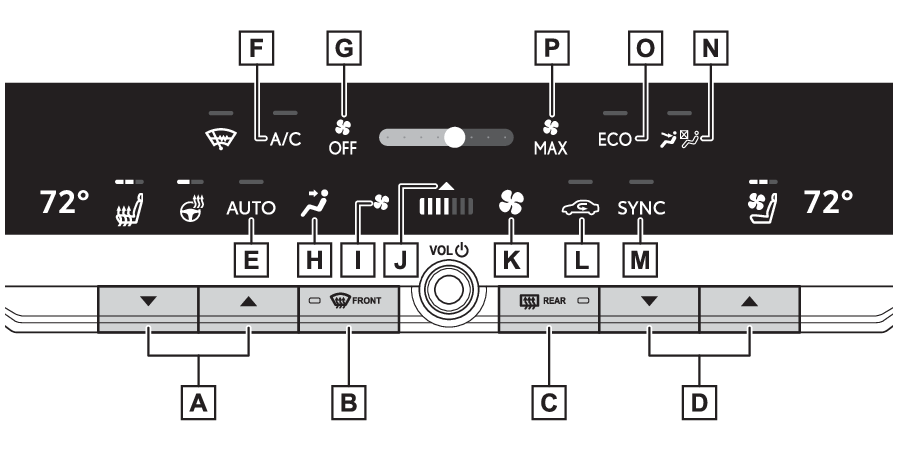
to the set temperature.Air conditioning controlsLeft-hand side temperature control switchWindshield defogger switchRear window and outside rear view mirror defoggers switchRight-hand side temperature control switch“
AUTO” switch“
A/C” switch“
OFF” switchAirflow mode control switchFan speed decrease switchOption screen switchFan speed increase switchOutside/recirculated air mode switch“
SYNC” switchFront seat concentrated airflow mode (S-FLOW) switchEco air conditioning mode switch“
MAX” switchAdjusting the temperature settingTo turn on the “
SYNC” mode, select the “
SYNC” switch.The “
SYNC” switch can be used to adjust the temperature for the driver’s and passenger’s side.
To enter individual mode, operate the passenger’s side temperature control switch
or select the “
SYNC” switch again. When the “
SYNC” mode is on, the indicator on the “
SYNC” switch illuminates.Touch and slide the icon or press the “
+” “
-” switch of the temperature display on the control screen can also adjust the temperature
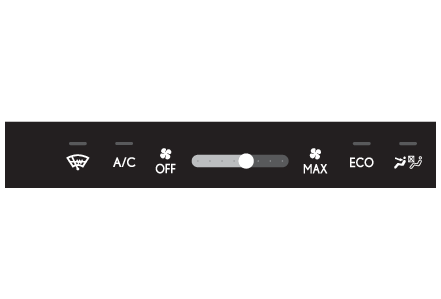
setting. Setting the fan speedTo increase the fan speed, select the fan speed increase switch or slide the icon
of the fan speed adjustment switch right. To decrease the fan speed, select the fan
speed decrease switch or slide the icon of the fan speed adjustment switch left.Select the “
OFF” switch to turns off the fan.The fan can also be stopped by sliding the icon of the fan speed adjustment switch
to the leftmost position.Select the “
MAX” switch to turns the fan speed to max.The fan can also be quickly increase the fan speed by sliding the icon of the fan
speed adjustment switch to the rightmost position.Changing the air flow modeSelect the airflow mode control switch.The airflow mode changes when the switch is selected.The air outlets and air volume changes according to the selected air flow mode. : Air flows to the upper body : Air flows to the upper body and feet : Air flows to the feet : Air flows to the feet and the windshield defogger operatesSwitching between outside air and recirculated air modesTemporarily changing the air mode to recirculated air mode is recommended to prevent
dirty air from entering the vehicle, such as when in a tunnel or heavy traffic, and
to help cool the interior when the outside air temperature is high.Select the outside/recirculated air mode switch.The air mode changes between outside air mode and recirculated air mode each time
the switch is selected. When recirculated air mode is selected, the indicator will
illuminate.The air mode may change automatically depending on the temperature setting, temperature
inside the vehicle, etc.Set cooling and dehumidification functionSelect the “
A/C” switch.When the function is on, the indicator illuminates on the “
A/C” switch.Automatic air conditioning system
Eco air conditioning modeAir conditioning system
Eco air conditioning modeA/C
Eco air conditioning modeEco air conditioning modeThe air conditioning is controlled with low fuel consumption prioritized such as reducing
fan speed, etc.Select the eco air conditioning mode switch.When the eco air conditioning mode is on, the indicator illuminates on the eco air
conditioning mode switch.Windshield defoggerSwitches
Windshield defogger switchDefogger
WindshieldDefogging the windshieldDefoggers are used to defog the windshield and front side windows.Press the windshield defogger switch.Set the outside/recirculated air mode switch to outside air mode if the recirculated
air mode is used. (It may switch automatically.)To defog the windshield and the side windows quickly, turn the air flow and temperature
up.To return to the previous mode, press the windshield defogger switch again when the
windshield is defogged.When the windshield defogger switch is on, the indicator illuminates on the windshield
defogger switch.Windows
Rear window defoggerSwitches
Rear window and outside rear view mirror defoggers switchSide mirrors
HeatersRear window defoggerOutside rear view mirrors
Outside rear view mirror defoggersMirrors
Outside rear view mirror defoggersHeaters
Outside rear view mirrorsDefogger
Outside rear view mirrorsDefogger
Rear windowDefogging the rear window and outside rear view mirrors (if equipped)Defoggers are used to defog the rear window and to remove raindrops, dew and frost
from the outside rear view mirrors (if equipped).Press the rear window and outside rear view mirror defoggers switch.The defoggers will automatically turn off after 15 minutes.When the rear window and outside rear view mirror defoggers switch is on, the indicator
illuminates on the rear window and outside rear view mirror defoggers switch.Note:Fogging up of the windowsThe windows will easily fog up when the humidity in the vehicle is high. Turning “
A/C” switch on will dehumidify the air from the outlets and defog the windshield effectively.If you turn “
A/C” switch off, the windows may fog up more easily.The windows may fog up if the recirculated air mode is used.Outside/recirculated air modeSetting to the recirculated air mode temporarily is recommended in preventing dirty
air from entering the vehicle interior and helping to cool the vehicle when the outside
air temperature is high.Outside/recirculated air mode may automatically switch depending on the temperature
setting or the inside temperature.When driving on dusty roadsClose all windows. If dust thrown up by the vehicle is still drawn into the vehicle
after closing the windows, it is recommended that the air intake mode be set to outside
air mode and the fan speed to any setting except off.When the outside temperature exceeds 75°F (24°C) and the air conditioning system is
onIn order to reduce the air conditioning power consumption, the air conditioning system
may switch to recirculated air mode automatically. This may also reduce fuel consumption.Recirculated air mode is selected as a default mode when the power switch is turned
to ON.It is possible to switch to outside air mode at any time by selecting the outside/recirculated
air mode switch.Operation of the air conditioning system in Eco drive modeIn Eco drive mode, the air conditioning system is controlled as follows to prioritize
fuel efficiency:Engine speed and compressor operation controlled to restrict heating/cooling capacityFan speed restricted when automatic mode is selectedTo improve air conditioning performance, perform the following operations:Adjust the fan speedTurn off Eco drive mode (Air conditioning system operation in Eco drive mode)Turn off Eco air conditioning modeWhen the driving mode is set to Eco driving mode, the Eco air conditioning mode will
be turned on automatically. Even in this case, the Eco air conditioning mode can be
turned off by selecting the Eco air conditioning mode switch.When the outside temperature falls to nearly 32°F (0°C)The dehumidification function may not operate even when “
A/C” switch is selected.Ventilation and air conditioning odorsTo let fresh air in, set the air conditioning system to the outside air mode.During use, various odors from inside and outside the vehicle may enter into and accumulate
in the air conditioning system. This may then cause odor to be emitted from the vents.To reduce potential odors from occurring:It is recommended that the air conditioning system be set to outside air mode prior
to turning the vehicle off.The start timing of the blower may be delayed for a short period of time immediately
after the air conditioning system is started in automatic mode.When parking, the system automatically switches to outside air mode to encourage better
air circulation throughout the vehicle, helping to reduce odors that occur when starting
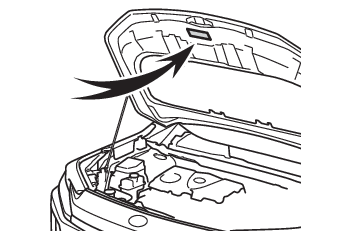
the vehicle.Air conditioning filterAir conditioning filterAir conditioning system refrigerantA label regarding the refrigerant of the air conditioning system is attached to the
hood at the location shown in the following illustration.The meaning of each symbol on the label are as follows:
Caution
Air conditioning system
Air conditioning system lubricant type
Requires registered technician to service air conditioning system
Flammable refrigerant
Warning:To prevent the windshield from fogging upDo not use the windshield defogger switch during cool air operation in extremely humid
weather. The difference between the temperature of the outside air and that of the
windshield can cause the outer surface of the windshield to fog up, blocking your
vision.When the outside rear view mirror defoggers are operating (if equipped)Do not touch the rear view mirror surfaces when the outside rear view mirror defoggers
are operating, as the surface of the mirrors will become extremely hot and may cause
burns.Notice:To prevent 12-volt battery dischargeDo not leave the air conditioning system on longer than necessary when the hybrid
system is off.When repairing/replacing parts of the air conditioning systemHave repair/replacement performed by your Toyota dealer. When a part of the air conditioning
system, such as the evaporator, is to be replaced, it must be replaced with a new
one.Using automatic modeSelect the “
AUTO” switch.The dehumidification function begins to operate. Air outlets and fan speed are automatically
adjusted according to the temperature setting and humidity.Adjust the temperature setting.To stop the operation, select the “
OFF” switch.If the fan speed setting or air flow modes are operated, the automatic mode indicator
goes off. However, automatic mode for functions other than that operated is maintained.Note:Using automatic modeFan speed is adjusted automatically according to the temperature setting and the ambient
conditions.Therefore, the fan may stop for a while until warm or cool air is ready to flow immediately
after the “
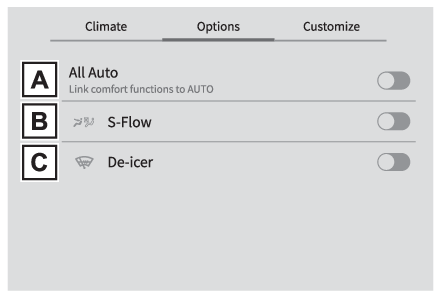
AUTO” switch is selected.Air conditioning control screenDisplay procedureSelect the option screen switch to display the option screen. (Air conditioning controls)Air conditioning control option screenTurns each function on/offEach time the switch is touched, the function turns on/off.When the function is on, the indicator on the switch illuminates.“
A/C”: Cooling and dehumidification function (Set cooling and dehumidification function): Windshield wiper de-icer (Windshield wiper de-icer (if equipped))“
ECO”: “
ECO” mode (Eco air conditioning mode): Front seat concentrated airflow mode (S-FLOW) (Front seat concentrated airflow mode (S-FLOW))Option control screenThe functions can be switched
(ON) and
(OFF).“
All Auto” control (if equipped) (“All Auto” control*)S-FLOW (Front seat concentrated airflow mode (S-FLOW))Windshield wiper de-icer (if equipped) (Windshield wiper de-icer (if equipped))Note:CustomizationSome functions can be customized.(Customizable features: Customizable features)Windshield wiper de-icerSwitches
Windshield wiper de-icer switchWindshield wiper de-icer (if equipped)This feature is used to prevent ice from building up on the windshield and wiper blades.Select the option screen switch. (Air conditioning controls)Select the
switch.The windshield wiper de-icer will automatically turn off after a period of time.Warning:To prevent burnsDo not touch the glass at lower part of the windshield or the side of the front pillars
when the windshield wiper deicer is on.Air conditioning system
Front seat concentrated airflow mode (S-FLOW)A/C
Front seat concentrated airflow mode (S-FLOW)Front seat concentrated airflow mode (S-FLOW)This function automatically controls the air conditioning airflow so that priority
is given to the front seats. Unnecessary air conditioning is suppressed, contributing
to increased fuel efficiency.Front seat concentrated airflow mode operates in the following situations.No passengers are detected in the rear seatsThe windshield defogger is not operatingWhile operating,
illuminates.Manually turning front seat concentrated airflow mode on/offIn front seat concentrated airflow mode, directing airflow to the front seats only
and to all seats can be switched via switch operation. When the mode has been switched
manually, automatic airflow control stops operating.Select
on the air conditioning option screen and switch the airflow.Indicator illuminated: Airflow to the front seats onlyIndicator off: Airflow to all the seatsNote:Operation of automatic airflow controlIn order to maintain a comfortable interior, airflow may be directed to seats without
passengers immediately after the hybrid system is started and at other times depending
on the outside temperature.After the hybrid system is started, if passengers move around inside or enter/exit
the vehicle, the system cannot accurately detect the presence of passengers and automatic
airflow control will not operate.Operation of manual airflow controlEven if the function is manually switched to directing airflow to only the front seats,
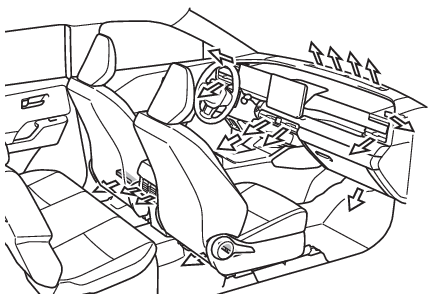
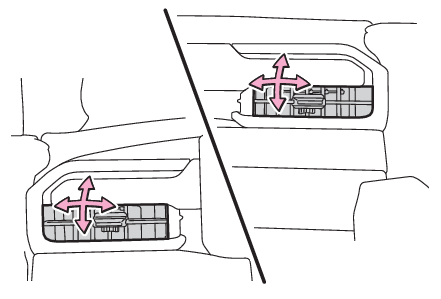
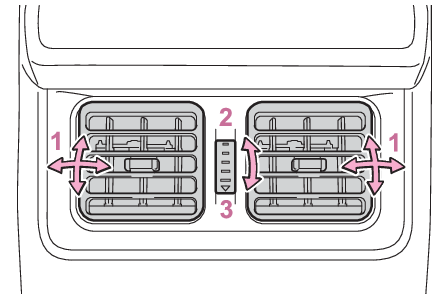
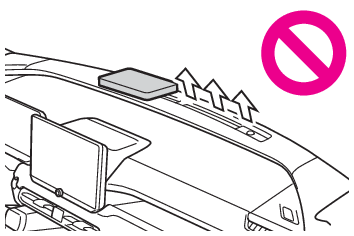
when a rear door is opened it will automatically direct airflow to all seats.To return to automatic airflow controlWith the indicator off, turn the power switch to OFF.After 60 minutes or more elapse, turn the power switch to ON.Air outlet layout and operationsLocation of air outletsThe air outlets and air volume change according to the selected air flow mode.Adjusting the air flow direction and opening/closing the air outletsFrontDirect air flow to the left or right, up or downRearDirect air flow to the left or right, up or downOpen the ventClose the ventWarning:To prevent the windshield defogger from operating improperlyDo not place anything on the instrument panel which may cover the air outlets. Otherwise,
air flow may be obstructed, preventing the windshield defoggers from defogging.