PDA (Proactive Driving Assist) When a detectable object (System operating conditions and detectable objects) is detected, the proactive driving assist supports the brake and steering operations. Warning: For safe use Driving safely is solely the responsibility of the driver. The proactive driving assist is designed to provide some assistance for braking and steering operations depending on the situation to help reduce driver operating load. However, the scope of this assistance is limited. The driver should perform brake and steering operations as necessary. Read the following items carefully. Do not overly rely on the proactive driving assist and always drive carefully. (Situations in which the system may not operate properly) The proactive driving assist is not a system which reduces the amount of attention necessary for safe driving. Even if the system is operating correctly, the surrounding conditions as recognized by the driver and detected by the system may differ. It is necessary for the driver to pay attention, assess risks, and ensure safety. Over-reliance on this system to drive the vehicle safely may lead to an accident resulting in death or serious injury. The proactive driving assist is not a system which allows for inattentive driving and is not a system which assists in poor visibility conditions. The driver is solely responsible for paying attention to their surroundings and driving safely. When turning off proactive driving assist Situations in which the sensors and the systems may not operate properly: Situations in which the sensors and the systems may not operate properly When it is necessary to disable the system: When it is necessary to disable the system System operating conditions and detectable objects According to the driving conditions, the operation and detectable objects of the proactive driving assist will change as follows.
Function Conditions Operation Detectable objects
Steering Assist (SA) Lane is detected The system anticipates the driver’s operation and supports the operation of the steering wheel. None
Deceleration Assist (DA) A preceding vehicle or an adjacent vehicle cutting in front of the vehicle is detected The vehicle is gently decelerated so that the vehicle-to-vehicle distance will not be excessively short. Preceding vehicles Motorcycles
A curve is detected ahead of the vehicle The vehicle is gently decelerated if the vehicle speed is determined to be too high for the curve ahead. None
Note: Vehicle speeds at which the system can operate Steering assistance within a lane Approximately 5 to 80 mph (10 to 140 km/h) Deceleration assistance for preceding vehicle Approximately 15 to 80 mph (20 to 140 km/h) Deceleration assistance for curve Approximately 15 to 80 mph (20 to 140 km/h) Situations in which system operation will be canceled In the following situations, system operation will be canceled: When the dynamic radar cruise control or cruise control is operating When the pre-collision system is off When the P, R or N shift position is selected The driver’s seat belt is unfastened In the following situations, the brake operation assist will be canceled: Approximately 9 mph (15 km/h) or less When a certain vehicle speed has been reached, as judged by the system, according to the surrounding conditions In the following situations, system operation may be canceled: When the brake control or output restriction control of a driving support system operates (For example: Pre-Collision System, Drive-Start Control) When the system determines that a detected object has moved away from the vehicle When lane lines can no longer be detected When the brake pedal has been depressed When the accelerator pedal has been depressed When the steering wheel has been operated with more than a certain amount of force When the turn signal lever is operated to the left/right turn position Warning: Situations in which the system may not operate properly Situations in which the lane may not be detected: Situations in which the lane may not be detected When a detectable object stops immediately before entering the path of the vehicle When changing lanes while overtaking a detectable object When passing a detectable object that is changing lanes or turning left/right When there are objects (guardrails, power poles, trees, walls, fences, poles, traffic cones, mailboxes, etc.) in the surrounding area When there are patterns or a painting ahead of the vehicle that may be mistaken for a detectable object When passing through a place with a low structure above the road (tunnel with a low ceiling, traffic sign, signboard, etc.) When driving on snowy, icy, or rutted roads When a detectable object is approaching your vehicle When your vehicle or a detectable object is wandering When the movement of a detectable object changes (change in direction, sudden acceleration or deceleration, etc.) When suddenly approaching a detectable object When a preceding vehicle or motorcycle is not directly in front of your vehicle When there is a structure above a detectable object When a detectable object cuts in front of a vehicle When approaching a vehicle ahead which is perpendicular, at an angle to the vehicle, or is facing the vehicle If a parked vehicle is perpendicular or at an angle to the vehicle When the vehicle has not been driven for a certain amount of time after the hybrid system was started While turning left or right or a few seconds after turning left or right While changing lanes or a few seconds after changing lanes When entering a curve, driving around a curve and a few seconds after driving around a curve
Changing proactive driving assist settings The proactive driving assist can be enabled/disabled through a customize setting. (Customizable features) The settings of the proactive driving assist can be changed through customize settings. (Customizable features) System operation display Depending on the situation, the following operations will be displayed. Some icons cannot be displayed unless the display is changed to the driving safety support function information screen.
Display Operation
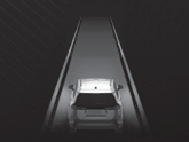
Steering assistance is being performed (The brightness increases next to the vehicle during control operation.)
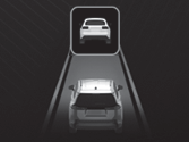
Deceleration assistance for preceding vehicle is being performed
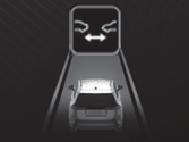
Notification to urge maintaining an appropriate vehicle-to-vehicle distance
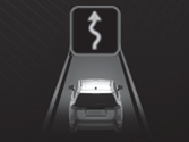
Deceleration assistance for curve is being performed
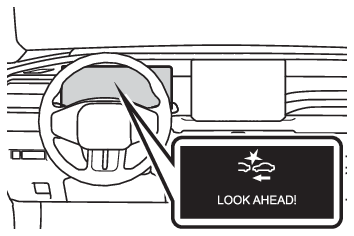
Note: Notification after preceding vehicle deceleration assistance has ended After preceding vehicle deceleration assistance has ended, if the driver does not operate the brake pedal or accelerator pedal and the vehicle approaches the preceding vehicle, the following message will be displayed and a buzzer will sound to urge the driver to decelerate. If the system determines that the driver is operating the brake pedal or accelerator pedal, the notification will be canceled.