Toyota Safety Sense 4.0
Driver monitorDriver monitorDriver monitorFunctions that use the driver monitor camera (if equipped)During controlled driving, the driver monitor camera detects the position and direction
the driver is facing, and whether their eyes are opened or closed, etc. Through this,
the system determines if the driver is checking their surroundings and if the driver
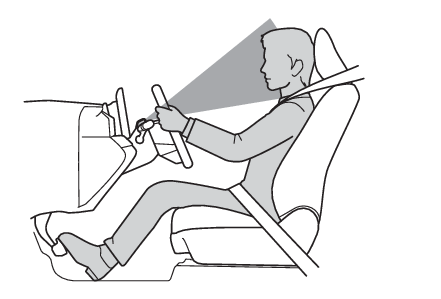
can perform driving operations.In order to operate properly, the driver monitor camera requires an unobstructed view
of the driver’s face. If the steering column or seat position is either too high or
too low, or if any other condition is present that obstructs the driver monitor camera’s
view of the driver’s face, some driving support systems may not operate properly,
or a warning message may be displayed.Warning functionIn situations such as the following, a buzzer will sound and a message will be displayed
to warn the driver.When the system determines that the driver is not paying attention to the road or
their eyes are closedWhen the driver’s face cannot be detected or the system determines that the driver
has poor driving postureWhen the system determines that the driver shows signs of drowsinessWhen the position of the steering wheel/driver’s seat is too high or too low, the
driver monitor camera may not be able to recognize the whole face of the driver which
can limit feature functionality and possibly trigger an alarm. Adjust the steering
wheel/seat position to achieve a proper seating position where the whole meter is
visible. Confirm proper seat belt routing, head restraint positioning, and appropriate
distance from the steering wheel and frontal airbag as described in this manual. If
the alarm continues even after making the recommended adjustments, contact your Toyota
dealer.Face identificationAs a function of the My Settings, the driver monitor camera is used as a face authentication
device to identify individuals. (My Settings)Traffic Jam Assist (if equipped)Traffic Jam Assist*Collaboration with other driving assist systemsSome functions of the following driving assist systems are controlled based on the
driver’s condition as detected by the driver monitor camera.PCS (Pre-Collision System)Changing the pre-collision settingLDA (Lane Departure Alert)Operating conditions of the lane departure alert function and the lane departure prevention
function, Operation of the lane departure alert function and the lane departure prevention functionDynamic radar cruise control (vehicles with Traffic Jam Assist)Conditions for extended resume time (vehicles with Traffic Jam Assist)Warning:For safe useThe warning function is not designed to prevent the driver from driving carelessly
or having a poor driving posture. Pay careful attention to the surrounding conditions
in order to ensure safe driving.The warning function cannot reduce drowsiness. If you feel unable to concentrate or
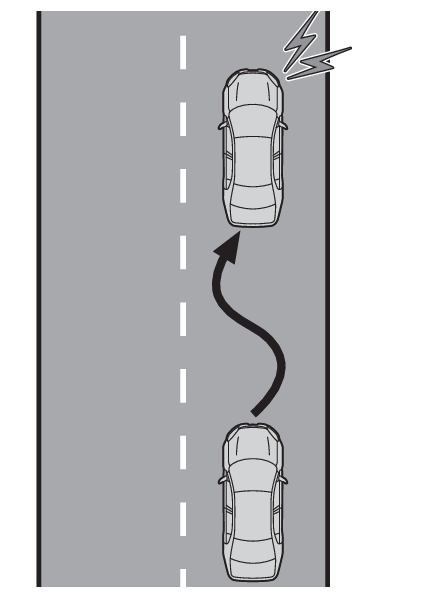
drowsy, take a break and sleep as necessary in order to ensure safe driving.Note:Warning functionThese functions may not operate when the vehicle speed is low.Situations in which the driver monitor camera may not operate properlySituations in which the driver monitor camera may not operate properly (if equipped)Driver break suggestion functionIf the vehicle is swaying, a message will be displayed and a buzzer will sound to
urge the driver to take a break.Note:Driver break suggestion functionThis function is operable when all of the following conditions are met:The vehicle speed is approximately 40 mph (65 km/h) or more.*1The vehicle speed is approximately 32 mph (50 km/h) or more.*2The lane width is approximately 9.8 ft. (3 m) or more.Depending on the condition of the vehicle and road surface, the driver break suggestion
function may not operate.Press the
meter control switch to turn off the message.*1Unless
is pressed, the message of the driver break suggestion function will remain displayed.*1*1For American Samoa*2Except for American SamoaDriver Monitor OFF indicatorChanging Driver monitor settingThe settings of Driver Monitor can be changed through customize settings. (Customizable features)If driver monitor camera setting is OFF, the camera monitoring stops, and all functions
that use the driver monitor camera (Functions that use the driver monitor camera (if equipped)) are disabled. Also, Driver Monitor OFF indicator (Warning lights and indicators) illuminates.If Warning sensitivity setting is OFF, the warning function (Warning function) is disabled but the camera monitoring continues for other functions.