Hybrid transmission (for vehicles with electronically controlled type shift lever) Select the shift position depending on your purpose and situation. Shift position purpose and functions Vehicles without paddle shift switches
Shift position Objective or function
P Parking the vehicle/starting the hybrid system
R Reversing
N Neutral (Condition in which the power is not transmitted)
D Normal driving*
B Applying engine braking or strong braking when the accelerator pedal has been released on steep downward slopes etc.
*To improve fuel efficiency and reduce noise, set the shift position in D for normal driving.
Vehicles with paddle shift switches
Shift position Objective or function
P Parking the vehicle/starting the hybrid system
R Reversing
N Neutral (Condition in which the power is not transmitted)
D Normal driving*1
S S mode driving*2 (Selecting gears in the S position (vehicles with paddle shift switches))
*1To improve fuel efficiency and reduce noise, set the shift position in D for normal driving. You can choose gear range suitable for your driving situation by operating the paddle shift switches. *2By selecting shift ranges using S mode, you can control accelerating force and engine braking force.
Note: When driving with dynamic radar cruise control or cruise control activated Even when performing the following actions with the intent of enabling engine braking, engine braking will not change because dynamic radar cruise control or cruise control will not be canceled. Vehicles with paddle shift switches: While driving in D position or S mode, downshifting to 5 or 4. (Selecting shift ranges in the D position (vehicles with paddle shift switches), Selecting gears in the S position (vehicles with paddle shift switches)) When switching the driving mode to Sport mode while driving in D position. (Driving mode select switch) Restraining sudden start (Drive-Start Control) Sudden start restraint control (Drive-Start Control [DSC]) If a message about a shift operation is shown To prevent the shift position from being selected incorrectly or the vehicle from moving unexpectedly, the shift position may be changed automatically or operating the shift lever may be required. In this case, change the shift position following the messages on the multi-information display. After recharging/reconnecting the 12-volt battery When recharging or replacing the 12-volt battery Warning: When driving on slippery road surfaces Do not accelerate or shift the shift position suddenly. Sudden changes in engine braking may cause the vehicle to spin or skid, resulting in an accident. Notice: Hybrid battery (traction battery) charge If the shift position is in N, the hybrid battery (traction battery) will not be charged. To help prevent the battery from discharging, avoid leaving the N position selected for a certain amount of time. Situations where shift control system malfunctions are possible If any of the following situations occurs, shift control system malfunctions are possible.Immediately stop the vehicle in a safe place on level ground, apply the parking brake, and then contact your Toyota dealer. When the warning message indicating the shift control system appears on the multi-information display. (If a warning message is displayed) The display indicates that no shift position is selected for more than a few seconds.
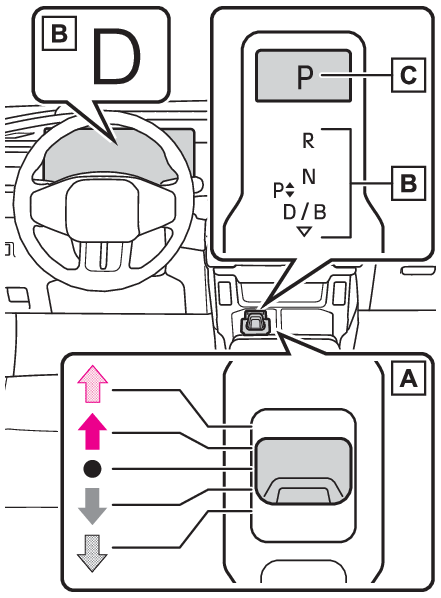
Shift position display and how to change the shift position Vehicles without paddle shift switches
Forward two positions
Forward one position
Home position
Backward one position
Backward two positions
Shift lever Operate the shift lever securely while checking the shift position indicator. The shift lever can be moved forward and backward in two positions each. Shifting to the R position:Move the shift lever forward two positions while depressing the brake pedal.*1 Shifting to the D position:Move the shift lever backward two positions while depressing the brake pedal.*2 Shifting to the N position:While depressing the brake pedal, move the shift lever one position forward if the current shift position is P, D, or B, or one position backward if the current shift position is R. Shifting to the B position:Move the shift lever backward.Shifting is possible only when the current shift position is D. *1The shift position can be changed by moving forward one position from N. *2The shift position can be changed by moving backward one position from P, N and B. Release the shift lever after each shifting operation to allow it to return to its home position ( ). When shifting from P to N, D or R, from N, D, B or R to P, from D or B to R, or from R to D, take your foot off the accelerator pedal and ensure that the brake pedal is being depressed and the vehicle is stationary. Shift position indicator Meter display: The current shift position is illuminated. Shift lever display: The current shift position is illuminated. When selecting the shift position, make sure that the shift position has been changed to the desired position by checking the shift position indicator provided on the instrument cluster. P position switch Fully stop the vehicle and set the parking brake, and then press the P position switch. When the shift position is changed to P, the shift position indicator illuminates. Check that the shift position indicator shows P.
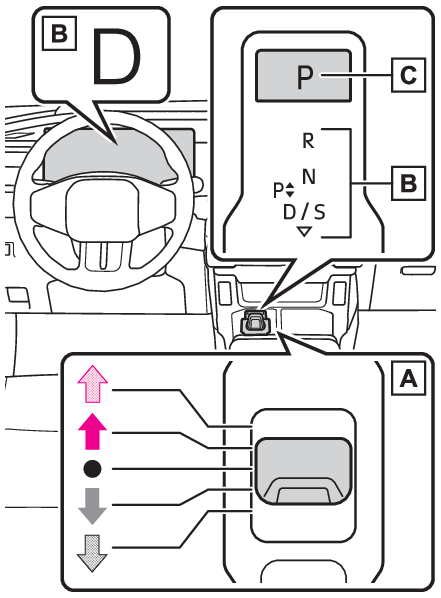
Vehicles with paddle shift switches
Forward two positions
Forward one position
Home position
Backward one position
Backward two positions
Shift lever Operate the shift lever securely while checking the shift position indicator. The shift lever can be moved forward and backward in two positions each. Shifting to the R position:Move the shift lever forward two positions while depressing the brake pedal.*1 Shifting to the D position:Move the shift lever backward two positions while depressing the brake pedal.*2 Shifting to the N position:While depressing the brake pedal, move the shift lever one position forward if the current shift position is P, D, or S, or one position backward if the current shift position is R. Shifting to the S position:Move the shift lever backward.Shifting is possible only when the current shift position is D. *1The shift position can be changed by moving forward one position from N. *2The shift position can be changed by moving backward one position from P, N and S. Release the shift lever after each shifting operation to allow it to return to its home position ( ). When shifting from P to N, D or R, from N, D, S or R to P, from D or S to R, or from R to D, take your foot off the accelerator pedal and ensure that the brake pedal is being depressed and the vehicle is stationary. Shift position indicator Meter display: The current shift position is illuminated. Shift lever display: The current shift position is illuminated. When selecting the shift position, make sure that the shift position has been changed to the desired position by checking the shift position indicator provided on the instrument cluster. P position switch Fully stop the vehicle and set the parking brake, and then press the P position switch. When the shift position is changed to P, the shift position indicator illuminates. Check that the shift position indicator shows P.
Note: Changing the shift position in each power switch mode The shift position cannot be changed when the power switch is in ACC or off. When the power switch is in ON, if the “ READY” indicator is not illuminated, the shift position can only be changed to N. When the “ READY” indicator is illuminated, the shift position can be changed from P to D, N, or R. When the “ READY” indicator is flashing, the shift position cannot be changed from P to any other position, even if the shift lever is operated. Operate the shift lever again after the “ READY” indicator changes from flashing to illuminated. Shifting the shift position from P to other positions While depressing the brake pedal firmly, operate the shift lever. If the shift lever is operated without depressing the brake pedal, the buzzer will sound and the shifting operation will be disabled. When selecting the shift position, make sure that the shift position has been changed to the desired position by checking the shift position indicator provided on the instrument cluster. The shift position cannot be changed from P to S directly. The shift position cannot be changed when In the following situations, a buzzer will sound to inform you that the shift position cannot be changed. Use the appropriate operation to attempt to change the shift position again. When attempting to change the shift position from P with the brake pedal not depressed When attempting to change the shift position from P with the accelerator pedal depressed When attempting to change the shift position from N while stopped or driving at an extremely low speed with the brake pedal not depressed When attempting to change the shift position from N while stopped or driving at an extremely low speed with the accelerator pedal depressed When the P position switch is pressed while driving When driving at an extremely low speed, the shift position may change to P. Shift operation attempted when 12-volt battery voltage drops The shift position automatically changes to N when In the following situations, a buzzer will sound to inform you that the shift position has been changed to N. Use the appropriate operation to attempt to change the shift position again. When attempting to change the shift position from D or B to R with the brake pedal not depressed (vehicles without paddle shift switches) When attempting to change the shift position from D or S to R with the brake pedal not depressed (vehicles with paddle shift switches) When attempting to change the shift position from D or B to R with the accelerator pedal depressed (vehicles without paddle shift switches) When attempting to change the shift position from D or S to R with the accelerator pedal depressed (vehicles with paddle shift switches) When attempting to change the shift position to R while the vehicle is moving forward When driving at a low speed, the shift position may change to R. When attempting to change the shift position to D while the vehicle is moving backward When driving at a low speed, the shift position may change to D. When the P position switch pressed repeatedly or continually pressed while driving Automatic P position selection function In the following situations, the shift position is automatically changed to P. When pressing the power switch with the vehicle stopped while the power switch is in ON and the shift position is in a position other than P (after the shift position has changed to P, the power switch will turn off)* If the driver’s door is opened and all of the following conditions are met, while the shift position is in a position other than P The power switch is in ON. The driver is not wearing the seat belt. The brake pedal is not depressed. To start off the vehicle after the shift position is changed to P, operate the shift lever again. When the vehicle is stopped after the hybrid system has been stopped in an emergency while driving. When voltage of the 12-volt battery drops while the shift position is in a position other than P. *When the power switch is pressed while driving at extremely slow speeds, such as immediately before stopping the vehicle, the shift position may automatically change to P. Make sure that the vehicle is completely stopped before pressing the power switch. If the shift position cannot be shifted from P There is a possibility that the 12-volt battery is discharged. Check the 12-volt battery in this situation. (When recharging or replacing the 12-volt battery) Customization Some functions can be customized. (Customizable Features) Warning: For the shift lever Do not remove the shift lever knob or use anything but a genuine Toyota shift lever knob. Also, do not hang anything on the shift lever.Doing so could prevent the shift lever from returning to position, causing unexpected accidents to occur when the vehicle is in motion. In order to prevent the shift position from accidentally being changed, do not touch the shift lever when not using them. Once you confirm that the shift indicator has changed after operation, release the shift lever.The shift position may change unexpectedly, if you return the lever to the home position with your hands or hold on, causing unexpected accidents to occur when the vehicle is in motion. P position switch Do not press the P position switch while the vehicle is moving.If the P position switch is pressed when driving at very low speeds (for example, directly before stopping the vehicle), the vehicle may stop suddenly when the shift position switches to P, which could lead to an accident. In order to prevent the shift position from accidentally being changed, do not touch the P position switch when not using them. Notice: Notes regarding shift lever and P position switch operation Avoid repeatedly operating the shift lever and P position switch in quick succession. The system protection function may activate and it will not be temporarily possible to shift the shift position other than P. If this happens, please wait for a while before attempting to change the shift position again. When exiting the vehicle (driver’s seat only) Check that the shift position indicator shows P and that the parking brake indicator is illuminated before opening the door and exiting the vehicle.
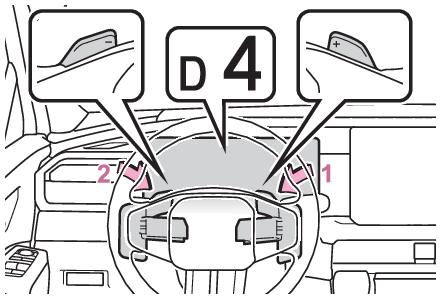
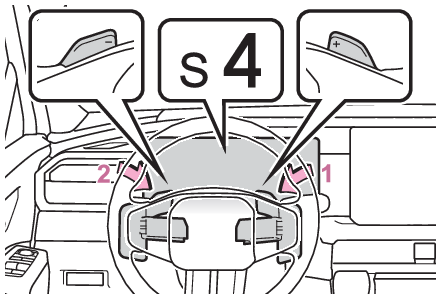
Switches ECO MODE switch Eco modeSelecting the driving mode Driving mode select switch Transmission Paddle shift switches Switches Paddle shift switches Paddle shift switches Hybrid transmission Paddle shift switches Selecting shift ranges in the D position (vehicles with paddle shift switches) To drive using temporary shift range selection, operate the “ -” paddle shift switch. Changing the shift range enables the level of engine braking force to be selected. The shift range can then be selected by operating the “ -” and “ +” paddle shift switches. Upshifting Downshifting The selected shift range, from D1 to D5, will be displayed on the meter. The initial shift range when the “ -” paddle shift switch is operated is automatically set to D4 or D5 according to the vehicle speed, etc. To return to normal D position driving, hold the “ +” paddle shift switch for a period of time. Shift ranges and their functions You can choose from 5 levels of engine braking force. A lower shift range will provide greater engine braking force than a higher shift range, and the engine revolutions will also increase. Note: When the “ -” paddle shift switch is operated with the shift lever in the D position The shift range is downshifted to a range that enables engine braking force that is suitable to driving conditions. Automatic deactivation of shift range selection in the D position Shift range selection in the D position will be deactivated in the following situations: When the vehicle comes to a stop If the accelerator pedal is depressed for more than a certain period of time When the shift position is shifted to a position other than D. Warning buzzers Downshifting Downshifting restriction warning buzzer To help ensure safety and driving performance, downshifting operation may sometimes be restricted. In some circumstances, downshifting may not be possible even when the paddle shift switch is operated. (A buzzer will sound twice.) Transmission Paddle shift switches Switches Paddle shift switches Paddle shift switches Hybrid transmission Paddle shift switches Transmission S mode Hybrid transmission S mode Selecting gears in the S position (vehicles with paddle shift switches) To enter S mode, shift the shift position to S. Gears can be selected by operating the paddle shift switches, allowing you to drive in the gear of your choosing. The shift range can then be selected by operating the “ -” and “ +” paddle shift switches. Upshifting Downshifting The selected shift range, from S1 to S6, will be displayed on the meter. The initial shift range in S mode is automatically set to S4 or S5 according to vehicle speed, etc. Shift ranges and their functions You can choose from 6 levels of accelerating force and engine braking force. A lower shift range will provide greater accelerating force and engine braking force than a higher shift range, and the engine revolutions will also increase. Note: S mode To prevent the engine from over-revving, upshifting may automatically occur when the shift range is S2 or lower. When in S4 or lower, if the paddle shift switch is held toward “ +” the shift range will be set to S6. Warning buzzers Downshifting Downshifting restrictions warning buzzer To help ensure safety and driving performance, downshifting operation may sometimes be restricted. In some circumstances, downshifting may not be possible even when the paddle shift switch is operated. (A buzzer will sound twice.) Keeping the shift position in N without activating the automatic P position selection function By performing the following operation, the shift position can be held in N until the shift position switches to P without activating the automatic P position selection function. Stop the vehicle. Turn off the brake hold system. (Brake hold function) Make sure that hybrid system is running. Then, press and hold the parking brake switch until a buzzer sounds and a message is shown on the multi-information display. The automatic mode of the parking brake is turned off. Shift the shift position to N. Press and hold the parking brake switch until the parking brake indicator light flashes. Press the power switch. The hybrid system stops with the shift position in N* Make sure to check that the buzzer sounds and “ Holding N Push P switch when done” is displayed on the multi-information display. In order to shift to a position other than N, first press the P position switch to change the shift position to P. Use this function on a level place. Block the wheels as needed. *To keep this state, do not operate the power switch. If the power switch is operated repeatedly, the power switch will turn off after the shift position has automatically changed to P. Warning: When keeping the shift position in N without activating the automatic P position selection function Use this function on a level place.On an incline, the vehicle may start to move, possibly leading to an accident and resulting in a serious injury. Block the wheels as needed.Do not use this function except when using automatic car washes.