Switches
Driving position memory switchesSteering wheel
Steering wheel position memorySeats
Seat position memorySeats
Driving position memorySeat position memoryFront seats
Seat position memoryFront seats
Driving position memoryDriver’s seat position memory
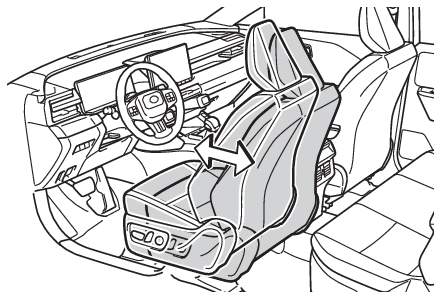
Driving position memoryDriving position memoryDriving position memory**If equippedThis feature automatically adjusts the positions of the driver’s seat and head-up
display (if equipped) to make entering and exiting the vehicle easier or to suit your
preferences.Driving positions for the registered drivers (3 patterns) and guest (1 pattern) can
be registered in My Settings.When electronic key assignment is registered for My Settings, the driving position
for each driver can be recalled (memory recall function).For details about My Settings, refer to My Settings.Seats
Power easy access systemFront seats
Power easy access systemDriver’s seat position memory
Power easy access systemPower easy access systemDriving position memory
Power easy access systemPower easy access systemWhen all of the following have been performed, the driver’s seat are automatically
adjusted to a position that allows the driver to enter and exit the vehicle easily.The shift position has been shifted to P.The power switch has been turned off.The driver’s seat belt has been unfastened.When any of the following has been performed, the driver’s seat automatically return
to their original positions.The power switch has been turned to ACC or ON.The driver’s seat belt has been fastened.Note:Operation of the power easy access systemWhen exiting the vehicle, the power easy access system may not operate if the seat
is already in the rearmost position.If the seat position is adjusted during power easy access system operation, the automatic
operation will stop. (The seat will change to manual operation.)If the seat position is adjusted during or after the power easy access system operation
when the driver is exiting the vehicle, the power easy access system will not operate
when entering the vehicle.Jam protection functionIf a person or object interferes while the seat is moving automatically, the operation
will stop.CustomizationThe seat movement amount settings of the power easy access system can be customized.
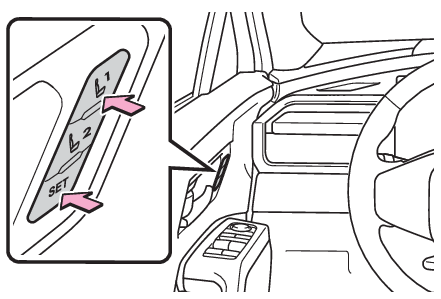
(Customizable features: Enabling easier driver entry and exit (power easy access system)*1)Recording/recalling a driving position into buttonRecording procedureCheck that the shift position is in P.Turn the power switch to ON.Adjust the driver’s seat and head-up display (if equipped) to the desired positions.While pressing the “
SET” button, or within 3 seconds after the “
SET” button is pressed, press button “
1” or “
2” until the buzzer sounds.If the selected button has already been preset, the previously recorded position will
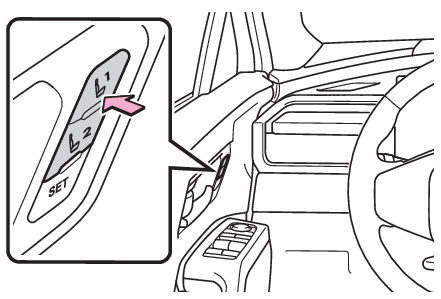
be overwritten.Recall procedureCheck that the shift position is in P.Turn the power switch to ON.Press one of the buttons for the driving position you want to recall.Note:To stop the position recall operation part-way throughPerform any of the following:Press the “
SET” button.Press button “
1” or “
2”.Operate any of the seat adjustment switches (only cancels seat position recall).Vehicles with the head-up display: Operate the meter control switches to adjust the
head-up display position (only cancels head-up display position recall).Jam protection functionIf a person or object interferes while the seat is moving automatically, the operation
will stop.Seat positions that can be memorized (Adjustment procedure)The positions adjusted by the following procedure can be recorded:Seat position adjustmentSeatback angle adjustmentSeat cushion (front) angle adjustmentVertical height adjustmentOperating the driving position memory after turning the power switch offRecorded seat positions can be activated up to 180 seconds after the driver’s door
is opened and another 60 seconds after it is closed again.In order to correctly use the driving position memory functionIf a seat position is already in the furthest possible position and the seat is operated
in the same direction, the recorded position may be slightly different when it is
recalled.When recalling the driving positionTake care when recalling the driving position so that the head restraint does not
touch the ceiling.When the recorded seat position cannot be recalledThe seat position may not be recalled in some situations when the seat position is
recorded in a certain range. For details, contact your Toyota dealer.Warning:Seat adjustment cautionTake care during seat adjustment so that the seat does not strike the rear passenger
or squeeze your body against the steering wheel.Front seats
Memory recall functionDriver’s seat position memory
Memory recall functionDriving position memory
Memory recall functionRecalling a driving position automatically when getting in the vehicle (memory recall
function)The driving positions can be automatically recalled for each registered driver by
registering electronic key assignments in My Settings when My Settings is turned on
(an individual is identified with an electronic key).Registering procedureWhen the shift position to P after driving the vehicle, the current driving position
will be recorded.Recalled procedureCarry only the key that has been assigned and registered in My Settings, and then
unlock and open the driver’s door using the smart key system or wireless remote control.The driving position other than the head-up display (if equipped) will move to the
recorded position. However, the seat will move to a position slightly behind the recorded
position in order to make entering the vehicle easier.If the driving position is in a position that has already been recorded, the driving
position will not move.Turn the power switch to ACC or ON.The seat and head-up display (if equipped) will move to the recorded position. (The
head-up display only moves when the power switch is turned to ON.)Cancelation procedureRefer to the “
MULTIMEDIA OWNER’S MANUAL”.Note:Recalling the driving position using the memory recall functionIf a door other than the driver’s door is unlocked with the smart key system, the
driving position cannot be recalled. In this case, press the driving position button
which has been set.Jam protection functionIf a person or object interferes while the seat is moving automatically, the operation
will stop.