Digital KeyDigital Key**If equippedA smartphone (including smart watch) can be used instead of the electronic key of
the vehicle. Also, Digital Key can be shared with your family or friends.Note:NFC Key CardsThe supplied NFC Key Card can be used to unlock and lock the doors and start the hybrid
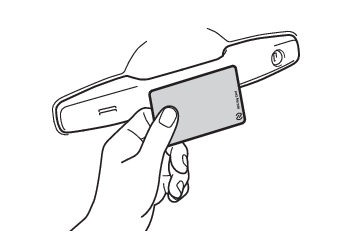
system.The NFC Key Card can be used even when the Digital Key cannot be used.Unlocking and locking the doors using the NFC Key CardHold the NFC Key Card over the position shown in the illustration on the outside of
the driver seat. All the doors are unlocked.All the doors can be locked by holding the NFC Key Card in the same way when locking
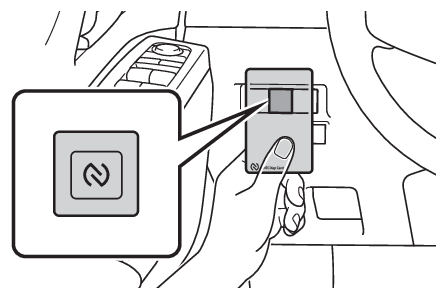
the doors.Starting the hybrid system using the NFC Key CardDepress the brake pedal with the shift position in P.Keep depressing the brake pedal until step 3.Hold the NFC Key Card over the position shown in the illustration.When the NFC Key Card is recognized, a buzzer sounds and the power switch is automatically
turned to ON. If the smart key system setting is deactivated in the vehicle customization
setting and ACC customization is in off, the power switch is turned to ACC.Press the power switch shortly and firmly.CustomizationIf the Digital Key system has been deactivated in a customized setting, refer to Digital Key*.Digital key usage conditionsIn order to use the Digital Key, you need to*:Install the Toyota AppRegister the vehicle to the customer’s Toyota App profile*Additional payment might be required to activate Digital Key services, please consult
your local a Toyota dealer or Toyota website for more informationDigital key precautionsWhen using the Digital Key, observe the usage methods and precautions described in
this manual.The Digital Key may be disabled in cases such as the following. Therefore,
please also carry the vehicle’s electronic key as necessary.If your smartphone malfunctionsWhen the service has stopped temporarily due to system maintenance or some other reasonRegistration and deletion of Digital Key can be performed when the smartphone and
server can communicate. The Digital Key can be used for a certain period of time even when the smartphone
battery needs to be recharged.If the Digital Key cannot be used, use a smart key or
NFC Key Card.When transferring vehicle ownership, make sure to delete the Digital Keys.How to delete
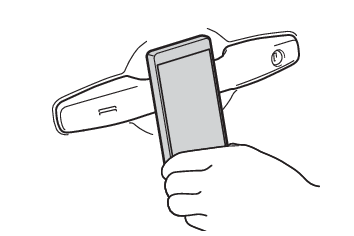
the Digital Keys, refer to the Toyota web site.If the vehicle is not operated for 14 days or more, the Digital Key will not connect
automatically. In this case, hold the Digital Key to the position shown in the illustration
below to unlock the door.A part of the services may be stopped due to server maintenance. However, registered
Digital Keys can be used for certain period of time during the maintenance.A smartphone which downloaded the Digital Key can be used to lock, unlock the doors,
start the hybrid system, and perform any other operations as same as the electronic
key of the vehicle. Be especially careful not to leave the smartphone unattended in
the car, lose it, or allow it to be stolen.If the smartphone is lost or stolen, contact
your Toyota dealer immediately.When taking your vehicle to a Toyota dealer for an inspection or repairs, make sure
to bring electronic keys and NFC Key Cards.With the Digital Key alone, the power back door’s close & lock (walk-away) function
cannot be used.The Digital Key system communicates with the smartphone, and if vehicle operation
cannot be detected, it automatically changes to power saving mode. The following functions
do not operate in power saving mode. In such cases, touch the driver door handle to
unlock the door. The power saving mode can be canceled by turning the hybrid system
switch to ON.Illuminated entry systemSituations where the function may not operate properlyThe Digital Key system uses weak radio waves. In the following situations, the communication
between the Digital Key and the vehicle may be affected, preventing the Digital Key
system from operating properly. Under the following conditions when the vehicle is near locations where strong electrical
waves and noise are generated.Locations where electromagnetic noise is generated when a train passes by, such as
under an elevated railway track or by the side of a railroad track.Locations where electromagnetic noise is generated around high-voltage lines along
roads and railroad tracks.Locations where wireless communication devices such as smart home appliances are densely
concentrated.Around facilities, factories, or vehicles that have obtained a radio license.When the Digital Key is in contact with, or is covered by the following metallic objects.Metal smartphone cases, wallets, or bagsIC cards or cards with aluminum foilCigarette packs containing aluminum foil insideCoinsHand warmersMedia such as CDs or DVDsWhen carrying the Digital Key together with the following devices that emit radio
waves.Other wireless communication devices such as cellular phones, wireless devices, cordless
phones, etc.Wireless communication devices such as smart home appliances, microwave ovens, drones,
amateur radio stations, etc.Personal computers, portable information terminals (tablets, etc.), digital audio
players, and portable game devicesInduction rice cookers, induction pots, machine tools, vacuum cleaners, washing machines,
dryers, plasma TVs, etc.If window tint with a metallic content or metallic objects are attached to the rear
window.The Digital Key may not operate properly in the following cases.When locking or unlocking the door, the smartphone is too close to the door glass,
or is positioned near the ground or in a high location.When opening the back door, the smartphone is near the ground or in a high place.If the smartphone is away from the vicinity of the center console when the hybrid
system is started.The smartphone is placed in the clothing pocket or otherwise hidden and closely adhered
to the body.The frequency used for communication between the smart phone (Digital Key) or NFC
Key Card and the NFC antenna is 13.56 MHz. This frequency band is also assigned as
the ISM band and is used for high frequency power sources, high frequency dryers,
and high frequency plasma generators. If the product is used in an environment where
these or similar devices are used, it may cause damage to the communication function.
In addition, note that the contactless communication function may be affected by static
electricity, electromagnetic noise, or surrounding metal environments. Communications
may not function properly, especially if the product is surrounded by or in contact
with metal objects.