Meter
Multi-information displayDisplay
Multi-information displayMulti-information displayThe multi-information display is used to display fuel efficiency related information
and various types of driving-related information. The multi-information display can
also be used to change the display settings and other settings.Multi-information display
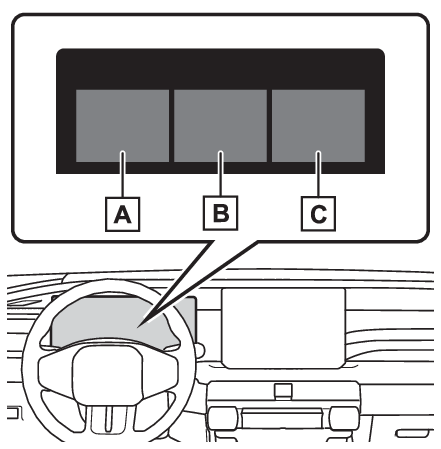
Display contentsDisplay contentsFollowing information is displayed on the multi-information display.Content display area (left)Content display area (center)Content display area (right)Content display area (center)Map display (if equipped) (Map display)Driving support system information (Driving support system information)Fuel consumption screen (Consumption screen)Blank (No items) (Settings display)Content display area (left)Fuel Economy (Fuel Economy)ECO Accelerator Guidance/“
Eco Score” (ECO Accelerator Guidance/“Eco Score”)Driving time since starting/EV Driving Ratio (EV Ratio/EV Driving Ratio)Navigation system-linked display (Navigation system-linked display)Audio system-linked display (Audio system-linked display)Drive information (Driving information display)TRIP A (Trip information display)TRIP B (Trip information display)Energy monitor (Energy monitor)“
TPWS” (Tire Pressure Warning System) (Tire pressure warning system (if equipped))AWD operation status display (if equipped) (AWD system display (AWD models))Trailer Mode BSM (Trailer Driving Assist*)Warning message displaySettings display (Settings display)Blank (No items) (Blank (No items))Content display area (right)Driving support system information display*1 (Driving support system information display)Navigation system-linked display*2 (Navigation system-linked display)*1When except Driving support system information display is selected.*2When Driving support system information display is selected.Note:Liquid crystal displaySmall spots or light spots may appear on the display. This phenomenon is characteristic
of liquid crystal displays, and there is no problem continuing to use the display.Warning:Caution for use while drivingWhen operating the multi-information display while driving, pay extra attention to
the safety of the area around the vehicle.Do not look continuously at the multi-information display while driving as you may
fail to see pedestrians, objects on the road, etc. ahead of the vehicle.The information display at low temperaturesThe information display at low temperaturesSwitches
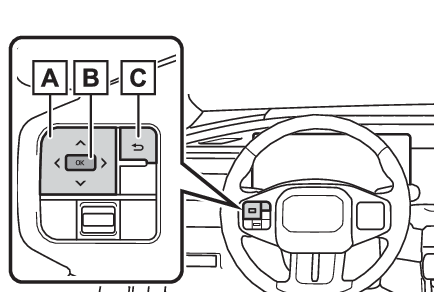
Meter control switchesSteering wheel
Meter control switchesMulti-information display
Changing the displayMulti-information display
Meter control switchesMeter control switchesMeter
Meter control switchesMeter
Meter control switchesMeter control switches/
: Change the screen, display the cursor and move the cursor up/down
/
: Change displayed content and scroll up/down the screenPress: Enter/SetPress and hold: Reset/Display customizable itemsReturn to the previous screenDriving information displayMulti-information display
Driving information displayMeter
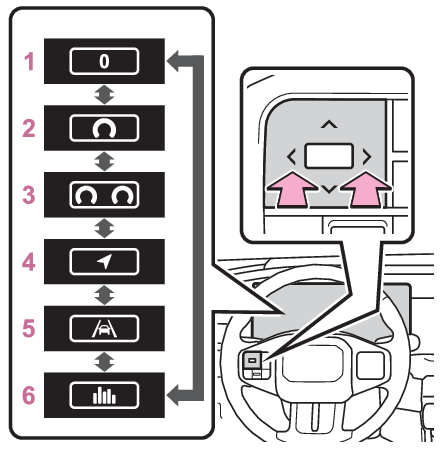
Changing the displayChanging the displayThe multi-information display is operated using the meter control switches.Changing the screenPress
or
of the meter control switches to scroll the screen.Simple1 dial2 dialsNavigationDriving support system information*ECO*For details, refer to Driving support system informationChanging settings of the meter typeThe meter type can be set from
on the multi-information display. (Gauges, meters and multi-information display (, ))Changing the display contentsPress the
or
on the meter operation switch to switch between items in the contents display area
(left).Changing the meter display itemThe items to be displayed in the contents display area (left) can be set from
on the multi-information display. (Gauges, meters and multi-information display (, ))Warning:Caution for use while drivingFor safety, avoid operating the meter control switches while driving as much as possible,
and do not look continuously at the multi-information display while driving. Stop
the vehicle and operate the meter control switches. Failure to do so may cause a steering
wheel operation error, resulting in an unexpected accident.Current fuel economyAverage fuel economyMeter
Fuel EconomyFuel EconomyCurrent fuel economyDisplays the instantaneous current Fuel Economy.Average fuel economyDisplays the average fuel economy since the function was reset or the average fuel
economy after starting.*1, 2, 3The average fuel economy selected by “
Fuel Economy” on the
screen is displayed.*1Use the displayed fuel consumption as a reference only.*2Average fuel economy after starting is reset each time the hybrid system stops.*3Average fuel economy since the function was reset can be reset by pressing and holding
. Meter
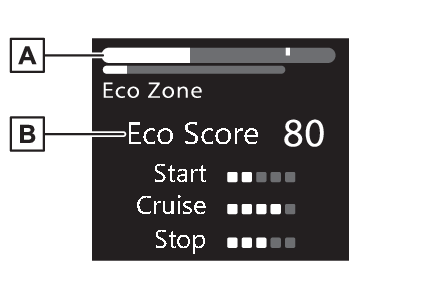
ECO Accelerator Guidance/“Eco Score”ECO Accelerator Guidance/“
Eco Score”Displays a reference operation range for using the accelerator pedal according to
driving conditions, and a score result that evaluates the current driving status.ECO Accelerator Guidance“
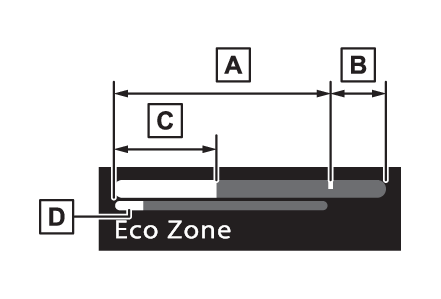
Eco Score”ECO Accelerator GuidanceECO areaShows that the vehicle is being driven in an Eco-friendly manner.Power areaShows that an Eco-friendly driving range is being exceeded (during full power driving
etc.).Current accelerationReference operation rangeA zone is displayed in blue under the Eco area which can be used as a reference operation
range for using the accelerator pedal according to driving conditions such as starting
off and cruising.The ECO Accelerator Guidance display changes according to the driving
status, such as when starting off or cruising.It is easier to drive in an Eco-friendly
manner by driving according to the display showing the accelerator pedal operations
and staying within the reference operation range.“
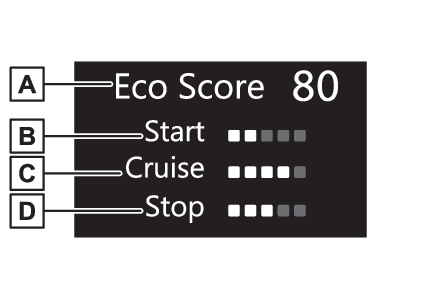
Eco Score”The driving status for the following 3 situations are evaluated in 5 levels: Smooth
start-off acceleration (“
Start”), driving without sudden acceleration (“
Cruise”) and smooth stopping (“
Stop”). Each time the vehicle is stopped, a score result is displayed out of a perfect
score of 100 points.Score result“
Start”“
Cruise”“
Stop”3 situations are displayed with each icon while driving.How to read the bar display:
Score
Bar display
Unrated
Low
High
After starting off, “
Eco Score” display does not start until the vehicle speed exceeds approximately 19mph (30km/h).The
“
Eco Score” is reset each time the vehicle starts off to start a new evaluation.Note:ECO Accelerator Guidance/“
Eco Score” will not operate whenThe ECO Accelerator Guidance/“
Eco Score” will not operate in the following situations:The Hybrid System Indicator is not operating.The vehicle is being driven using the dynamic radar cruise control.Meter
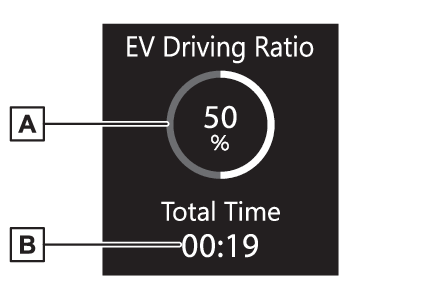
EV Ratio/EV Driving RatioEV Ratio/EV Driving RatioEV driving ratio after startingDisplays the percentage of EV driving since the hybrid system was started.*Elapsed time after startingDisplays the elapsed time since hybrid system was started.**It is reset each time the hybrid system stops.Navigation system-linked displayMulti-information display
Navigation system-linked displayMeter
Navigation system-linked displayNavigation system-linked displaySelect to display the following navigation system-linked information.Next street nameTurn-by-turn directions/guidanceDistance from the vehicle position to the destinationName of the street in which the vehicle is currently being drivenDistance to the next turn and the turn directionMulti-information display
Audio system-linked displayMeter
Audio system-linked displayAudio system-linked displayThe operating conditions of the audio system can be displayed on the multi-information
display.Drive informationDisplay
Drive informationAverage vehicle speedElapsed timeDisplay
Driving informationMeter
Driving information displayDriving information displayMulti-information display
Driving information displayDriving information displayDrive information2 items that are selected using the “
Drive Info Items” setting (average speed and distance) can be displayed vertically. Use the displayed information as a reference only.“
Average Speed”: Displays the average vehicle speed since hybrid system start“
Distance”: Displays the distance driven since hybrid system start*“
Total Time”: Displays elapsed time since hybrid system start**These items are reset each time the hybrid system stops. Meter
Trip information displayTrip information display2 items that are selected using the “
TRIP A Items” or “
TRIP B Items” setting (average speed and distance) can be displayed vertically.Use the displayed information as a reference only.“
Average Speed”: Displays the average vehicle speed since the display was reset*“
Distance”: Displays the distance driven since the display was reset*“
Total Time”: Displays elapsed time since the display was reset**To reset, display the desired item and press and hold
.Multi-information display
Energy monitorMeter
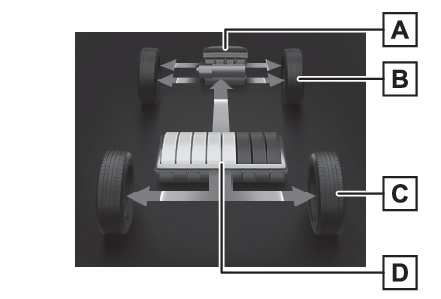
Energy monitorEnergy monitorThe energy monitor can be used to check the vehicle drive status, hybrid system operation
status and energy regeneration status.Reading the displayThe arrows will appear in accordance with the energy flow. When there is no energy
flow, arrows will not be displayed.The color of the arrows will change as followsGreen: When the hybrid battery (traction battery) is regenerated or charged.Blue: When the hybrid battery (traction battery) is in use.Red: When the gasoline engine is in use.The image shows all the arrows as an example. The actual display will vary depending
on conditions.Gasoline engineFront tiresRear tires*Hybrid battery (traction battery)*For FF vehicles, the arrows to
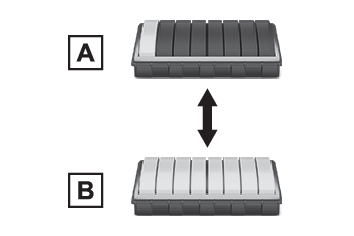
are not displayed.Note:Hybrid battery (traction battery) statusThe display changes in 8 levels according to the remaining charge amount of the hybrid
battery (traction battery).These images are examples only, and may vary slightly from actual conditions.LowHighRemaining charge amount warning of hybrid battery (traction battery)The buzzer sounds intermittently when the hybrid battery (traction battery) remains
without charging while the shift position is in N, or the remaining charge amount
drops below a certain level. If the remaining charge amount drops further, the buzzer
sounds continuously.When a warning message is shown on the multi-information display and the buzzer sounds,
follow the instructions displayed on the screen to perform troubleshooting.Tire inflation pressureTire pressure warning system (if equipped)Meter
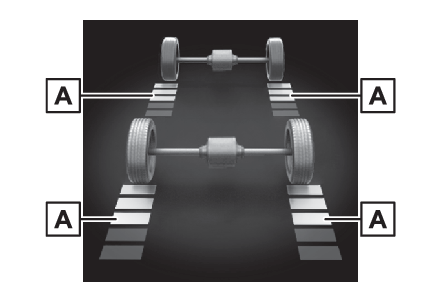
AWD system displayAWD system display (AWD models)Torque distribution displayDisplays the drive status of each wheel in 6 steps from 0 to 5.The illustration used is intended as an example, and may differ from the image that
is actually displayed on the multi-information display.Meter
Blank (No items)Blank (No items)Displays no drive information contents on the multi-information display.Meter
Settings displaySettings displayVehicle settings and the content displayed on the screen can be changed by using the
meter control switches.Setting procedurePress
or
with the cursor on the content display area (left), then select
and then press
.Press
or
of the meter control switches and move the cursor to select the item for changing
settings.If the function is turned on and off or the volume, etc. is changed on the setting
screen, the setting is changed each time
is pressed.For functions that allow operation contents, display contents, etc., to
be selected, the setting screen is displayed by pressing and holding
. When the setting screen is displayed, select the setting or desired value (time,
etc.) with
.For functions whose level can be adjusted, operate
or
of the meter control switches and adjust the desired item.After changing the settings, press
of the meter control switches.HUD (Head-up display) (if equipped) (Using the head-up display)Changing settings of the head-up display. Vehicle Settings PBD (Power Back Door) (if equipped)Select to set up the following items.System settingsSelect to enable/disable the power back door system.“
Hands Free”*Select to enable/disable the Hands Free Power Back Door.“
Opening Adjustment”Select the open position when power back door is fully open.*Vehicles with Hands Free Power Back Door“
Scheduled Maintenance”Select to reset the scheduled maintenance information (message indicating maintenance
is required and distance until the next maintenance) after all maintenance is performed.Rear Seat Reminder (Rear Seat Reminder function)Select to enable/disable the Rear Seat Reminder function.Warning buzzer volumeThe volume of the warning buzzer can be adjusted. Settings“
Language”Select to change the language on the multi-information display.“
Units”Select to change the unit of measure for fuel consumption.Meter TypeSelect to change the meter type setting. (Changing settings of the meter type) EV indicatorSelect to enable/disable the EV indicator.Displayed informationThe items to be displayed in the contents display area (left)
can be set. (Display contents)Drive InfoSelect to change displayed items on drive information display. (Driving information display)TRIP A ItemsSelect to change displayed items on TRIP A display. (Multi-information display)TRIP B ItemsSelect to change displayed items on TRIP B display. (Multi-information display)Pop-Up DisplaySelect to enable/disable the pop-up displays, which may appear in some
situations.CalendarSelect to set up the calendar.This can only be set if GPS calibration of clock
is turned off in the multimedia system settings.Default SettingsSelect to reset the meter display settings.Note:Brightness of the meter lights (day mode and night mode)The brightness of the meter lights can be adjusted individually.In the following situations, the meters changes between day mode and night mode.Day mode: When the tail lights are off or when the tail lights are on but the surrounding
area is brightNight mode: When the tail lights are on and the surrounding area is darkSuspension of the settings displaySome settings cannot be changed while driving. When changing settings, park the vehicle
in a safe place.If a warning message is displayed, operation of the settings display will be suspended.Warning:Cautions during setting up the displayAs the engine needs to be running during setting up the display, ensure that the vehicle
is parked in a place with adequate ventilation. In a closed area such as a garage,
exhaust gases including harmful carbon monoxide (CO) may collect and enter the vehicle.
This may lead to death or a serious health hazard.Notice:During setting up the displayTo prevent 12-volt battery discharge, ensure that the hybrid system is operating while
setting up the display features.Meter
Map displayMap displayDisplays the map data according to the navigation system.Driving support system informationMulti-information display
Driving support system informationMeter
Driving support system information displayDriving support system information displayThe operating state of the following systems can be displayed on the multi-information
display or head-up display (if equipped).LTA (Lane Tracing Assist) (LTA (Lane Tracing Assist))LDA (Lane Departure Alert) (LDA (Lane Departure Alert))Dynamic radar cruise control (Dynamic radar cruise control)Cruise control (Cruise control)Meter
Consumption screenConsumption screenBy selecting
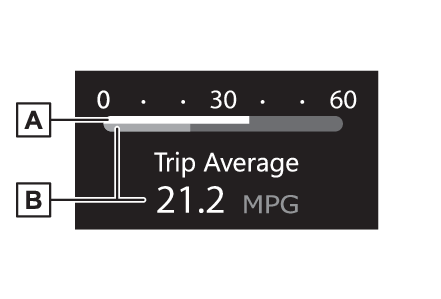
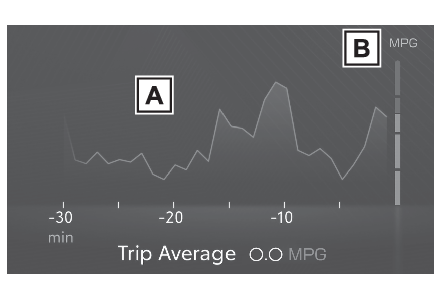
during page switching (Display contents), the information on fuel consumption is displayed in the contents display area (center).Displaying the current fuel consumption screenSelect
on the multi-information display.Select “
Meter Setting”, “
Meter type” and then “
ECO”.Select “
Fuel consumption”, “
Graph type”, and then “
Current data”.Current fuel consumption screenFuel consumption in the past 30 minutesCurrent fuel consumptionUse the displayed average fuel consumption as a reference. The image is an example
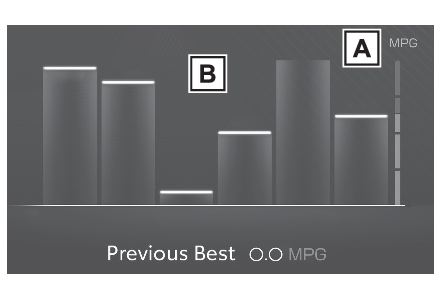
only, and may vary slightly from actual conditions.Displaying the history fuel consumption screenSelect
on the multi-information display.Select “
Meter Setting”, “
Meter type” and then “
ECO”.Select “
Fuel consumption”, “
Graph type”, and then “
History data”.History fuel consumption screenLatest fuel consumptionPrevious fuel consumption recordUse the displayed average fuel consumption as a reference. The image is an example
only, and may vary slightly from actual conditions.Note:Updating the history dataSelect
on the multi-information display.Select “
Meter Setting”, “
Meter type” and then “
ECO”.Select “
Fuel consumption” and then “
Update history data”.Resetting the dataSelect
on the multi-information display.Select “
Meter Setting”, “
Meter type” and then “
ECO”.Select “
Fuel consumption”.Select “
Clear current data” or “
Clear history data”, whichever you want to reset.Warning message displaySelect to display warning messages and measures to be taken if a malfunction is detected.
(If a warning message is displayed)Suggestion functionMulti-information display
Suggestion functionMulti-information display
Convenience Services (Suggestion function)Convenience Services (Suggestion function)Meter
Convenience Services (Suggestion function)Convenience Services (Suggestion function)Displays suggestions to the driver in the following situations. To select a response
to a displayed suggestion, use the meter control switches.Suggestion to enable the power back door (if equipped)If the power back door system is disabled (setting on
set to off) and the power back door switch on the instrument panel is operated, a
suggestion message will be displayed asking if you wish to enable the power back door
system.To enable the power back door system, select “
Yes”.Suggestion to turn off the headlightsIf the headlights are left on for a certain amount of time after the power switch
has been turned off, a suggestion message will be displayed.When the headlight switch is in the AUTO position:The message asking if you wish to turn the headlights off is displayed.To turn the headlights off, select “
Yes”.If the driver’s door is opened after the power switch is turned off, this suggestion
message will not be displayed.Note:CustomizationSome functions can be customized. (Gauges, meters and multi-information display (, ))Meter
Items displayed when the power switch is turned offItems displayed when the power switch is turned offThe following items will be displayed on the multi-information display when the power
switch is turned off.Average fuel consumption since starting*Distance driven since starting*Driving time since starting*EV driving ratio since starting**It is reset each time the hybrid system stops.