Toyota Safety Sense 2.5
Dynamic radar cruise control with full-speed rangeRadar cruise control
Dynamic radar cruise control with full-speed rangeDynamic radar cruise control with full-speed range
FunctionCruise control
Dynamic radar cruise control with full-speed rangeDynamic radar cruise control with full-speed rangeIn vehicle-to-vehicle distance control mode, the vehicle automatically accelerates,
decelerates and stops to match the speed changes of the preceding vehicle even if
the accelerator pedal is not depressed. In constant speed control mode, the vehicle
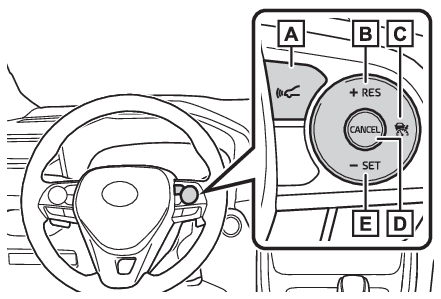
runs at a fixed speed.Use the dynamic radar cruise control with full-speed range on freeways and highways.Vehicle-to-vehicle distance control mode (Driving in vehicle-to-vehicle distance control mode)Constant speed control mode (Selecting constant speed control mode)Switches
Vehicle-to-vehicle distance switchSystem ComponentsMulti-information display
Dynamic radar cruise control with full-speed rangeDisplay
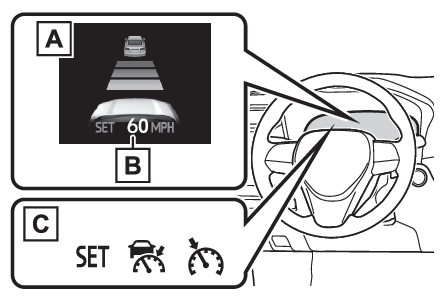
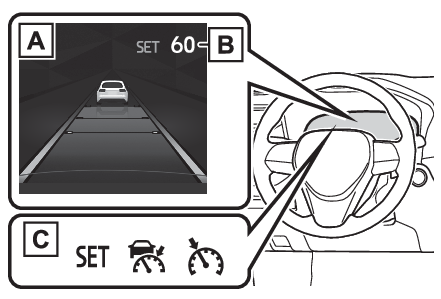
Dynamic radar cruise control with full-speed rangeMeter displayVehicles with 7-inch multi-information displayMulti-information displaySet speedIndicatorsVehicles with 12.3-inch multi-information displayMulti-information displaySet speedIndicatorsSwitches
Dynamic radar cruise control with full-speed rangeOperation switchesVehicle-to-vehicle distance switch“
+RES” switchCruise control main switchCancel switch“
-SET” switchWarning:Before using dynamic radar cruise control with full-speed rangeDriving safely is the sole responsibility of the driver. Do not rely solely on the
system, and drive safely by always paying careful attention to your surroundings.The dynamic radar cruise control with full-speed range provides driving assistance
to reduce the driver’s burden. However, there are limitations to the assistance provided.Read the following conditions carefully. Do not overly rely on this system and always
drive carefully.When the sensor may not be correctly detecting the vehicle ahead: When the sensor may not be correctly detecting the vehicle aheadConditions under which the vehicle-to-vehicle distance control mode may not function
correctly: Conditions under which the vehicle-to-vehicle distance control mode may not function
correctlySet the speed appropriately depending on the speed limit, traffic flow, road conditions,
weather conditions, etc. The driver is responsible for checking the set speed.Even when the system is functioning normally, the condition of the preceding vehicle
as detected by the system may differ from the condition observed by the driver. Therefore,
the driver must always remain alert, assess the danger of each situation and drive
safely. Relying solely on this system or assuming the system ensures safety while
driving can lead to an accident, resulting in death or serious injury.Switch the dynamic radar cruise control with full-speed range setting to off, using
the cruise control main switch when not in use.Cautions regarding the driving assist systemsObserve the following precautions, as there are limitations to the assistance provided
by the system. Failure to do so may cause an accident resulting in death or serious
injury.Assisting the driver to measure following distanceThe dynamic radar cruise control with full-speed range is only intended to help the
driver in determining the following distance between the driver’s own vehicle and
a designated vehicle traveling ahead. It is not a mechanism that allows careless or
inattentive driving, and it is not a system that can assist the driver in low-visibility
conditions.It is still necessary for driver to pay close attention to the vehicle’s surroundings.Assisting the driver to judge proper following distanceThe dynamic radar cruise control with full-speed range determines whether the following
distance between the driver’s own vehicle and a designated vehicle traveling ahead
is within a set range. It is not capable of making any other type of judgement. Therefore,
it is absolutely necessary for the driver to remain vigilant and to determine whether
or not there is a possibility of danger in any given situation.Assisting the driver to operate the vehicleThe dynamic radar cruise control with full-speed range does not include functions
which will prevent or avoid collisions with vehicles ahead of your vehicle. Therefore,
if there is ever any possibility of danger, the driver must take immediate and direct
control of the vehicle and act appropriately in order to ensure the safety of all
involved.Situations unsuitable for dynamic radar cruise control with full-speed rangeDo not use dynamic radar cruise control with full-speed range in any of the following
situations. Doing so may result in inappropriate speed control and could cause an
accident resulting in death or serious injury.Roads where there are pedestrians, cyclists, etc.In heavy trafficOn roads with sharp bendsOn winding roadsOn slippery roads, such as those covered with rain, ice or snowOn steep downhills, or where there are sudden changes between sharp up and down gradientsVehicle speed may exceed the set speed when driving down a steep hill.At entrances to freeways and highwaysWhen weather conditions are bad enough that they may prevent the sensors from detecting
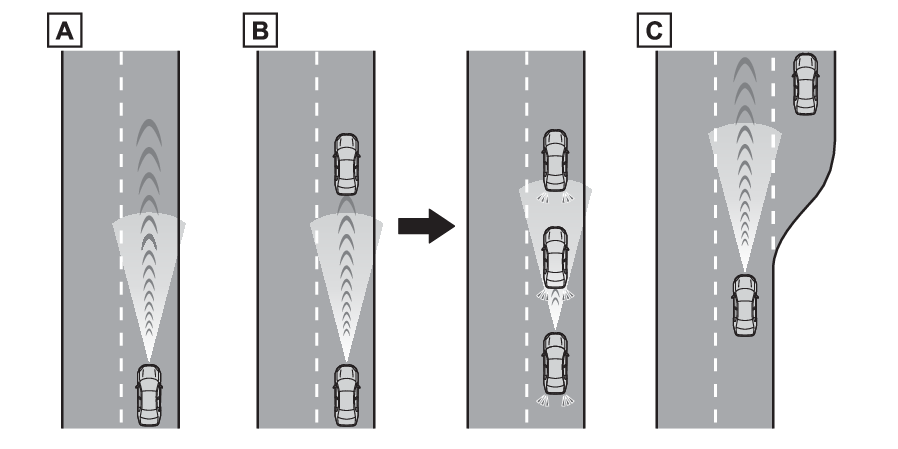
correctly (fog, snow, sandstorm, heavy rain, etc.)When there is rain, snow, etc. on the front surface of the radar or front cameraIn traffic conditions that require frequent repeated acceleration and decelerationWhen your vehicle is towing a trailer or during emergency towingWhen an approach warning buzzer is heard oftenDriving in vehicle-to-vehicle distance control modeThis mode employs a radar to detect the presence of vehicles up to approximately 328
ft. (100 m) ahead, determines the current vehicle-to-vehicle following distance, and
operates to maintain a suitable following distance from the vehicle ahead. The desired
vehicle-to-vehicle distance can also be set by operating the vehicle-to-vehicle distance
switch.When driving on downhill slopes, the vehicle-to-vehicle distance may become shorter.Example of constant speed cruisingWhen there are no vehicles aheadThe vehicle travels at the speed set by the driver.Example of deceleration cruising and follow-up cruisingWhen a preceding vehicle driving
slower than the set speed appearsWhen a vehicle is detected running ahead of you, the system automatically decelerates
your vehicle. When a greater reduction in vehicle speed is necessary, the system applies
the brakes (the stop lights will come on at this time). The system will respond to
changes in the speed of the vehicle ahead in order to maintain the vehicle-to-vehicle
distance set by the driver. Approach warning warns you when the system cannot decelerate
sufficiently to prevent your vehicle from closing in on the vehicle ahead.When the vehicle ahead of you stops, your vehicle will also stop (vehicle is stopped
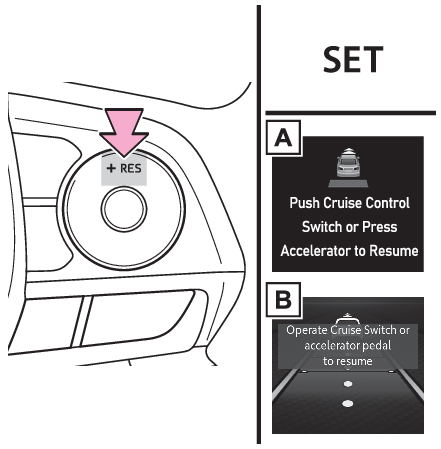
by system control). After the vehicle ahead starts off, pressing the “
+RES” switch or depressing the accelerator pedal (start-off operation) will resume follow-up
cruising. If the start-off operation is not performed, system control continues to
keep your vehicle stopped.When the turn signal lever is operated and your vehicle moves to an overtaking lane
while driving at 50 mph (80 km/h) or more, the vehicle will accelerate to help to
overtake a passing vehicle.The system’s identification of what is an overtaking lane may be determined solely
based on the location of the steering wheel in the vehicle (left side driver position
versus right side driver position.) If the vehicle is driven to a region where the
overtaking lane is on a different side from where the vehicle is normally driven,
the vehicle may accelerate when the turn signal lever is operated in the opposite
direction to the overtaking lane (e.g., if the driver normally operates the vehicle
in a region where the overtaking lane is to the right but then drives to a region
where the overtaking lane is to the left, the vehicle may accelerate when the right
turn signal is activated).Example of accelerationWhen there are no longer any preceding vehicles driving slower
than the set speedThe system accelerates until the set speed is reached. The system then returns to
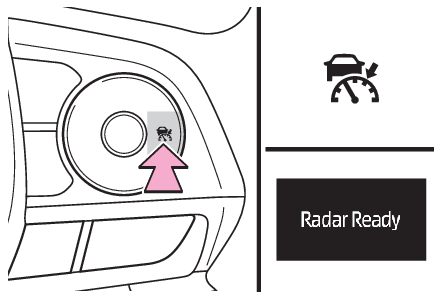
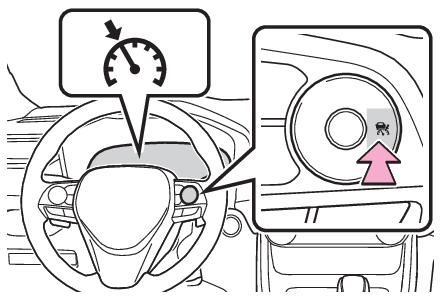
constant speed cruising.Setting the vehicle speed (vehicle-to-vehicle distance control mode)Press the cruise control main switch to activate the cruise control.Dynamic radar cruise control indicator will come on and a message will be displayed
on the multi-information display. Press the switch again to deactivate the cruise
control.If the cruise control main switch is pressed and held for 1.5 seconds or more, the
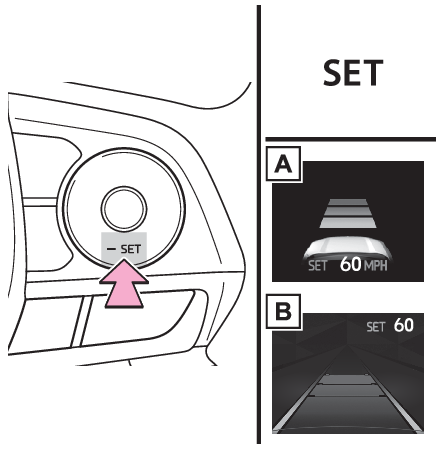
system turns on in constant speed control mode. (Selecting constant speed control mode)Accelerate or decelerate, with accelerator pedal operation, to the desired vehicle
speed (at or above approximately 20 mph [30 km/h]) and press the “
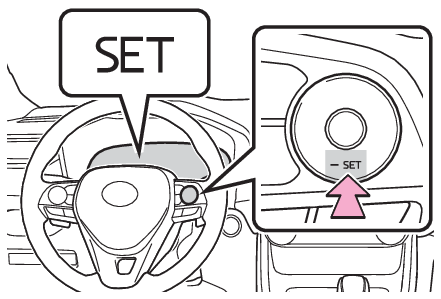
-SET” switch to set the speed.Cruise control “
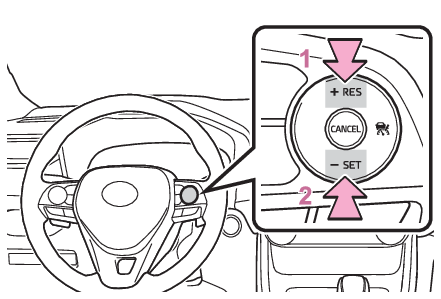
SET” indicator will come on.The vehicle speed at the moment the switch is released becomes the set speed.Vehicles with 7-inch multi-information displayVehicles with 12.3-inch multi-information displayAdjusting the set speedAdjusting the set speed by the switchTo change the set speed, press the “
+RES” or “
-SET” switch until the desired set speed is displayed.Increases the speed (Except when the vehicle has been stopped by system control in
vehicle-to-vehicle distance control mode)Decreases the speedFine adjustment: Press the switch.Large adjustment: Press and hold the switch to change the speed, and release when
the desired speed is reached.In the vehicle-to-vehicle distance control mode, the set speed will be increased or
decreased as follows:For the U.S. mainland and HawaiiFine adjustment: By 1 mph (1.6 km/h)*1 or 1 km/h (0.6 mph)*2 each time the switch is pressedLarge adjustment: Increases or decreases in 1 mph (1.6 km/h)*1 or 1 km/h (0.6 mph)*2 increments for as long as the switch is heldExcept for the U.S. mainland and HawaiiFine adjustment: By 1 mph (1.6 km/h)*1 or 1 km/h (0.6 mph)*2 each time the switch is pressedLarge adjustment: Increases or decreases in 5 mph (8 km/h)*1 or 5 km/h (3.1 mph)*2 increments for as long as the switch is heldIn the constant speed control mode (Selecting constant speed control mode), the set speed will be increased or decreased as follows:Fine adjustment: By 1 mph (1.6 km/h)*1 or 1 km/h (0.6 mph)*2 each time the switch is pressedLarge adjustment: The speed will continue to change while the switch is held.*1When the set speed is shown in “MPH”*2When the set speed is shown in “km/h”Increasing the set speed by the accelerator pedalAccelerate with accelerator pedal operation to the desired vehicle speedPress the “
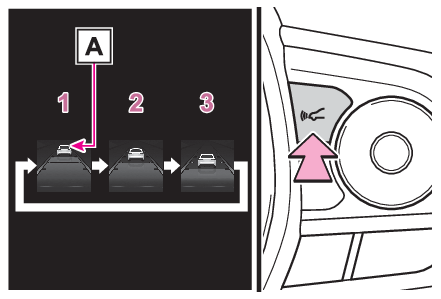
-SET” switchChanging the vehicle-to-vehicle distance (vehicle-to-vehicle distance control mode)Pressing the switch changes the vehicle-to-vehicle distance as follows:LongMediumShortIf a vehicle is running ahead of you, the preceding vehicle mark
will also be displayed.Vehicle-to-vehicle distance settings (vehicle-to-vehicle distance control mode)Select a distance from the table below. Note that the distances shown correspond to
a vehicle speed of 50 mph (80 km/h). Vehicle-to-vehicle distance increases/decreases
in accordance with vehicle speed. When the vehicle is stopped by system control, the
vehicle stops at a certain vehicle-to-vehicle distance depending on the situation.
Distance options
Vehicle-to-vehicle distance
Long
Approximately 160 ft. (50 m)
Medium
Approximately 130 ft. (40 m)
Short
Approximately 100 ft. (30 m)
Resuming follow-up cruising when the vehicle has been stopped by system control (vehicle-to-vehicle
distance control mode)After the vehicle ahead of you starts off, press the “
+RES” switch.Your vehicle will also resume follow-up cruising if the accelerator pedal is depressed
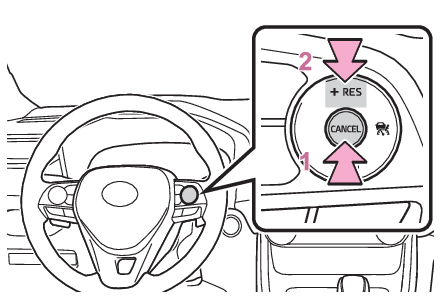
after the vehicle ahead of you starts off.Vehicles with 7-inch multi-information displayVehicles with 12.3-inch multi-information displayCanceling and resuming the speed controlPressing the cancel switch cancels the speed control.The speed control is also canceled when the brake pedal is depressed. (When the vehicle
has been stopped by system control, depressing the brake pedal does not cancel the
setting.)Pressing the “
+RES” switch resumes the cruise control and returns vehicle speed to the set speed.Warning buzzers
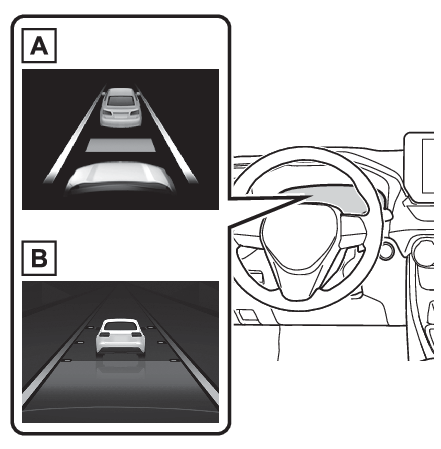
Approach warningApproach warningApproach warning (vehicle-to-vehicle distance control mode)When your vehicle is too close to a vehicle ahead, and sufficient automatic deceleration
via the cruise control is not possible, the display will flash and the buzzer will
sound to alert the driver. An example of this would be if another driver cuts in front
of you while you are following a vehicle. Depress the brake pedal to ensure an appropriate
vehicle-to-vehicle distance.Vehicles with 7-inch multi-information displayVehicles with 12.3-inch multi-information displayWarnings may not occur whenIn the following instances, warnings may not occur even when the vehicle-to-vehicle
distance is small.When the speed of the preceding vehicle matches or exceeds your vehicle speedWhen the preceding vehicle is traveling at an extremely slow speedImmediately after the cruise control speed was setWhen depressing the accelerator pedalSelecting constant speed control modeWhen constant speed control mode is selected, your vehicle will maintain a set speed
without controlling the vehicle-to-vehicle distance. Select this mode only when vehicle-to-vehicle
distance control mode does not function correctly due to a dirty radar, etc.With the cruise control off, press and hold the cruise control main switch for 1.5
seconds or more.Immediately after the switch is pressed, the dynamic radar cruise control indicator
will come on. Afterwards, it switches to the cruise control indicator.Switching to constant speed control mode is only possible when operating the switch
with the cruise control off.Accelerate or decelerate, with accelerator pedal operation, to the desired vehicle
speed (at or above approximately 20 mph [30 km/h]) and press the “
-SET” switch to set the speed.Cruise control “
SET” indicator will come on.The vehicle speed at the moment the switch is released becomes the set speed.Adjusting the speed setting: Adjusting the set speedCanceling and resuming the speed setting: Canceling and resuming the speed controlNote:Dynamic radar cruise control with full-speed range can be set whenThe shift lever is in D.The desired set speed can be set when the vehicle speed is approximately 20 mph (30
km/h) or more. (However, when the vehicle speed is set while driving at below approximately
20 mph [30 km/h], the set speed will be set to approximately 20 mph [30 km/h].)Accelerating after setting the vehicle speedThe vehicle can accelerate by operating the accelerator pedal. After accelerating,
the set speed resumes. However, during vehicle- to-vehicle distance control mode,
the vehicle speed may decrease below the set speed in order to maintain the distance
to the preceding vehicle.When the vehicle stops while follow-up cruisingPressing the “
+RES” switch while the vehicle ahead stops will resume follow-up cruising if the vehicle
ahead starts off within approximately 3 seconds after the switch is pressed.If the vehicle ahead starts off within 3 seconds after your vehicle stops, follow-up
cruising will be resumed.Automatic cancelation of vehicle-to-vehicle distance control modeVehicle-to-vehicle distance control mode is automatically canceled in the following
situations.VSC is activated.TRAC is activated for a period of time.When the VSC or TRAC system is turned off.The sensor cannot detect correctly because it is covered in some way.When the brake control or output restriction control of a driving support system operates.(For
example: Pre-Collision System, Drive-Start Control)The parking brake is operated.The vehicle is stopped by system control on a steep incline.The following are detected when the vehicle has been stopped by system control:The driver is not wearing a seat belt.The driver’s door is opened.The vehicle has been stopped for about 3 minutesIf vehicle-to-vehicle distance control mode is automatically canceled for any reasons
other than the above, there may be a malfunction in the system. Contact your Toyota
dealer.Automatic cancelation of constant speed control modeConstant speed control mode is automatically canceled in the following situations:Actual vehicle speed is more than approximately 10 mph (16 km/h) below the set vehicle
speed.Actual vehicle speed falls below approximately 20 mph (30 km/h).VSC is activated.TRAC is activated for a period of time.When the VSC or TRAC system is turned off.When the brake control or output restriction control of a driving support system operates.(For
example: Pre-Collision System, Drive-Start Control)The parking brake is operated.If constant speed control mode is automatically canceled for any reasons other than
the above, there may be a malfunction in the system. Contact your Toyota dealer.Brake operationA brake operation sound may be heard and the brake pedal response may change, but
these are not malfunctions.Warning messages and buzzers for dynamic radar cruise control with full-speed rangeWarning messages and buzzers are used to indicate a system malfunction or to inform
the driver of the need for caution while driving. If a warning message is shown on
the multi-information display, read the message and follow the instructions. (If a warning message is displayed on the multi-information display, If a warning message is displayed)When the sensor may not be correctly detecting the vehicle aheadIn the case of the following and depending on the conditions, operate the brake pedal
when deceleration of the system is insufficient or operate the accelerator pedal when
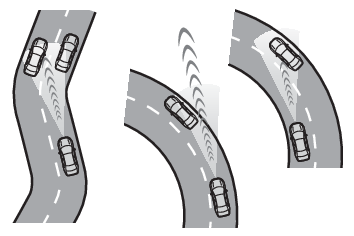
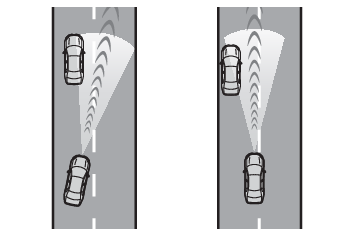
acceleration is required.As the sensor may not be able to correctly detect these types of vehicles, the approach
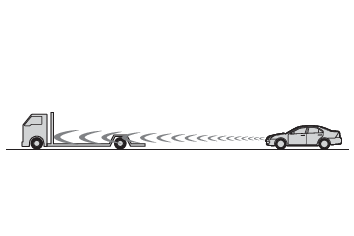
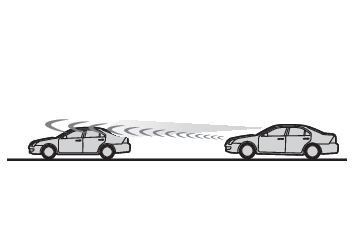
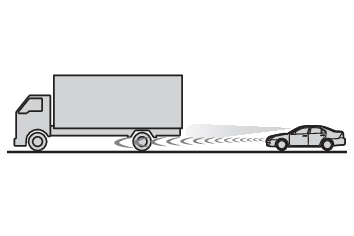
warning (Approach warning (vehicle-to-vehicle distance control mode)) may not be activated.Vehicles that cut in suddenlyVehicles traveling at low speedsVehicles that are not moving in the same laneVehicles with small rear ends (trailers with no load on board, etc.)Motorcycles traveling in the same laneWhen water or snow thrown up by the surrounding vehicles hinders the detecting of
the sensorWhen your vehicle is pointing upwards (caused by a heavy load in the luggage compartment,
etc.)Preceding vehicle has an extremely high ground clearanceConditions under which the vehicle-to-vehicle distance control mode may not function
correctlyIn the case of the following conditions, operate the brake pedal (or accelerator pedal,
depending on the situation) as necessary.As the sensor may not be able to correctly detect vehicles ahead, the system may not
operate properly.When the road curves or when the lanes are narrowWhen steering wheel operation or your position in the lane is unstableWhen the vehicle ahead of you decelerates suddenlyWhen driving on a road surrounded by a structure, such as in a tunnel or on a bridgeWhile the vehicle speed is decreasing to the set speed after the vehicle accelerates
by depressing the accelerator pedal