Smart key systemKeyless entry
Smart key systemDoor lock
Smart key systemKeys
Keyless entrySmart key system**If equippedThe following operations can be performed simply by carrying the electronic key on
your person, for example in your pocket. The driver should always carry the electronic
key.Locks and unlocks the side doors (Unlocking and locking the doors from the outside)Locks and unlocks the back door (Unlocking and locking the back door from the outside)Starts the engine (Starting the engine)Note:Smart key system
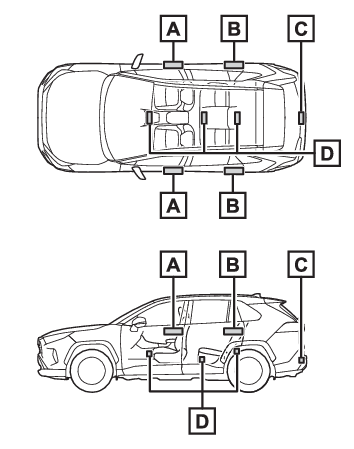
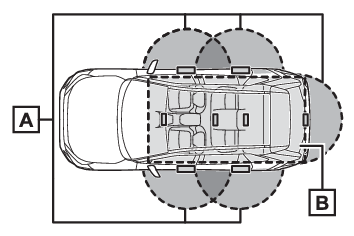
Antenna locationAntenna (Smart key system)Antenna locationAntennas outside the cabin (front)Antennas outside the cabin (rear) (if equipped)Antenna outside the luggage compartmentAntennas inside the cabinEffective range (areas within which the electronic key is detected)When locking or unlocking the doorsThe system can be operated when the electronic key is within about 2.3 ft. (0.7 m)
of the front door handles, rear door handles (if equipped) and back door opener switch.
(Only the doors detecting the key can be operated.)When starting the engine or changing engine switch modesThe system can be operated when the electronic key is inside the vehicle.Keys
Warning buzzerIf an alarm sounds or a warning message is displayedAn alarm sounds and warning message displays shown on the multi-information display
are used to protect against unexpected accidents or theft of the vehicle resulting
from erroneous operation. When a warning message is displayed, take appropriate measures
based on the displayed message.When only an alarm sounds, circumstances and correction procedures are as follows.When an exterior alarm sounds once for 5 seconds
Situation
Correction procedure
An attempt was made to lock the vehicle while a door was open.
Close all of the doors and lock the doors again.
When an interior alarm pings continuously
Situation
Correction procedure
The engine switch was turned to ACC while the driver’s door was open (or the driver’s
door was opened while the engine switch was in ACC).
Turn the engine switch to OFF and close the driver’s door.
Battery-saving functionThe battery-saving function will be activated in order to prevent the electronic key
battery and the battery from being discharged while the vehicle is not in operation
for a long time.In the following situations, the smart key system may take some time to unlock the
doors.The electronic key has been left in an area of approximately 6 ft. (2 m) of the outside
of the vehicle for 10 minutes or longer.The smart key system has not been used for 5 days or longer.If the smart key system has not been used for 14 days or longer, the doors cannot
be unlocked at any doors except the driver’s door. In this case, take hold of the
driver’s door handle, or use the wireless remote control or the mechanical key, to
unlock the doors.Wireless remote control
Battery-saving functionKeys
Battery-saving functionElectronic key
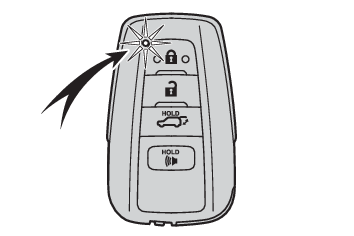
Battery-saving functionTurning an electronic key to battery-saving modeWhen battery-saving mode is set, battery depletion is minimized by stopping the electronic
key from receiving radio waves.Press
twice while pressing and holding
.Confirm that the electronic key indicator flashes 4 times. While the battery-saving
mode is set, the smart key system cannot be used. To cancel the function, press any
of the electronic key buttons.Electronic keys that will not be used for long periods of time can be set to the battery-saving
mode in advance.When electronic key function stopsIf the position of the electronic key has not changed for a certain amount of time
such as when the electronic key is left somewhere, the function of the electronic
key stops to reduce depletion of the battery.In this case, function can automatically
be restored by moving the position of the key such as by lifting it up.Conditions affecting operationThe smart key system uses weak radio waves. In the following situations, the communication
between the electronic key and the vehicle may be affected, preventing the smart key
system, wireless remote control and engine immobilizer system from operating properly.(Ways
of coping: If the electronic key does not operate properly (vehicles with smart key system))When the electronic key battery is depletedNear a TV tower, electric power plant, gas station, radio station, large display,
airport or other facility that generates strong radio waves or electrical noiseWhen the electronic key is in contact with, or is covered by the following metallic
objectsCards to which aluminum foil is attachedCigarette boxes that have aluminum foil insideMetallic wallets or bagsCoinsHand warmers made of metalMedia such as CDs and DVDsWhen other wireless key (that emits radio waves) is being used nearbyWhen carrying the electronic key together with the following devices that emit radio
wavesPortable radio, cellular phone, cordless phone or other wireless communication devicesAnother vehicle’s electronic key or a wireless key that emits radio wavesPersonal computers or personal digital assistants (PDAs)Digital audio playersPortable game systemsIf window tint with a metallic content or metallic objects are attached to the rear
windowWhen the electronic key is placed near a battery charger or electronic devicesWhen parking in a coin-operated parking lot (Radio waves used to detect vehicles may
affect the smart key system.)Note for the entry functionEven when the electronic key is within the effective range (detection areas), the
system may not operate properly in the following cases:The electronic key is too close to the window or outside door handle, near the ground,
or in a high place when the doors are locked or unlocked.The electronic key is on the instrument panel, luggage cover or floor, or in the door
pockets or glove box when the engine is started or engine switch modes are changed.Do not leave the electronic key on top of the instrument panel or near the door pockets
when exiting the vehicle. Depending on the radio wave reception conditions, it may
be detected by the antenna outside the cabin and the door will become lockable from
the outside, possibly trapping the electronic key inside the vehicle.As long as the electronic key is within the effective range, the doors may be locked
or unlocked by anyone. However, only the doors detecting the electronic key can be
used to unlock the vehicle.Even if the electronic key is not inside the vehicle, it may be possible to start
the engine if the electronic key is near the window.The doors may unlock if a large amount of water splashes on the door handle, such
as in the rain or in a car wash when the electronic key is within the effective range.
(The doors will automatically be locked after approximately 60 seconds if the doors
are not opened and closed.)If the wireless remote control is used to lock the doors when the electronic key is
near the vehicle, there is a possibility that the door may not be unlocked by the
entry function. (Use the wireless remote control to unlock the doors.)Touching the door lock sensor while wearing gloves may delay or prevent lock operation.
Remove the gloves and touch the lock sensor again.When the lock operation is performed using the lock sensor, recognition signals will
be shown up to two consecutive times. After this, no recognition signals will be given.If the door handle becomes wet while the electronic key is within the effective range,
the door may lock and unlock repeatedly. In that case, follow the following correction
procedures to wash the vehicle:Place the electronic key in a location 6 ft. (2 m) or more away from the vehicle.
(Take care to ensure that the key is not stolen.)Set the electronic key to battery-saving mode to disable the smart key system. (Turning an electronic key to battery-saving mode)If the electronic key is inside the vehicle and a door handle becomes wet during a
car wash, a message may be shown on the multi-information display and a buzzer will
sound outside the vehicle. To turn off the alarm, lock all the doors.The lock sensor may not work properly if it comes into contact with ice, snow, mud,
etc. Clean the lock sensor and attempt to operate it again, or use the lock sensor
on the lower part of the door handle.A sudden approach to the effective range or door handle may prevent the doors from
being unlocked. In this case, return the door handle to the original position and
check that the doors unlock before pulling the door handle again.If there is another electronic key in the detection area, it may take slightly longer
to unlock the doors after the door handle is gripped.When the vehicle is not driven for extended periodsTo prevent theft of the vehicle, do not leave the electronic key within 6 ft. (2 m)
of the vehicle.The smart key system can be deactivated in advance. (Smart key system*1)Battery-saving mode can reduce the power consumption of electronic keys. (Turning an electronic key to battery-saving mode)To operate the system properlyMake sure to carry the electronic key when operating the system. Do not get the electronic
key too close to the vehicle when operating the system from the outside of the vehicle.Depending on the position and holding condition of the electronic key, the key may
not be detected correctly and the system may not operate properly. (The alarm may
go off accidentally, or the door lock prevention may not operate.)If the smart key system does not operate properlyLocking and unlocking the doors: Use the mechanical key. (Locking and unlocking the doors)Starting the engine: Starting the engineCustomizationSettings (e.g. smart key system) can be changed.(Customizable features: Smart key system* and wireless remote control (, ))If the smart key system has been deactivated in a customized setting, refer to the
explanations for the following operations.Locking and unlocking the doors:Use the wireless remote control or mechanical key.
(Using the wireless remote controlVehicles without smart key systemVehicles with smart
key system, Locking and unlocking the doors)Starting the engine and changing engine switch modes: Starting the engineStopping the engine: Stopping the engineWarning:Caution regarding interference with electronic devicesPeople with implantable cardiac pacemakers, cardiac resynchronization therapy-pacemakers
or implantable cardioverter defibrillators should maintain a reasonable distance between
themselves and the smart key system antennas. (Antenna location)The radio waves may affect the operation of such devices. If necessary, the entry
function can be disabled. Ask your Toyota dealer for details, such as the frequency
of radio waves and timing of the emitted radio waves. Then, consult your doctor to
see if you should disable the entry function.Users of any electrical medical device other than implantable cardiac pacemakers,
cardiac resynchronization therapy-pacemakers or implantable cardioverter defibrillators
should consult the manufacturer of the device for information about its operation
under the influence of radio waves.Radio waves could have unexpected effects on the
operation of such medical devices.Ask your Toyota dealer for details on disabling the entry function.