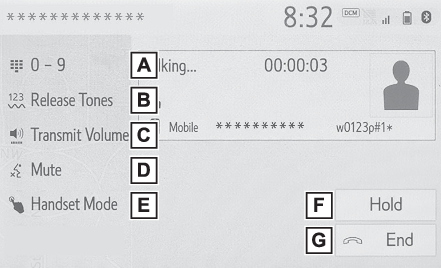
Talking on the Bluetooth® hands-free systemTalking on the Bluetooth® hands-free systemWhile talking on the phone, the following screen is displayed. The operations outlined
below can be performed on this screen.Talking on the Bluetooth® hands-free system
Call screen operationCall screen operationSelect to display the keypad to send tones. (By keypad)Select to send tones. This button only appears when a number that contains a (w) is
dialed in hands-free mode. (By selecting “Release Tones”)Select to adjust your voice volume that the other party hears from their speaker.
(Transmit volume setting)Select to mute your voice to the other party.Select to change handset modes between hands-free and cellular phone.Select to put a call on hold.To cancel this function, select “
Activate”.Select to hang up the phone.Note:Changing from hands-free call to cellular phone call is not possible while driving.Only when the vehicle is not moving, the contact image can be displayed.When cellular phone call is changed to hands-free call, the hands-free screen will
be displayed and its functions can be operated on the screen.Changing between cellular phone call and hands-free call can be performed by operating
the cellular phone directly.Transferring methods and operations will be different depending on the type of cellular
phone you have.For the operation of the cellular phone, see the manual that comes with it.Talking on the Bluetooth® hands-free system
Sending tonesSending tonesBy keypadThis operation cannot be performed while driving.Select “
0-9”.Enter the desired number.By selecting “
Release Tones”“
Release Tones” appear when a continuous tone signal(s) containing a (w) is registered in the contact
list.This operation can be performed while driving.Select “
Release Tones”.Note:A continuous tone signal is a character string that consists of numbers and the characters
“
p” or “
w”. (e.g. 056133w0123p#1)When the “
p” pause tone is used, the tone data up until the next pause tone will be automatically
sent after 2 seconds have elapsed. When the “
w” pause tone is used, the tone data up until the next pause tone will be automatically
sent after a user operation is performed.Release tones can be used when automated operation of a phone based service such as
an answering machine or bank phone service is desired. A phone number with continuous
tone signals can be registered in the contact list.Tone data after a “
w” pause tone can be operated by voice command during a call.Talking on the Bluetooth® hands-free system
Transmit volume settingTransmit volume settingSelect “
Transmit Volume”.Select the desired level for the transmit volume.Select
to display previous screen.Note:The sound quality of the voice heard from the other party’s speaker may be negatively
impacted.“
Transmit Volume” is dimmed when mute is on.Switching calls while a call is in progressWhen there are no calls on hold during a call: “
Hold” is displayed. When selected, the current call is placed on hold.When there is no current call, but there is a call on hold: “
Activate” is displayed. When selected, the system switches to the call that was on hold.When there is another call on hold during a call: “
Swap Calls” is displayed. When selected, the current call is placed on hold, and the system
switches to the call that was on hold.Note:This function may not be available depending on the type of cellular phone.Talking on the Bluetooth® hands-free system
Incoming call waitingIncoming call waitingWhen a call is interrupted by a third party while talking, the incoming screen is
displayed.Select “
Answer” or press the
switch on the steering wheel to start talking with the other party.To refuse to receive the call: Select “
Decline”.Each time “
Swap Calls” is selected, the party who is on hold will be switched.Note:This function may not be available depending on the type of Bluetooth® phone.