Placing a call using the Bluetooth® hands-free systemPlacing a call using the Bluetooth® hands-free systemAfter a Bluetooth® phone has been registered, a call can be made using the hands-free system. There
are several methods by which a call can be made, as described below.Calling methods on the Bluetooth® phoneDisplay the phone top screen. (Phone screen operation)Select the desired method to call from.Calling methods from phone screenBy call history (By call history)By favorites (By favorites list)By contacts (By contacts list)By keypad* (By keypad)By message (Calling the message sender)Also the following lists are available from each function’s screenBy voice command system (Voice command system operation)By home screen (By home screen)*0The operation cannot be performed while driving.Placing a call using the Bluetooth® hands-free system
By call historyBy call historyUp to 30 of the latest call history items (missed, incoming and outgoing) can be selected.Display the phone top screen. (Phone screen operation)Select “
History” and select the desired contact.If the contact which is not registered on the contact list is selected, the name is
displayed as “
Unknown Contact”. In this case, select the number to make a call properly.Check that the dialing screen is displayed.Note:The icons of call type are displayed.: Missed call: Incoming call: Outgoing callWhen making a call to the same number continuously, only the most recent call is listed
in call history.When a phone number registered in the contact list is received, the name is displayed.Number-withheld calls are also memorized in the system.International phone calls may not be made depending on the type of Bluetooth® phone you have.The list should group together consecutive entries with the same phone number and
same call type. For example, two calls from John’s mobile would be displayed as follows:
John (2)Placing a call using the Bluetooth® hands-free system
By favorites listBy favorites listCalls can be made using registered contacts which can be selected from a contact list.
(By contacts list)Display the phone top screen. (Phone screen operation)Select “
Favorites” and select the desired contact.Select the desired number.Check that the dialing screen is displayed.Placing a call using the Bluetooth® hands-free system
By contacts listBy contacts listCalls can be made by using contact data which is transferred from a registered cellular
phone. (Contacts/Call history settings screen)Up to 5000 contacts (maximum of 4 phone numbers, e-mail addresses and addresses per
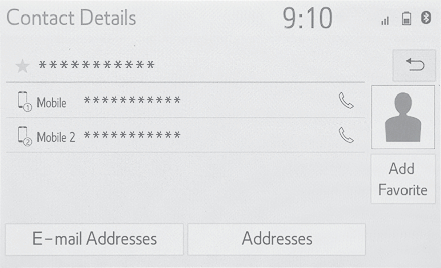
contact) can be registered in the contact list.Display the phone top screen. (Phone screen operation)Select “
Contacts” and select the desired contact.Select the desired number.“
Add Favorite”/“
Remove Favorite”: Select to register/remove the contact in the favorites list. (Registering contacts in the favorites list in a different way (from the contact details
screen))“
E-mail Addresses”: Select to display all registered e-mail addresses for the contact.“
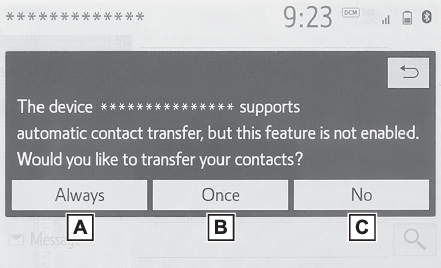
Addresses”: Select to display all registered addresses for the contact.Check that the dialing screen is displayed.When the contact list is emptyFor PBAP compatible Bluetooth® phones when “
Automatic Transfer” is set to on (Contacts/Call history settings screen)Contacts are transferred automatically.For PBAP compatible Bluetooth® phones when “
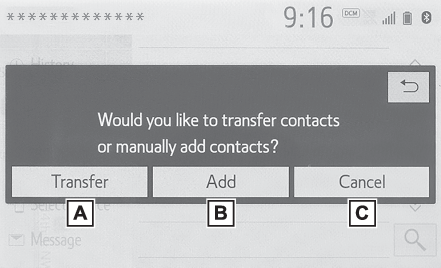
Automatic Transfer” is set to off (Contacts/Call history settings screen)Select the desired item.Select to always transfer all the contacts from a connected cellular phone automatically.Select to transfer all the contacts from a connected cellular phone only once.Select to cancel transferring.Check that a confirmation screen is displayed when the operation is complete.For PBAP incompatible but OPP compatible Bluetooth® phonesSelect the desired item.Select to transfer the contacts from the connected cellular phone.Transfer the contact
data to the system using a Bluetooth® phone.Select to add a new contact manually.Follow the steps in “Registering a new contact
to the contacts list” from step 2. (Registering a new contact to the contacts list)Select to cancel transferring.Note:If your cellular phone is neither PBAP nor OPP compatible, the contacts cannot be
transferred using Bluetooth®. But the contacts can be transferred from USB device. (From USB device)Depending on the type of Bluetooth® phone:It may be necessary to perform additional steps on the phone when transferring contact
data.The registered image in the contact list may not transfer depending on the type of
Bluetooth® phone connected.Placing a call using the Bluetooth® hands-free system
By keypadBy keypadDisplay the phone top screen. (Phone screen operation)Select “
Keypad” and enter the phone number.Select
or press the
switch on the steering wheel.Check that the dialing screen is displayed.Note:Depending on the type of Bluetooth® phone being connected, it may be necessary to perform additional steps on the phone.Placing a call using the Bluetooth® hands-free system
By home screenBy home screenDisplay the home screen. (Home screen operation)Select the desired contact.Check that the dialing screen is displayed.Registering a new contactSelect and hold the screen button to add a contact.Select the desired contact.Select the desired number.Note:If there is no contact in the contacts list, the contacts cannot be registered at
the home screen.The contact cannot be registered at the home screen while driving.