Voice command systemSteering switchVoice command systemThe voice command system enables the radio, phone dialing, etc. to be operated using
voice commands. Refer to the command list for samples of voice commands. (Command list)Voice command system
Using the voice command systemUsing the voice command systemSteering switch
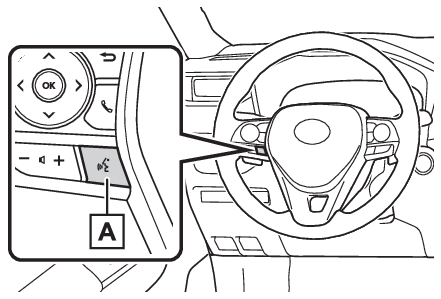
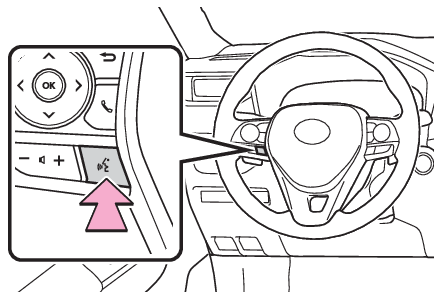
Talk switchSteering switchTalk switchVoice command systemPress the talk switch to start the voice command system. To cancel voice command,
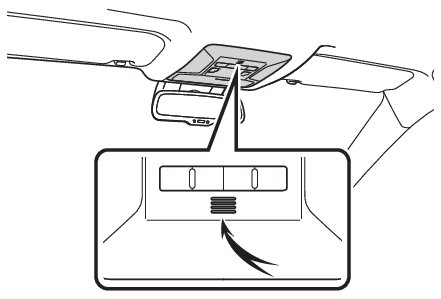
press and hold the talk switch.When an Apple CarPlay connection is establishedPress and hold the talk switch to start Siri. To cancel Siri, press the talk switch.Press the talk switch to start the voice command system.MicrophoneIt is unnecessary to speak directly into the microphone when giving a command.Note:Voice commands may not be recognized if:Spoken too quickly.Spoken at a low or high volume.The roof or windows are open.Passengers are talking while voice commands are spoken.The fan speed of the air conditioning system is set at high.The air conditioning vents are turned towards the microphone.In the following conditions, the system may not recognize the command properly and
using voice commands may not be possible:The command is incorrect or unclear. Note that certain words, accents or speech patterns
may be difficult for the system to recognize.There is excessive background noise, such as wind noise.Normally, it is necessary to wait for a beep before saying a command. To enable the
ability to talk over prompts and say commands before the beep, enable the voice prompt
interrupt function. (Displaying the voice settings screen)This system may not operate immediately after the engine switch is in ACC or ON.Notice:Do not touch and put a sharp object to the microphone. It may cause failure.Voice command system
Voice command system operationVoice command system operationThe voice command system is operated by saying commands which correspond to a supported
function. To display examples of commands for supported functions, select a function
button on the screen after starting the voice command system.Operation from the main menuPress the talk switch.Voice guidance for the voice command system can be skipped by pressing the talk switch.If “
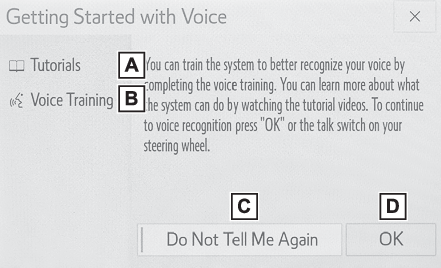
Getting Started with Voice” screen is displayed, select “
OK” or press the talk switch. (Increasing the voice recognition performance)After hearing a beep, say a supported command.To display sample commands of the desired function, say the desired function or select
the desired function button. To display more commands, select “
More Commands”.Selecting “
Help” or saying “
Help” prompts the voice command system to offer examples of commands and operation methods.Registered POIs, registered names in the contacts list etc., can be said in the place
of the “
<>” next to the commands. (Command list)For example: Say “
Find a restaurant”, “
Call John Smith” etc.If a desired outcome is not shown, or if no selections are available, perform one
of the following to return to the previous screen:Say “
Go back”.Select
.To cancel voice recognition, select
, say “
Cancel”, or press and hold the talk switch.To perform the voice command operation again, select “
Start Over” or say “
Start over”.To suspend voice command operation, select “
Pause” or say “
Pause”. To resume the voice command operation, select “
Resume” or press the talk switch.Note:If the system does not respond or the confirmation screen does not disappear, press
the talk switch and try again.If a voice command cannot be recognized, voice guidance will say “
Sorry, could you repeat that?” and voice command reception will restart.If a voice command cannot be recognized 3 consecutive times, voice recognition will
be canceled.Voice recognition prompts can be changed on the voice settings screen. (Displaying the voice settings screen)This function can be used to cancel voice guidance by turning the voice prompts off.
When you press the talk switch while using this setting, a beep sounds, and then you
can immediately say a command.Some voice guidance can be canceled by setting voice prompts to off. Use this setting
when it is desirable to say a command immediately after pressing the talk switch and
hearing a beep.Increasing the voice recognition performanceTo increase voice recognition performance, use the “
Tutorials” and “
Voice Training” functions on the “
Getting Started with Voice” screen. These functions are only available when the vehicle is not moving.The “
Tutorials” and “
Voice Training” functions can also be started on the voice settings screen. (Displaying the voice settings screen)Press the talk switch.Select the desired item to be set.Select to display the voice command tutorials.Select to train the voice command system.The user will be asked to say 10 sample phrases. This will help the voice command
system adapt to the user’s accent.Select to prevent the screen from being displayed again.Select to proceed to the voice command screen.