Operating information Note: The use of a cellular phone inside or near the vehicle may cause a noise from the speakers of the audio/visual system which you are listening to. However, this does not indicate a malfunction. Notice: To avoid damage to the audio/visual system: Be careful not to spill beverages over the audio/visual system. Radio Usually, a problem with radio reception does not mean there is a problem with the radio ― it is just the normal result of conditions outside the vehicle. For example, nearby buildings and terrain can interfere with FM reception. Power lines or phone wires can interfere with AM signals. And of course, radio signals have a limited range. The farther the vehicle is from a station, the weaker its signal will be. In addition, reception conditions change constantly as the vehicle moves. Here are some common reception problems that may not indicate a problem with the radio as described. FM Fading and drifting stations: Generally, the effective range of FM is about 25 miles (40 km). Once outside this range, you may notice fading and drifting, which increase with the distance from the radio transmitter. They are often accompanied by distortion. Multi-path: FM signals are reflective, making it possible for 2 signals to reach the vehicle’s antenna at the same time. If this happens, the signals will cancel each other out, causing a momentary flutter or loss of reception. Static and fluttering: These occur when signals are blocked by buildings, trees or other large objects. Increasing the bass level may reduce static and fluttering. Station swapping: If the FM signal being listened to is interrupted or weakened, and there is another strong station nearby on the FM band, the radio may tune in the second station until the original signal can be picked up again. AM Fading: AM broadcasts are reflected by the upper atmosphere ― especially at night. These reflected signals can interfere with those received directly from the radio station, causing the radio station to sound alternately strong and weak. Station interference: When a reflected signal and a signal received directly from a radio station are very nearly the same frequency, they can interfere with each other, making it difficult to hear the broadcast. Static: AM is easily affected by external sources of electrical noise, such as high tension power lines, lightening or electrical motors. This results in static. iPod Certification Use of the Made for Apple badge means that an accessory has been designed to connect specifically to the Apple product(s) identified in the badge, and has been certified by the developer to meet Apple performance standards. Apple is not responsible for the operation of this device or its compliance with safety and regulatory standards. Please note that the use of this accessory with an Apple product may affect wireless performance. iPhone, iPod, iPod classic, iPod nano, iPod touch, and Lightning are trademarks of Apple Inc., registered in the U.S. and other countries. Compatible models The following iPod nano®, iPod touch® and iPhone® devices can be used with this system. Made for iPhone 7 iPhone 7 Plus iPhone SE iPhone 6s iPhone 6s Plus iPhone 6 iPhone 6 Plus iPhone 5s iPhone 5c iPhone 5 iPhone 4s iPod touch (6th generation) iPod touch (5th generation) iPod nano (7th generation) Note: This system only supports audio playback. Depending on difference between models or software versions etc., some models might be incompatible with this system. High-resolution sound source This device supports high-resolution sound sources. The definition of high-resolution is based on the standards of groups such as the CTA (Consumer Technology Association). Supported formats and playable media are as follows. Supported formats WAV, FLAC, ALAC, OGG Vorbis Playable media USB File information Compatible USB devices
USB communication formats USB 2.0 HS (480 Mbps)
File formats FAT 16/32
Correspondence class Mass storage class
Compatible audio format Compatible compressed files
Item USB
Compatible file format MP3/WMA/AAC
WAV(LPCM)/FLAC/ALAC/OGG Vorbis
MP4/AVI/WMV
Compatible file format (video)* MP4/AVI/WMV
Folders in the device Maximum3000
Files in the device Maximum9999
Files per folder Maximum255
*USB video only
Corresponding sampling frequency
File type Frequency (kHz)
MP3 files: MPEG 1 LAYER 3 32/44.1/48
MP3 files: MPEG 2 LSF LAYER 3 16/22.05/24
WMA files: Ver. 7, 8, 9*1 (9.1/9.2) 32/44.1/48
AAC files: MPEG4/AAC-LC 11.025/12/16/22.05/24/32/44.1/48
WAV (LPCM) files*2 8/11.025/12/16/22.05/24/32/44.1/48/88.2/96/176.4/192
FLAC*2 8/11.025/12/16/22.05/24/32/44.1/48/88.2/96/176.4/192
ALAC*2 8/11.025/12/16/22.05/24/32/44.1/48/64/88.2/96
OGG Vorbis*2 8/11.025/16/22.05/32/44.1/48
*1Only compatible with Windows Media Audio Standard *2Sound source of 48kHz or more is down-converted to 48kHz/24bit.
Corresponding bit rates*1
File type Bit rate (kbps)
MP3 files:MPEG 1 LAYER 3 32 - 320
MP3 files:MPEG 2 LSF LAYER 3 8 - 160
WMA files: Ver. 7, 8 CBR 48 - 192
WMA files:Ver. 9*2 (9.1/9.2) CBR 48 - 320
AAC files:MPEG4/AAC-LC 8 - 320
OGG Vorbis 32-500
*1Variable Bit Rate (VBR) compatible *2Only compatible with Windows Media Audio Standard
File type Quantization bit rate (bit)
WAV (LPCM) files 16/24
FLAC
ALAC
Compatible channel modes
File type Channel mode
MP3 files Stereo, joint stereo, dual channel and monaural
WMA files 2ch
AAC files 1ch, 2ch (Dual channel is not supported)
WAV (LPCM)/FLAC/ALAC/OGG Vorbis 2ch
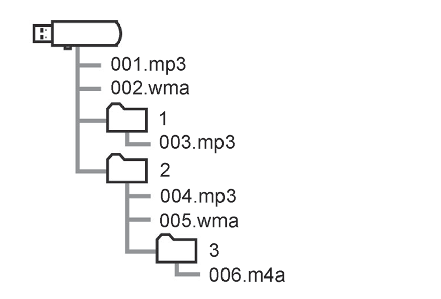
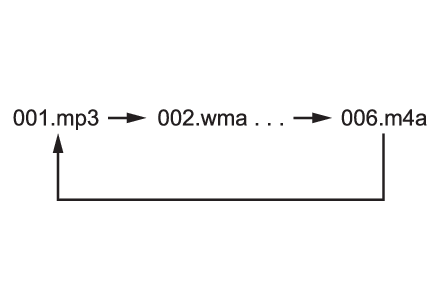
MP3 (MPEG Audio Layer 3), WMA (Windows Media Audio) and AAC (Advanced Audio Coding) are audio compression standards. This system can play MP3/WMA/AAC files on USB memory. MP4, WMV and AVI files can use the following resolutions: 128x96, 160x120, 176x144 (QCIF), 320x240 (QVGA), 352x240 (SIF), 352x288 (CIF), 640x480 (VGA), 720x480 (NTSC), 720x576 (PAL) When naming an MP3/WMA/AAC file, add an appropriate file extension (.mp3/.wma/.m4a). This system plays back files with .mp3/.wma/.m4a file extensions as MP3/WMA/AAC files respectively. To prevent noise and playback errors, use the appropriate file extension. MP3 files are compatible with the ID3 Tag Ver. 1.0, Ver. 1.1, Ver. 2.2 and Ver. 2.3 formats. This system cannot display disc title, track title and artist name in other formats. WMA/AAC files can contain a WMA/AAC tag that is used in the same way as an ID3 tag. WMA/AAC tags carry information such as track title and artist name. The emphasis function is available only when playing MP3 files. This system can play back AAC files encoded by iTunes. The sound quality of MP3/WMA files generally improves with higher bit rates. m3u playlists are not compatible with the audio player. MP3i (MP3 interactive) and MP3PRO formats are not compatible with the audio player. The player is compatible with VBR (Variable Bit Rate). When playing back files recorded as VBR (Variable Bit Rate) files, the play time will not be correctly displayed if the fast forward or reverse operations are used. It is not possible to check folders that do not include MP3/WMA/AAC files. MP3/WMA/AAC files in folders up to 8 levels deep can be played. However, the start of playback may be delayed when using USB memory containing numerous levels of folders. For this reason, we recommend creating USB memory with no more than 2 levels of folders. The play order of the USB memory with the structure shown above is as follows: The order changes depending on the personal computer and MP3/WMA/AAC encoding software you use.
Compatible video format
Format Codec
MPEG-4 Video codec: H.264/MPEG-4 AVC MPEG4 Audio codec: AAC MP3 Corresponding screen size: MAX 1920 1080 Corresponding frame rate: MAX 60i/30p
AVI Container Video codec: H.264/MPEG-4 AVC MPEG4 WMV9 WMV9 Advanced profile Audio codec: AAC MP3 WMA9.2 (7,8,9.1,9.2) Corresponding screen size: MAX 1920 1080 Corresponding frame rate: MAX 60i/30p
Windows Media Video Video codec: WMV9 WMV9 Advanced profile Audio codec: WMA9.2 (7,8,9.1,9.2) Corresponding screen size: MAX 1920 1080 Corresponding frame rate: MAX 60i/30p
Terms ID3 tag This is a method of embedding track-related information in an MP3 file. This embedded information can include the track number, track title, the artist’s name, the album title, the music genre, the year of production, comments, cover art and other data. The contents can be freely edited using software with ID3 tag editing functions. Although the tags are restricted to a number of characters, the information can be viewed when the track is played back. WMA tag WMA files can contain a WMA tag that is used in the same way as an ID3 tag. WMA tags carry information such as track title and artist name. MP3 MP3 is an audio compression standard determined by a working group (MPEG) of the ISO (International Standard Organization). MP3 compresses audio data to about 1/10 the size of that on conventional discs. WMA WMA (Windows Media Audio) is an audio compression format developed by Microsoft®. It compresses files into a size smaller than that of MP3 files. The decoding formats for WMA files are Ver. 7, 8 and 9. Windows Media is either a registered trademark or trademark of Microsoft Corporation in the United States and/or other countries. This product includes technology owned by Microsoft Corporation and cannot be used or distributed without a license from Microsoft Licensing, Inc. AAC AAC is short for Advanced Audio Coding and refers to an audio compression technology standard used with MPEG2 and MPEG4. Error messages USB
Message Explanation
“ USB Error” This indicates a problem in the USB memory or its connection.
“ No music files found.” This indicates that no MP3/WMA/AAC files are included in the USB memory.
“ No video files found.” This indicates that no video files are included in the USB memory.
iPod
Message Explanation
“ iPod Error” This indicates a problem in the iPod or its connection.
“ No music files found.” This indicates that there is no music data in the iPod.
“ Please check the iPod firmware version.” This indicates that the software version is not compatible. Perform the iPod firmware updates and try again.
“ Unable to authorize the iPod.” This indicates that it failed to authorize the iPod. Please check your iPod.
Bluetooth® audio
Message Explanation
“ Music tracks not supported. Please check your portable player.” This indicates a problem in the Bluetooth® device.
Note: If the malfunction is not rectified: Take your vehicle to your Toyota dealer.
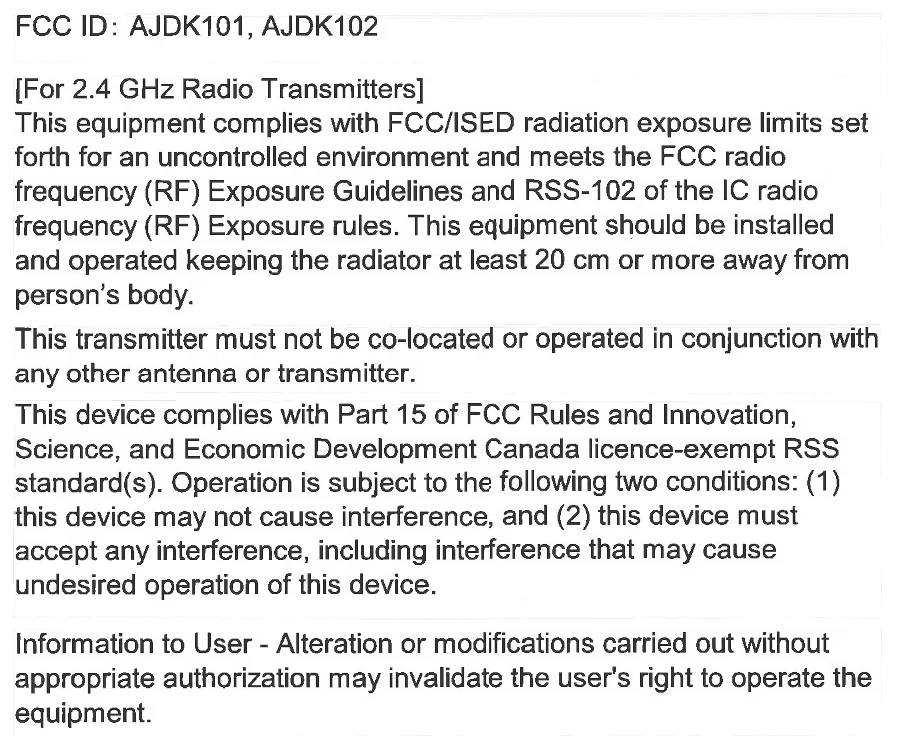
Certification For vehicles sold in the U.S.A., Hawaii, Guam, Saipan, American Samoa and Puerto Rico For vehicles sold in Canada Gracenote For U.S. owners