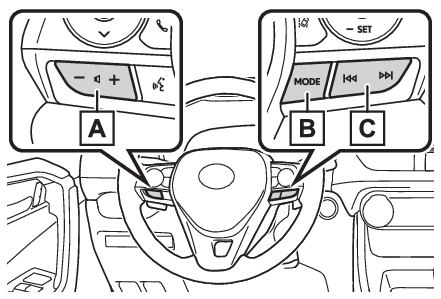
Steering switchSteering switch
Audio switchSteering switchesSteering switch operationSome parts of the audio/visual system can be adjusted using the switches on the steering
wheel.Volume control switch“
MODE” switch switchVolume control switchPress: Volume up/downPress and hold (0.8 sec. or more): Volume up/down continuously“
MODE” switchAM/FMPress: Change audio modesPress and hold (0.8 sec. or more): Mute (Press and hold again to resume the sound.)AUXPress: Change audio modesPress and hold (0.8 sec. or more): MuteUSB*, iPod/iPhone, Bluetooth® audio*, APPS*Press: Change audio modesPress and hold (0.8 sec. or more): Pause (Press and hold again to resume the play
mode.)*When Apple CarPlay connection is established, this function will be unavailable. switchAM/FMPress: Preset channel up/downPress and hold (0.8 sec. or more): Seek up/downPress and hold (1.5 sec. or more): Seek up/down continuously while the switch is being
pressedPress and hold (1.5 sec. or more): Fast channel up/downUSB*, iPod/iPhone, Bluetooth® audio*Press: Track/file up/downPress and hold (0.8 sec. or more): Fast forward/rewind*When Apple CarPlay connection is established, this function will be unavailable.Note:In the APPS mode, some operation may be done on the screen depend on the selected
APPS.