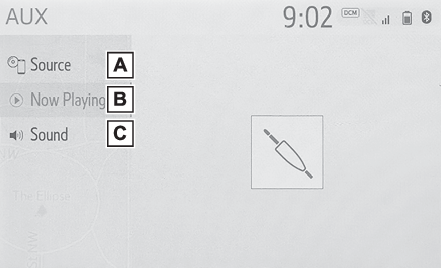
AUXAUXOverviewThe AUX operation screen can be reached by the following methods: Selecting an audio sourceConnecting a device to the AUX port (USB/AUX port)Control screenSelect to display the audio source selection screen. (Selecting an audio source)Select to return to the control screen.Select to display the sound setting screen. (Sound settings)Warning:Do not connect portable audio device or operate the controls while driving.Notice:Do not leave portable audio device in the vehicle. The temperature inside the vehicle
may become high, resulting in damage to the player.Do not push down on or apply unnecessary pressure to the portable audio device while
it is connected as this may damage the portable audio device or its terminal.Do not insert foreign objects into the port as this may damage the portable audio
device or its terminal.