iPod/iPhoneiPod/iPhoneOverviewThe iPod/iPhone operation screen can be reached by the following methods: Selecting an audio sourceConnecting an iPod/iPhone (USB/AUX port)When the iPod connected to the system includes iPod video, the system can only output
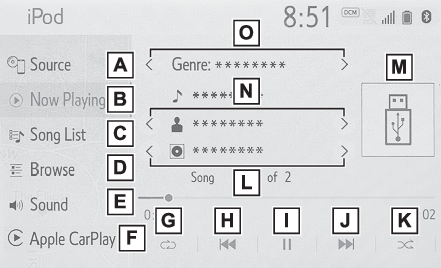
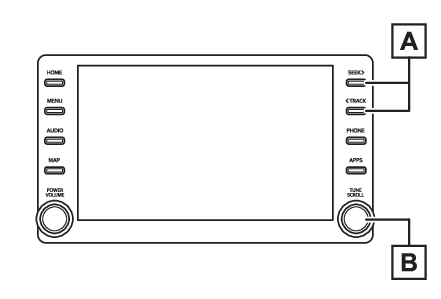
the sound.Control screenSelect to display the audio source selection screen.Select to return to the top screen.*1Select to display a song list screen.*1Select to display the play mode selection screen.*1Select to display the sound setting screen. (Sound settings)Select to display the Apple CarPlay screen.*2Select to set repeat playback. (Repeating)Select to change the track.Select and hold to fast rewind.Select to play/pause.Select to change the track.Select and hold to fast forward.Select to set random playback. (Random order)Select to change the album.*1Displays cover artSelect to change the artist.*1Select to change the playlist.*1*1When an Apple CarPlay connection is established, this switch will not be displayed.*2This switch will only be displayed when an Apple CarPlay connection is established.Control panelPress to change the track.Press and hold to fast forward/rewind.Turn to change the track.Turn to move up/down the list. Also, the knob can be used
to enter selections on the list screens by pressing it.Note:Some functions may not be available depending on the type of model.When an iPod/iPhone is connected using a genuine iPod/iPhone cable, the iPod/iPhone
starts charging its battery.Depending on the iPod, the video sound may not be able to be heard.Depending on the iPod and the songs in the iPod, iPod cover art may be displayed.
This function can be changed to “
On” or “
Off”. (Common settings) It may take time to display iPod cover art, and the iPod may not be operated while
the cover art display is in process.When an iPod/iPhone is connected and the audio source is changed to iPod/iPhone mode,
the iPod/iPhone will resume playing from the same point it was last used.Depending on the iPod/iPhone that is connected to the system, certain functions may
not be available.If an iPhone is connected via Bluetooth® and USB at the same time, system operation may become unstable. For known phone compatibility
information, refer to http://www.toyota.com/Entune/.Tracks selected by operating a connected iPod/iPhone may not be recognized or displayed
properly.The system may not function properly if a conversion adapter is used to connect a
device.RepeatingThe track currently being listened to can be repeated.Select
.Note:Each time
is selected, the mode changes as follows:When shuffle is off (iPhone 5 or later)track repeat album repeat offWhen shuffle is off (iPhone 4s or earlier)track repeat offWhen shuffle is ontrack repeat offRandom orderTracks or albums can be automatically and randomly selected.Select
.Note:Each time
is selected, the mode changes as follows:shuffle (1 album shuffle) album shuffle (all album shuffle) offWarning:Do not operate the player’s controls or connect the iPod/iPhone while driving.Notice:Do not leave your portable player in the car. In particular, high temperatures inside
the vehicle may damage the portable player.Do not push down on or apply unnecessary pressure to the portable player while it
is connected as this may damage the portable player or its terminal.Do not insert foreign objects into the port as this may damage the portable player
or its terminal.