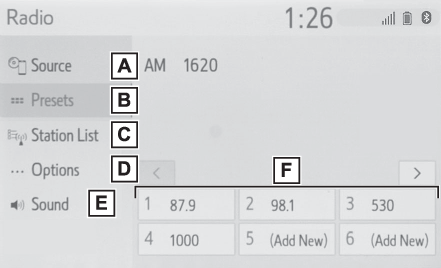
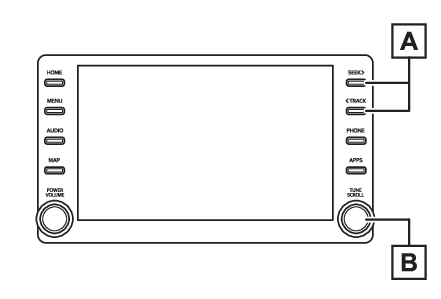
RadioFMAMAM/FM radioOverviewThe radio operation screen can be reached by the following methods:Selecting an audio sourceControl screenSelect to display the audio source selection screen.Select to display the preset stations screen. (Presetting a station)Select to display a list of receivable stations. (Selecting a station from the list)Select to display the radio options screen. (Radio options)Select to display the sound setting screen. (Sound settings)Select to tune to preset stations/channels. (Presetting a station)Control panelPress to seek for stations in the relevant program type.Press and hold for continuous
seek.Turn to step up/down frequencies.Turn to move up/down the station. Also, the knob
can be used to enter selections on the list screens by pressing it.Note:The radio automatically changes to stereo reception when a stereo broadcast is received.Radio
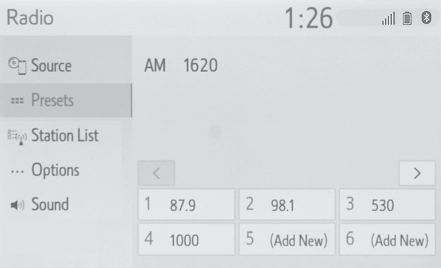
Presetting a stationPresetting a stationRadio mode has a mix preset function, which can store up to 36 stations (6 stations
per page x 6 pages) from any of the AM or FM bands.Tune in the desired station.Select and hold “
(Add New)”.When “
(Add New)” is selected, a confirmation message appears. Select “
Yes” and select “
OK”.To change the preset station to a different one, select and hold the preset station.Note:The number of preset radio stations displayed on the screen can be changed. (Radio settings)Selecting a station from the listSelect “
Station List”.Select “
AM” or “
FM”.Select the desired program genre when the genre selection screen is displayed.Select the desired station.Refreshing the station listSelect “
Station List”.“
Cancel Refresh”: Select to cancel the refresh.“
Source”: Select to change to another audio source while refreshing.Note:The audio/visual system sound is muted during refresh operation.In some situations, it may take some time to update the station list.Radio optionsSelect “
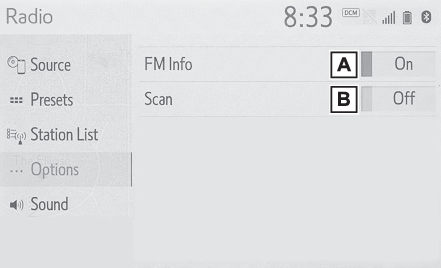
Options”.Select the desired item to be set.Analog FM only: Select to display RBDS text messages.Select to scan for receivable stations.Radio
Radio broadcast data systemRadio broadcast data systemThis audio/visual system is equipped with Radio Broadcast Data Systems (RBDS). RBDS
mode allows text messages to be received from radio stations that utilize RBDS transmitters.When RBDS is on, the radio can do the following functions.Only selecting stations of a particular program typeDisplaying messages from radio stationsSearching for a stronger signal stationRBDS features are available only when listening to an FM station that broadcasts RBDS
information and the “
FM Info” function is on. (Radio options)