Vehicle settingsVehicle button (Setup screen)Vehicle settingsSettings are available for vehicle customization, etc.Vehicle settings
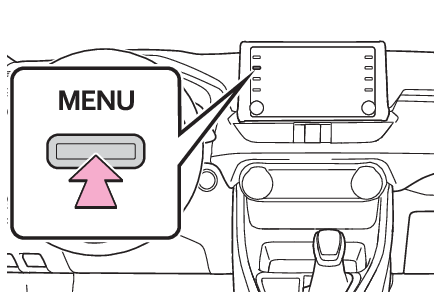
Displaying the vehicle settings screenDisplaying the vehicle settings screenPress the “
MENU” button.Select “
Setup”.Select “
Vehicle”.Select the desired items to be set.Vehicle settings
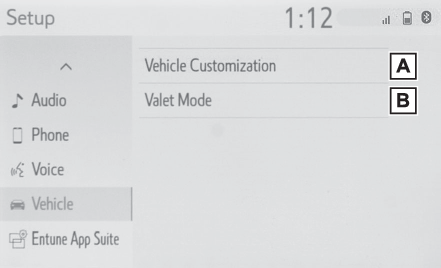
Vehicle settings screenVehicle settings screenSelect to set vehicle customization. (Customizable features)Select to set valet mode. (Setting the valet mode)Vehicle settings
Valet mode settingSetting the valet modeThe security system can be set to on by entering a security code (4-digit number).When set to on, the system will become inoperative once the electrical power source
is disconnected until the security code is entered.Display the vehicle settings screen. (Displaying the vehicle settings screen)Select “
Valet Mode”.Enter the 4-digit personal code and select “
OK”.Enter the same 4-digit personal code again and select “
OK”.The system will request that you input the security code again to confirm that you
remember it correctly.When valet mode activates, the system stops and a security code (4-digit number) standby
screen is displayed.Note:If the 4-digit personal code is forgotten, please contact your Toyota dealer.If the valet mode has been activatedEnter the 4-digit personal code and select “
OK”.Note:If an incorrect security code (4-digit number) is entered 6 times, the system will
not accept another security code (4-digit number) for 10 minutes.