Screen adjustmentScreen adjustmentThe contrast and brightness of the screen display and the image of the camera display
can be adjusted. The screen can also be turned off, and/or changed to either day or
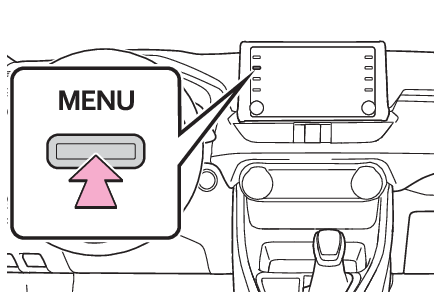
night mode.(For information regarding audio/visual screen adjustment: Audio screen adjustment)Displaying the screen adjustment screenPress the “
MENU” button.Select “
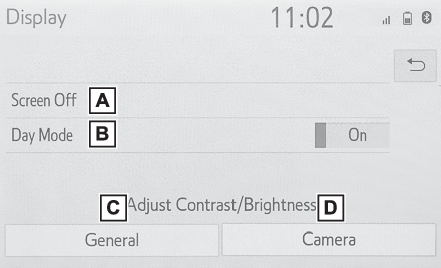
Display”.Select the desired items to be set.Select to turn the screen off. To turn it on, press any button.Select to turn day mode on/off. (Changing between day and night mode)Select to adjust the screen display. (Adjusting the contrast/brightness)Select to adjust the camera display.Note:When the screen is viewed through polarized sunglasses, a rainbow pattern may appear
on the screen due to optical characteristics of the screen. If this is disturbing,
please operate the screen without polarized sunglasses.Changing between day and night modeDepending on the position of the headlight switch, the screen changes to day or night
mode. This feature is available when the headlight is switched on.Select “
Day Mode”.Note:If the screen is set to day mode with the headlight switch turned on, this condition
is memorized even with the engine turned off.Adjusting the contrast/brightnessThe contrast and brightness of the screen can be adjusted according to the brightness
of your surroundings.Select “
General” or “
Camera”.Select the desired item.“
Display (General)” screen only: Select “
<” or “
>” to select the desired display.“
Contrast”“
+”: Select to strengthen the contrast of the screen.“
-”: Select to weaken the contrast of the screen.“
Brightness”“
+”: Select to brighten the screen.“
-”: Select to darken the screen.