Entering letters and numbers/list screen operationEntering letters and numbers/list screen operationEntering letters and numbers/list screen operation
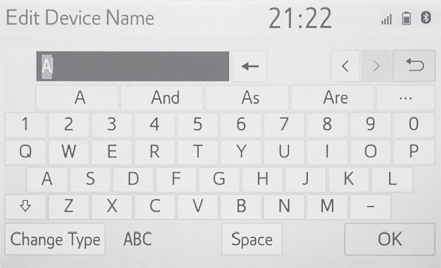
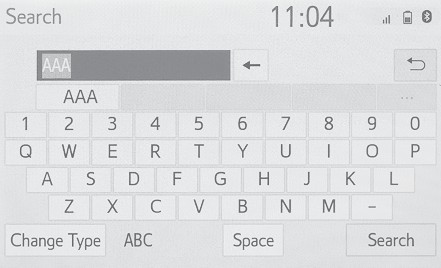
Entering letters and numbersEntering letters and numbersWhen searching by a name or entering data, letters and numbers can be entered via
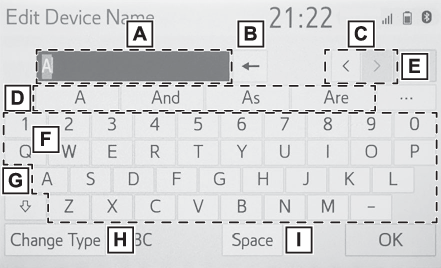
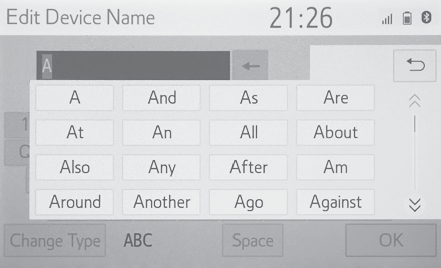
the screen.Text field. Entered character(s) will be displayed.Select to erase one character. Select and hold to continue erasing characters.Select to move the cursor.Select to choose predictive text candidate for entered text. (Displaying predictive text candidates)Select to display a list of predictive text candidates when there is more than one.
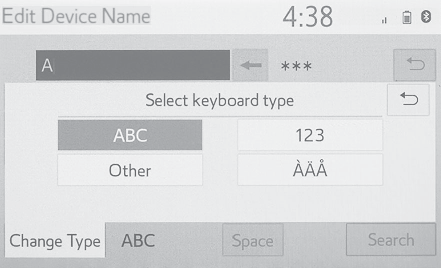
(Displaying predictive text candidates)Select to enter desired characters.Select to enter characters in lower case or in upper case.Select to change character types. (Changing character type)Select to make a space on cursor.Note:Keyboard layout can be changed. (General settings)Changing character typeSelect “
Change Type”.Select the desired character.Note:Depending on the screen being displayed, it may not be possible to change keyboard
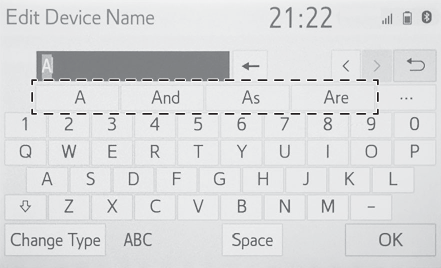
characters.Displaying predictive text candidatesWhen text is input, the system predicts the text that may complete the currently unconfirmed
text and displays predictive replacement candidates that match the beginning of the
text.Input text.Select the desired candidate.To select a candidate that is not displayed, select
, and then select the desired predictive replacement candidate.Entering letters and numbers/list screen operation
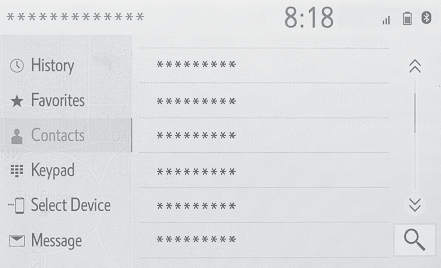
List screenList screenThe list screen may be displayed after entering characters. When a list is displayed,
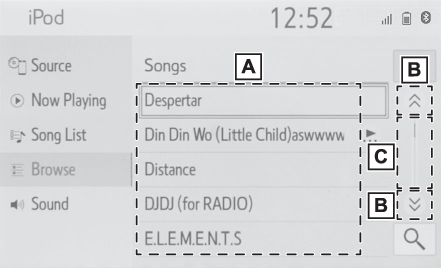
use the appropriate screen button to scroll through the list.Scrolling list screenTo scroll up/down the list, flick the list up/down.Select to skip to the next or previous page. Select and hold
or
to scroll through the displayed list.Indicates the position of the displayed entries in the entire list.To scroll up/down
pages, drag the bar.Note:If
appears to the right of an item name, the complete name is too long to display.Select to
scroll to the end of the name.Select
to move to the beginning of the name.Searching a listItems are displayed in the list with the most similar results of the search at the
top.Select
.Input text.Select “
Search”.The list is displayed.