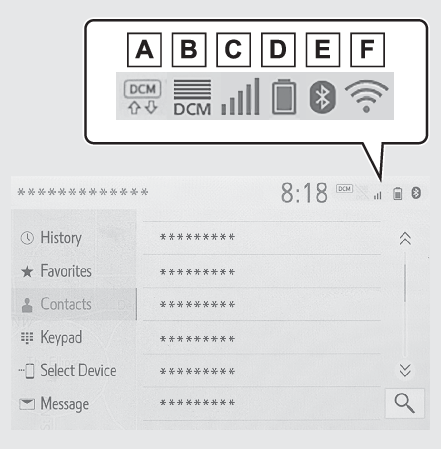
Status iconStatus iconStatus icons are displayed at the top of the screen.Status icon
Status icon explanationStatus icon explanationIndicate during data communication performed via Data Communication Module (DCM)*1The reception level of Data Communication Module (DCM) display*1 (Reception level display)The reception level of the connected phone display (Reception level display)Remaining battery charge display (Remaining battery charge display)Bluetooth® phone connection condition display (Bluetooth® connection condition display)Wi-Fi® connection condition display*1, 2 (Wi-Fi® Hotspot*)*1Vehicles equipped with DCM*2This function is not made available in some countries or areas.Note:The number of status icons that can be displayed differs depending on the displayed
screen.Reception level displayThe level of reception does not always correspond with the level displayed on the
cellular phone. The level of reception may not be displayed depending on the phone
you have.When the cellular phone is out of the service area or in a place inaccessible by radio
waves,
/
is displayed.“
Rm” is displayed when receiving in a roaming area. While roaming, display “
Rm” top-left on the icon.The receiving area may not be displayed depending on the type of Bluetooth® phone you have.While connected with cellular phone
Bluetooth® connection condition displayAn antenna for the Bluetooth® connection is built into the instrument panel.The condition of the Bluetooth® connection may deteriorate and the system may not function when a Bluetooth® phone is used in the following conditions and/or places:The cellular phone is obstructed by certain objects (such as when it is behind the
seat or in the glove box or console box).The cellular phone is touching or is covered with metal materials.Leave the Bluetooth® phone in a place where the condition of the Bluetooth® connection is good.
Indicators
Conditions
(Blue)
Indicates that the condition of the Bluetooth® connection is good.
(Gray)
While in this condition, sound quality during phone calls may deteriorate.
Indicates that the cellular phone is not connected via Bluetooth®.