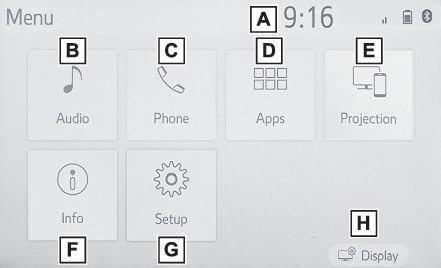
Setup button (Menu screen)Projection button (Menu screen)Phone button (Menu screen)Menu screenInfo button (Menu screen)Audio button (Menu screen)Apps button (Menu screen)Menu screenMenu screen
Menu screen operationMenu screen operationPress the “
MENU” button to display the “
Menu” screen.Displays the clock. Select to display the clock settings screen. (Clock settings)Select to display the audio control screen. (Quick reference)Select to display the hands-free operation screen. (Quick reference)When an Apple CarPlay connection is established, select to display the Phone app
screen.*Select to display the application screen.* (Toyota Entune App Suite Connect)When an Apple CarPlay connection is established and this button displays “
Apple CarPlay”, select to display the home screen of Apple CarPlay. * (Apple CarPlay*)Select to display the fuel consumption screen. (Fuel consumption information*)Select to display the “
Setup” screen. (“Setup” screen)Select to adjust the contrast, brightness, etc. of the display. (Screen adjustment)*0This function is not made available in some countries or areas.