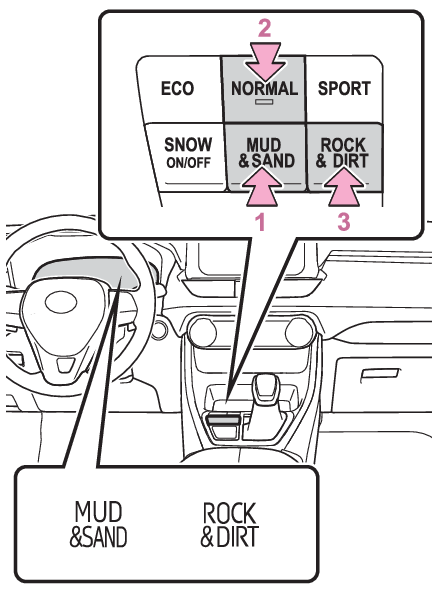
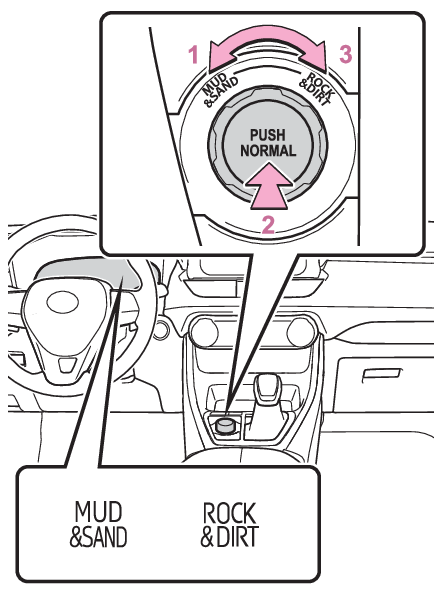
Rock & Dirt modeMulti-terrain SelectMud & Sand modeMulti-terrain Select (AWD vehicles)Multi-terrain Select is a system that improves drivability in off-road situations.When driving over muddy, sandy or rough road surfaces, the system selects a suitable
driving mode to switch AWD, brake and drive force control to perform control suitable
for the road condition.Warning:Before using Multi-terrain SelectMake sure to observe the following precautions. Failure to observe these precautions
may result in an unexpected accident.Check that the Mud & Sand and Rock & Dirt indicators are illuminated before driving.
Multi-terrain Select will not operate when the indicators are off.Do not rely solely upon the Multi-terrain Select. This function is not intended to
expand the limits of the vehicle. If the system is continuously used for a long period
of time, the load on related parts increases and the system may be unable to operate
normally, which may lead to an accident. Thoroughly check the road conditions and
driving route before driving, and drive with caution.The road conditions listed in “Guidelines for selecting each mode” are for reference
only. There is a chance that the function may not be the most appropriate in terms
of road conditions such as pitch, slipperiness, undulation, etc. Thoroughly check
the road conditions before driving.Guidelines for selecting each modeControl that is suitable for the following road conditions can be performed by switching
to either of the two modes. Select a mode that is appropriate for the road condition.Mud & Sand modeSuitable for driving on roads with increased driving resistance such as sandy roads,
muddy roads, etc.Rock & Dirt modeSuitable for driving in bumpy road conditions, such as on unpaved forest roads.Normal modeChanging the modeDynamic Torque Control AWD vehiclesMud & Sand modeWhen the switch is pressed while not in Mud & Sand mode, the system switches to Mud
& Sand mode and the Mud & Sand mode indicator, VSC OFF indicator and PCS warning light
illuminate on the multi-information display.Normal modeMode that performs AWD, brake and drive force control suitable for driving on general
roads. Use normal mode when not driving off-road.The driving mode returns to normal mode if the switch is pressed while in Mud & Sand
mode or Rock & Dirt mode.Rock & Dirt modeWhen the switch is pressed while not in Rock & Dirt mode, the system switches to Rock
& Dirt mode and the Rock & Dirt mode indicator illuminates on the multi-information
display.Dynamic Torque Vectoring AWD vehiclesMud & Sand modeWhen the switch is turned to the left while not in Mud & Sand mode, the system switches
to Mud & Sand mode and the Mud & Sand mode indicator, VSC OFF indicator and PCS warning
light illuminate on the multi-information display.Normal modeMode that performs AWD, brake and drive force control suitable for driving on general
roads. Use normal mode when not driving off-road.The driving mode returns to normal mode if the switch is pressed while in Mud & Sand
mode or Rock & Dirt mode.Rock & Dirt modeWhen the switch is turned to the right while not in Rock & Dirt mode, the system switches
to Rock & Dirt mode and the Rock & Dirt mode indicator illuminates on the multi-information
display.Note:Multi-terrain SelectMulti-terrain Select is intended for use when driving on rough roads. Drive in normal
mode during normal driving.The Mud & Sand and Rock & Dirt modes control the vehicle so that it can maximize the
drive force and improve drivability on rough roads. As a result, fuel efficiency may
diminish when compared to driving in normal mode.If Mud & Sand or Rock & Dirt mode is selectedThe background of the multi-information display will change following the Multi-terrain
Select mode.The AWD operation status display will automatically switch on the multi-information
display.AWD control for Mud & Sand and Rock & Dirt modesIf the vehicle speed exceeds the speeds listed below, 4WD control is performed similar
to that performed in Normal mode, even if Mud & Sand or Rock & Dirt mode is selected.Mud & Sand mode: Vehicle speed is approximately 40 km/h (25 mph) or moreRock & Dirt mode: Vehicle speed is approximately 25 km/h (16 mph) or moreIf the vehicle speed drops below the above speeds, the system automatically switches
to the 4WD control suitable for each mode.When Multi-terrain Select brake control temporarily stops operatingIf Mud & Sand or Rock & Dirt mode is continuously used for a long period of time,
the brakes may overheat, and Multi-terrain Select brake control may temporarily stop
operating.At this time, the buzzer sounds intermittently and “
Traction Control Turned OFF” is displayed on the multi-information display.If Multi-terrain Select brake control stops operating, stop the vehicle in a safe
location as soon as possible* and wait until the system temperature decreases. Once the display message on the
multi-information display turns off, the brake control returns to normal. Note that
normal driving is still possible even when Multi-terrain Select brake control is not
operating.*After stopping the vehicle, do not stop the engine until the display message has turned
off.When Mud & Sand or Rock & Dirt mode is canceledIn the following situations, Mud & Sand mode or Rock & Dirt mode are automatically
canceled even if they are selected.When the driving mode is changed (Selecting a driving mode)When the engine switch is turned offDriving in Mud & Sand or Rock & Dirt modeThe following types of situations may occur, but they are not malfunctions.Vibrations may be felt throughout the vehicle or steering wheelOperating noise may be heard from the engine compartmentWhen an inspection at your Toyota dealer is necessaryIn the following situations, the system may be malfunctioning. Have the vehicle inspected
by your Toyota dealer immediately.When the slip indicator light illuminates while Mud & Sand or Rock & Dirt mode is
selectedWhen the indicator for each mode does not illuminate even though Mud & Sand or Rock
& Dirt mode is selected