Warning buzzers
Intuitive parking assistParking assist sensors (intuitive parking assist)Multi-information display
Intuitive parking assist-sensorIntuitive parking assist
FunctionIntuitive parking assist**If equippedThe distance from your vehicle to objects, such as a wall, when parallel parking or
maneuvering into a garage is measured by the sensors and communicated via the multi-information
display, navigation system or multimedia system screen and a buzzer. Always check
the surrounding area when using this system.System componentsSensor
Parking Support Brake function (static objects)Sensor
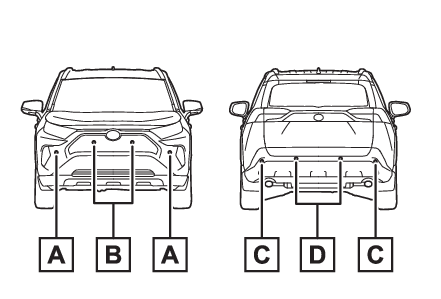
Intuitive parking assistLocation and types of sensorsFront corner sensorsFront center sensorsRear corner sensorsRear center sensorsDisplay
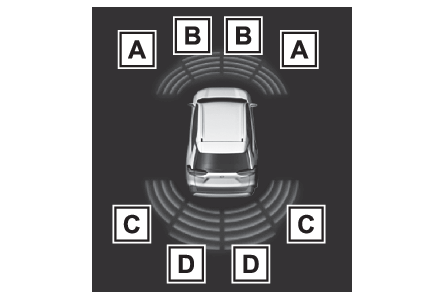
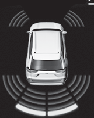
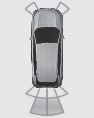
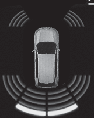
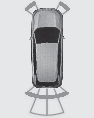
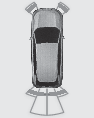
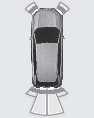
Intuitive parking assistDisplay (Multi-information display)When the sensors detect an object, such as a wall, a graphic is shown on the multi-information
display depending on the position and distance to the object.Front corner sensor detectionFront center sensor detection*1Rear corner sensor detection*2Rear center sensor detection*2*1Displayed when the shift lever is in a driving position*2Displayed when the shift lever is in RDisplay (Audio system screen)When the sensors detect an object, such as a wall, a graphic is shown on the navigation
system (if equipped) or multimedia system (if equipped) screen depending on the positionand
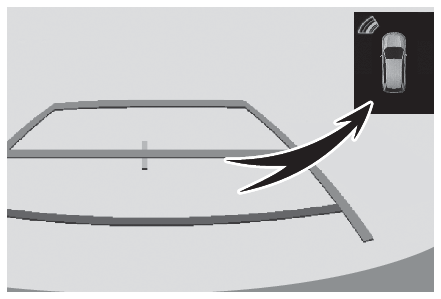
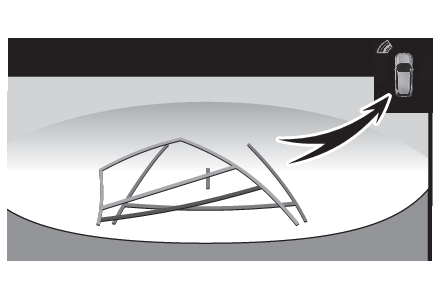
distance to the object.When the Toyota parking assist monitor (if equipped) is displayedA simplified image is displayed on the upper corner of the screen when an obstacle
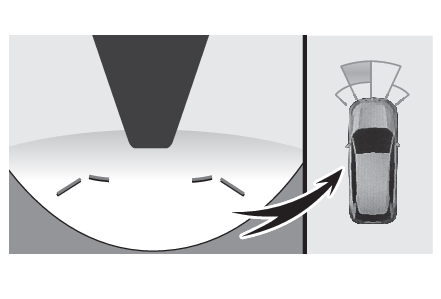
is detected.When the panoramic view monitor (if equipped) is displayedPanoramic view*A graphic is shown when the panoramic view monitor is displayed.*A simplified image is displayed on the upper corner of the screen when an obstacle
is detected while magnified display is shown.Except panoramic viewA simplified image is displayed on the upper corner of the screen when an obstacle
is detected.Switches
Intuitive parking assistTurning intuitive parking assist on/offThe Intuitive parking assist can be enabled/disabled on
screen of the multi-information display. (Settings display)When the intuitive parking assist function is disabled, the intuitive parking assist
OFF indicator (Indicators) illuminates on the multi-information display.To re-enable the system, select
on the multi-information display, select
and turn it on.If the system is disabled, it will remain off even if the engine switch is turned
to ON after the engine switch has been turned off.Warning:Intuitive parking assist precautionsObserve the following precautions. Failing to do so may result in the vehicle being
unable to be driven safely and possibly cause an accident.Do not use the sensor at speeds in excess of 6 mph (10 km/h).The sensors’ detection areas and reaction times are limited. When moving forward or
reversing, check the areas surrounding the vehicle (especially the sides of the vehicle)
for safety, and drive slowly, using the brake to control the vehicle’s speed.Do not install accessories near the bumpers as those areas are within the sensors’
detection areas.The area directly under the bumpers is not detected.Thin posts or objects lower than
the sensor may not be detected when approached, even if they have been detected once.When to disable the functionIn the following situations, disable the function as it may operate even though there
is no possibility of a collision.The vehicle is equipped with a commercial fender pole, wireless antenna or fog lights.The front or rear bumper or a sensor receives a strong impact.A non-genuine Toyota suspension (lowered suspension, etc.) is installed.Towing eyelets (if equipped) are installed.A backlit license plate is installed.When using the intuitive parking assistIn the following situations, the system may not function correctly due to a sensor
malfunction, etc. Have the vehicle checked by your Toyota dealer.The intuitive parking assist operation display flashes or shows continuously, and
a buzzer sounds when no objects are detected.If the area around a sensor collides with something, or is subjected to strong impact.If the bumper or grille collides with something.If the display flashes or is displayed continuously and a buzzer does not sound, except
when the mute function has been turned on.Notes when washing the vehicleDo not apply intensive bursts of water or steam to the sensor area.Doing so may result in the sensor malfunctioning.When using a high pressure washer to wash the vehicle, do not spray the sensors directly,
as doing so may cause a sensor to malfunction.When using steam to clean the vehicle, do not direct steam too close to the sensors
as doing so may cause a sensor to malfunction.Note:The system can be operated whenThe engine switch is in ON.Intuitive parking assist function is on.The vehicle speed is less than about 6 mph (10 km/h).The shift lever is in a position other than P.Intuitive parking assist
Warning messageIf “
Parking Assist Unavailable Clean Parking Assist Sensor” is displayed on the multi-information displayA sensor may be covered with ice, snow, dirt, etc. Remove the ice, snow, dirt, etc.,
from the sensor to return the system to normal.Also, due to ice forming on a sensor at low temperatures, a warning message may be
displayed or the sensor may not be able to detect an object. Once the ice melts, the
system will return to normal.If a warning message is displayed even if the sensor is clean, there may be a sensor
malfunction. Have the vehicle inspected by your Toyota dealer.Sensor detection informationThe sensor’s detection areas are limited to the areas around the vehicle’ front and
rear bumpers.The following situations may occur during use.Depending on the shape of the object and other factors, the detection distance may
shorten, or detection may be impossible.Detection may be impossible if static objects draw too close to the sensor.There will be a short delay between static object detection and display (warning buzzer
sounds). Even at low speeds, there is a possibility that the object will come within
30 cm before the display is shown and the warning buzzer sounds.It might be difficult to hear the buzzer due to the volume of the audio system or
air flow noise of the air conditioning system.It may be difficult to hear the sound of this system due to the buzzers of other systems.
Conditions under which the function may not function correctlyCertain vehicle conditions and the surrounding environment may affect the ability
of a sensor to correctly detect objects. Particular instances where this may occur
are listed below.There is dirt, snow or ice on a sensor. (Cleaning the sensors will resolve this problem.)A sensor is frozen. (Thawing the area will resolve this problem.) In especially cold
weather, if a sensor is frozen the sensor display may be displayed abnormally, or
objects, such as a wall, may not be detected.A sensor is covered in any way.When a sensor or the area around a sensor is extremely hot or cold.On an extremely bumpy road, on an incline, on gravel, or on grass.The vicinity of the vehicle is noisy due to vehicle horns, motorcycle engines, air
brakes of large vehicles, or other loud noises producing ultrasonic waves.There is another vehicle equipped with parking assist sensors in the vicinity.A sensor is coated with a sheet of spray or heavy rain.If a sensor is hit by a large amount of water, such as when driving on a flooded road.If the vehicle is significantly tilted.The vehicle is approaching a tall or curved curb.If objects draw too close to the sensor.Objects which may not be properly detectedThe shape of the object may prevent the sensor from detecting it. Pay particular attention
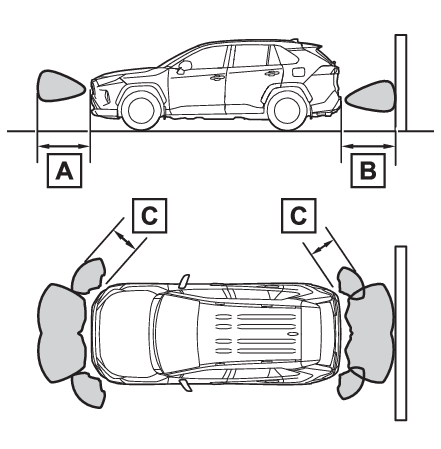
to the following objects:Wires, fences, ropes, etc.Cotton, snow and other materials that absorb sound wavesSharply-angled objectsLow objectsTall objects with upper sections projecting outwards in the direction of your vehiclePeople may not be detected if they are wearing certain types of clothing.Certification (Canada only)This ISM device complies with Canadian ICES-001.Sensor detection display, object distanceDetection range of the sensorsApproximately 3.3 ft. (100 cm)Approximately 4.9 ft. (150 cm)Approximately 2.1 ft. (63 cm)The diagram shows the detection range of the sensors. Note that the sensors cannot
detect objects that are extremely close to the vehicle.The range of the sensors may change depending on the shape of the object, etc.Distance displayWhen an object is detected by a sensor, the approximate distance to the object will
be displayed on the multi-information display, navigation system (if equipped) or
multimedia system (if equipped) screen. (As the distance to the object becomes short,
the distance segments may blink.)The images may differ from that shown in the illustrations.Approximate distance to objectFront center sensor: 3.3 ft. (100 cm) to 2.1 ft. (63 cm)Rear center sensor: 4.9 ft. (150 cm) to 2.1 ft. (63 cm)
Multi-information display
Navigation or multimedia system screen
Approximate distance to object: 2.1 ft. (63 cm) to 1.6 ft. (48 cm)
Multi-information display
Navigation or multimedia system screen
Approximate distance to object: 1.6 ft. (48 cm) to 1.1 ft. (34 cm)
Multi-information display
Navigation or multimedia system screen
Approximate distance to object: 1.1 ft. (34 cm) to 0.5 ft. (15 cm)
Multi-information display*
Navigation or multimedia system screen
*The distance segments will blink slowly.Approximate distance to object: Less than 0.5 ft. (15 cm)
Multi-information display*
Navigation or multimedia system screen
*The distance segments will blink rapidly.Buzzer operation and distance to an objectA buzzer sounds when the sensors are operating.The buzzer beeps faster as the vehicle approaches an object.When the vehicle comes
within approximately 1.1 ft. (34 cm) of the object, the buzzer sounds continuously.When 2 or more sensors simultaneously detect a static object, the buzzer sounds for
the nearest object.Even when the sensors are operating, the buzzer will be muted in some situations.
(automatic buzzer mute function)Note:Muting the buzzer soundAutomatic buzzer mute functionEven when the sensors are operating, the buzzer will be muted in the following situations:The distance between the vehicle and the detected object does not become shorter (except
when the distance between the vehicle and object is 1.1 ft. [34 cm] or less).Your vehicle is moving away from the object.There are no detectable objects entering the path of your vehicle.However, if another object is detected or the situation changes while the buzzer is
muted, the buzzer begins sounding again.To mute the buzzer soundThe buzzer can be temporarily muted by pressing of the meter control switches while
a suggestion that says mute is available is shown on the multi-information display.When the mute is canceledMute will be automatically canceled in the following situations.When the shift position is changedWhen the vehicle speed has reached or exceeded a certain speedWhen the Intuitive parking assist is turned off once and turned on againWhen the engine switch is turned off once and turned to ON againCustomizationThe buzzer volume can be adjusted on the multi-information display. (Settings display)