Toyota Safety Sense 2.0
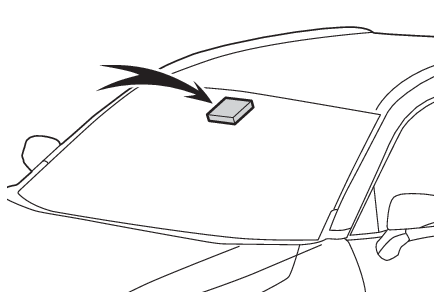
RSA (Road Sign Assist)RSA (Road Sign Assist)Road Sign AssistRSA (Road Sign Assist)**If equippedThe RSA system recognizes specific road signs using the front camera to provide information
to the driver via the display.If the system judges that the vehicle is being driven over the speed limit, performing
prohibited actions, etc. in relation to the recognized road signs, it alerts the driver
using a warning display and warning buzzer.Warning:Before using the RSADo not rely solely upon the RSA system. RSA is a system which supports the driver
by providing information, but it is not a replacement for a driver’s own vision and
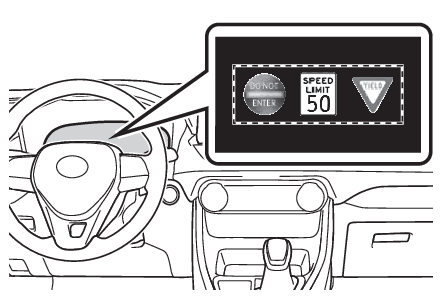
awareness. Drive safely by always paying careful attention to the traffic rules.Indication on the multi-information displayWhen the front camera recognizes a sign, the sign will be displayed on the multi-information
display.When the driving support system information display is selected, a maximum of 3 signs
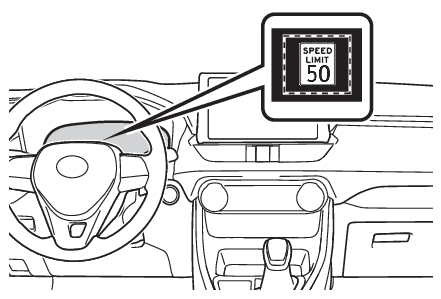
can be displayed. (Multi-information display)When a tab other than the driving support system information display is selected,
only a recognized speed limit sign or do not enter sign (when notification is necessary)
will be displayed. (Multi-information display)If signs other than speed limit signs are recognized, they will be displayed in an
overlapping stack under the current speed limit sign.Supported types of road signsThe following types of road signs are recognized.A non-official or a recently introduced traffic sign may not be recognized.
Speed limit
Do Not Enter
Stop
Yield
Warning displayIn the following situations, the RSA system will alert the driver.When the vehicle speed exceeds the speed warning threshold of the speed limit sign
displayed, the sign display will be emphasized and a buzzer will sound.When the RSA system recognizes a do not enter sign and determines that your vehicle
has entered a no-entry area, the displayed sign will flash and a buzzer will sound.Depending on the situation, traffic environment (traffic direction, speed unit) may
be detected incorrectly and a warning display may not operate properly.Note:Setting procedureSettings displayAutomatic turn-off of RSA sign displayIn the following situations, a displayed speed limit sign will stop being displayed
automatically:A new sign is not recognized for a certain distance.The road changes due to a left or right turn, etc.In the following situations, do not enter, stop and yield signs will stop being displayed
automatically:The system determines that your vehicle has passed the sign.The road changes due to a left or right turn, etc.Conditions in which the function may not operate or detect correctlyIn the following situations, RSA does not operate normally and may not recognize signs,
display the incorrect sign, etc. However, this does not indicate a malfunction.The front camera is misaligned due to a strong impact being applied to the sensor,
etc.Dirt, snow, stickers, etc. are on the windshield near the front camera.In inclement weather such as heavy rain, fog, snow or sand stormsLight from an oncoming vehicle, the sun, etc. enters the front camera.The sign is dirty, faded, tilted or bent.All or part of the sign is hidden by the leaves of a tree, a pole, etc.The sign is only visible to the front camera for a short amount of time.The driving scene (turning, lane change, etc.) is judged incorrectly.Even if it is a sign not appropriate for the currently traveled lane, such a sign
exists directly after a freeway branches, or in an adjacent lane just before merging.Stickers are attached to the rear of the preceding vehicle.A sign resembling a system compatible sign is recognized.Side road speed signs may be detected and displayed (if positioned in sight of the
front camera) while the vehicle is traveling on the main road.Roundabout exit road speed signs may be detected and displayed (if positioned in sight
of the front camera) while traveling on a roundabout.The front of the vehicle is raised or lowered due to the carried load.The surrounding brightness is not sufficient or changes suddenly.When a sign intended for trucks, etc. is recognized.Speed limit sign displayIf the engine switch was last turned to OFF while a speed limit sign was displayed
on the multi-information display, the same sign displays again when the engine switch
is turned to ON.If “
RSA Malfunction Visit Your Dealer” is shownThe system may be malfunctioning. Have the vehicle inspected by your Toyota dealer.CustomizationSome functions can be customized. (Settings display)