Tail lights
Light switchSwitches
Light switchLights
Headlight switchLicense plate lights
Light switchHeadlightsHeadlights
Light switchFront side marker lightsRarking lights
Light switchHeadlight switchThe headlights can be operated manually or automatically.Side marker lights
Light switchRear side marker lights
Light switchParking lights
Light switchFront side marker lights
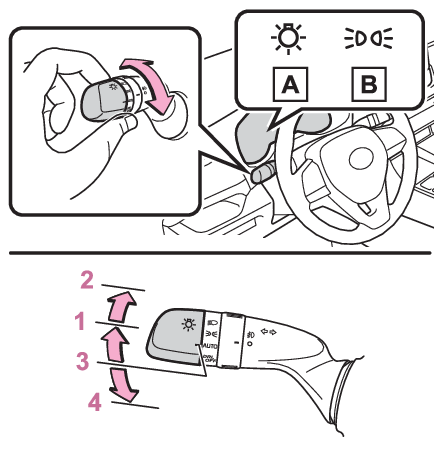
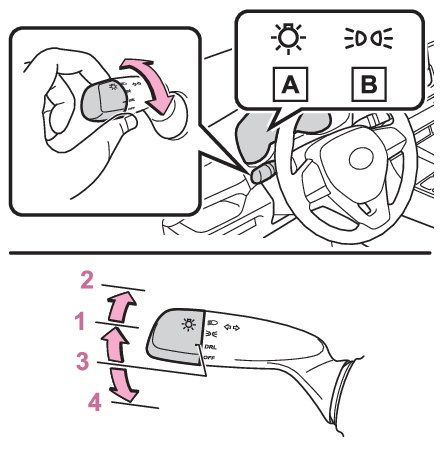
Light switchTurning on the headlightsOperating the
switch turns on the lights as follows:Type AU.S.A.Canada The side marker, parking, tail, license plate, instrument panel lights, and daytime
running lights (Daytime running light system) turn on. The headlights and all lights listed above (except daytime running lights) turn on. The headlights, daytime running lights (Daytime running light system) and all the lights listed above turn on and off automatically. (U.S.A.) Off
(Canada) The daytime running lights turn on. (Daytime running light system)Type BU.S.A.Canada The side marker, parking, tail, license plate, instrument panel lights, and daytime
running lights (Daytime running light system) turn on. The headlights and all lights listed above (except daytime running lights) turn on. The daytime running lights turn on. (Daytime running light system) OffNote:AUTO mode can be used whenThe engine switch is in ON.Daytime running light systemDaytime running light systemVehicles without projector headlights: The daytime running lights illuminate using
the same lights as the low beam headlight lights, and illuminate dimmer than the low
beam headlight lights.Vehicles with projector headlights: The daytime running lights illuminate using the
same lights as the parking lights and illuminate brighter than the parking lights.To make your vehicle more visible to other drivers during daytime driving, the daytime
running lights turn on automatically when all of the following conditions are met.
(The daytime running lights are not designed for use at night.)The engine is runningThe parking brake is releasedThe headlight switch is in the
(Canada only),
,
or
* position*When the surroundings are brightThe daytime running lights remain on after they illuminate, even if the parking brake
is set again.For the U.S.A.: Daytime running lights can be turned off by operating the switch.Compared to turning on the headlights, the daytime running light system offers greater
durability and consumes less electricity, so it can help improve fuel economy.Sensor
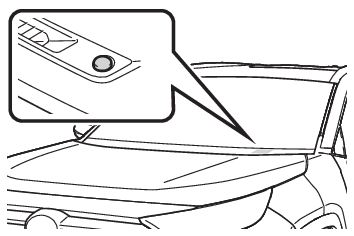
Automatic headlight systemAutomatic light control systemHeadlight control sensor (if equipped)The sensor may not function properly if an object is placed on the sensor, or anything
that blocks the sensor is affixed to the windshield. Doing so interferes with the
sensor detecting the level of ambient light and may cause the automatic headlight
system to malfunction.Automatic light off systemWhen the headlights are on: The lights turn off 30 seconds after the engine switch
is turned to ACC or OFF and a door is opened and closed. (The lights turn off immediately
if
on the key is pressed after all the doors are closed.)When only the tail lights are on: The tail lights turn off automatically if the engine
switch is turned to ACC or OFF and the driver’s door is opened.To turn the lights on again, turn the engine switch to ON, or turn the light switch
off once and then back to
or
position.Light reminder buzzerVehicles without smart key systemA buzzer sounds when the engine switch is turned to ACC or OFF, the key is removed
and the driver’s door is opened while the lights are turned on. Vehicles with smart key systemA buzzer sounds when the engine switch is turned to ACC or OFF and the driver’s door
is opened while the lights are turned on.Windshield wiper linked headlight illumination (if equipped)When driving during daytime with the headlight switch turned to
, if the windshield wipers are used, the headlights will turn on automatically after
several seconds to help enhance the visibility of your vehicle.Battery-saving functionIn order to prevent the battery of the vehicle from discharging, if the headlights
and/or tail lights are on when the engine switch is turned to OFF, the battery saving
function will operate and automatically turn off all the lights after approximately
20 minutes.When any of the following are performed, the battery-saving function is canceled once
and then reactivated. All the lights will turn off automatically 20 minutes after
the battery-saving function has been reactivated:When the headlight switch is operatedWhen a door is opened or closedIf “
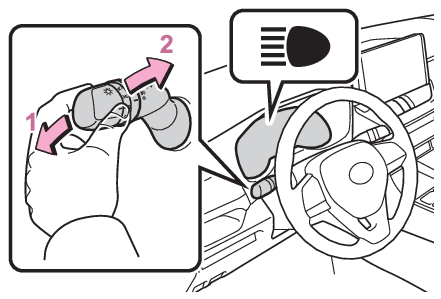
Headlight System Malfunction Visit Your Dealer” is displayed on the multi-information displayThe system may be malfunctioning. Have the vehicle inspected by your Toyota dealer.CustomizationSettings (e.g. light sensor sensitivity) can be changed.(Customizable features: Automatic light control system*)Notice:To prevent battery dischargeDo not leave the lights on longer than necessary when the engine is not running.Turning on the high beam headlightsWith the headlights on, push the lever away from you to turn on the high beams.Pull the lever toward you to the center position to turn the high beams off.Pull the lever toward you and release it to flash the high beams once.You can flash the high beams with the headlights on or off.