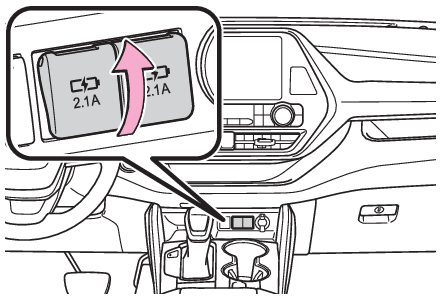
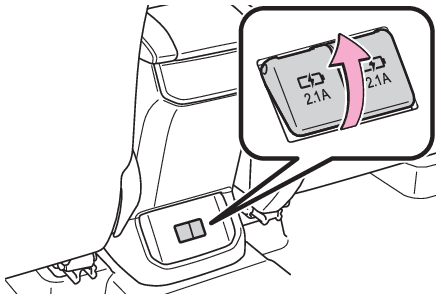
Other interior featuresUSB charging portsUSB charging portsThe USB charging ports are used to supply 2.1 A of electricity at 5 V to external
devices.The USB charging ports are for charging only. They are not designed for data
transfer or other purposes.Depending on the external device, it may not charge properly.
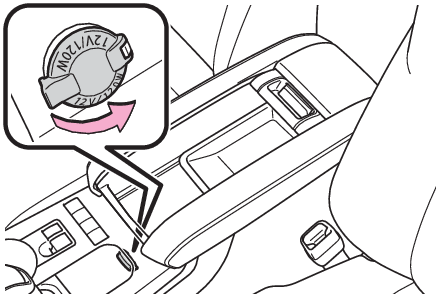
Refer to the manual included with the device before using a USB charging port.Using the USB charging portsOn the instrument panelOpen the lid.Rear of console boxOpen the lid.Note:The USB charging ports can be used whenThe power switch is in ACC or ON.Situations in which the USB charging ports may not operate correctlyIf a device which consumes more than 2.1 A at 5 V is connectedIf a device designed to communicate with a personal computer, such as a USB memory
device, is connectedIf the connected external device is turned off (depending on device)If the temperature inside the vehicle is high, such as after the vehicle has been
parked in the sunAbout connected external devicesDepending on the connected external device, charging may occasionally be suspended
and then start again. This is not a malfunction.Notice:To prevent damage to the USB charging portsDo not insert foreign objects into the ports.Do not spill water or other liquids into the ports.When the USB charging ports are not in use, close the lids. If a foreign object or
liquid enters a port may cause a short circuit.Do not apply excessive force to or impact the USB charging ports.Do not disassemble or modify the USB charging ports.To prevent damage to external devicesDo not leave external devices in the vehicle. The temperature inside the vehicle may
become high, resulting in damage to an external device.Do not push down on or apply unnecessary force to an external device or the cable
of an external device while it is connected.To prevent 12-volt battery dischargeDo not use the USB charging ports for a long period of time with the hybrid system
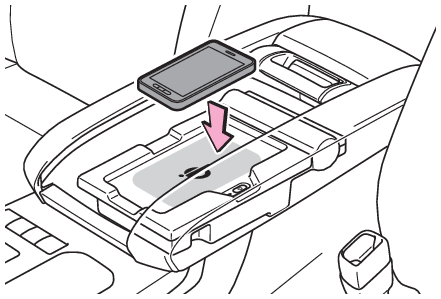
stopped.Wireless chargerWireless charger (if equipped)A portable device, such as a smartphone or mobile battery, can be charged by just
placing it on the charging area, provided the device is compatible with the Qi wireless
charging standard created by the Wireless Power Consortium.The wireless charger cannot be used with a portable device that is larger than the
charging area. Additionally, depending on the portable device, the wireless charger
may not operate properly. Refer to the operation manual of the portable device.The “
Qi” symbolThe “
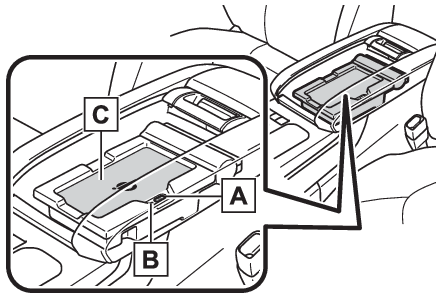
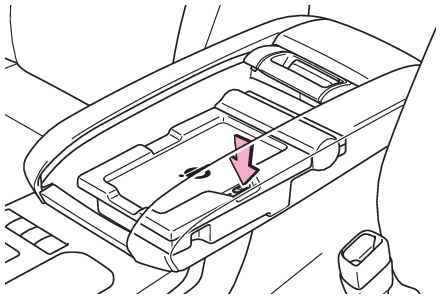
Qi” symbol is a trademark of the Wireless Power Consortium.Name for all partsPower supply switchOperation indicator lightCharge areaUsing the wireless chargerPush the tab and slide the console box lid. (Console box)Press the power supply switch of the wireless charger.Pressing the switch again turns the wireless charger off.When turned on, the operation indicator light (green) comes on.When the power switch is turned off, the on/off state of the wireless charger will
be memorized.Place a portable device on the charging area with its charging surface facing down.While charging, the operation indicator light (orange) will be illuminated.If charging does not begin, move the portable device as close to the center of the
charging area as possible.When charging is complete, the operation indicator light (green) will illuminate.Recharging functionIf a certain amount of time has elapsed since charging completed and the portable
device has not been moved, the wireless charger will restart charging.If the portable device is moved within the charging area, charging will stop temporarily
then restart.Operation indicator light status
Operation indicator light
State
Off
The Wireless charger is off
Green (illuminated)
Standby (charging is possible)
Charging is complete*
Orange (illuminated)
A portable device has been placed on the charging area (identifying the portable device)
Charging in progress
*Depending on the portable device, the operation indicator light may stay illuminated
(orange) after charging has completed.If the operation indicator light blinksIf an error is detected, the operation indicator light will blink (orange). Take the
appropriate measures according to the table below.Blinks (orange) at a one second interval continuously
Suspected causes
Measure
Vehicle to charger communication failure.
Contact your Toyota dealer.
Blinks (orange) 3 times repeatedly
Suspected causes
Measure
A foreign object exists between the portable device and charging area.
Remove the foreign object.
Portable device is not positioned properly on the charging area.
Move the portable device toward the center of the charging area.
Blinks (orange) 4 times repeatedly
Suspected causes
Measure
The temperature of the wireless charger is excessively high.
Stop charging immediately and continue charging after a while.
Note:The wireless charger can be operated whenThe power switch is in ACC or ON.Portable devices that can be chargedPortable devices compatible with the Qi wireless charging standard can be charged
by the wireless charger. However, compatibility with all devices which meet the Qi
wireless charging standard is not guaranteed.The wireless charger is designed to supply low power electricity (5 W or less) to
a cellular phone, smartphone, or other portable device.If a cover or accessory is attached to the portable deviceDo not charge a portable device if a cover or accessory which is not Qi compatible
is attached. Depending on the type of cover and/or accessory attached, it may not
be possible to charge the portable device. If the portable device is placed on the
charging area and does not charge, remove the cover and/or accessories.If interference is heard in AM radio broadcasts while chargingTurn off the wireless charger and check if the noise is reduced. If noise is reduced,
press and hold the power supply switch of the wireless charger for 2 seconds. The
frequency of the wireless charger is changed and noise may be reduced. When the frequency
is changed, the operation indicator light will blink (orange) 2 times.Charging precautionsIf the electronic key cannot be detected in the cabin, charging cannot be performed.
When a door is opened and closed, charging may be temporarily suspended.While charging, the wireless charger and the portable device will become warm. This
is not a malfunction. If a portable device becomes warm while charging and charging
stops due to the protection function of the portable device, wait until the portable
device cools down and charge it again.Sound generated during operationWhen the power supply switch is turned on or while a portable device is being identified,
operation sounds may be heard. This is not a malfunction.Cleaning the wireless chargerCleaning and protecting the vehicle interiorCertification for the wireless chargerWarning:Caution while drivingWhen charging a portable device while driving, for safety reasons, the driver should
not operate the portable device.Caution regarding interference with electronic devicesPeople with implantable cardiac pacemakers, cardiac resynchronization therapy pacemakers
or implantable cardioverter defibrillators, as well as any other electrical medical
device, should consult their physician about the usage of the wireless charger.Operations of the wireless charger may have an affect on medical devices.To prevent damage or burnsObserve the following precautions.Failure to do so may result in the possibility of fire, equipment failure or damage,
or burns due to heat.Do not put any metallic objects between the charging area and the portable device
while charging.Do not attach metallic objects, such as aluminum stickers, to the charging area.Do not cover the wireless charger with a cloth or other object while charging.Do not attempt to charge portable devices which are not compatible with the Qi wireless
charging standard.Do not disassemble, modify or remove the wireless charger.Do not apply force or impact to the wireless charger.Notice:Conditions in which the wireless charger may not operate correctlyIn the following situations, the wireless charger may not operate correctly:When a portable device is fully chargedWhen there is a foreign object between the charging area and portable deviceWhen a portable device becomes hot while chargingWhen a portable device is placed on the wireless area with its charging surface facing
upWhen a portable device is not centered on the charging areaWhen the vehicle is near a TV tower, electric power plant, gas station, radio station,
large display, airport or other facility that generates strong radio waves or electrical
noiseWhen the portable device is in contact with, or is covered by any of the following
metallic objects:Cards to which aluminum foil is attachedCigarette boxes that have aluminum foil insideMetallic wallets or bagsCoinsMetal hand warmersMedia such as CDs and DVDsWhen wireless keys (that emit radio waves) other than those of your vehicle are being
used nearby.If in situations other than above the wireless charger does not operate properly or
the operation indicator light is blinking, the wireless charger may be malfunctioning.
Contact your Toyota dealer.To prevent failure or damage to dataDo not bring magnetic cards, such as a credit card, or magnetic recording media, close
to the wireless charger while charging. Otherwise, data may be erased due to the influence
of magnetism. Additionally, do not bring precision instruments such as wrist watches,
close to the wireless charger, as such objects may malfunction.Do not leave portable devices in the cabin. The temperature inside the cabin may become
high when parked in the sun, and cause damage to the device.To prevent 12-volt battery dischargeDo not use the wireless charger for a long period of time with the hybrid system is
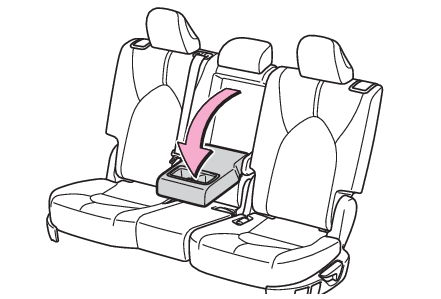
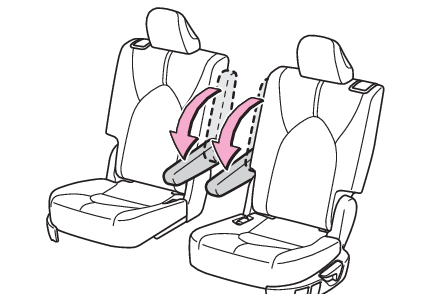
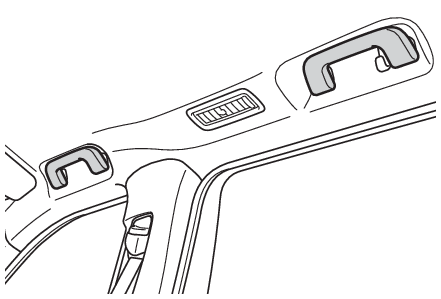
stopped.ArmrestArmrestSecond seats (8-seat models)Pull the armrest down for use.Second seats (7-seat models)Pull the armrest down for use.Notice:To prevent damage to the armrestDo not apply too much load on the armrest.Assist gripsAssist gripsAn assist grip installed on the ceiling can be used to support your body while sitting
on the seat.Warning:Assist gripDo not use the assist grip when getting in or out of the vehicle or rising from your
seat.Notice:To prevent damage to the assist gripDo not hang any heavy object or put a heavy load on the assist grip.Hooks
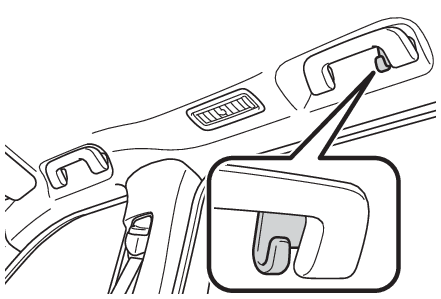
Coat hooksCoat hooksCoat hooksThe coat hooks are provided with the rear assist grips.Warning:Items that must not be hung on the hookDo not hang coat hangers or other hard or sharp objects on the hook. If the SRS curtain
shield airbags deploy, these items may become projectiles, causing death or serious
injury.Power outletsPower outlets (12 VDC)Please use as a power supply for electronic goods that use less than 12 VDC/10 A (power
consumption of 120 W).When using electronic goods, make sure that the power consumption of all the connected
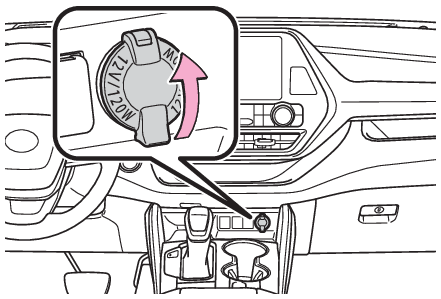
power outlets is less than 120 W.On the instrument panelOpen the lid.Inside the console boxOpen the lid.Note:The power outlet can be used whenThe power switch is in ACC or ON.When stopping the hybrid systemDisconnect electrical devices with charging functions, such as mobile battery packs.If
such devices are left connected, the hybrid system may not stop normally.Notice:To avoid damaging the power outletClose the power outlet lid when the power outlet is not in use. Foreign objects or
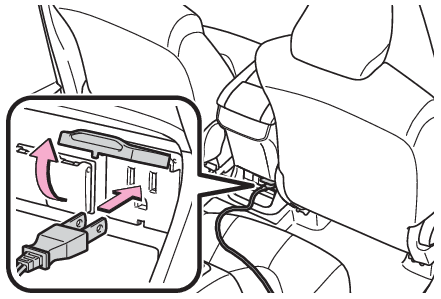
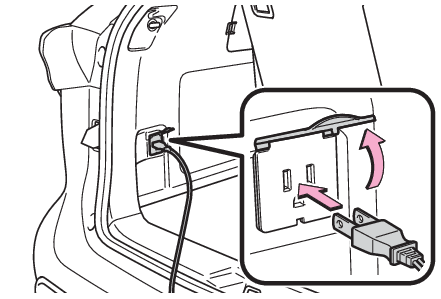
liquids that enter the power outlet may cause a short circuit.To prevent 12-volt battery dischargeDo not use the power outlet longer than necessary when the hybrid system is not running.Power outletsPower outlets (120 VAC) (if equipped)Please use as a power supply for electronic devices that use less than 120 VAC (power
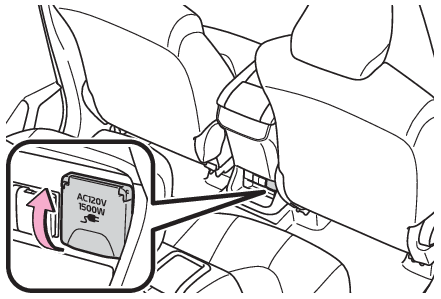
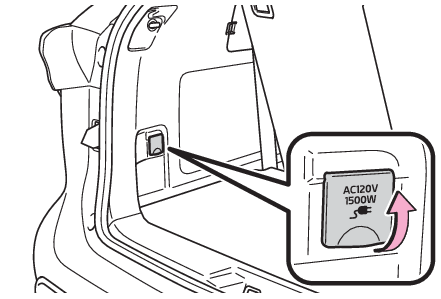
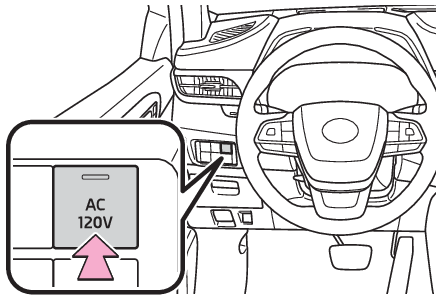
consumption of 1500 W).Using the power outletsOn the console boxOpen the lid.In the luggage compartmentOpen the lid.When turning the power outlets onCheck that the parking brake is engaged, securely depress the brake pedal and press
the power switch.Check that the READY indicator is illuminated, and press the “
AC120V” switch.The power outlets can be used when the indicator on the “
AC120V” switch is illuminated.The power outlets are turned off/on each time the “
AC120V” switch is pressed.When connecting a deviceOpen the lid, and fully and securely insert the plug of the device into the power
outlet.Rear of console boxLuggage compartmentWhen turning the power outlets offTurn the connected devices off.Press the “
AC120V” switch to turn the power outlets off.Disconnect each plug from the power outlets.Close the lid of each power outlet.Note:The power outlet can be used whenThe READY indicator is illuminated.Rules/regulations regarding idling stopThe engine will start automatically to charge the hybrid battery (traction battery)
if its charge becomes low. In some municipalities, if the engine starts while the
vehicle is parked or stopped, it may violate local rules or regulations regarding
idling stop and you may be penalized. Make sure to check the local rules and regulations
before using the power outlets while the vehicle is parked or stopped.Power outletsWhen connecting a device, make sure that the total power consumption of all devices
connected to the 120 VAC power outlets is less than 1500 W. If a device is connected
and the power consumption is exceeded, a protection circuit will cut the power supply
and the power outlets will not be able to be used.Depending on the device to be used, the current flow may be high and the initial peak
wattage may exceed 1500 W.In this case, the protection circuit may operate, and the
power outlets may not be able to be used.Depending on the connected device, it may cause interference with TV and radio broadcasts.The voltage of the power outlets cannot be measured with a commercially available
electrical tester. If it is necessary to check the voltage, have the vehicle inspected
by your Toyota dealer.While a power outlet is being used, a cooling fan sound may be heard from near a rear
seat. This does not indicate a malfunction.Devices which may not operate correctlyThe following 120 VAC devices may not operate properly even if their power consumption
is less than 1500 W:Devices with high initial peak wattageMeasuring devices that process precise dataDevices that require an extremely stable power supplyDevices that require a constant power supply from the power outlet, such as a device
with a timer.When the 120 VAC power outlets cannot be usedIf the “
AC120V” switch is pressed but the switch indicator does not illuminate, the protection circuit
may have operated.In this case, perform the appropriate procedures as follows.Disconnect the plug of each device from the power outlets, check that the total power
consumption of all devices to be connected to the power outlets is less than 1500
W, reconnect the devices and then press the “
AC120V” switch again.Disconnect the plug of each device from the power outlets, check that the devices
are not malfunctioning, reconnect the devices and then press the “
AC120V” switch again.Check the charge of the hybrid battery (traction battery) (Energy monitor). If the charge is low, shift the shift lever to P, allow the engine to run to charge
the hybrid battery (traction battery), and then press the “
AC120V” switch again.If the temperature inside the vehicle is high, such as after the vehicle has been
parked in the sun, use the air conditioning system to sufficiently ventilate or cool
the interior, and then press the “
AC120V” switch again.If the vehicle has been stopped in a cold area, to protect the hybrid battery (traction
battery), the power outlets may not be able to be used. In this case, drive the vehicle
for a while to warm up the hybrid battery (traction battery), and then press the “
AC120V” switch again.If the power outlets cannot be used even after performing the appropriate procedures
above, have the vehicle inspected by your Toyota dealer.Warning:For safe useObserve the following precautions.Failure to do so may lead to an accident, resulting
in death or serious injury.Do not use devices such as the following when driving:Devices which cannot be properly secured within the vehicle.Devices which may distract the driver and be a hindrance to safe driving, such as
a TV, DVD player, etc.Unsecured devices which generate heat, such as a toaster, microwave, electric heater,
electric kettle, coffee maker, etc., as they may cause burns or a fire in the case
of sudden braking or an accident.Devices which may fall under the pedals and prevent the brake pedal from being depressed.Do not use devices which produce steam while the windows are closed. Doing so may
cause the windows to fog up, reducing visibility and making it difficult to drive
safely. Also, the steam may damage or negatively affect other devices.Do not connect a malfunctioning device to a power outlet, as doing so may cause the
power outlets to become inoperable.Do not disconnect the plug of a device while your hands are wet or insert a pin or
other object into the power outlet. Also, if a liquid or snow is on the power outlet,
dry the outlet before using it.Do not attempt to modify, disassemble or repair a power outlet. Also, do not replace
the 120 VAC inverter with a commercially available one. For information on repairs,
contact your Toyota dealer.Do not let children touch the power outlets.Keep the power outlets free of dust and foreign matter.If the plug of a device fits loosely in a power outlet, even though it is fully inserted,
replace the power outlet. For information on replacement, contact your Toyota dealer.Using the power outlets while parked or stoppedObserve the following precautions.Failure to do so may lead to an accident, possibly
resulting in death or serious injury.Make sure to engage the parking brake and shift the shift lever to P.Do not leave the vehicle unattended while the READY indicator is illuminated and a
device is connected to a power outlet.Make sure that the hood is closed. As the engine will start automatically depending
on the condition of the vehicle, make sure that nothing is left near or contacting
the exhaust pipes. Also, do not put your head or hands anywhere inside the engine
compartment, as the cooling fan may operate suddenly. Keep hands and clothing (especially
a tie, scarf, etc.) away from the fan as they may get caught in a fan.Do not use the power outlets in an area with poor ventilation or an enclosed area,
such as a garage without a ventilation or exhaust system, or in an area where the
vehicle may become surrounded by snow, as the exhaust gasses may accumulate, causing
a lack of oxygen.Do not use the power outlets if the vehicle has a vehicle cover installed.Do not sleep in the vehicle while using devices such as an electric heater.Devices to be connectedMake sure to read any instruction manual which came with a device and observe any
warnings on the device. Do not connect a device to a power outlet if the device is
malfunctioning or its plug is damaged.Do not use power outlets for medical devices, as the output of the power outlet may
be cut, depending on the condition of the vehicle.Notice:Observe the following precautions.Failure to do so may lead to the power outlets not
operating correctly or damage to the vehicle or a connected device.To avoid short circuit or malfunctionDo not set a device which generates heat near the interior components or on a seat.
Heat may cause these parts to melt or burn.Do not use devices which are sensitive to vibration or heat in the vehicle.These devices
may malfunction due to vibration while driving or heat while the vehicle is parked
in the sun.When not using a power outlet, make sure to close the cover. If foreign matter or
a liquid enters the power outlet, it may cause a malfunction or short circuit.Do not use a multi-point outlet adapter as doing so may overload the power outlet.When the ambient temperature is highIf the temperature inside the vehicle is high, such as after the vehicle has been
parked in the sun, the power outlets may not be able to be used. Sufficiently ventilate
the interior or use the air conditioning system to cool the interior before attempting
to use the power outlets.When the ambient temperature is lowIf the vehicle has been stopped in a cold area, to protect the hybrid battery (traction
battery), the power outlets may not be able to be used. In this case, drive the vehicle
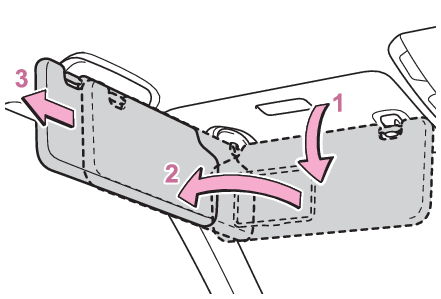
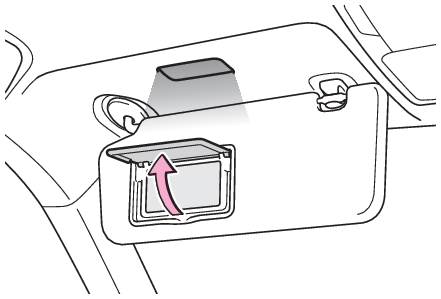
for a while to warm up the hybrid battery (traction battery).Sun visorsSun visorsTo set the visor in the forward position, flip it down.To set the visor in the side position, flip down, unhook, and swing it to the side.To use the side extender, place the visor in the side position, then slide it backward.Vanity mirrorsVanity lightsMirrors
Vanity mirrorsLights
Vanity lightsVanity mirrorsOpen the cover.The light turns on when the cover is opened.Note:To prevent 12-volt battery dischargeIf the vanity lights remain on when the power switch is turned off, the lights will
go off automatically after 20 minutes.Notice:To prevent the 12-volt battery from being dischargedDo not leave the vanity lights on for extended periods while the hybrid system is
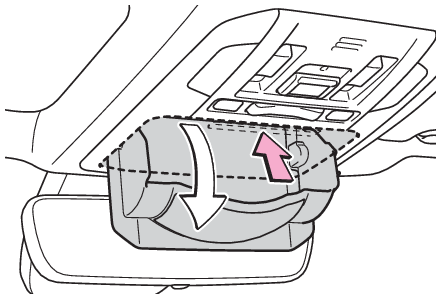
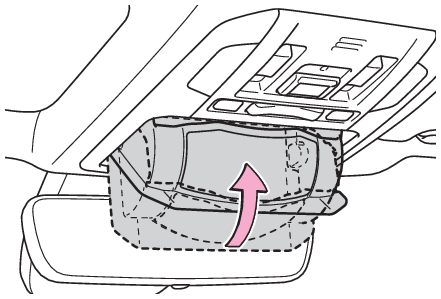
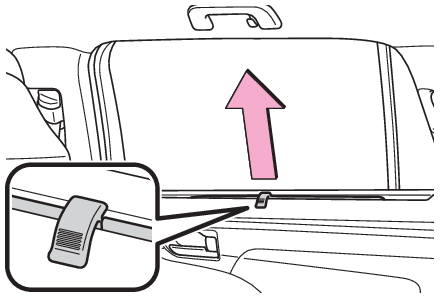
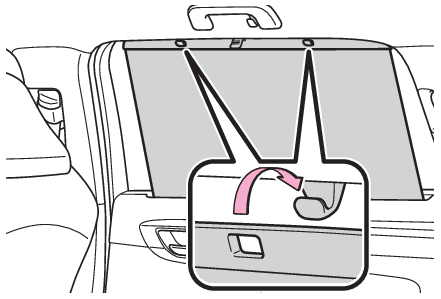
off.Conversation mirrorConversation mirrorPush the lid.Push the lid back up half way.Note:To use the overhead console from the conversation mirror stateFully close the lid, then open it again. (Auxiliary boxes)Rear door sunshadesRear door sunshades (if equipped)Pull the tab up.Hook the sunshade on to the anchors.To lower the sunshade, pull the tab up slightly to unhook the shade from the anchors,
and lower it slowly.Notice:To ensure normal operation of the sunshadesDo not put anything in an area where it may interfere with the operation of a rear
door sunshade.To prevent damage to the rear door sunshades, do not apply excessive load or attach
items to the rear door sunshades.