Display
Toyota Multi-operation touch
Toyota Multi-operation touch
Toyota multi-operation touch*
The Toyota multi-operation touch allows a screen, such as the air conditioning control
screen, and the navigation screen to be displayed and operated simultaneously.
Toyota multi-operation touch overview
The following functions can be displayed and operated on the toyota multi-operation
touch.
Operate a switch to change the displayed function screen.
The displayed function can also be changed by performing an up or down flick operation
on the Toyota multi-operation touch.
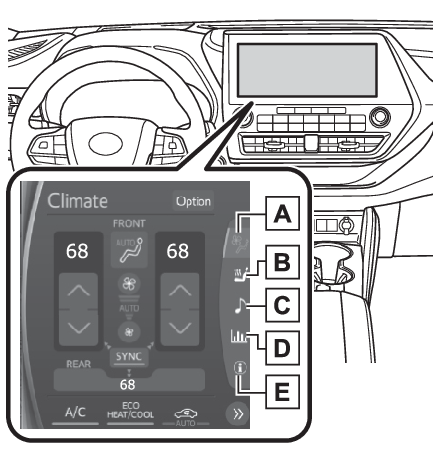 Select to display the air conditioning control screen. (Front air conditioning control screen (vehicle with a 12.3-inch display), Rear air conditioning control screen (vehicle with a 12.3-inch display))
Select to display the seats climate screen. (Front (Toyota multi-operation touch: Vehicle with a 12.3-inch display), Toyota multi-operation touch (Vehicle with a 12.3-inch display))
Select to display the audio control screen.*
Select to display the energy monitor/fuel consumption screen. (Energy monitor)
2WD models: Select to display the setting screen. (Toyota multi-operation touch settings)AWD models: Select to display the vehicle information screen. (AWD Control (if equipped))
Toyota multi-operation touch operation
Moving screens on the Toyota multi-operation touch
Selecting
or
to change its displayed position on the Toyota multi-operation touch.
The screen position can also be changed by perform a left or right flick operation
on a screen.
Displaying a screen in full screen
Selecting
or
on the energy monitor/consumption screen or vehicle information screen will display
that screen in full screen.
Select
or
to return to the split-screen display.
Toyota multi-operation touch settings
AWD models: Select “
Setting” on the vehicle information screen to display the setting screen.
Select to display the air conditioning control screen. (Front air conditioning control screen (vehicle with a 12.3-inch display), Rear air conditioning control screen (vehicle with a 12.3-inch display))
Select to display the seats climate screen. (Front (Toyota multi-operation touch: Vehicle with a 12.3-inch display), Toyota multi-operation touch (Vehicle with a 12.3-inch display))
Select to display the audio control screen.*
Select to display the energy monitor/fuel consumption screen. (Energy monitor)
2WD models: Select to display the setting screen. (Toyota multi-operation touch settings)AWD models: Select to display the vehicle information screen. (AWD Control (if equipped))
Toyota multi-operation touch operation
Moving screens on the Toyota multi-operation touch
Selecting
or
to change its displayed position on the Toyota multi-operation touch.
The screen position can also be changed by perform a left or right flick operation
on a screen.
Displaying a screen in full screen
Selecting
or
on the energy monitor/consumption screen or vehicle information screen will display
that screen in full screen.
Select
or
to return to the split-screen display.
Toyota multi-operation touch settings
AWD models: Select “
Setting” on the vehicle information screen to display the setting screen.
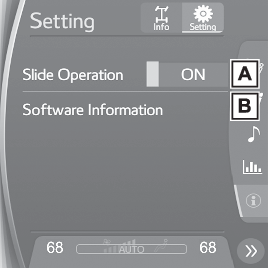 Select slide operation on/off
Display the software information
Copyright
©1982-2013, QNX Software Systems Limited. All rights reserved.
Select slide operation on/off
Display the software information
Copyright
©1982-2013, QNX Software Systems Limited. All rights reserved.