Side mirrors
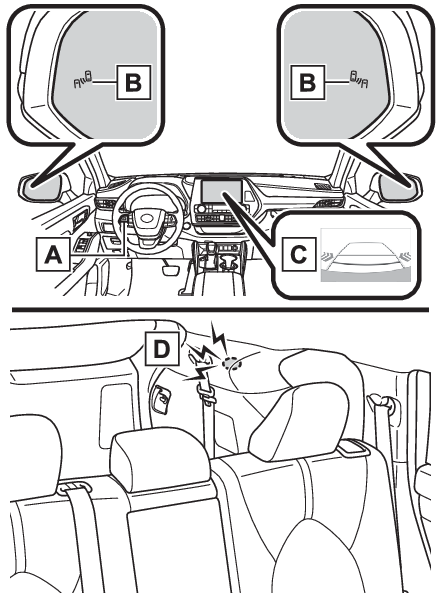
RCTA functionOutside rear view mirrors
RCTA functionRCTA
FunctionRear Cross Traffic Alert (RCTA)RCTA (Rear Cross Traffic Alert) functionThe RCTA function uses the BSM rear side radar sensors installed behind the rear bumper.
This function is intended to assist the driver in checking areas that are not easily
visible when backing up.Display
RCTASystem componentsMeter control switchesTurning the RCTA function on/off.When the RCTA function is disabled, the RCTA OFF indicator illuminates.Outside rear view mirror indicatorsWhen a vehicle approaching from the right or left at the rear of the vehicle is detected,
both outside rear view mirror indicators will flash.Audio system screenIf a vehicle approaching from the right or left at the rear of the vehicle is detected,
the RCTA icon (RCTA icon display) for the detected side will be displayed on the audio system screen. This illustration
shows an example of a vehicle approaching from both sides of the vehicle.RCTA buzzerIf a vehicle approaching from the right or left at the rear of the vehicle is detected,
a buzzer will sound.Switches
RCTA switchTurning the RCTA function on/off4.2-inch displayUse the meter control switches to enable/disable the RCTA function. (Settings display)Press
or
to select
.Press
or
to select “
RCTA” and then press
.7-inch displayUse the meter control switches to enable/disable the RCTA function. (Settings display)Press
or
to select
.Press
or
to select “
RCTA” and then press
.When the RCTA function is disabled, the RCTA OFF indicator (Indicators) illuminates on the multi-information display. (Each time the power switch is turned
off then changed to ON, the RCTA function will be enabled automatically.)Warning:Cautions regarding the use of the functionThe driver is solely responsible for safe driving. Always drive safely, taking care
to observe your surroundings.The RCTA function is only a supplementary function which alerts the driver that a
vehicle is approaching from the right or left at the rear of the vehicle. As the RCTA
function may not function correctly under certain conditions, the driver’s own visual
confirmation of safety is necessary. Over reliance on this function may lead to an
accident resulting death or serious injury.Notice:Before using the RCTA functionDo not place objects near the sensors.Note:Outside rear view mirror indicator visibilityIn strong sunlight, the outside rear view mirror indicator may be difficult to see.Hearing the RCTA buzzerThe RCTA buzzer may be difficult to hear over loud noises, such as if the audio system
volume is high.RCTA
Warning messageWhen “
Rear Cross Traffic Alert Unavailable” is shown on the multi-information displayWater, ice, snow, mud, etc., may be attached to the rear bumper around the sensors.
(BSM (Blind Spot Monitor)) Removing the water, ice, snow, mud, etc., from the attached to the rear bumper around
the sensors to return the function to normal.Additionally, the function may not operate normally when driving in extremely hot
or cold environments.Sensor
RCTARear side radar sensorsBSM (Blind Spot Monitor)Warning buzzers
RCTA functionSetting the buzzer volumeAdjusting the buzzer volumeThe buzzer volume can be adjusted on the multi-information display.4.2-inch displayUse the meter control switches to change settings. (Settings display)Press
or
to select
.Press
or
to select “
RCTA” and then press and hold
.Select the volume and then press
.Each time the switch is pressed, the volume level will change between 1, 2, and 3.7-inch displayUse the meter control switches to change settings. (Settings display)Press
or
to select
.Press
or
to select and “
RCTA” then press and hold
.Select the volume and then press
.Each time the switch is pressed, the volume level will change between 1, 2, and 3.Muting a buzzer temporarilyA mute button will be displayed on the multi-information display when an object is
detected. To mute the buzzer, press
. Mute will be canceled automatically in the following situations:When the shift lever is changed.When the vehicle speed exceeds a certain speed.When the operating function is temporarily canceled.When the operating function is disabled manually.When the power switch is turned off.RCTA function RCTA functionOperation of the RCTA functionThe RCTA function uses rear side radar sensors to detect vehicles approaching from
the right or left at the rear of the vehicle and alerts the driver of the presence
of such vehicles by flashing the outside rear view mirror indicators and sounding
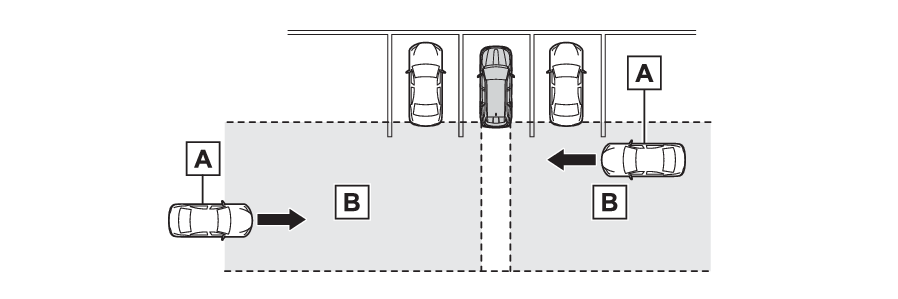
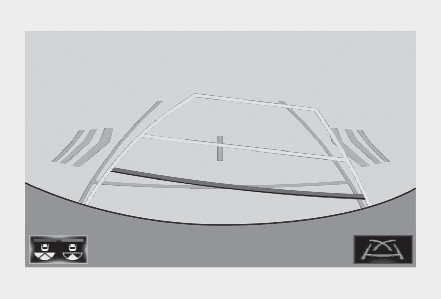
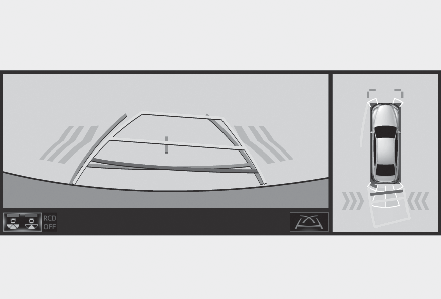
a buzzer.Approaching vehiclesDetection areas of approaching vehiclesRCTA icon displayWhen a vehicle approaching from the right or left at the rear of the vehicle is detected,
the following will be displayed on the audio system screen.Example (Toyota parking assist monitor) (if equipped): Vehicles are approaching from
both sides of the vehicleExample (Panoramic view monitor) (if equipped): Vehicles are approaching from both
sides of the vehicleRCTA function detection areasThe areas that vehicles can be detected in are outlined below.The buzzer can alert the driver of faster vehicles approaching from farther away.Example:
Approaching vehicle speed
Approximate alert distance
18 mph (28 km/h) (fast)
65 ft. (20 m)
5 mph (8 km/h) (slow)
18 ft. (5.5 m)
Note:The RCTA function is operational whenThe RCTA function operates when all of the following conditions are met:The power switch is in ON.The RCTA function is on.The shift lever is in R.The vehicle speed is less than approximately 5 mph (8 km/h).The approaching vehicle speed is between approximately 5 mph (8 km/h) and 18 mph (28
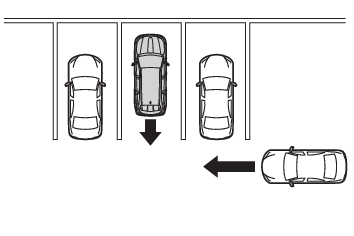
km/h).Conditions under which the RCTA function will not detect a vehicleThe RCTA function is not designed to detect the following types of vehicles and/or
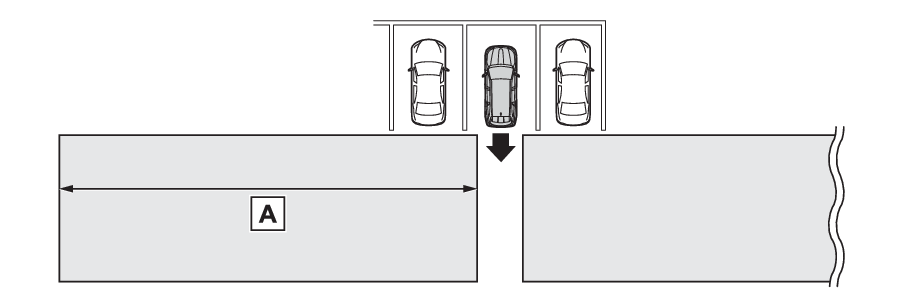
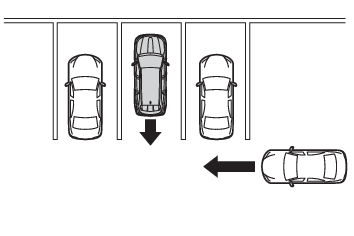
objects:Vehicles approaching from directly behindVehicles backing up in a parking space next to your vehicleVehicles that the sensors cannot detect due to obstructionsGuardrails, walls, signs, parked vehicles and similar stationary objects*Small motorcycles, bicycles, pedestrians, etc.*Vehicles moving away from your vehicleVehicles approaching from the parking spaces next to your vehicle**Depending on the conditions, detection of a vehicle and/or object may occur.Conditions under which the RCTA function may not function correctlyThe RCTA function may not detect vehicles correctly in the following situations:When a sensor is misaligned due to a strong impact to the sensor or its surrounding
areaWhen mud, snow, ice, a sticker, etc. is covering a sensor or its surrounding area
on the rear bumperWhen driving on a road surface that is wet with standing water during bad weather,
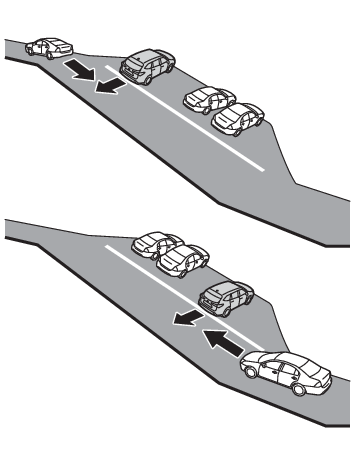
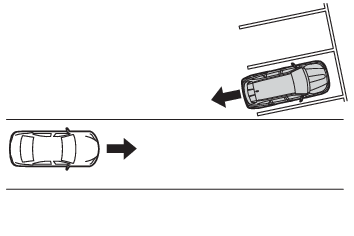
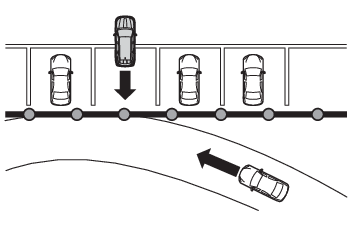
such as heavy rain, snow, or fogWhen multiple vehicles are approaching with only a small gap between each vehicleIf a vehicle is approaching the rear of your vehicle rapidly When a towing eyelet is installed to the rear of the vehicle.When backing up on a slope with a sharp change in gradeWhen backing out of a shallow angle parking spotImmediately after the RCTA function is turned onImmediately after the hybrid system is started with the RCTA function onWhen the sensors cannot detect a vehicle due to obstructionsInstances of the RCTA function unnecessarily detecting a vehicle and/or object may
increase in the following situations:When a vehicle passes by the side of your vehicleWhen the parking space faces a street and vehicles are being driven on the streetWhen the distance between your vehicle and metal objects, such as a guardrail, wall,
sign, or parked vehicle, which may reflect electrical waves toward the rear of the
vehicle, is shortWhen a towing eyelet is installed to the rear of the vehicle