TiresTiresReplace or rotate tires in accordance with maintenance schedules and treadwear.Tires
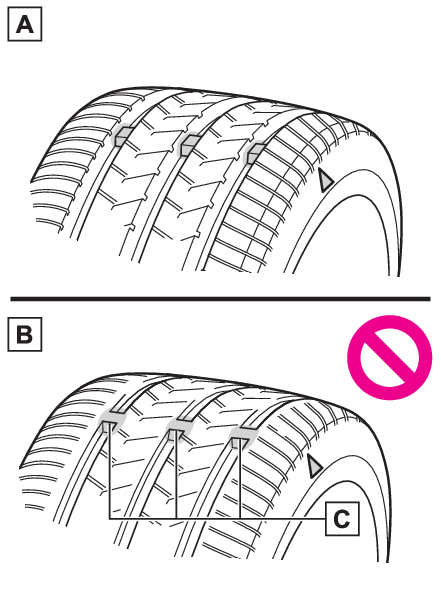
CheckingChecking tiresCheck if the treadwear indicators are showing on the tires. Also check the tires for
uneven wear, such as excessive wear on one side of the tread.Check the spare tire condition and pressure if not rotated.New treadWorn treadTreadwear indicatorThe location of treadwear indicators is shown by a “TWI” or “
” mark, etc., molded into the sidewall of each tire.Replace the tires if the treadwear
indicators are showing on a tire.Note:When to replace your vehicle’s tiresTires should be replaced if:The treadwear indicators are showing on a tire.You have tire damage such as cuts, splits, cracks deep enough to expose the fabric,
and bulges indicating internal damage.A tire goes flat repeatedly or cannot be properly repaired due to the size or location
of a cut or other damage.If you are not sure, consult with your Toyota dealer.Tire lifeAny tire over 6 years old must be checked by a qualified technician even if it has
seldom or never been used or damage is not obvious.Maximum load of tireCheck that the number given by dividing the maximum load by 1.10 of the replacement
tire is greater than 1/2 of the Gross Axle Weight Ratings (GAWR) of either the front
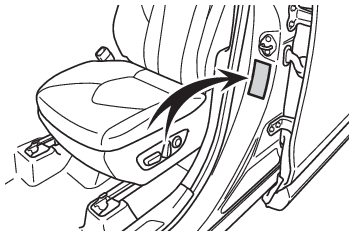
axle or the rear axle, whichever is greater.For the GAWR, see the Certification Label.For the maximum load of the tire, see the
load limit at maximum cold tire inflation pressure mentioned on the sidewall of the
tire. (Tire information)Tire typesSummer tiresSummer tires are high-speed performance tires best suited to highway driving under
dry conditions. Since summer tires do not have the same traction performance as snow
tires, summer tires are inadequate for driving on snow-covered or icy roads. For driving
on snow-covered roads or icy roads, the use of snow tires is recommended. When installing
snow tires, be sure to replace all four tires.All season tiresAll season tires are designed to provide better traction in snow and to be adequate
for driving in most winter conditions as well as for use year-round. All season tires,
however, do not have adequate traction performance compared with snow tires in heavy
or loose snow. Also, all season tires fall short in acceleration and handling performance
compared with summer tires in highway driving.Snow tiresFor driving on snow-covered roads or icy roads, we recommend using snow tires. If
you need snow tires, select tires of the same size, construction and load capacity
as the originally installed tires. Since your vehicle has radial tires as original
equipment, make sure your snow tires also have radial construction. Do not install
studded tires without first checking local regulations for possible restrictions.
Snow tires should be installed on all wheels. (Winter driving tips)If the tread on snow tires wears down below 0.16 in. (4 mm)The effectiveness of the tires as snow tires is lost.Checking the tire valvesWhen replacing the tires, check the tire valves for deformation, cracks, and other
damage.Warning:When inspecting or replacing tiresObserve the following precautions to prevent accidents.Failure to do so may cause
damage to parts of the drive train as well as dangerous handling characteristics,
which may lead to an accident resulting in death or serious injury.Do not mix tires of different makes, models or tread patterns.Also, do not mix tires
of remarkably different treadwear.Do not use tire sizes other than those recommended by Toyota.Do not mix differently constructed tires (radial, bias-belted or bias-ply tires).Do not mix summer, all season and snow tires.Do not use tires that have been used on another vehicle.Do not use tires if you do
not know how they were used previously.Do not tow if your vehicle has a spare tire installed.Notice:Driving on rough roadsTake particular care when driving on roads with loose surfaces or potholes.These conditions
may cause losses in tire inflation pressure, reducing the cushioning ability of the
tires. In addition, driving on rough roads may cause damage to the tires themselves,
as well as the vehicle’s wheels and body.If tire inflation pressure of each tire becomes low while drivingDo not continue driving, or your tires and/or wheels may be ruined.Tires
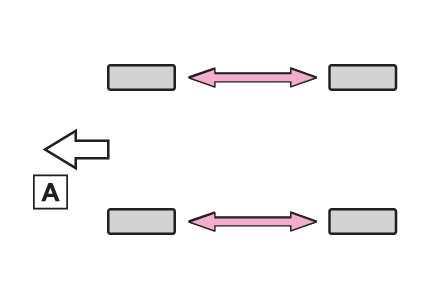
Rotating tiresTire rotationRotate the tires in the order shown.FrontTo equalize tire wear and extend tire life, Toyota recommends that tire rotation is
carried out at the same interval as tire inspection.Make sure to perform wheel position registration procedure after rotating the tires.
(Registering the position of each wheel)Tires
Tire pressure warning systemTires
Tire inflation pressure display functionTire pressure warning system
FunctionTire pressure warning systemTire inflation pressure
Tire inflation pressure display functionFlat tire
Tire pressure warning systemMulti-information display
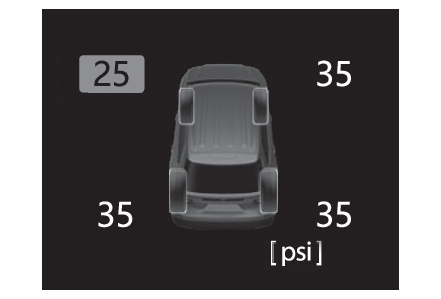
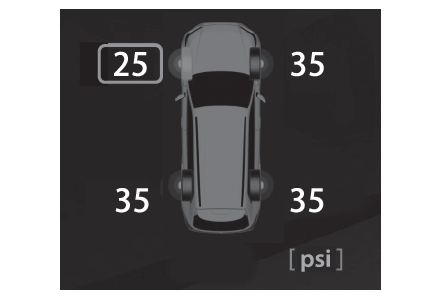
Tire pressureTire pressure displayTire pressure warning systemYour vehicle is equipped with a tire pressure warning system that uses tire pressure
warning valves and transmitters to detect low tire inflation pressure before serious
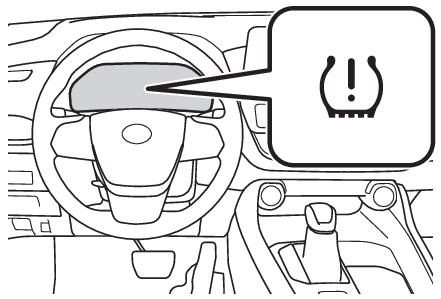
problems arise.The tire pressure warning system of this vehicle adopts a 2-type warning system. (Tire pressure warning light (warning buzzer))When “Adjust Pressure” is displayed on the multi-information display (Normal Warning)A warning with the tire pressure warning light and warning buzzer when there is an
unknown level of low tire pressure with the appearance of the tire due to natural
air leakage as well as the pressure lowering due to changes in the pressure according
to the outside temperature.When “Immediately Check tire when Safe” is displayed on the multi-information display
(Emergency Warning)A warning with the tire pressure warning light and warning buzzer when there is a
known level of low tire pressure with the appearance of the tire due to pressure suddenly
lowering. (Ways of coping: Tire pressure warning light (warning buzzer), If you have a flat tire)However, the system may not be able to detect sudden tire ruptures (bursting, etc.).The tire pressure detected by the tire pressure warning system can be displayed on
the multi-information display.7-inch display12.3-inch displayHow to change the unitPark the vehicle in a safe place and turn the power switch off.Changing the unit cannot be performed while the vehicle is moving.Turn the power switch to ON.Select
of the multi-information display using the meter control switches and then press
.Select “Vehicle Settings” and then press and hold
.Select “TPWS setting” and then press
.Select “Pressure unit setting”.Select the desired unit and then press
.Note:Routine tire inflation pressure checksThe tire pressure warning system does not replace routine tire inflation pressure
checks. Make sure to check tire inflation pressure as part of your routine of daily
vehicle checks.Tire inflation pressureIt may take a few minutes to display the tire inflation pressure after the power switch
is turned to ON. It may also take a few minutes to display the tire inflation pressure
after inflation pressure has been adjusted.Tire inflation pressure changes with temperature. The displayed values may also be
different from the values measured using a tire pressure gauge.Situations in which the tire pressure warning system may not operate properlyIn the following cases, the tire pressure warning system may not operate properly.If non-genuine Toyota wheels are used.A tire has been replaced with a tire that is not an OE (Original Equipment) tire.A tire has been replaced with a tire that is not of the specified size.Tire chains, etc. are equipped.If a window tint that affects the radio wave signals is installed.If there is a lot of snow or ice on the vehicle, particularly around the wheels or
wheel housings.If the tire inflation pressure is extremely higher than the specified level.If tires not equipped with tire pressure warning valves and transmitters are used.If the ID code on the tire pressure warning valves and transmitters is not registered
in the tire pressure warning computer.Performance may be affected in the following situations.Near a TV tower, electric power plant, gas station, radio station, large display,
airport or other facility that generates strong radio waves or electrical noiseWhen carrying a portable radio, cellular phone, cordless phone or other wireless communication
deviceIf tire position information is not correctly displayed due to the radio wave conditions,
the display may be corrected by changing the location of the vehicle as the radio
wave conditions may change.When the vehicle is parked, the time taken for the warning to start or go off could
be extended.When tire inflation pressure declines rapidly for example when a tire has burst, the
warning may not operate.Tire pressure warning system
Installing tire pressure warning valves and transmittersInstalling tire pressure warning valves and transmittersWhen replacing tires or wheels, tire pressure warning valves and transmitters must
also be installed.When new tire pressure warning valves and transmitters are installed, new ID codes
must be registered in the tire pressure warning computer. (Registering ID codes)Note:Replacing tires and wheelsIf the ID code of the tire pressure warning valve and transmitter is not registered,
the tire pressure warning system will not work properly. In this case, after driving
for about 20 minutes, the tire pressure warning light blinks for 1 minute and stays
on to indicate a system malfunction.Notice:Repairing or replacing tires, wheels, tire pressure warning valves, transmitters and
tire valve capsWhen removing or fitting the wheels, tires or the tire pressure warning valves and
transmitters, contact your Toyota dealer as the tire pressure warning valves and transmitters
may be damaged if not handled correctly.Make sure to install the tire valve caps. If the tire valve caps are not installed,
water could enter the tire pressure warning valves, corrode the valve, and cause sticking
and air leaks.When replacing tire valve caps, do not use tire valve caps other than those specified.
The cap may become stuck.To avoid damage to the tire pressure warning valves and transmittersWhen a tire is repaired with liquid sealants, the tire pressure warning valve and
transmitter may not operate properly. If a liquid sealant is used, contact your Toyota
dealer or other qualified service shop as soon as possible. Make sure to replace the
tire pressure warning valve and transmitter when replacing the tire. (Installing tire pressure warning valves and transmitters)Tire pressure warning system
Registering the position of each wheelRegistering the position of each wheelWhen to register the position of each wheelIt is necessary to register the position of each wheel after performing a tire rotation.Wheel position registration can be performed by oneself. Wheel position registration
is performed by driving forward with moderate left and right turns. However, depending
on the driving conditions and driving environment, registration may take some time
to complete.Registering the position of each wheelPark the vehicle in a safe place, turn the power switch off and wait 15 minutes or
more.Start the hybrid system.The wheel position registration procedure cannot be performed while the vehicle is
moving.Select
of the multi-information display using the meter control switches and then press
.Select “Vehicle Settings” and then press and hold
.Select “TPWS setting” and then press
.Select “Tire Rotation” and then press
.Select “Yes” and then press
.A message indicating that wheel position registration is being performed will be displayed
on the multi-information display. “---” will be displayed for the tire inflation pressure
of each tire and wheel position registration will begin.Drive straight (with occasional left and right turns) at approximately 25 mph (40
km/h) or more for approximately 10 to 30 minutes.When wheel position registration is complete, a message indicating that registration
has been completed and the inflation pressure of each tire will be displayed on the
multi-information display.Even if it is not possible to drive continuously at approximately 25 mph (40 km/h)
or more, registration can be completed by driving for a long time. However, if registration
does not complete after driving for 1 hour or more, park the vehicle in a safe place
and leave it with the power switch in ON for approximately 15 minutes or more, and
then perform the driving procedure again.Note:When performing wheel position registrationNormally, wheel position registration can be completed within approximately 30 minutes.Wheel position registration is performed while driving at a vehicle speed of approximately
25 mph (40 km/h) or more.Wheel position registration procedureIf the power switch is turned off while registering the wheel position, the next time
the power switch is turned to ON, the wheel position registration will resume and
it will not be necessary to restart the procedure.While the position of each wheel is being determined and the inflation pressures are
not being displayed, if the inflation pressure of a tire drops, the tire pressure
warning light will come on.If the wheel position cannot be registered easilyIn the following situations, wheel position registration may take longer than usual
to be completed or may not be possible.Vehicle is not driven at approximately 25 mph (40 km/h) or moreVehicle is driven on unpaved roadsIf wheel position registration does not complete after driving for 1 hour or more,
park the vehicle in a safe place for approximately 15 minutes and then drive the vehicle
again.If the vehicle is reversed during wheel position registration, all data collected
until then will be cleared. Perform driving again.Tire pressure warning system
Setting the tire pressureSetting the tire pressureWhen you need to setting the tire pressureIn the following situations, it will be necessary to perform the tire inflation pressure
setting procedure of the tire pressure warning system.When the specified tire inflation pressure has changed, such as due to carried load,
etc.When the tire inflation pressure is changed such as when the tire size is changed.If the tire inflation pressure has been adjusted to the specified level, perform the
tire inflation setting procedure by selecting specified inflation pressure on the
multi-information display. (Setting by selecting a specified tire inflation pressure)When the tire inflation pressure is to be other than specified, such as when tires
other than the specified size are used, etc., set the tire inflation pressure using
the current pressure. Make sure to adjust the tire inflation pressure of each tire
to the appropriate level before performing tire pressure setting. The tire pressure
warning system operates based on this tire inflation pressure. (Setting using the current tire inflation pressure)Setting by selecting a specified tire inflation pressurePark the vehicle in a safe place and then start the hybrid system.The tire inflation pressure cannot be set while the vehicle is moving.Select
of the multi-information display using the meter control switches and then press
.Select “Vehicle Settings” and then press and hold
.Select “TPWS setting” and then press
.Select “Tire Pressure Setting” and then press
.Select “Setting by Specified Pressure” and then press
.Select the desired tire pressures, then press
. (Checking the specified tire inflation pressure)The tire pressure warning light will slowly blink 3 times.After setting the tire inflation pressure, a message indicating that setting has been
completed will be displayed on the multi-information display.Setting using the current tire inflation pressureAdjust the tire inflation pressure of each tire to the appropriate level.Make sure to adjust the tire inflation pressure with the tires cold.Start the hybrid system.The tire inflation pressure cannot be set while the vehicle is moving.Select
of the multi-information display using the meter control switches and then press
.Select “Vehicle Settings” and then press and hold
.Select “TPWS setting” and then press
.Select “Tire Pressure Setting” and then press
.Select “Setting by Current Pressure” and then press
.The tire pressure warning light will slowly blink 3 times and a message indicating
that tire inflation pressure is being set will be displayed on the multi-information
display.After setting the tire inflation pressure, a message indicating that setting has been
completed will be displayed on the multi-information display.Note:Warning performance of the tire pressure warning system (Setting using the current
tire inflation pressure)When performing the tire pressure setting using the current tire inflation pressure,
the warning timing of the tire pressure warning system will vary according to the
conditions under which tire pressure setting was performed. Therefore, a warning may
be output even if the tire inflation pressure drops slightly or if the tire inflation
pressure increases above that when the tire inflation pressure was set.Make sure to perform the tire pressure setting procedure after adjusting the tire
inflation pressure. Also, make sure the tires are cold before performing the tire
pressure setting procedure or adjusting the tire inflation pressure.Tire inflation pressure setting procedure (Setting using the current tire inflation
pressure)If the power switch is turned off while setting the tire inflation pressure, the next
time the power switch is turned to ON, the setting procedure will resume and it will
not be necessary to restart the procedure.If the tire inflation pressure setting procedure is started unnecessarily, adjust
the tire inflation pressure to the specified level with the tires cold and then perform
setting by selecting a specified tire inflation pressure, or perform the tire inflation
pressure setting procedure with the current tire inflation pressure.If the tire inflation pressure cannot be set easilyNormally, it takes approximately 3 minutes to complete the setting procedure to the
current tire inflation pressure.If the tire pressure warning light does not blink 3 times when starting the tire inflation
pressure setting procedure, the procedure may not have started. Perform the procedure
again from the beginning.If tire inflation pressure setting procedure cannot be completed after performing
the above procedure, contact your Toyota dealer.Warning:When setting using the current tire inflation pressureMake sure to adjust the tire inflation pressure of each tire to the appropriate level
before performing tire pressure setting. Otherwise, the tire pressure warning light
may not illuminate even if the tire inflation pressure drops or may illuminate even
though the tire inflation pressure is normal.Tire pressure warning system
Registering ID codesRegistering ID codesWhen to register ID codesThe tire pressure warning valve and transmitter is equipped with a unique ID code.
When new tire pressure warning valves and transmitters are installed, new ID codes
must be registered in the tire pressure warning computer.How to registration ID codeBefore performing ID code registration, make sure that no wheels with tire pressure
warning valve and transmitters installed are near the vehicle.Park the vehicle in a safe place, turn the power switch off and wait 15 minutes or
more.Start the hybrid system.The ID code registration procedure cannot be performed while the vehicle is moving.Select
of the multi-information display using the meter control switches and then press
.Select “Vehicle Settings” and then press and hold
.Select “TPWS setting” and then press
.Select “Tire Set Switching” and then press
.Select “Register New Valve / ID” and then press
.Select “Tire Set 1” or “Tire Set 2”. Then press
.ID codes will be registered to the displayed wheel set.To change the wheel set to be registered, select the displayed set, and then select
the wheel set you wish to register.If ID codes have already been registered for that wheel set, the tire pressure warning
light will slowly blink 3 times, and a message indicating that change is occurring
will be displayed on the multi-information display.Select “Yes” and then press
.The tire pressure warning light will slowly blink 3 times and a message indicating
that ID code registration is being performed will be displayed on the multi-information
display. Wheel set changing will be canceled and registration will begin.When registration is being performed, the tire pressure warning light will blink for
approximately 1 minute then illuminate and “---” will be displayed for the inflation
pressure of each tire on the multi-information display.Drive straight (with occasional left and right turns) at approximately 25 mph (40
km/h) or more for approximately 10 to 30 minutes.When registration is complete, the tire pressure warning light will turn off and a
message indicating that registration has been completed will be displayed on the multi-information
display.Registration may take longer than normal to complete if the vehicle speed cannot be
maintained at approximately 25 mph (40 km/h) or more. If registration cannot be completed
after driving for 1 hour or more, perform the registration procedure again from the
beginning.If the tire inflation pressure of the wheel set installed differs from that of the
previous set, it will be necessary to perform the tire inflation pressure setting
procedure of the tire pressure warning system. (Setting the tire pressure)If the specified tire inflation pressure is the same, it will not be necessary to
perform the tire inflation pressure setting procedure.Note:When registering ID codesNormally, wheel position registration can be completed within approximately 30 minutes.ID code registration is performed while driving at a vehicle speed of approximately
25 mph (40 km/h) or more.ID codes can be registered by yourself, but depending on the driving conditions and
driving environment, registration may take some time to complete.When using a wheel set which all of the ID codes have already been registered, the
wheel set can be changed in a short amount of time. (Selecting wheel set)If ID codes are not registered easilyIn the following situations, ID code registration may take longer than usual to be
completed or may not be possible.When the vehicle has not been parked for approximately 15 minutes or more before being
drivenVehicle is not driven at approximately 25 mph (40 km/h) or moreVehicle is driven on unpaved roadsVehicle is driven near other vehicles and system cannot recognize tire pressure warning
valve and transmitters of your vehicle over those of other vehiclesWheel with tire pressure warning valve and transmitter installed is inside or near
the vehicleIf the vehicle is reversed during registration, all data collected until then will
be cleared. Perform driving again.If registration does not complete after driving for 1 hour or more, perform the ID
code registration procedure again from the beginning.If the tire pressure warning light does not blink 3 times when starting ID code registration
procedure, the procedure may not have started. Perform the procedure again from the
beginning.If the ID codes cannot be registered even when performing the above procedure, contact
your Toyota dealer.Canceling ID code registrationTo cancel ID code registration after it has been started, select “Register New Valve
/ ID” again on the multi-information display.If ID code registration has been canceled, the tire pressure warning light will turn
off.If the warning light does not turn off, ID code registration may not have been cancelled
correctly. To cancel registration, select “Register New Valve / ID” on the multi-information
display.Tire pressure warning system
Selecting wheel setSelecting wheel setYour vehicle is equipped with a tire pressure warning system with a function to register
two sets of ID codes. This allows for registration of a second wheel set, for example
a winter set.The wheel set can be changed only if a second wheel set has been registered to the
system. If a second wheel set has not been registered, “Switching Incomplete See Owner’s
Manual” will be displayed and it will not be possible to change to the selected wheel
set. ID codes can be registered by yourself. (Registering ID codes)Only a change between both registered wheel set is possible, mixing between these
wheel sets is not supported.While registering ID codes, it may not be possible to change between wheel sets normally.
Cancel registration before changing between wheel sets.Changing ID codes between different wheel setsInstall the desired wheel set.Select
of the multi-information display using the meter control switches and then press
.Select “Vehicle Settings” and then press
.Select “TPWS setting” and then press
.Select “Tire Set Switching” and then press
.Select “Register Valve / ID” and then press
.Select “Tire Set 1” or “Tire Set 2”. Then press
.Select “Yes” and then press
.The tire pressure warning light will slowly blink 3 times, a message indicating that
change is occurring will be displayed, and the wheel set change will begin.Wheel set change will begin and the tire pressure warning light will blink for 1 minute
and then illuminate. Also, while the change is being performed, “---” will be displayed
for the tire inflation pressure of each tire on the multi-information display.After approximately 2 minutes, the wheel set change will complete, the tire pressure
warning light will turn off, and a completion message will be displayed on the multi-information
display.If changing does not complete after approximately 4 minutes, a message indicating
that the change could not be completed will be displayed.Check which wheel set is installed and perform the change procedure again from the
beginning.If the specified tire inflation pressure of the wheel set installed differs from that
of the previous set, it will be necessary to perform the tire inflation pressure setting
procedure of the tire pressure warning system. (Setting the tire pressure)If the specified tire inflation pressure is the same, it will not be necessary to
perform the tire inflation pressure setting procedure.Register the position of each wheel. (Registering the position of each wheel)Note:If “Tire Set Switching Incomplete Try Tire Set Registration Again See Owner's Manual”
is displayedThe wheel set change could not be completed.Check which wheel set is installed and perform the change procedure again from the
beginning.