FCTA (Front Cross Traffic Alert)Front Cross Traffic Alert (FCTA)Toyota Safety Sense 3.0
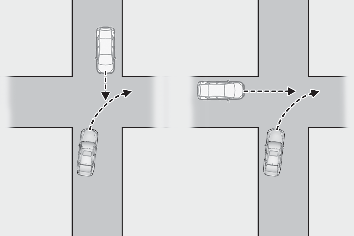
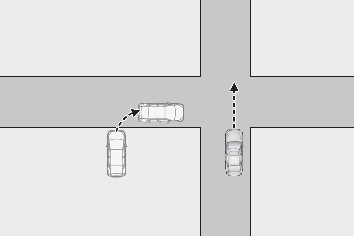
FCTA (Front Cross Traffic Alert)FCTA (Front Cross Traffic Alert)**If equippedWhen approaching an intersection, etc., at a low speed, vehicles approaching from
the left and right of the front of the vehicle can be detected and the driver informed
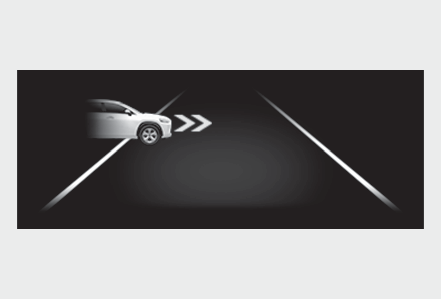
of these vehicles.FCTA system controlWhen the system detects a vehicle approaching from the left or right in front of your
vehicle when approaching an intersection, a notification will be displayed.Head-up displayWhen the system determines that your vehicle may be about to enter an intersection
even though a vehicle is approaching from the left or right in front of your vehicle,
a buzzer will sound and a message will be displayed to urge you to depress the brake
pedal.Multi-information displayWarning:For safe useDriving safely is solely the responsibility of the driver. Pay careful attention to
the surrounding conditions in order to ensure safe driving.The FCTA system is a supplementary system that informs the driver of vehicles approaching
from the left and right of the front of the vehicle.Over-reliance on this system may lead to an accident resulting in death or serious
injury.The details of the warning display may differ from the actual traffic conditions.Although the warning display will stop being displayed after a certain amount of time,
this does not necessarily indicate that there are no longer any vehicles or pedestrians
around your vehicle.Note:FCTA system operating conditionsThe system will operate when all of the following conditions are met:A shift position other than P or R is selectedThe vehicle speed is approximately 10 mph (15 km/h) or lessA vehicle is approaching from the left or right in front of your vehicle at a speed
between approximately 7 to 37 mph (10 to 60 km/h)There are no vehicles in front of your vehicleThe accelerator pedal is not being strongly depressedThe brake pedal is not being strongly depressedSituations in which the system may operate even though no vehicles are approachingIn certain situations, such as the following, the system may operate even though no
vehicles are approaching:When approaching objects on the roadside, such as guardrails, traffic signs, utility
poles, street lights, trees, tall grass, walls, etc.When passing an object on the side of the road, such as a parked vehicleWhen a vehicle or pedestrian is approaching from the left or right in front of your
vehicle in the distanceWhen a vehicle or pedestrian is moving within a parking spot, etc., next to the lane
your vehicle is inWhen a pedestrian or bicyclist is approaching on a sidewalkWhen a vehicle or pedestrian is moving away from your vehicleWhen an approaching vehicle is decelerating or stopsWhen an approaching vehicle makes a left/right turn immediately in front of your vehicleWhen a pedestrian is approaching your vehicleWhen an oncoming vehicle makes a right/left turnWhen your vehicle enters an intersection before a vehicle approaching from the left
or right in front of your vehicleWhen stopped at traffic light and a vehicle approaches from the left or right in front
of your vehicleWhen making a left/right turn in front of an approaching vehicleWhen an oncoming vehicle approaches and passesWhen being overtaken by another vehicleWhen driving next to another vehicle or a pedestrianWhen a vehicle or pedestrian approaches the side of your vehicleSituations in which the system may not operate properlyIn situations such as the following, a vehicle may not be detected by a front side
radar sensor and the system may not operate properly:If an approaching vehicle moves suddenly (sudden steering, acceleration, deceleration,
etc.)If a vehicle is approaching from the left or right of the front of your vehicle diagonallyWhen a vehicle is approaching from the left or right in front of your vehicle in the
distanceWhen there is an object between your vehicle and an approaching vehicleWhen several vehicles are approaching with little space between themSituations in which the sensors may not operate properly: Situations in which the sensors may not operate properlySituations in which some or all of the functions of the system cannot operate: Situations in which some or all of the functions of the system cannot operateChanging FCTA settingsThe FCTA can be enabled/disabled through a customize setting. (Customizable features)The following settings of the FCTA can be changed through customize settings. (Customizable features)