LCA (Lane change Assist)Lane change Assist (LCA)Toyota Safety Sense 3.0
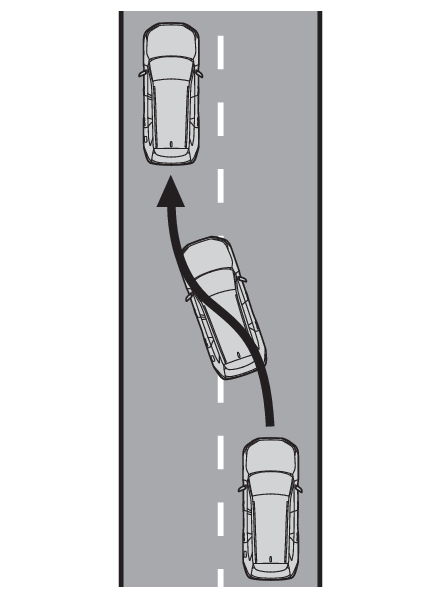
LCA (Lane change Assist)LCA (Lane Change Assist)**If equippedLCA functionsThis function is linked to the LTA and provides assistance in performing lane changes
through steering wheel operations.Use the this function only on highways and expressways.The steering assist operation can be overridden by the steering wheel operation of
the driver.The lane change assist function is not designed to operate when changing lanes at
a junction.Warning:Before using the LCA systemDo not overly rely on the LCA system.The LCA system is not a system which provides automated assistance in driving and
it is not a system which reduces the need for checking an adjacent lane for other
vehicles, approaching vehicles, etc. when changing lanes. The driver is solely responsible
for paying attention to their surroundings and operating the steering wheel as necessary
to ensure safety.Also, do not use the LCA to change lanes into which a lane change should not be performed
(oncoming lanes, road shoulders, etc.).Failure to perform appropriate driving operations and pay careful attention may lead
to an accident.Note:Operating conditions of functionThis function is operable when all of the following conditions are met:The LTA is operating.The lane change assist function is enabled by a customize setting.The vehicle speed is between approximately 55 and 85 mph (90 and 140 km/h).The system detects a broken white line on the side which the lane change is to be
performed.A vehicle is not detected in the lane toward which the turn signal is operated.The steering wheel is not being turned with a large force.The hands off steering wheel warning (Hands off steering wheel warning operation) is not operating.Cancelation of functionsIn the following situations, operation of the LCA may be canceled with the display
and buzzer:When the operating conditions (Operating conditions of function) are no longer metWhen the system can no longer detect lane linesWhen the turn signal lever is operated to the second position (Operating the LCA)When the turn signal lever is operated in the opposite direction of the lane changeWhen the system detects operation of the steering wheel, brake pedal or accelerator
pedal by the driver.If the system detects that a vehicle is quickly approaching in the lane toward which
the turn signal is operated a buzzer will sound and a message will be displayed to
alert the driver. At the same time the steering wheel may be slightly operated to
help keep the vehicle away from the approaching vehicle.Hands off steering wheel warning operationWhen the system determines the driver is not holding the steering wheel, a message
urging the driver to grip the steering wheel and the icon shown in the illustration
will be displayed on the multi-information display to warn the driver. If the system
detects that the steering wheel is held, the warning will be canceled. When using
the system, make sure to grip the steering wheel firmly, regardless of whether the
warning is operating or not.Situations in which the hands off steering wheel warning may not operate properlyDepending on the condition of the vehicle, handle control condition and road surface,
the warning function may not operate.In the following situations, the system may not be able to detect when the driver’s
hands are off the steering wheel.When a steering wheel cover is installedWhen the driver is wearing glovesWhen foreign matter is attached to the steering wheelWhen the driver is gripping the wood trim, seam of the leather, spokes, or other part
of the steering wheel that does not have sensorsIn the following situations, the hands off steering wheel warning may not operate
and the LCA function may continue operating even though the driver’s hands are off
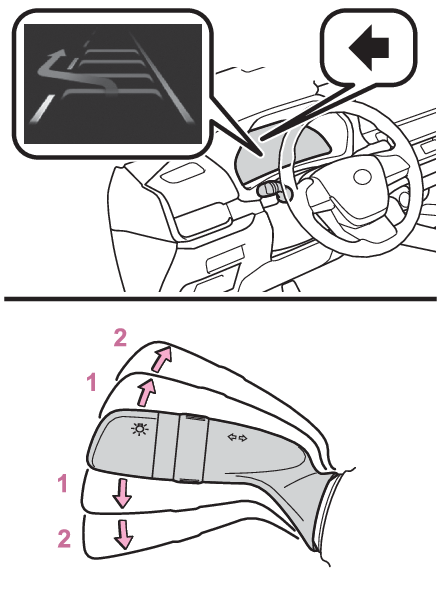
the steering wheel:When something other than a hand is contacting the steering wheelWhen a wide object or arms are held across the steering wheelOperating the LCAIf the turn signal lever is held in the first position, the lane change direction
will be displayed and the function will operate.To change lanes by holding the turn signal lever in the first position without using
the LCA, turn the customize setting of the LCA off.First position: LCA is operationalSecond position: LCA is not operationalWarning:Situations in which the LCA should not be usedWhen driving on a one lane roadWhen there is no broken white line between the current lane and the lane to be changed
toEnabling/disabling the systemLCA can be enabled/disabled through a customize setting. (Customizable features)Displays and system operationThe operating state of the LCA system is indicated.
LCA display
Steering icon
Condition
Blue arrow and white line
Green
LCA is operating
Grey
Approaching vehicle detected while LCA is operating
Not displayed
Grey
Lane line no longer detected while LCA is operating